Nivo: Labels and Bar doesn't show up when the value is too small in grouped mode
Chart Type: Bar
CodeSandbox: https://codesandbox.io/embed/535j62oz64
Consider this data.
{
key1: 9512.0976,
key2: 4000.0032,
key3: 3.4515000000000002,
key4: 107.1447,
key5: 4000.0032,
key6: 0,
key7: 0,
key8: 321.42960000000005,
time: "2019-04"
}
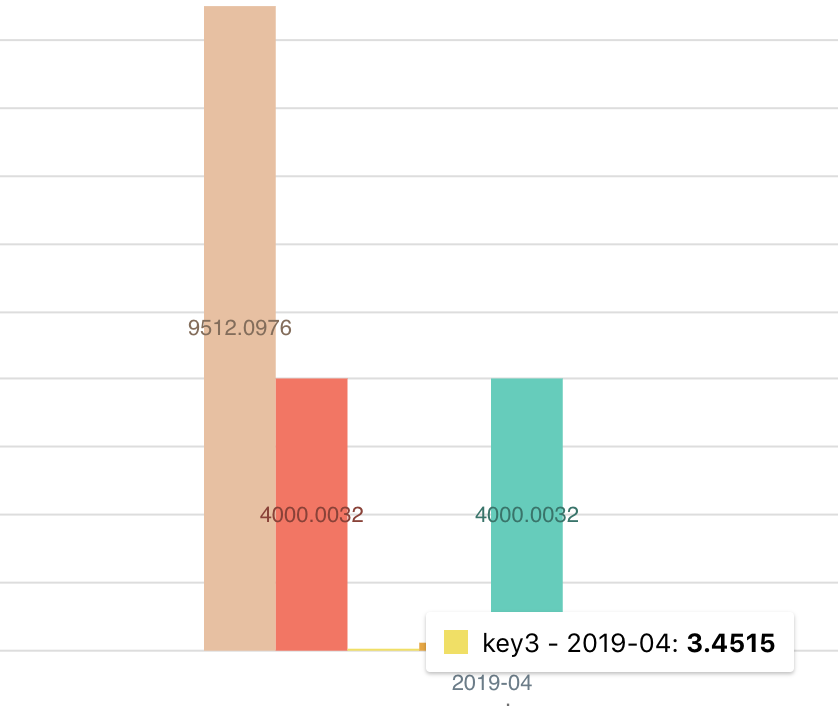
When in groupMode=grouped mode using this data will not show key3 in label and actual bar because it's too small compared to other values.
This seems like a bug. Any value if it's greater than 0 should be be visible no matter how small it is.
 HelloKashif
All 19 comments
Please consider reproducing this issue on a platform like codesandbox like asked in the issue template, thank you!
 plouc
on 5 Apr 2019
plouc
on 5 Apr 2019
Sorry, Added codesandbox link
HelloKashif
on 5 Apr 2019
Thank you!
plouc
on 5 Apr 2019
The same issue here, not necessarily for zero, any small value in the grouped bar doesn't render. Should be interesting to render it and also use a minimum height, so we could still see them in the chart and use the tooltips.
 claytongomes
on 11 Apr 2019
claytongomes
on 11 Apr 2019
@claytongomes, minimum height won't be supported, it misleading as it won't reflect the actual size of the corresponding value, also it will be very hard to implement because of the many variations (grouped, stacked, reversed…).
If you want to show small values, maybe you should consider another strategy such as grouping all small values and adding another chart which focus on those.
plouc
on 2 May 2019
@s-kashif, only zero height bars are skipped, there's not much to do about this.
plouc
on 2 May 2019
I missed you were talking about grouped bars, and the height of the bar in your case is 0.1875px
plouc
on 2 May 2019
It's weird… using the same data, the bar is rendered locally
plouc
on 2 May 2019
Is there a way to have the label show when mouse hovers over the column of the (invisible) small value?
I can't see how to override the default behaviour.
 cazroam
on 26 Jul 2019
cazroam
on 26 Jul 2019
As @cazroam, I'm wondering if there is a way to override the default behavior of the tooltip hovering, because I'm experiencing the same problem with "invisible" small values...
I would like a hovering on the whole column and not only on the corresponding bar.
If I find a way to do it, I'll let you know!
 domidemps
on 17 Oct 2019
domidemps
on 17 Oct 2019
Any news?
 4-life
on 24 Jan 2020
4-life
on 24 Jan 2020
As @cazroam, I'm wondering if there is a way to override the default behavior of the tooltip hovering, because I'm experiencing the same problem with "invisible" small values...
I would like a hovering on the whole column and not only on the corresponding bar.
If I find a way to do it, I'll let you know!
Did you figure this out?
 Stoffy92
on 26 Mar 2020
Stoffy92
on 26 Mar 2020
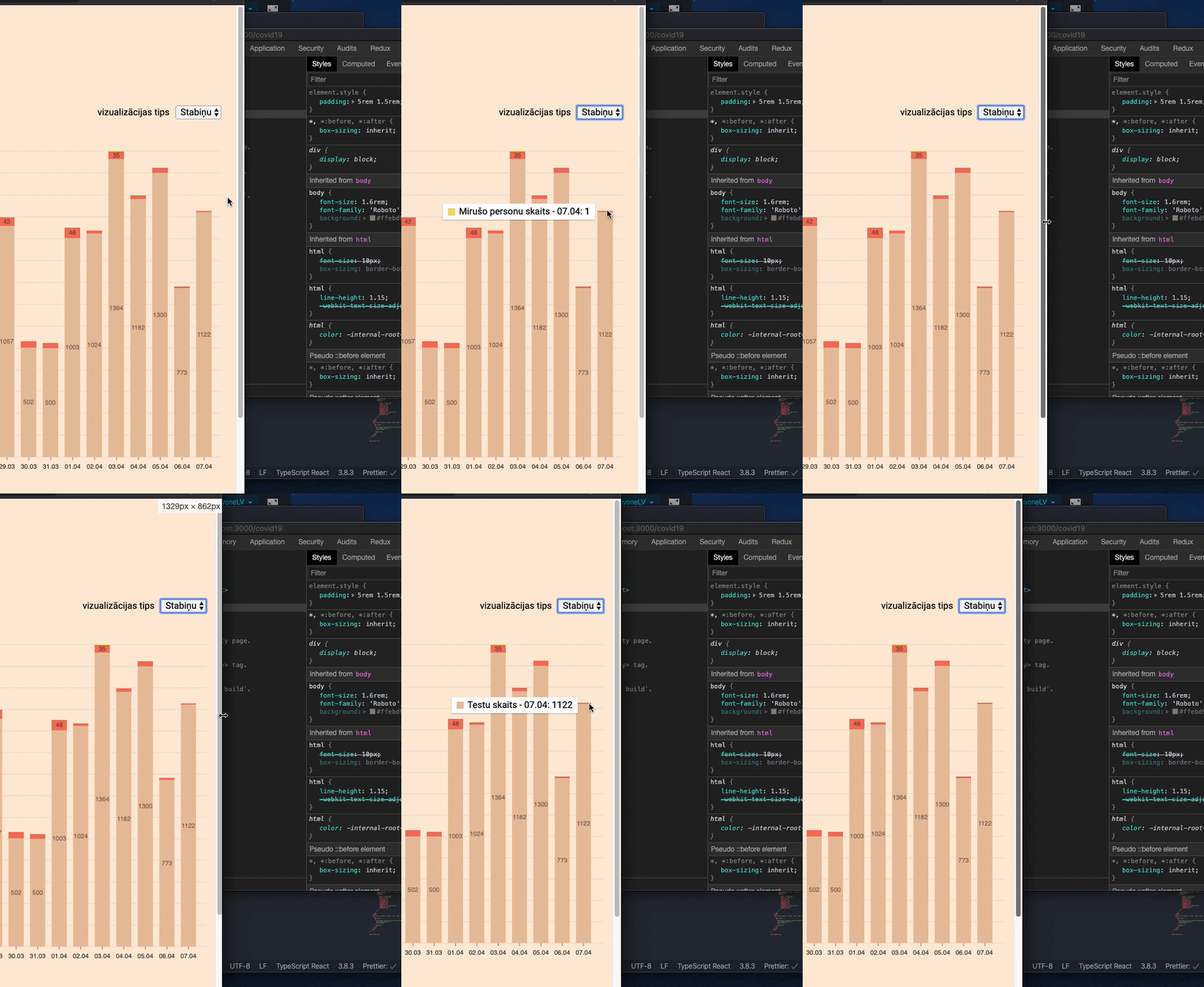
I'm experiencing the same issue with stacked bar chart - i have data set where there is value of 1 - i display the data using the responsive bar component as stacked bar chart - at specific widths the bar with value 1 disappears - and then reappears when resized to different width.
Watch carefully the GIF below and notice the little yellow bar on top of the last stacked bar.
 jurgisrudaks
on 7 Apr 2020
jurgisrudaks
on 7 Apr 2020
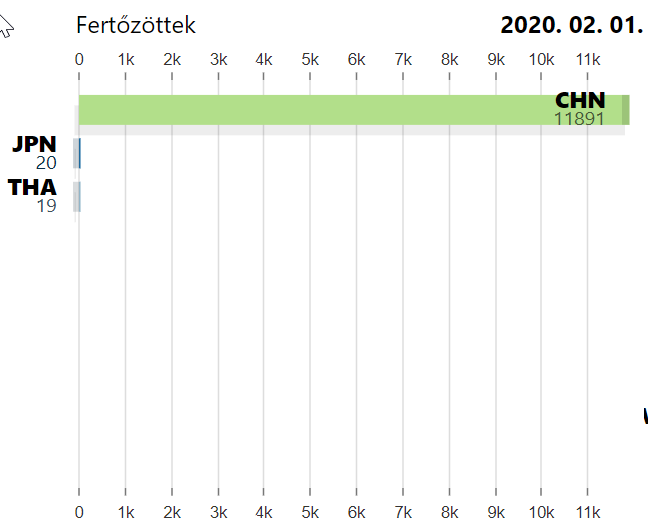
I have similar issue with Responsivebar. I have a kind of horizontal RaceBar(only one value per BarComponent). If a value is smaller than 1/1000 of the largest value, the bar component simply doesn't show at all. Not even the ID. For example I have 9 items in this chart, the 4th item's value is 10. I only see 3 barcomponents instead of 9.
 teddybee
on 2 May 2020
teddybee
on 2 May 2020
Exactly same issue as @teddybee.
I could reduce the breaking point at which a smaller variable isn't displayed by removing styling options (innerPadding) but the problem still occurs if the difference between values is too large.
 JulienTimsch
on 15 May 2020
JulienTimsch
on 15 May 2020
Please any news?
JulienTimsch
on 24 Sep 2020
The issue also effects the extra layers.
For example I draw an avarage line on the bars, but the layer generathor method don't get as long array with bar elemnts than it should be. The less than 1 px tall/long bars simply evaporate. I had 120 items for data, and got 105 in the generator's bar array.
teddybee
on 7 Nov 2020
We added the ability (0.64) to set the scale type for the value via valueScale, exactly like xScale/yScale from line or valueScale from swarmplot. You can see the modified sandbox from @HelloKashif's initial description here: https://codesandbox.io/s/sleepy-elion-i8oq4
I had 120 items for data, and got 105 in the generator's bar array.
This should no longer be the case on the latest version, as we don't do any filtering of values anymore, they just do not render with our default BarItem component.
 wyze
on 7 Nov 2020
wyze
on 7 Nov 2020
I can confirm, with 0.64 my isues have been gone. Thank you wyze. (I used 0.63.1 when I wrote that yesterday)
teddybee
on 7 Nov 2020
Related issues
 dubzzz
·
3Comments
dubzzz
·
3Comments
 stahlmanDesign
·
3Comments
stahlmanDesign
·
3Comments
 luisrudge
·
3Comments
luisrudge
·
3Comments
 zhe1ka
·
3Comments
zhe1ka
·
3Comments
 Haaziq-Uvais
·
3Comments
Haaziq-Uvais
·
3Comments
Most helpful comment
Any news?