Hello,
I'm trying to integrate a ResponsivePie into my React Project.
It's not working in IE 11.
The component, with the graph inside of it, is never loading (I'm using react-router) while the others pages are still ok.
I've created a Component with the ResponsivePie, and imported it into another Component, to put the graph in a
P.S.: I'm not able to load the "nivo rocks" website with IE11
 fabrusso
All 14 comments
@fabrusso, I'm really sorry to read that :/ what error do you have?
 plouc
on 16 Oct 2018
plouc
on 16 Oct 2018
Would it be possible to update the demo website to work in IE11 ? The served JS isn't transpiled at all right now
 AlexCLeduc
on 8 Nov 2018
AlexCLeduc
on 8 Nov 2018
@AlexCLeduc, sorry but I have to disagree :) https://github.com/plouc/nivo/tree/gh-pages/static/js, of course the code is transpiled.
plouc
on 8 Nov 2018
Will try to test it using a windows VM
plouc
on 8 Nov 2018
Woops, you're right, TIL IE11 supports source maps!
When I open up the demo website in IE11, I get an issue with .includes being undefined. Including one of those catch-all polyfills like babel-polyfill would definitely fix that issue.
AlexCLeduc
on 8 Nov 2018
I've updated browserslist to include not ie < 11.
plouc
on 2 Dec 2018
Hello! I would like to re-open this issue; I saw this error when I visited the site
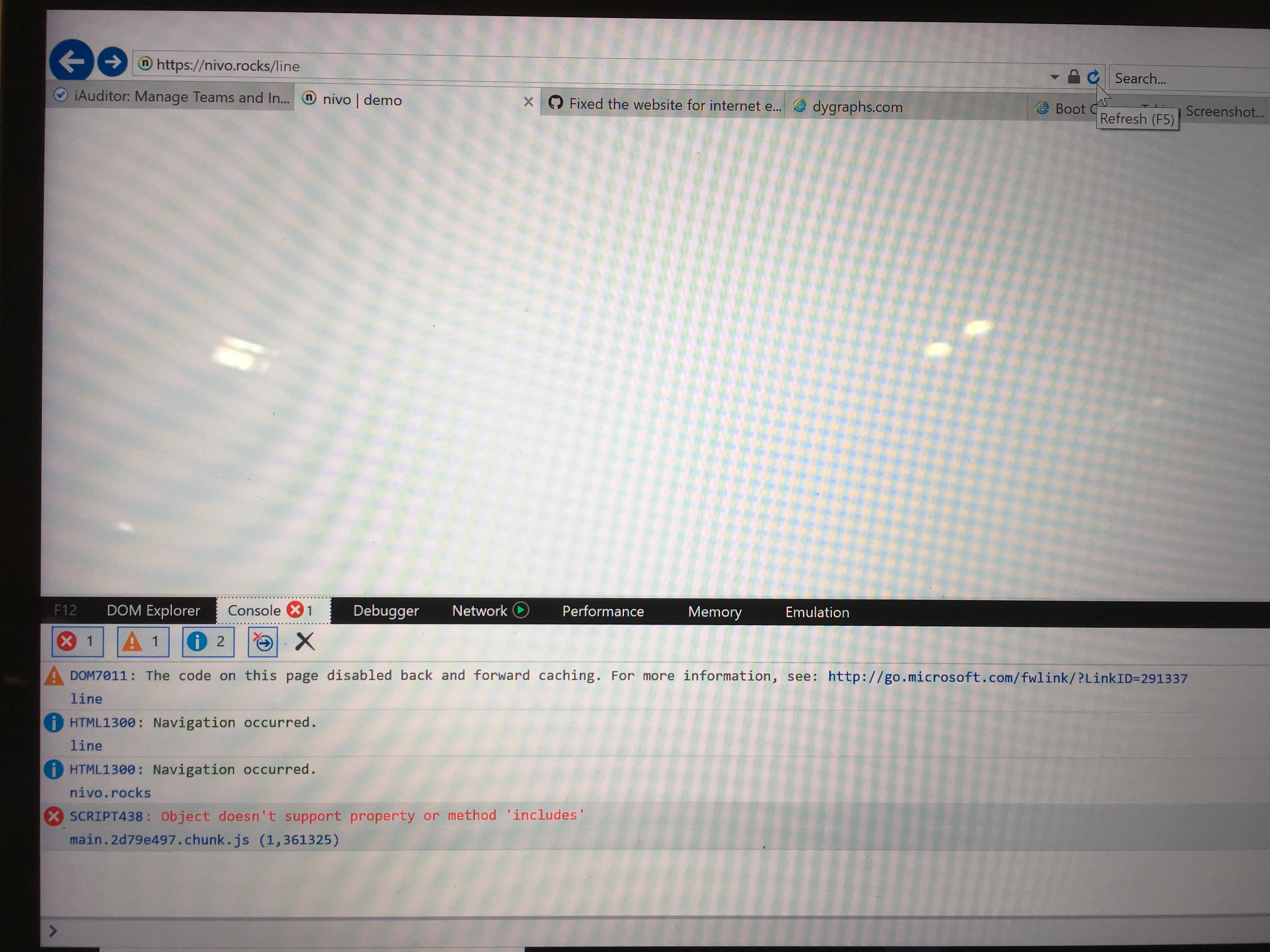
Platform: Win7
 serchavalos
on 4 Apr 2019
serchavalos
on 4 Apr 2019
Hello,
sorry if I answer late.
Right now, the site is displayed on IE11 but seems to report numerous errors like:
Syntax Error
CONST must be initialized
"Missing resources for /"
When I try to enter the pie demo page, this error is shown in the console:
Missing resources for / pie /
And it is not possible to view either the graph or the source code.
I would like to understand if it is only the DEMO site that does not work or it is not possible to use the library on IE11 ... because I am having problems visualizing the components on the Microsot browser.
fabrusso
on 23 Apr 2019
@fabrusso it's just the demo site, the library itself works fine in IE11.
AlexCLeduc
on 23 Apr 2019
Well, finally I dropped IE support for the demo website as it requires far too much work and maintaining the documentation is already quite time consuming.
Unfortunately, several d3 libraries dropped support for older browsers, I didn't tried, but I think you could have it working by adding the required polyfills or compiling some of the node_modules.
It's not ideal, but nivo is tightly coupled to d3, so…
plouc
on 23 Apr 2019
@AlexCLeduc @plouc
Thanks both!.
I'll try to use it when needed and I will let you know.
P.S.: I'm forced to use IE, I would love not to... but work, is work.
fabrusso
on 23 Apr 2019
Please note that even if you get it working, some features might be barely usable such as voronoi overlay which involve heavy computation and makes use of TypedArray for example.
P.S.: I've been there too :/
plouc
on 23 Apr 2019
Please note that even if you get it working, some features might be barely usable such as voronoi overlay which involve heavy computation and makes use of TypedArray for example.
P.S.: I've been there too :/
Sure, I do expect is simply impossibile for IE to do stuff like that.
I need it for a "simple" data driven document,some pies and bar charts... so I'll try.
Thanks.
fabrusso
on 23 Apr 2019
I spent way too many hours looking for a fix when I ran into this issue as well. That said, I finally found a working production build by transpiling d3-scale for some simple bar/pie charts that I am using for a work-related application.
For anyone else who runs into this issue and you're using webpack v4, here's a workaround using babel-loader (babel will transpile the required module into es5 syntax):
webpack.config.js
const { NODE_ENV } = process.env
const inProduction = NODE_ENV === "production"; // using this variable ensures it won't transpile for testing/other evironments
const inDevelopment = NODE_ENV === "development";

module.exports = {
  ...
  module: {
    rules: [
      ...
      {
        test: /\.(js|jsx)$/,
        loader: "babel-loader",
        exclude: inProduction ? /node_modules\/(?!(d3-scale))/ : /(node_modules)/,
        options: {
      cacheDirectory: inDevelopment,
      cacheCompression: false,
        },
      },
      ...
    ],
  }
  ...
}
If you need to include any other libraries that use es6+, then simply add them to the Regex:
/node_modules\/(?!(d3-scale|other-library|another-library))/
You may also need to adjust your babel configuration and browerslist to include IE11 polyfills as well.
 mattcarlotta
on 15 Dec 2019
mattcarlotta
on 15 Dec 2019
Related issues
 indvstry
·
3Comments
indvstry
·
3Comments
 p45mark
·
3Comments
p45mark
·
3Comments
 Haaziq-Uvais
·
3Comments
Haaziq-Uvais
·
3Comments
 zhe1ka
·
3Comments
zhe1ka
·
3Comments
 luisrudge
·
3Comments
luisrudge
·
3Comments
Most helpful comment
Well, finally I dropped IE support for the demo website as it requires far too much work and maintaining the documentation is already quite time consuming.
Unfortunately, several d3 libraries dropped support for older browsers, I didn't tried, but I think you could have it working by adding the required polyfills or compiling some of the node_modules.
It's not ideal, but nivo is tightly coupled to d3, so…