Nivo: Tooltips on line graphs that are to dense dont line up with the mouse
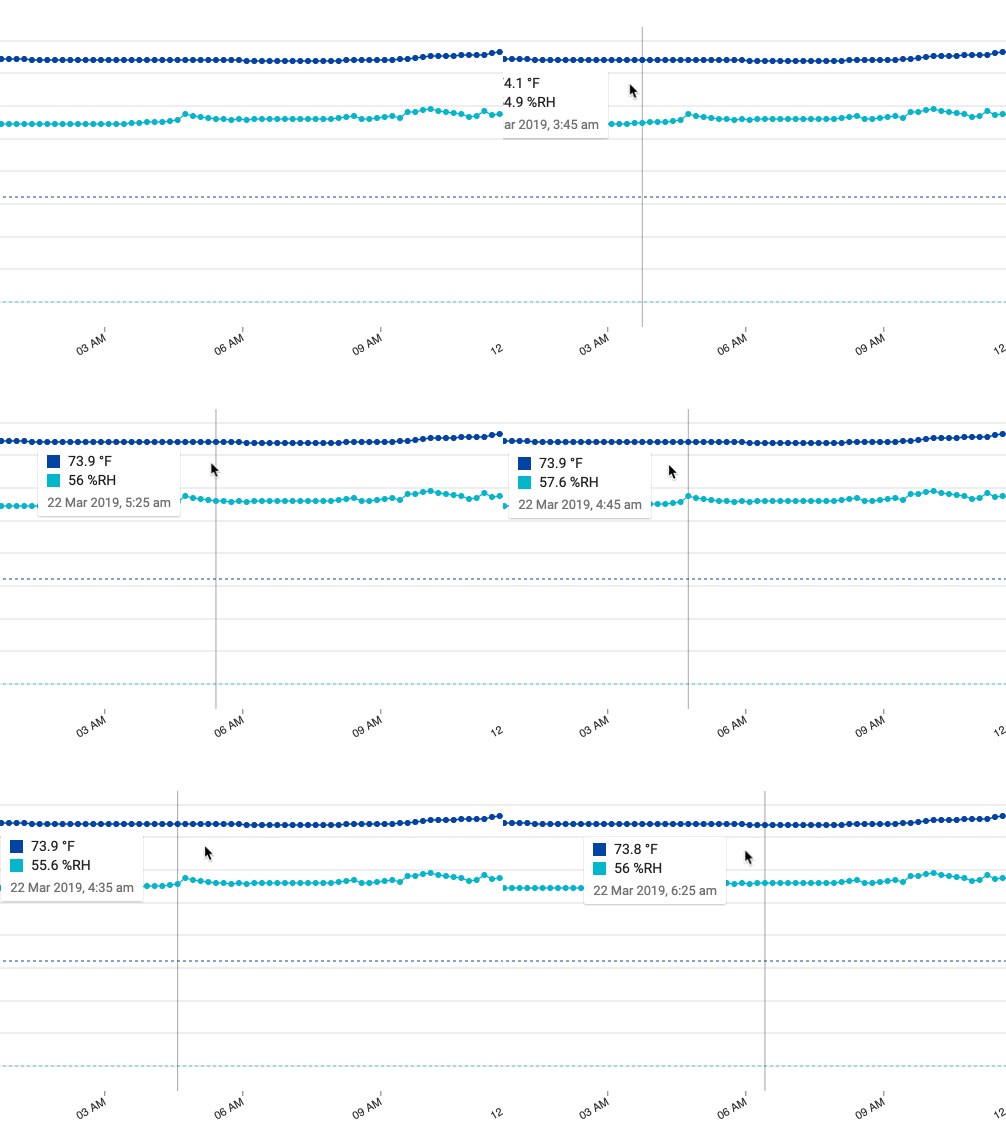
If a line graph which uses tooltips that are less then 40px apart the LineSliceItems start to overlap. Hovering over a point means you select the points hitbox to the right that overlaps it.

 kjones1876
All 10 comments
We are experiencing this as well. For small graphs with many points, the selected data point is to the right of the mouse.
 mmoutenot
on 28 Dec 2018
mmoutenot
on 28 Dec 2018
Hi @kjones1876! you could add some instructions on how to test it?
I tried to test it but I'm not sure I did it correctly; I think I still see the bug
 serchavalos
on 22 Mar 2019
serchavalos
on 22 Mar 2019
Please do not add comment with :+1:, use reactions instead, I'm gonna delete every comment like this, sorry but it doesnt' bring any value.
 plouc
on 3 Apr 2019
plouc
on 3 Apr 2019
One way I was looking to fix this problem was to add some variables which then are set after we determine the number slices.
xOffset = -20
width = 40
For example I've used a check for if the slices.length > 100 then we'd use a tight offset and bounding width.
xOffset = -1
width = 10
Which works for more slices and fits the tooltip nicely. While I was able to get this working hijacking the node_modules in my local dev, I'm not sure exactly how to implement this using ES6 etc so if someone wanted to, then this is a solution. Ideally we'd put something like a step down function or something to do with the scale of the chart, so this is calculated off of the total slices rather than hard coded like my example above.
https://github.com/plouc/nivo/blob/master/packages/line/src/LineSlicesItem.js#L28
const LineSlicesItem = ({ slice, height, slices, showTooltip, hideTooltip, isHover, xOffset=-20, width=40 }) => {
    if(slices > 100) {
        xOffset = -1
        width = 10
    }
   .......
            <rect
                x={xOffset}
                width={width}
               ....
            />
        </g>
    )
}
https://github.com/plouc/nivo/blob/master/packages/line/src/LineSlices.js#L25
{slices.map(slice => (
            <LineSlicesItem
                key={slice.id}
                slice={slice}
                height={height}
                slices={slices.length}
...
Edit: Looking at this, I'm not sure we should have the Line Slice Item do a calculation and maybe instead pass it the xOffset and width from the Line Slice and do the calculation once?
https://github.com/plouc/nivo/blob/master/packages/line/src/LineSlices.js#L25
const LineSlices = ({
    slices,
    height,
    showTooltip,
    hideTooltip,
    theme,
    tooltip,
    tooltipFormat,
}) => {
    let xOffset=-20,
        width=40
    if(slices.length > 100){
        xOffset=-1
        width=10
    }
    return(
        <g>
            {slices.map(slice => (
                <LineSlicesItem
                    key={slice.id}
                    slice={slice}
                    height={height}
                    xOffset={xOffset}
                    width={width}
                    showTooltip={showTooltip}
                    hideTooltip={hideTooltip}
                    theme={theme}
                    tooltipFormat={tooltipFormat}
                    tooltip={tooltip}
                />
            ))}
        </g>
    )
}
https://github.com/plouc/nivo/blob/master/packages/line/src/LineSlicesItem.js#L28
const LineSlicesItem = ({ slice, height, xOffset, width, showTooltip, hideTooltip, isHover }) => (
    <g transform={`translate(${slice.x}, 0)`}>
       .....
        )}
        <rect
            x={xOffset}
            width={width}
 R-K-H
on 3 Apr 2019
R-K-H
on 3 Apr 2019
I like the proposal. If you have a pull request, I’m happy to give it a shot.
I’m actually curious to try if this will work for charts with multiple data points where the spaces in between are smaller than 10px
serchavalos
on 4 Apr 2019
@serchavalos I have a chart with over 1000 datapoints, the 10px spacing seems to give it enough to make sense. To get to the edges of the graph it might make sense to keep it 0px xOffset. Anyways... I'll take a look at what I've forked and make sure to test it first. Then open a pull request. I'm not sure if you'd like to make it extendable / customizable, that's easy enough but might complicate things.
Expect it in a day or so.
R-K-H
on 5 Apr 2019
In fact does this work for it? https://github.com/plouc/nivo/pull/406
R-K-H
on 5 Apr 2019
I'm currently changing the way slices work, you'll now be able to choose between x or y slices, and they'll depend on the chart's size/points spacing.
plouc
on 2 May 2019
That's great news, I never got around to anything on my fork that made any sense outside of the above, which I didn't think was the ideal solution anyways.
R-K-H
on 2 May 2019
Fixed by https://github.com/plouc/nivo/pull/529/commits/1c085bf0bd8e13852f59b869a10b8a99a5ba5362, not yet released though.
plouc
on 3 May 2019
Related issues
 PattieC4ke
·
3Comments
PattieC4ke
·
3Comments
 ellipticaldoor
·
4Comments
ellipticaldoor
·
4Comments
 zhe1ka
·
3Comments
zhe1ka
·
3Comments
 pratikguru
·
3Comments
pratikguru
·
3Comments
 dubzzz
·
3Comments
dubzzz
·
3Comments