Nighttab: Saving configuration outside the browser's local storage (or backing up)?
Is there a way to save the configuration like as a file that you can restore or in the folder of the install? Or maybe get the configuration from the local storage from the browser and be able to restore it into the browser? Because it can be annoying to have to set up the webpage again every time local browser storage is cleared.
 zethexx
All 6 comments
I agree. This could allow users to transfer their settings between devices or browsers. Maybe it could be stored in a JSON file for easy access?
 spikecodes
on 21 Apr 2019
spikecodes
on 21 Apr 2019
Yup, I've had this thought before. If you look at my other project, awesomeSheet, it does this quite well. Controls to export data as JSON which can be imported later:
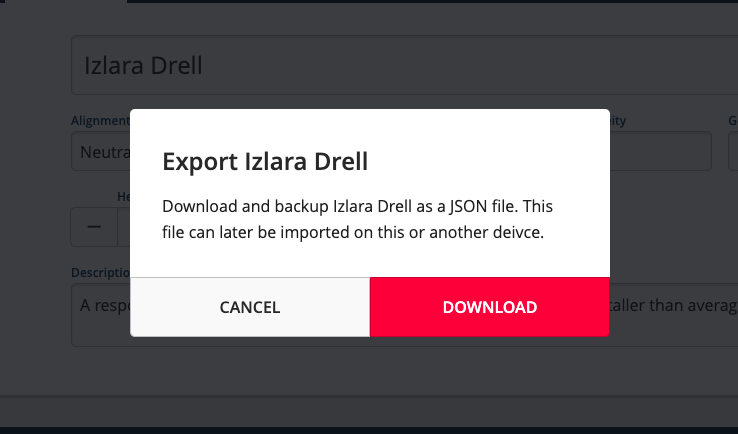
I will add this to the project board. But fair warning, it's a large task and will take a while for me to design and build it. 🙂
 zombieFox
on 23 Apr 2019
zombieFox
on 23 Apr 2019
As a workaround, for now, it is possible to achieve this with nightTab in two ways:
- If you are familiar with Chrome Dev Tools. Under
Application > Local Storageyou can copy the current state of nightTab to the clipboard. Then on another browsers (in Dev Tools again) paste it into the same location. If on either computers there is nothing listed underLocal Storagejust make a change to nightTab and the app will make a fresh save: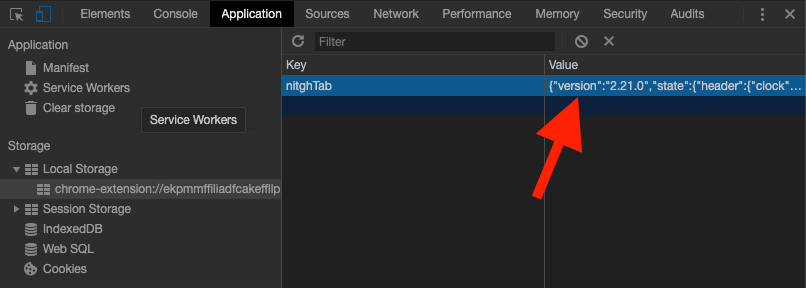
- Alternatively, edit state.js and bookmarks.js on your copy of nightTab and share that between computers.
These are not ideal solutions and controls on the UI would be better. I'm just listing the options available right now before new work on this feature request begins.
zombieFox
on 23 Apr 2019
Feature is now live. 🚀
zombieFox
on 20 Jun 2019
Any way to read "database" from a file? I have many devices and it's not easy to import/export/sync data to every device. It would be so great such a feature.
 adrianmihalko
on 29 Sep 2019
adrianmihalko
on 29 Sep 2019
@adrianmihalko Do you mean syncing data between devices on the same chrome account?
I came across this recently: https://developer.chrome.com/extensions/storage.
I've opened a new ticket (93) to explore this more.
zombieFox
on 30 Sep 2019
Related issues
spikecodes
·
3Comments
 Q-out
·
5Comments
Q-out
·
5Comments
 Jungack
·
5Comments
Q-out
·
5Comments
Q-out
·
4Comments
Jungack
·
5Comments
Q-out
·
5Comments
Q-out
·
4Comments
Most helpful comment
As a workaround, for now, it is possible to achieve this with nightTab in two ways:
Application > Local Storageyou can copy the current state of nightTab to the clipboard. Then on another browsers (in Dev Tools again) paste it into the same location. If on either computers there is nothing listed underLocal Storagejust make a change to nightTab and the app will make a fresh save:These are not ideal solutions and controls on the UI would be better. I'm just listing the options available right now before new work on this feature request begins.