Ngx-formly: Develop a read-only/read-write form with formly
I'm submitting a ...
[ ] bug report => search github for a similar issue or PR before submitting
[x] feature request
[x] support request
Current behavior
The feature does not exist.
Expected behavior
I would like to use ngx-formly to render fields as simple labels. Once the user clicks on any field, the field becomes editable and the user can save the values.
Can you please guide me on how to reach there? What needs to be done or extended, etc.
Minimal reproduction of the problem with instructions
N/A
What is the motivation/use case for changing the behavior?
To have a single model for a form to either render as read-only or read0-write and save time on dev.
Please tell us about your environment:
Ubuntu 18 / Windows / VS Code
Angular version: 7.0.X
Browser: [all]
Language: [TypeScript 3.X]
 bhaidar
All 28 comments
the entire form will be read-write on click or just the selected field?
 aitboudad
on 1 Mar 2019
aitboudad
on 1 Mar 2019
@aitboudad I believe we can start with having the entire mode in either edit mode or read-only mode.
So maybe if the user clicks on a field value, the entire form turns into editable. Or, clicking a button turns the form editable.
I would really like to build on this, but some guidance on where to exactly look might help here.
Thanks
bhaidar
on 2 Mar 2019
well the implementation is quite easy in that case, see https://stackblitz.com/edit/angular-dbs26f
aitboudad
on 2 Mar 2019
That could be a solution, but how is it possible to replace text fields, selects, etc. with a simple label when in read-only?
When the form is disabled to render differently? Can we control that? So instead of translating controls to a textbox, checkbox, etc. to translate to labels?
Or being able to render a label together with a field so that when readonly is enabled, the textbox is hidden and the label is shown otherwise, the textbox is shown and the label is hidden?
How about for instance making use of "template" on the field to either render a label or normal rendering based on a certain property on model maybe?
bhaidar
on 2 Mar 2019
I tried something like:
 {
      key: 'text',
      type: 'input',
      templateOptions: {
        label: 'First Name',
      },
       hooks: {
         onInit: (field) => {
            if (this.readonly) {
              field.template = `<label>${field.model['text']}</label>`;
            }
         }
      }
    },
field.temaplate is overriden by type.
bhaidar
on 2 Mar 2019
the solution depends on the use-case, that's why details matter in order to point you to the nearest perfect way.
template may be the solution but not the perfect one, in formly template is a type itself, that's why you can't mix them.
if that's what do you want to achieve using a custom wrapper would be the solution (https://stackblitz.com/edit/angular-mfsxfi)
aitboudad
on 3 Mar 2019
@aitboudad Oh that might be a neat solution!
This is the use-case. A form needs to be displayed as read-only. When the user decides to edit the fields, they will click a button or so to toggle read-write on the form.
What's the readOnlyTemplate basically doing? Is it responsible to render the field when the form is disabled?
bhaidar
on 3 Mar 2019
What's the
readOnlyTemplatebasically doing? Is it responsible to render the field when the form is disabled?
yes
aitboudad
on 3 Mar 2019
I can see it now in the sample! A custom wrapper.
I noticed the wrapper is not being assigned neither at the field level nor at the module level, which means, all registered wrappers would run and in our case, if readonly returns true, it will hide/show accordingly?
What's the use of extensions in this scenario?
Thanks
bhaidar
on 3 Mar 2019
Actually, the extension is adding the wrapper on the field!
My only question, at what stage extensions are called and executed? Maybe a direct reference to the source code?
Thanks
bhaidar
on 3 Mar 2019
My only question, at what stage extensions are called and executed? Maybe a direct reference to the source code?
during initialization, so whenever formly-form inputs changes https://github.com/ngx-formly/ngx-formly/blob/master/src/core/src/lib/components/formly.form.ts#L80
aitboudad
on 3 Mar 2019
Many thanks. It's very clear now. This made me dig into the source code and see how things are configured at the CoreModule level and then everything else is triggered in the FormlyForm component.
bhaidar
on 3 Mar 2019
@aitboudad
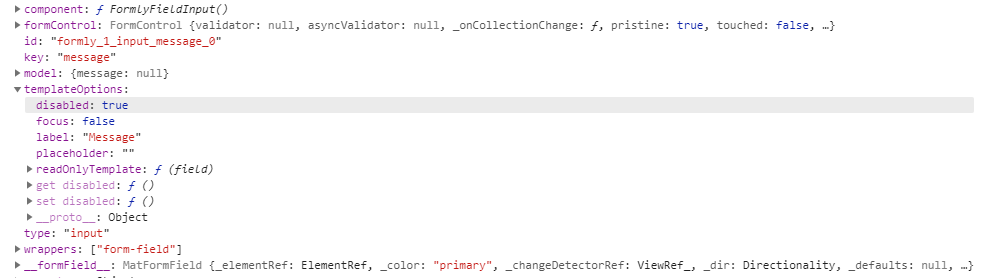
Is there any way to debug why a wrapper is not being added on the field? It's the same sample on StackBlitz I am trying to add to my solution and the wrapper is not catching up. I can only see field-group wrapper, not more.
The extension method used is not being hit when debugging in the browser.
This is a snapshot of the field:
Thanks
bhaidar
on 6 Mar 2019
@bhaidar extension name should be unique else it'll be overridden by the latest defined one, I guess you've already an extension named addon
aitboudad
on 6 Mar 2019
True, but I am defining another extension.
export const config = {
  wrappers: [
    { name: 'addons', component: FormlyWrapperAddonsComponent },
    { name: 'fieldGroup', component: FieldGroupWrapperComponent },
    { name: 'readonlySwitch', component: FormlyWrapperReadonlySwitchComponent }
  ],
  extensions: [
    { name: 'addons', extension: { onPopulate: addonsExtension } },
    { name: 'readonlySwitch', extension: { onPopulate: readonlySwitchExtension } }
  ],
...
bhaidar
on 6 Mar 2019
can you show me readonlySwitchExtension code ?
aitboudad
on 6 Mar 2019
````
import { FormlyFieldConfig } from '@ngx-formly/core';
export function readonlySwitchExtension(field: FormlyFieldConfig) {
if (!field.templateOptions || (field.wrappers && field.wrappers.indexOf('readonlySwitch') !== -1)) {
return;
}
if (field.templateOptions.readOnlyTemplate) {
field.wrappers = [...(field.wrappers || []), 'readonlySwitch'];
}
}
````
bhaidar
on 6 Mar 2019
normally it should work, if you can provide me a reproduction example that would be helpful.
aitboudad
on 6 Mar 2019
I don't think any of the extensions I have are being called, even the addons above. I am putting breakpoints and they are not being hit.
It's going to be a bit difficult to replicate that with a sample, I will try my best and see how it goes.
bhaidar
on 6 Mar 2019
then try to debug inside formly lib, the first step is to check if your extensions is registered https://github.com/ngx-formly/ngx-formly/blob/master/src/core/src/lib/services/formly.form.builder.ts#L32
aitboudad
on 6 Mar 2019
@aitboudad If the formly.form.builder.ts file cannot be found under devTools "Sources" tab, does it mean FormlyModule is not being loaded? Or? But the form is rendering properly.
bhaidar
on 6 Mar 2019
if the form is rendered then FormlyModule is loaded, try to add some console.log inside node_modules/@ngx-formly/core/fesm5/ngx-formly-core.js to figure out what's going wrong
aitboudad
on 6 Mar 2019
Sure! I didn't find any reference for getExtensions() in that file!
I noticed that my version for ngx-formly is 4.8.2. I am upgrading to the latest. I have Angular v7.x.x
bhaidar
on 6 Mar 2019
I see, you should upgrade to V5.
aitboudad
on 6 Mar 2019
This works! Thanks.
One more question, how to decide on the order of extensions? If I have multiple ones, how to choose whether I put it first and then the rest or vice-versa?
bhaidar
on 6 Mar 2019
Right now we only take the order of ng module definitions (similar to the angular router) later we can add priority option if necessary.
aitboudad
on 6 Mar 2019
So the below are both the same?
if (field.templateOptions.readOnlyTemplate) {
    field.wrappers = ['readonlySwitch', ...(field.wrappers || [])];
  }
if (field.templateOptions.readOnlyTemplate) {
    field.wrappers = [...(field.wrappers || []), 'readonlySwitch'];
  }
bhaidar
on 6 Mar 2019
here you're talking about the order of wrappers and not extensions, if you want readonlySwitch to be always the root wrapper for all fields then it should be placed at the first index.
aitboudad
on 6 Mar 2019
Related issues
bhaidar
·
19Comments
 mferak
·
22Comments
mferak
·
22Comments
 danielmhair
·
16Comments
danielmhair
·
16Comments
 bejgumshirisha
·
19Comments
bejgumshirisha
·
19Comments
 juristr
·
20Comments
juristr
·
20Comments