Ngx-formly: Question: Typing response is really slow inside a form
Hi,
I am opening a Material Dialog that renders a form. This technique is being used in all the app and all is working well.
Except today in a new dialog, there is slowness when typing inside the form fields. This dialog has different implementation than the rest but I made sure I didn't miss anything from the other implementation.
This new dialog renders a <form> with <formly-form> component.
It has also the OnPush Strategy.
Can you please guide on what to debug in order to know the reason behind this behavior?
Thanks
 bhaidar
All 19 comments
Could you please give a demo repository or stackblitz with example?
On Thu, Jun 13, 2019, 8:49 AM Bilal Haidar notifications@github.com wrote:
Hi,
I am opening a Material Dialog that renders a form. This technique is
being used in all the app and all is working well.Except today in a new dialog, there is slowness when typing inside the
form fields. This dialog has different implementation than the rest but I
made sure I didn't miss anything from the other implementation.This new dialog renders a
and components.It has also the OnPush Strategy.
Can you please guide on what to debug in order to know the reason behind
this behavior?Thanks
—
You are receiving this because you are subscribed to this thread.
Reply to this email directly, view it on GitHub
https://github.com/ngx-formly/ngx-formly/issues/1629?email_source=notifications&email_token=ADB4XNNK66JMWFPRODZQI3TP2JF5VA5CNFSM4HXZZLFKYY3PNVWWK3TUL52HS4DFUVEXG43VMWVGG33NNVSW45C7NFSM4GZKH2NA,
or mute the thread
https://github.com/notifications/unsubscribe-auth/ADB4XNLADQOZL26OYV4BE33P2JF5VANCNFSM4HXZZLFA
.
 kenisteward
on 14 Jun 2019
kenisteward
on 14 Jun 2019
@kenisteward That's really difficult in this case. That's why I am asking for hints on where to look in the source code.
bhaidar
on 14 Jun 2019
Two main part that you can check else there is something wrong on your code:
- when using expression properties as we evaluate the expression during
ngDoCheck(I'm thinking to provide an opt-in to eval only on model change). Comment on the following line https://github.com/ngx-formly/ngx-formly/blob/v5/src/core/src/lib/components/formly.form.ts#L68 and check if that fixes the issue.
- when using
repeatfield type check the following issue https://github.com/ngx-formly/ngx-formly/issues/1489#issuecomment-479651796
 aitboudad
on 14 Jun 2019
aitboudad
on 14 Jun 2019
- avoid using
formly-forminside field type
aitboudad
on 14 Jun 2019
@aitboudad Thanks for your response.
What do you want me to do try exactly? comment out the line inside ngDoCheck? so I build the source code and reference it or how?
bhaidar
on 14 Jun 2019
the easy way is to modify the source code through the node_modules else build the source code and use npm link.
aitboudad
on 16 Jun 2019
@aitboudad Nothing changes after commenting out the line of code inside node_modules!
bhaidar
on 17 Jun 2019
Then try one of the following ways :)
- provide a reproduction example
- or use google chrome performance profiler https://github.com/ngx-formly/ngx-formly/issues/1489#issuecomment-478718776
- or keep commenting you code app until you find what it is going wrong
aitboudad
on 17 Jun 2019
Have a look at this diagram. Events (click, keypress, etc.) are taking a lot of time

I open a formly form inside a mat dialog and start typing in the input fields.
The form itself works fine outside the mat dialog. Although other forms work fine too inside a mat dialog.
bhaidar
on 17 Jun 2019
can you upload the profiler as described in https://github.com/ngx-formly/ngx-formly/issues/1489#issuecomment-478718776
aitboudad
on 17 Jun 2019
bhaidar
on 17 Jun 2019
well I think the issue is not related to formly,
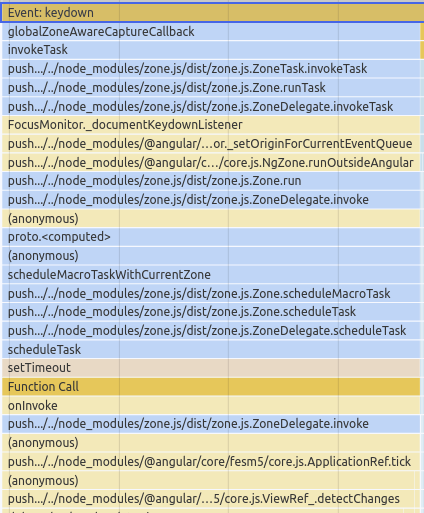
the slowness is caused by a setTimeout callback that is called whenever keydown event is triggered, the whole view is re-rendered (I think AdminTableComponent) which took ~1second for each keydown.
aitboudad
on 17 Jun 2019
I cannot see any setTimeout in the source code except for the addon for formly when implementing matPrefix and matSuffix.
how were you able to read that info from the performance logs? I've never used them before.
bhaidar
on 17 Jun 2019
Hint: when formly model change, the table list should be updated only after the dialog is closed else the AdminTableComponent will be rerendred on each trigger.
- Event: Keydown
aitboudad
on 17 Jun 2019
@aitboudad Can you illustrate more plz?
bhaidar
on 17 Jun 2019
just forget about setTimeout, the root cause of slowness is whenever an event (Keydown) is triggered some components are re-rendered that include AdminTableComponent.
start by commenting some part of your code until you find the component that caused that issue.
as from our side, we can't help much more than that without a reproduction example :pray:!
aitboudad
on 17 Jun 2019
In fact, I have an ngFor that loops over an array and render an AdminTableComponent. For some reason, when the lists variable is defined as a getter on the component it was causing all this delay in response. When I moved the declaration to the ngOnInit, everything works smooth now!
bhaidar
on 17 Jun 2019
Awesome, getter is called whenever zone.js trigger a check, so in case of it returning a new object each time, the view is re-rendered.
aitboudad
on 17 Jun 2019
Amazing @aitboudad Glad to know this detail :-) Long Live formly :-)
bhaidar
on 17 Jun 2019
Related issues
 bejgumshirisha
·
19Comments
bejgumshirisha
·
19Comments
 danielmhair
·
16Comments
danielmhair
·
16Comments
 enricooliva
·
16Comments
enricooliva
·
16Comments
 geert-put
·
15Comments
bhaidar
·
24Comments
geert-put
·
15Comments
bhaidar
·
24Comments