Ngx-extended-pdf-viewer: Use of ngx-extended-pdf-viewer and this.checkHeight() is missing
Check this first
- Does the bug also happen on https://mozilla.github.io/pdf.js/web/viewer.htm? no
- Does the bug also happen on https://pdfviewer.net/simple? no
Describe the bug
I want tu use pdf viewer but there is an error on call from a simple html page.
But the window.checkHeight() is not possible because my window has no checkHeight() function
core.js:4002 ERROR TypeError: Cannot read property 'clientHeight' of undefined
    at NgxExtendedPdfViewerComponent.push../node_modules/ngx-extended-pdf-viewer/fesm5/ngx-extended-pdf-viewer.js.NgxExtendedPdfViewerComponent.checkHeight (ngx-extended-pdf-viewer.js:1392)
    at NgxExtendedPdfViewerComponent.push../node_modules/ngx-extended-pdf-viewer/fesm5/ngx-extended-pdf-viewer.js.NgxExtendedPdfViewerComponent.openPDF (ngx-extended-pdf-viewer.js:1815)
    at ngx-extended-pdf-viewer.js:1298
    at ZoneDelegate.push../node_modules/zone.js/dist/zone.js.ZoneDelegate.invokeTask (zone.js:423)
    at Object.onInvokeTask (core.js:26247)
    at ZoneDelegate.push../node_modules/zone.js/dist/zone.js.ZoneDelegate.invokeTask (zone.js:422)
    at Zone.push../node_modules/zone.js/dist/zone.js.Zone.runTask (zone.js:195)
    at push../node_modules/zone.js/dist/zone.js.ZoneTask.invokeTask (zone.js:498)
    at ZoneTask.invoke (zone.js:487)
    at timer (zone.js:3070)
Version info
- Version of ngx-extended-pdf-viewer : 1.6.2 and 3.3.1
- Version of the JavaScript files pdf.js, pdf-worker.js and viewer.js : I don't know... default files used
Desktop (please complete the following information):
- OS: Windows10
- Browser: Chrome
- Version: Chrome 81.0.4044.138 (Build officiel) (64 bits)
To Reproduce
Source file html (the angular part is verified and all data inputs given by javascript functions or variables are correct) : joined html file.
I think I'm not defining a correct html to use pdf viewer but I don't know where is the problem and how to correct.
Demo PDF file
None
Screenshots
None
Additional context
None
 cyrduf
All 47 comments
My html file code (html langage):
cyrduf
on 15 May 2020
Quick first assessment: for some reason, the container bearing the CSS class zoom doesn't exist when the height is check. Remains the question why that happens. Maybe you can help me by setting a breakpoint and debugging the code. Currently, I'm clueless, I'm afraid.
The error is raised in this method:
  public checkHeight(): void {
    const container = document.getElementsByClassName('zoom')[0];
    if (container.clientHeight === 0 && this._height.includes('%')) {
      const available = window.innerHeight;
      const rect = container.getBoundingClientRect();
      const top = rect.top;
      let mh = available - top;
      const factor = Number(this._height.replace('%', ''));
      mh = (mh * factor) / 100;
      if (mh > 100) {
        this.minHeight = mh + 'px';
      } else {
        this.minHeight = '100px';
      }
    }
  }
 stephanrauh
on 15 May 2020
stephanrauh
on 15 May 2020
I guess you already know it, but just in case: the code in the fesm5 directory looks slightly different. The code snippet above shows the TypeScript code, while the fesm5 directory contains the JavaScript code generated by the TypeScript compiler.
stephanrauh
on 15 May 2020
Hello,
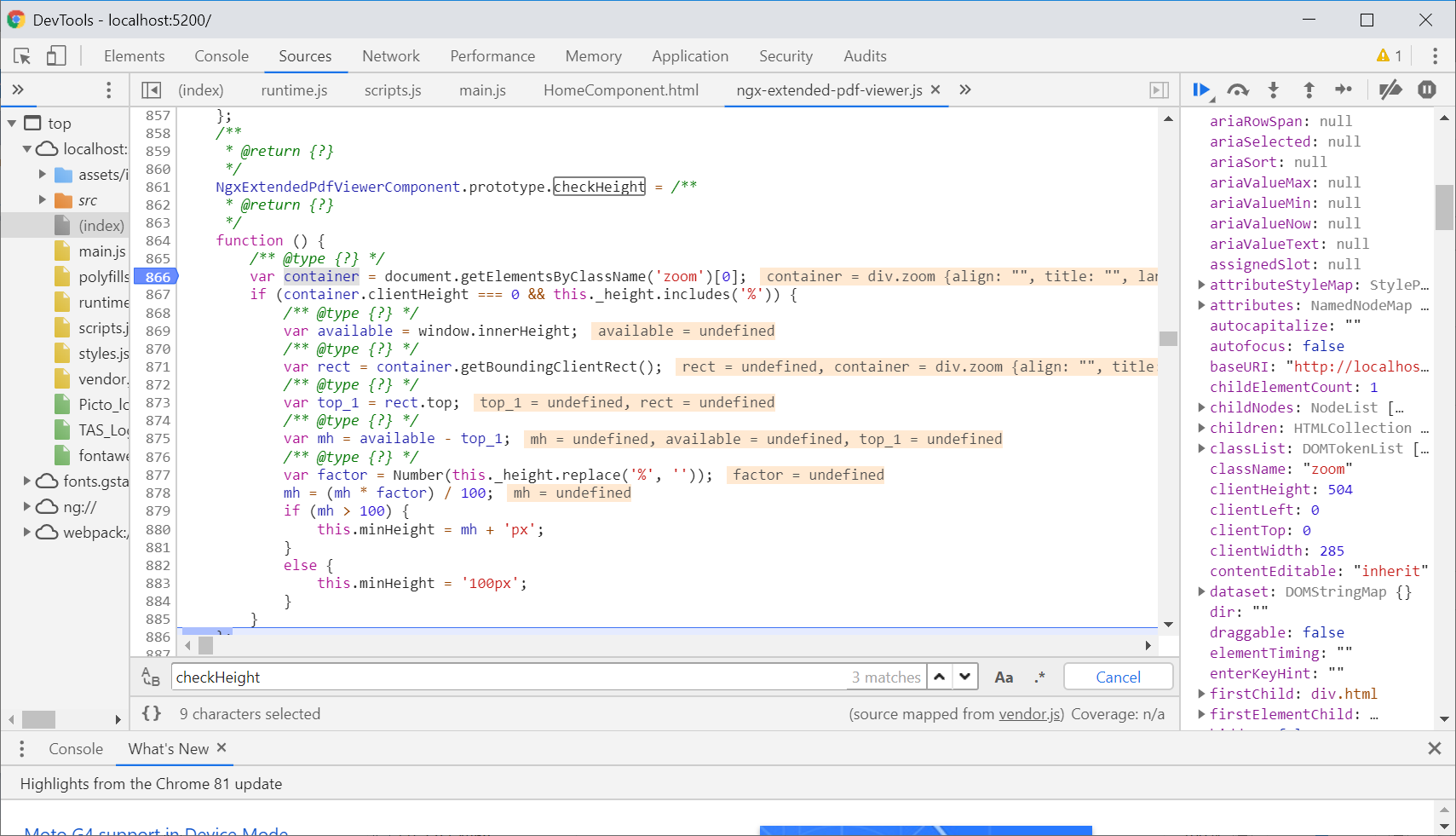
I made the test with checkpoint and it seems that the container is a div.zoom that has not checkHeight property...
For me it's not easy to know how to workaround this.
Regards
cyrduf
on 16 May 2020
Merci beaucoup! I'm a bit confused now. I suspected the container isn't there. Have a look at the error message: it says the property undefined.clientHeight doesn't exist. Your debugger says something else.
I'll add a check if the zoom <div> exists. I don't have an idea why it might be missing, but it doesn't hurt.
stephanrauh
on 16 May 2020
@cyrduf Slightly off-topic: I've observed that you're using Java-style getters. IMHO it's better to adopt the TypeScript getters. They allow you to make public attribute public. Only when you really want to change something in the accessor, you make it private and add a getter/setter pair. It's a matter of taste, so it's up to you, but I'm sure you'll love this feature.
You should also avoid calling methods from the HTML template. For instance, [style.width.px]="getPdfViewerAnnotateWidth()" will cause you problems, sooner or later. The method breaks Angular's approach to change detection. So Angular will call the method very often. It's become better over time, but when I ran into this time for the first time, the method was called thousands of time per second. Nowadays, it's only a handful of calls, but it's a performance leak nonetheless.
Maybe you've already seen this message - it's caused by using getters in the HTML template:
core.js:6260 ERROR Error: ExpressionChangedAfterItHasBeenCheckedError: Expression has changed after it was checked. Previous value: '0'. Current value: '1'.
    at throwErrorIfNoChangesMode (core.js:8179)
    at bindingUpdated (core.js:20148)
    at interpolation1 (core.js:20292)
    at ɵɵtextInterpolate1 (core.js:24300)
    at Module.ɵɵtextInterpolate (core.js:24271)
    at AppComponent_Template (app.component.html:13)
    at executeTemplate (core.js:12129)
    at refreshView (core.js:11968)
    at refreshComponent (core.js:13449)
    at refreshChildComponents (core.js:11689)
I've tried to write a reproducer, based on your sourcecode. I can't reproduce the bug. Can you have a look at it? Maybe it helps you to spot the bug.
https://github.com/stephanrauh/ngx-extended-pdf-viewer-issues/tree/master/issue294
stephanrauh
on 16 May 2020
@cyrduf Slightly off-topic: I've observed that you're using Java-style getters. IMHO it's better to adopt the TypeScript getters. They allow you to make public attribute public. Only when you really want to change something in the accessor, you make it private and add a getter/setter pair. It's a matter of taste, so it's up to you, but I'm sure you'll love this feature.
You should also avoid calling methods from the HTML template. For instance,
[style.width.px]="getPdfViewerAnnotateWidth()"will cause you problems, sooner or later. The method breaks Angular's approach to change detection. So Angular will call the method very often. It's become better over time, but when I ran into this time for the first time, the method was called thousands of time per second. Nowadays, it's only a handful of calls, but it's a performance leak nonetheless.Maybe you've already seen this message - it's caused by using getters in the HTML template:
core.js:6260 ERROR Error: ExpressionChangedAfterItHasBeenCheckedError: Expression has changed after it was checked. Previous value: '0'. Current value: '1'.
    at throwErrorIfNoChangesMode (core.js:8179)
    at bindingUpdated (core.js:20148)
    at interpolation1 (core.js:20292)
    at ɵɵtextInterpolate1 (core.js:24300)
    at Module.ɵɵtextInterpolate (core.js:24271)
    at AppComponent_Template (app.component.html:13)
    at executeTemplate (core.js:12129)
    at refreshView (core.js:11968)
    at refreshComponent (core.js:13449)
    at refreshChildComponents (core.js:11689)
Thank you, yes I have this message but as I'm new with angular and java I don't know what you mean by IMHO : the getter take value of a data from another component *.ts => how to take value without getter from another component directly in html file ?
cyrduf
on 16 May 2020
I've tried to write a reproducer, based on your sourcecode. I can't reproduce the bug. Can you have a look at it? Maybe it helps you to spot the bug.
https://github.com/stephanrauh/ngx-extended-pdf-viewer-issues/tree/master/issue294
I see your try and it seems to be like my case.
Just to give you some details : If I add pdf viewer call in another html file it seems to work, but I don't know why... and it's the same kind of html file...
I'm afraid to not understand why it's different behaviour with same source code.
cyrduf
on 16 May 2020
@cyrduf Slightly off-topic: I've observed that you're using Java-style getters. IMHO it's better to adopt the TypeScript getters. They allow you to make public attribute public. Only when you really want to change something in the accessor, you make it private and add a getter/setter pair. It's a matter of taste, so it's up to you, but I'm sure you'll love this feature.
You should also avoid calling methods from the HTML template. For instance,[style.width.px]="getPdfViewerAnnotateWidth()"will cause you problems, sooner or later. The method breaks Angular's approach to change detection. So Angular will call the method very often. It's become better over time, but when I ran into this time for the first time, the method was called thousands of time per second. Nowadays, it's only a handful of calls, but it's a performance leak nonetheless.
Maybe you've already seen this message - it's caused by using getters in the HTML template:core.js:6260 ERROR Error: ExpressionChangedAfterItHasBeenCheckedError: Expression has changed after it was checked. Previous value: '0'. Current value: '1'. at throwErrorIfNoChangesMode (core.js:8179) at bindingUpdated (core.js:20148) at interpolation1 (core.js:20292) at ɵɵtextInterpolate1 (core.js:24300) at Module.ɵɵtextInterpolate (core.js:24271) at AppComponent_Template (app.component.html:13) at executeTemplate (core.js:12129) at refreshView (core.js:11968) at refreshComponent (core.js:13449) at refreshChildComponents (core.js:11689)Thank you, yes I have this message but as I'm new with angular and java I don't know what you mean by IMHO : the getter take value of a data from another component *.ts => how to take value without getter from another component directly in html file ?
I tried to replace getter putting all div in comment except one using :
But the error on change value is always raising.
cyrduf
on 16 May 2020
I've tried to write a reproducer, based on your sourcecode. I can't reproduce the bug. Can you have a look at it? Maybe it helps you to spot the bug.
https://github.com/stephanrauh/ngx-extended-pdf-viewer-issues/tree/master/issue294I see your try and it seems to be like my case.
Just to give you some details : If I add pdf viewer call in another html file it seems to work, but I don't know why... and it's the same kind of html file...
I'm afraid to not understand why it's different behaviour with same source code.
I can't run your try because I'm using node v11.11 and if i run yours : visual code tell me node v10 or node v12 is required.
I wanted to see putting a breakpoint on checkHeight function if the div.zoom has checkHeight property in your case.
is it possible to be linked with problem ?
how iw it possible to have div container with different properties ?
cyrduf
on 16 May 2020
I've tried to write a reproducer, based on your sourcecode. I can't reproduce the bug. Can you have a look at it? Maybe it helps you to spot the bug.
https://github.com/stephanrauh/ngx-extended-pdf-viewer-issues/tree/master/issue294I see your try and it seems to be like my case.
Just to give you some details : If I add pdf viewer call in another html file it seems to work, but I don't know why... and it's the same kind of html file...
I'm afraid to not understand why it's different behaviour with same source code.I can't run your try because I'm using node v11.11 and if i run yours : visual code tell me node v10 or node v12 is required.
I wanted to see putting a breakpoint on checkHeight function if the div.zoom has checkHeight property in your case.is it possible to be linked with problem ?
how iw it possible to have div container with different properties ?
I can't add all project file (because is confidential) but let see additionnal files that give you how the html page is defined from home page... i fthat can help you to reproduce the problem.
cyrduf
on 16 May 2020
Have you checked my last answers ? I don't find how to solve the problem on my side.
cyrduf
on 19 May 2020
what you mean by IMHO : the getter take value of a data from another component *.ts => how to take value without getter from another component directly in html file?
As for the TypeScript flavor of getters and setters: have a look at this source code. It encapsulates a variable. The variable used to be public, but I wanted to add code when the variable is set, so I converted it to a getter/setter pair.
As for accessing state from a different component: please don't do that. Use services instead. It seems a bit odd at first, but in the long run, that's one of the tricks allowing you to keep your program maintainable when it grows.
As for accessing volatile state from a service without using a getter: there are several strategies to solve this problem. A simple and elegant solution is the "service with a subject" pattern. Many developers use ngrx as a solution, but that only pays for large applications.
I could offer you to book my Angular training... unfortunately, as long as the Corona lockdown holds, there's no training.
stephanrauh
on 19 May 2020
But the error on change value is always raising.
Hunting down an ExpressionChangedAfterItHasBeenCheckedError is always a bit difficult. Sometimes the values reported in the error message give you a hint. What's happening is this: Angular renders your page, after that, one of the variables changes, and in development mode, Angular checks the variables again. If there's a change, Angular is confused. Cutting a long story short, Angular doesn't know which of the two values is correct, so it reacts with an error message.
stephanrauh
on 19 May 2020
I can't run your try because I'm using node v11.11 and if i run yours : visual code tell me node v10 or node v12 is required.
The version of node.js shouldn't make a difference. However, it's always dangerous to use odd node version numbers. The even version numbers are long-term support versions, so they usually have less bugs.
I wanted to see putting a breakpoint on checkHeight function if the div.zoom has checkHeight property in your case.
The div doesn't have the checkHeight() method. That's a method defined by the NgxExtendedPdfViewerComponent. The div is simply passed to this method as an parameter.
stephanrauh
on 19 May 2020
how iw it possible to have div container with different properties?
In JavaScript, that's possible. There's no such thing as a class. TypeScript class hierarchies are compiled to prototype inheritance. Methods and attributes are properties of the individual object. You can add methods to a div at runtime. But as I've mentioned above, that's not the case here.
stephanrauh
on 19 May 2020
Have you checked my last answers ? I don't find how to solve the problem on my side.
Sorry for my sluggish response!
I still don't know what's happening. After reading the additional source code, I'm none the wiser.
However, I've added an additional check. If you update to the latest version of ngx-extended-pdf-viewer, the bug should be gone. Can you test this, please?
Best regards,
Stephan
stephanrauh
on 19 May 2020
I have solved the ExpressionChangedAfterItHasBeenCheckedError checking good solution on forums. But I'm still locked on the div chekHeight problem.
cyrduf
on 19 May 2020
Thank you I will check it tonight. I will tell you the answer later.
cyrduf
on 19 May 2020
It's not ok for me with another error in viewer.js with the 3.3.2 version => zone.js must be updated with 0.10.3 to this update.
Joined the error.
Regards

cyrduf
on 19 May 2020
Yes, zone.js must be updated. That's a limitation caused by the base library, pdf.js. It uses modern JavaScript (as it should!), but the old version of zone.js only supports old versions of JavaScript.
There's nothing I can do about it, but I'm sorry nonetheless.
stephanrauh
on 19 May 2020
Your new error message puzzles me. I've started a global search for ProgressBar.setWidth. I can't spot it. I don't even see anything similar. However, your stack trace indicates there's something wrong with the PDF viewer.
Just a far shot: maybe it's a cache problem. Can you clear the cache, please? The easiest way to do this is to open the browser's network tab in the developer tools and to set the "disable cache" checkbox.
If that doesn't work, please copy several lines around the offending line and paste them here. Maybe the context helps me to find where the bug occurs.
stephanrauh
on 19 May 2020
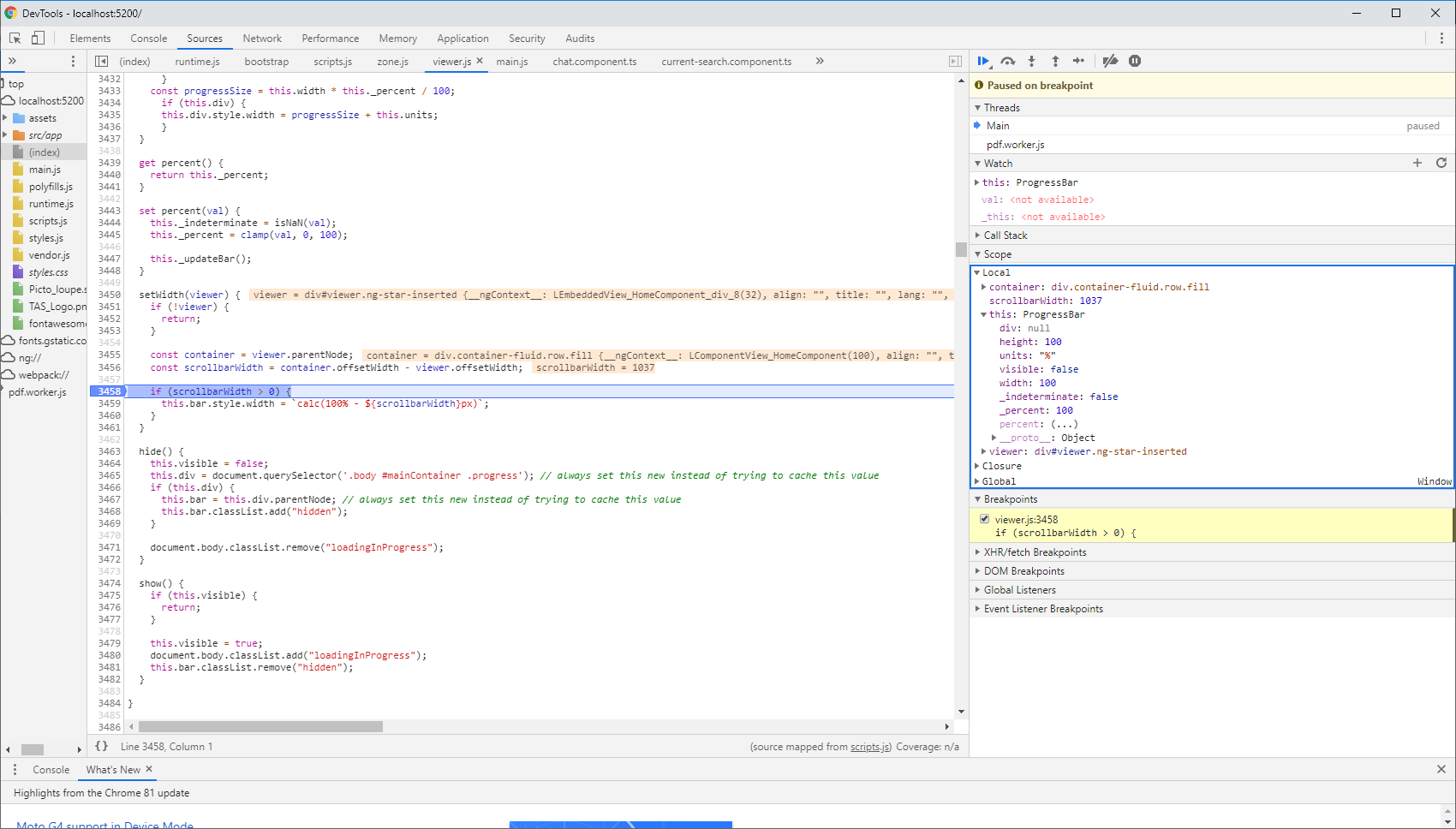
The cache disabling in developer tools don't solve the problem and there is the function where the problem is in viewer.js :
class ProgressBar {
  constructor(id, {
    height,
    width,
    units
  } = {}) {
    this.visible = true;
    this.div = document.querySelector(id + " .progress");
    if (this.div) {
      this.bar = this.div.parentNode;
    }
    this.height = height || 100;
    this.width = width || 100;
    this.units = units || "%";
    if (this.div) {
      this.div.style.height = this.height + this.units;
    }
    this.percent = 0;
  }

  _updateBar() {
    if (this._indeterminate) {
      this.div.classList.add("indeterminate");
      this.div.style.width = this.width + this.units;
      return;
    }

      if (this.div) {
      this.div.classList.remove("indeterminate");
      }
    const progressSize = this.width * this._percent / 100;
      if (this.div) {
      this.div.style.width = progressSize + this.units;
      }
  }

  get percent() {
    return this._percent;
  }

  set percent(val) {
    this._indeterminate = isNaN(val);
    this._percent = clamp(val, 0, 100);

    this._updateBar();
  }

  setWidth(viewer) {
    if (!viewer) {
      return;
    }

    const container = viewer.parentNode;
    const scrollbarWidth = container.offsetWidth - viewer.offsetWidth;

    if (scrollbarWidth > 0) {
      **this.bar.style.width = `calc(100% - ${scrollbarWidth}px)`;** **<= line given by error**
    }
  }

  hide() {
    this.visible = false;
    this.div = document.querySelector('.body #mainContainer .progress'); // always set this new instead of trying to cache this value
    if (this.div) {
      this.bar = this.div.parentNode; // always set this new instead of trying to cache this value
      this.bar.classList.add("hidden");
    }

    document.body.classList.remove("loadingInProgress");
  }

  show() {
    if (this.visible) {
      return;
    }

    this.visible = true;
    document.body.classList.add("loadingInProgress");
    this.bar.classList.remove("hidden");
  }
All right, I've mis-read the error message. But even not, I don't get it. My best guess is there's no progress bar. When the class (or the object, as I've explained above :) ) is initialized, it tries to get the progress bar:
class ProgressBar {
  constructor(id, {
    ...
    this.div = document.querySelector(id + " .progress");
    if (this.div) {
      this.bar = this.div.parentNode;
    }
Maybe there's no progress bar, so this.bar is undefined.
stephanrauh
on 19 May 2020
yes so how to solve this?
cyrduf
on 20 May 2020
cyrduf
on 20 May 2020
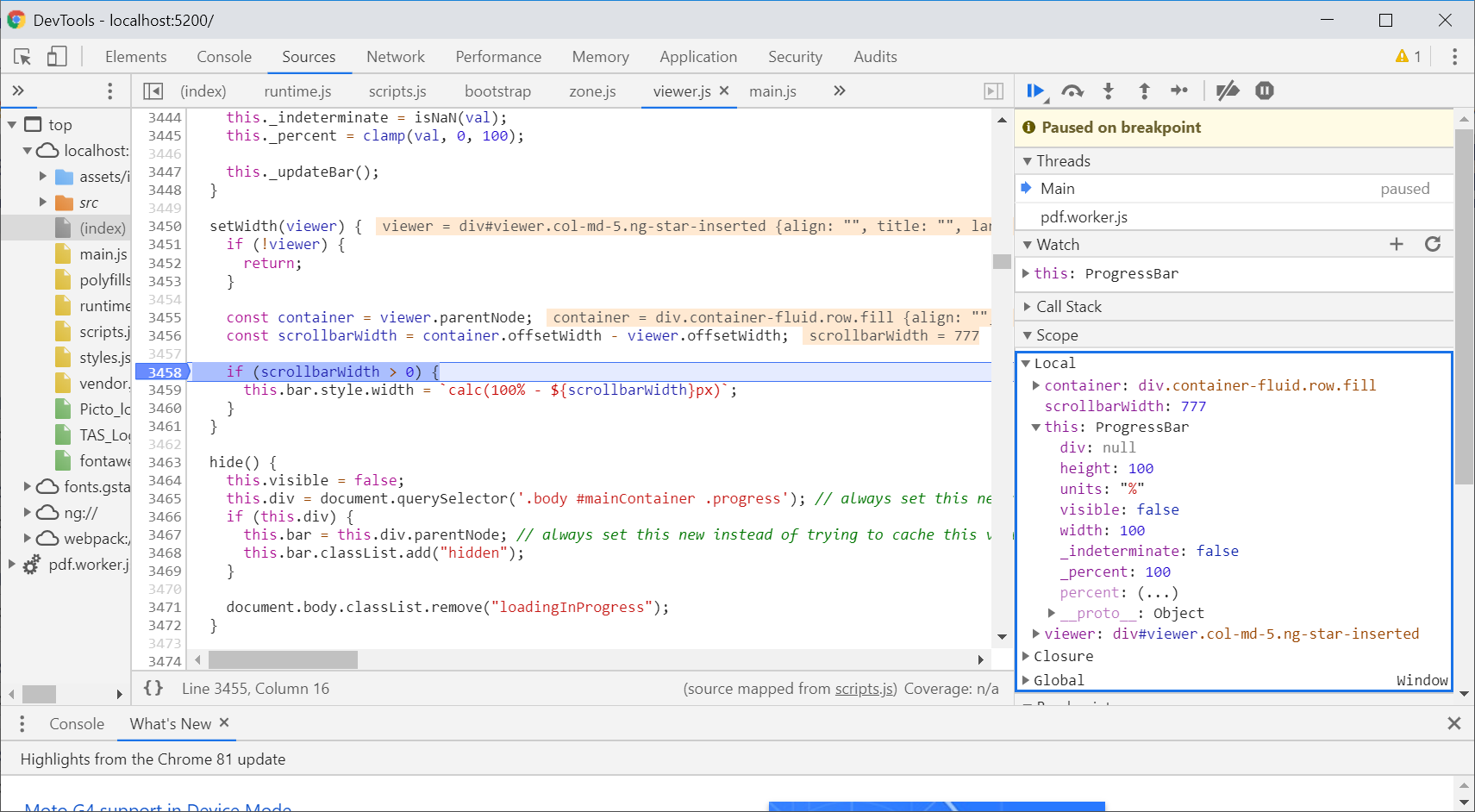
Exactly like I suspect. this.bar is undefined. What I can't say is why that happens. Just a wide shot: I wonder if Bootstrap interferes with the PDF viewer. You could remove the Bootstrap classes for a test. Does that make a difference?
stephanrauh
on 20 May 2020
Hello, you mean to remove bootstrap form my package.json to generate appli without this ?
cyrduf
on 21 May 2020
No. I was just referring to the Bootstrap classes you've put on the ngx-extended-pdf-viewer tag.
stephanrauh
on 21 May 2020
sorry but I don't know what your are refering ... can you send me an extract ?
cyrduf
on 21 May 2020
Just waiting some news from you since yesterday, I have updated node.js with v12 version, angular with v9.1.9 and this is not solving the problem. There is using now typescript v3.8.2 types/node 8.9.4. To avoid warnings during npm install.
cyrduf
on 21 May 2020
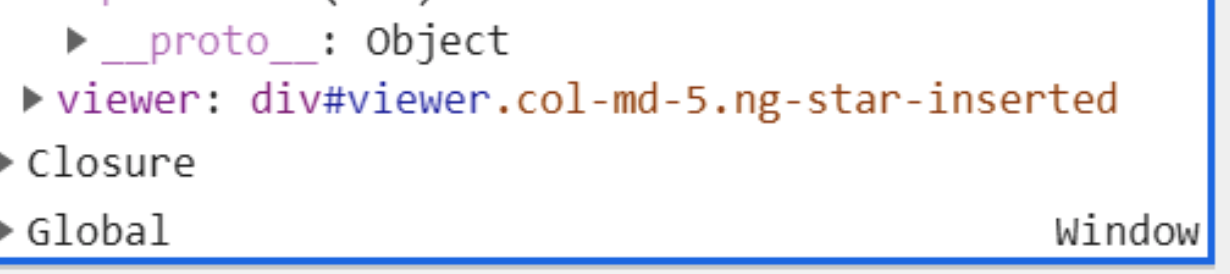
As for the Bootstrap classes: I was referring to col-md-5 in your screenshot:
stephanrauh
on 21 May 2020
I'm really lost with the use of the pdf viewer...
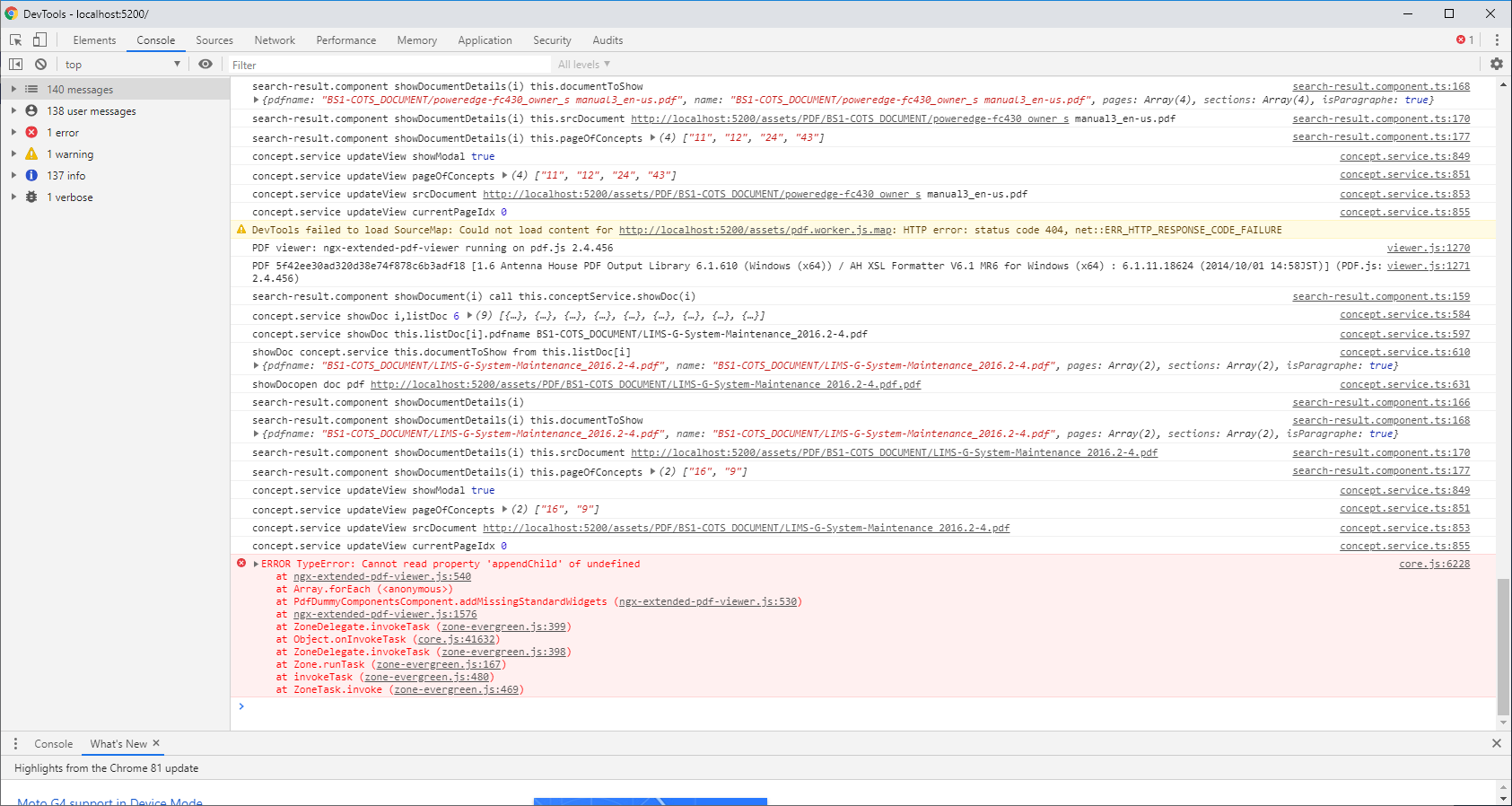
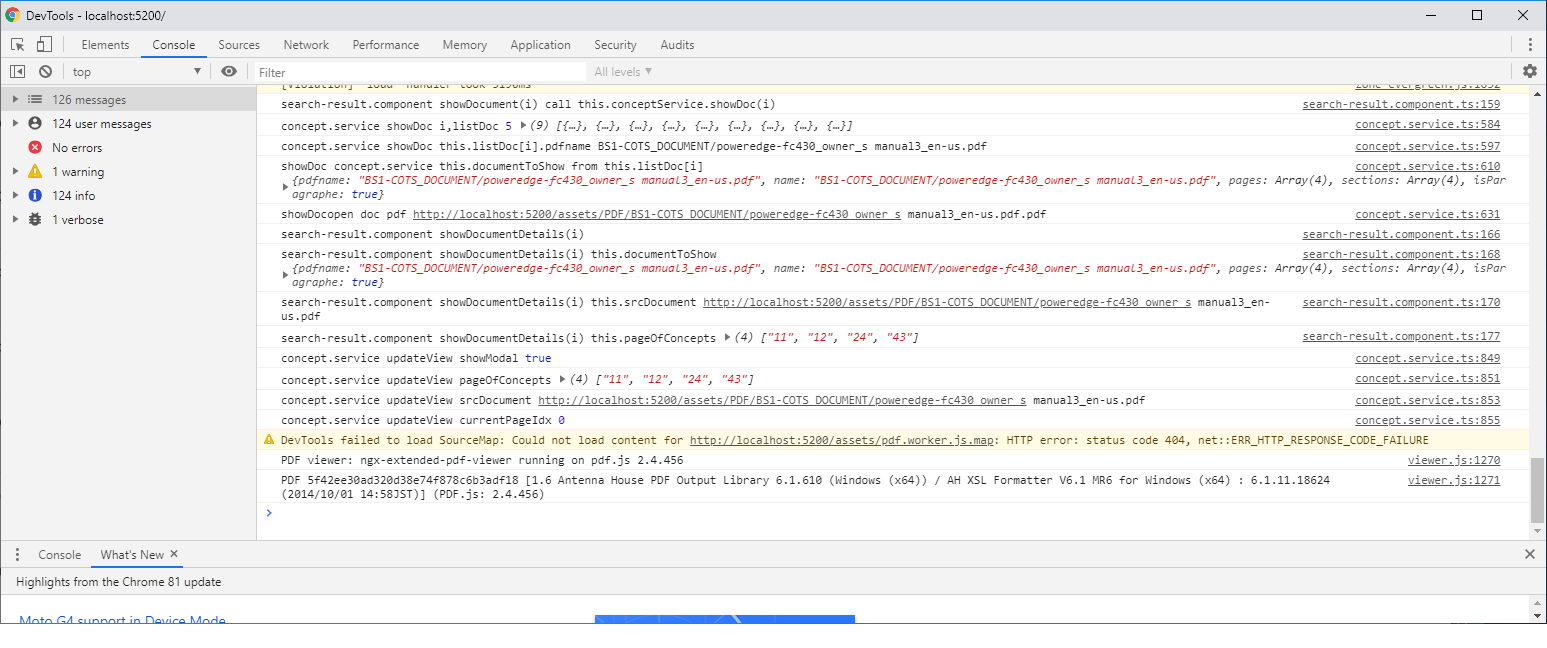
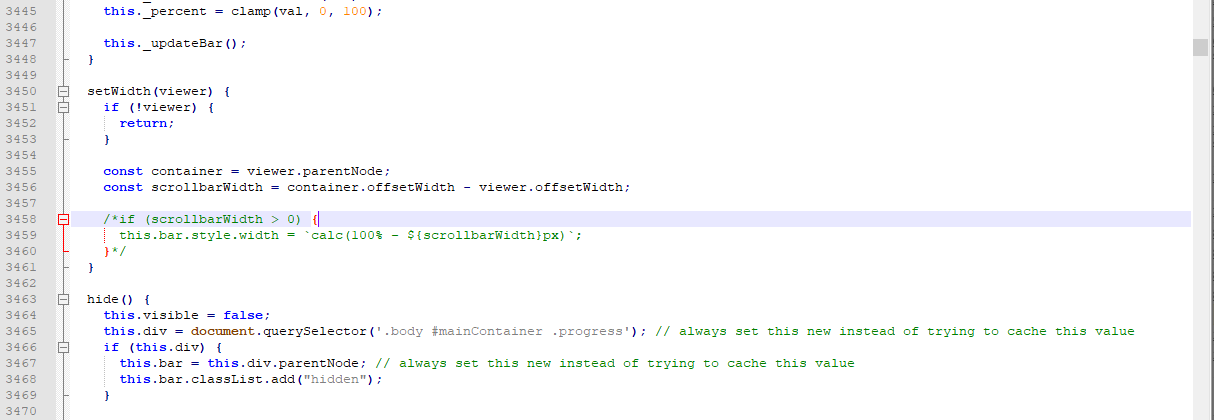
I comment the lines that block see png (5_1.png)
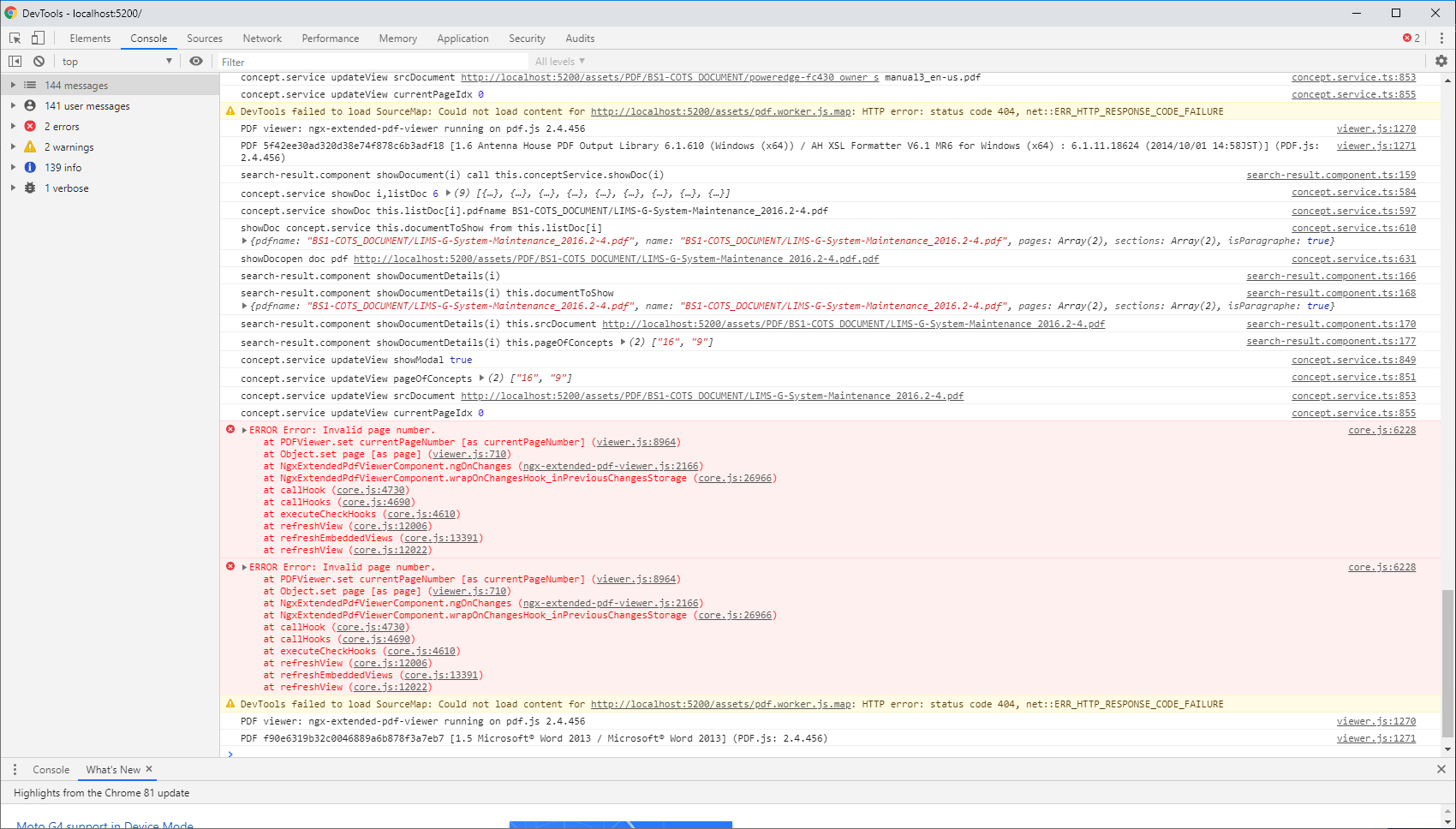
And in this case I have the traces given at png (5_2.png) without error but without pdf opening....
And in this case when I change dynamicly the pdf inputs I have the error given in (5_3.png)
Or given in (5_4.png) without reproductible behavior.
cyrduf
on 21 May 2020
I'm afraid I'm out of ideas. I can only guess what your source code looks like. Adding insult to injury, it behaves completely different from what I'd expect.
So I'm afraid I can't help you in my spare time. This is a leisure-time project, you know. That's why I insist on reproducers: they are a valuable tool to bring me up to speed.
If you're working at a company, maybe there's a second option. You could address my employer for consultancy. Business hours aren't for free, of course, but at least you can show me the real source code after we've signed an NDA.
stephanrauh
on 21 May 2020
I do this also for a company but as a non official project... on my leisure time.
cyrduf
on 21 May 2020
You've sent your latest batch of screenshot while I was writing the answer above. I suspect there's something wrong with your project setup. Or maybe there's a timing problem. The PDF viewer often has trouble when it comes to hide and show <ngx-extended-pdf-viewer>. For example, it can't be rendered in the background. If you've got multiple tabs, you have to make sure the PDF viewer is deactivated until the tab is activated.
stephanrauh
on 21 May 2020
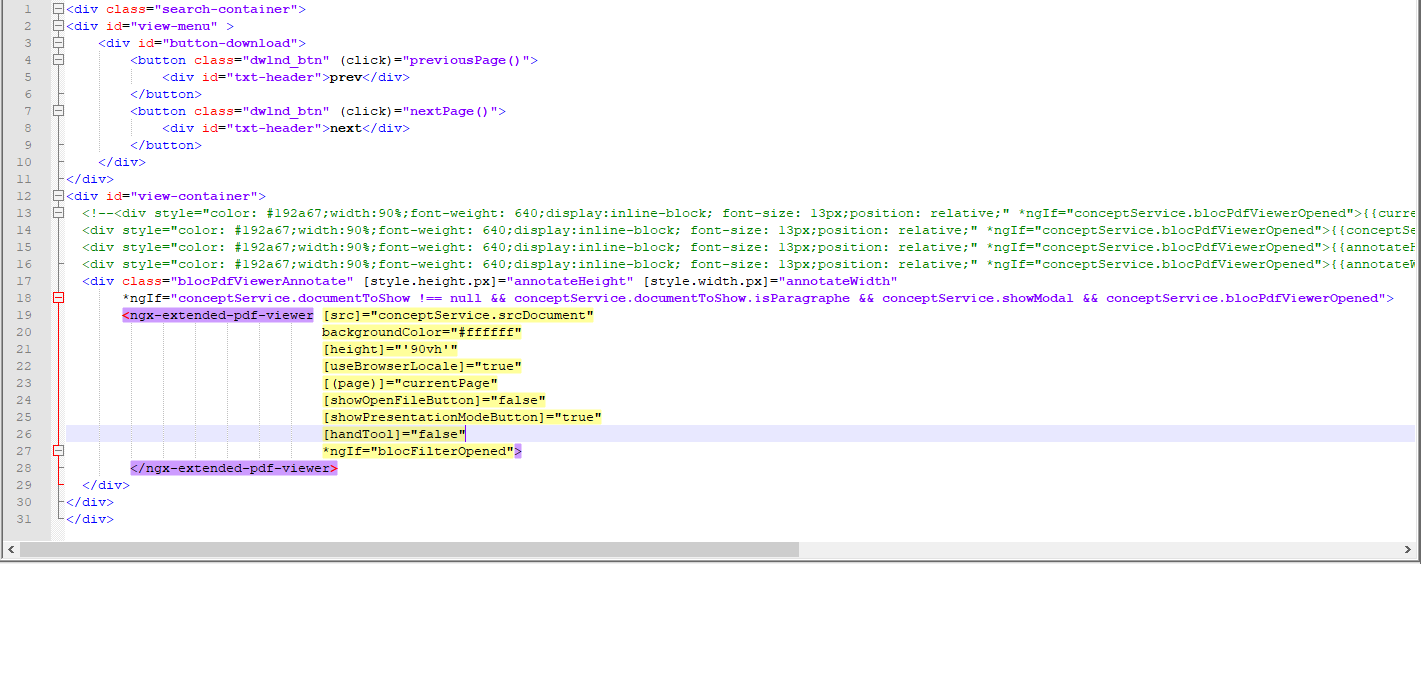
Yes I have made sure that the viewer is called only when the tab is activated... with "conceptService.blocPdfViewerOpened" => this boolean can dynamicly be true/false/true...
But I consider it's possible to change [(page)] or [src] dynamicly : is it not possible ?
cyrduf
on 21 May 2020
I made the requested test without col-md-5 : it's the same error.
cyrduf
on 21 May 2020
I have changed my strategy in html building and now it's ok for the pdf viewing.
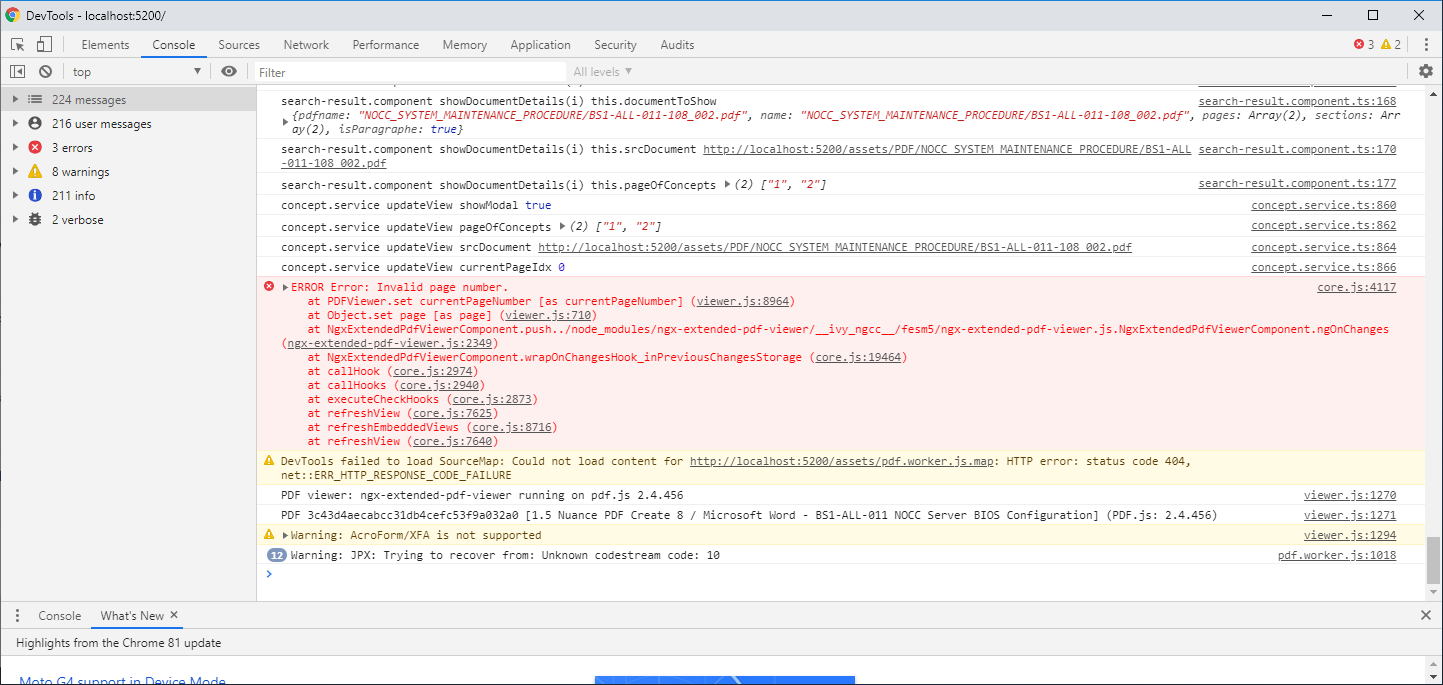
The only problem I have to solve now is the fact that if I want to change page dynamicly for an opened document it's not working with this kind of error.
If you have an example of html code with a piece of angular code that allows to make this.
Regards
cyrduf
on 22 May 2020
But I consider it's possible to change [(page)] or [src] dynamicly : is it not possible ?
Sure it is. Every attribute with square brackets in https://pdfviewer.net/attributes can be modified dynamically.
stephanrauh
on 22 May 2020
"Invalid page number" means the page number is not a number. Maybe it's undefined?
set currentPageNumber(val) {
    if (!Number.isInteger(val)) {
      throw new Error("Invalid page number.");
    }

    if (!this.pdfDocument) {
      return;
    }

    if (!this._setCurrentPageNumber(val, true)) {
      console.error(`${this._name}.currentPageNumber: "${val}" is not a valid page.`);
    }
  }
Thank you I think it's a number but I will check more seriously
Regards
cyrduf
on 22 May 2020
I found the problem with a string number... So I refactored all my html files for 1st problem and this one was simple.
cyrduf
on 22 May 2020
I'm happy to hear you've managed to solve all these bugs... but what cause them? Is there any lesson I can take away? Do I have to improve the documentation, or is there anything else I can do other developers benefit from?
Best regards,
Stephan
stephanrauh
on 23 May 2020
I will send you later my update to help you to understand but i don't really know why it didn't work (for the big problem). For the invalid page it was due to a page written as a string "1" instead of 1.
cyrduf
on 23 May 2020
For the invalid page it was due to a page written as a string "1" instead of 1.
Oops! I've added some code to silently accept string values. I suppose this happens all the time, and I want ngx-extended-pdf-viewer to be a friendly library.
The feature has landed with version 3.3.3.
stephanrauh
on 23 May 2020
Related issues
 StevenGarcia-CG
·
10Comments
StevenGarcia-CG
·
10Comments
 MKITConsulting
·
5Comments
MKITConsulting
·
5Comments
 sameerAhmad9291
·
7Comments
sameerAhmad9291
·
7Comments
 DHalilovic
·
6Comments
DHalilovic
·
6Comments
 vijucalicut
·
5Comments
vijucalicut
·
5Comments