Ngx-extended-pdf-viewer: items.scaleSelect.options is not iterable error
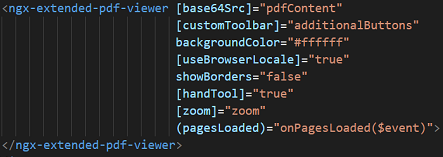
Code:
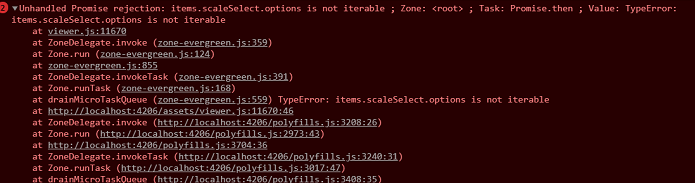
Error:
 tarun04
All 11 comments
I suppose you're talking about these lines:
    const customScale = Math.round(pageScale * 10000) / 100;
    this.l10n.get("page_scale_percent", {
      scale: customScale
    }, "{{scale}}%").then(msg => {
      let predefinedValueFound = false;

      for (const option of items.scaleSelect.options) {
        if (option.value !== pageScaleValue) {
          option.selected = false;
          continue;
        }

        option.selected = true;
        predefinedValueFound = true;
      }
I can't imagine how this for loop can break. The only idea I have is you've removed the dropdown from the toolbar. But I don't see any customization in your sourcecode. Weird.
On pdfviewer.net, this compiles to something completely different. That version looks even more resilient:
    this.l10n.get('page_scale_percent', {
      scale: customScale
    }, '{{scale}}%').then(msg => {
      let options = items.scaleSelect.options;
      let predefinedValueFound = false;

      for (let i = 0, ii = options.length; i < ii; i++) {
        let option = options[i];

        if (option.value !== pageScaleValue) {
          option.selected = false;
          continue;
        }

        option.selected = true;
        predefinedValueFound = true;
      }
 stephanrauh
on 7 Apr 2020
stephanrauh
on 7 Apr 2020
Please add a breakpoint to line 11670 of viewer.js. Which value does items.scaleSelect.options have? Is it undefined? If not, which class is it? In other words, what is items.scaleSelect.options.constructor.name?
stephanrauh
on 7 Apr 2020
Please add a breakpoint to line 11670 of
viewer.js. Which value doesitems.scaleSelect.optionshave? Is it undefined? If not, which class is it? In other words, what isitems.scaleSelect.options.constructor.name?
It is undefined
tarun04
on 7 Apr 2020
I have a pdfViewerComponent which is a dialog.
When I click a button, it calls API gets the base64 (pdfContent) and opens the dialog where
<ngx-extended-pdf-viewer>... </....> is loaded after the pdfContent is set to have some value.

I can't really create a reproducer atm.
tarun04
on 7 Apr 2020
Hm. I expected undefined. But I don't know how to solve the problem. Or how to reproduce it.
Maybe it helps to add the attribute [delayFirstView]="1000". That solves many timing problems and race conditions. It's a bad solution, but please give it a try. If it works, that might be a clue how to find and solve the root cause.
stephanrauh
on 7 Apr 2020
BTW, I'm 90% sure this bug doesn't have to do with Base64 files. Would you mind to run a test with a static PDF in the assets folder?
stephanrauh
on 7 Apr 2020
I will try both suggestions and get back to you.
Thank you for immediate response.
tarun04
on 7 Apr 2020
Hm. I expected
undefined. But I don't know how to solve the problem. Or how to reproduce it.Maybe it helps to add the attribute
[delayFirstView]="1000". That solves many timing problems and race conditions. It's a bad solution, but please give it a try. If it works, that might be a clue how to find and solve the root cause.
delayFirstView didn't work.
But when I removed [customToolbar] it worked fine.
tarun04
on 8 Apr 2020
So the issue is with the ng-template. It has to have one of the components that are in the setup provided.
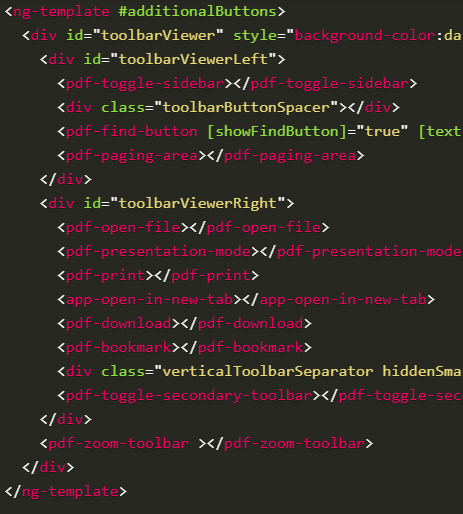
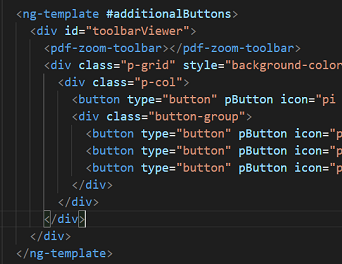
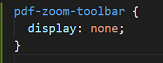
But I want a custom view for it. So as a workaround, I just included <pdf-zoom-toolbar ></pdf-zoom-toolbar> with display set to none in css. It worked.
Work around code:
tarun04
on 8 Apr 2020
Yeah, that's the work-around I wanted to suggest you, too.
Sorry for missing the [customToolbar] bit. It was a long working day yesterday, so I was very tired. I remember looking for something like [customToolbar], but I missed it nonetheless.
Now that I've understood the root cause, I can fix it. Basically, I'm going to insert an invisible and empty zoom dropdown. That approach makes the underlying library, pdf.js, happy because it finds the ids it relies on. At the same time, it gives you the freedom to omit the dropdown if you don't need it.
I'm putting this high on my priority list - so your feature is going to land in a few days (if everything goes according to the plan).
Best regards,
Stephan
stephanrauh
on 8 Apr 2020
The bugfix (or feature) has landed with version 3.2.2.
stephanrauh
on 21 Apr 2020
Related issues
 4vitek
·
5Comments
4vitek
·
5Comments
 Prasanth-FrontendDeveloper
·
7Comments
Prasanth-FrontendDeveloper
·
7Comments
 achapman009
·
3Comments
achapman009
·
3Comments
 i7i5
·
3Comments
i7i5
·
3Comments
 dheerajm91
·
6Comments
dheerajm91
·
6Comments