Ngx-chips: TypeError: this._onChangeCallback is not a function
I'm submitting a ... (check one with "x")
[x] bug report => search github for a similar issue or PR before submitting
[] support request/question

Notice: feature requests will be ignored, submit a PR if you'd like
Current behavior
I'm trying to use ngx to implement the tag systems. When entering the page everything happens as expected and no error is noticed on the console.
But when I do some kind of action, adding a new tag, editing, deleting or something with my tag-input field, the following error appears in the console:
ERROR TypeError: this._onChangeCallback is not a function
at TagInputComponent.set [as items] (ngx-chips.bundle.js:2823)
at TagInputComponent._this.appendTag (ngx-chips.bundle.js:1909)
at SafeSubscriber.subscribeFn [as _next] (ngx-chips.bundle.js:2186)
at SafeSubscriber.__tryOrSetError (ngx-chips.bundle.js:568)
at SafeSubscriber.next (ngx-chips.bundle.js:510)
at Subscriber._next (ngx-chips.bundle.js:448)
at Subscriber.next (ngx-chips.bundle.js:412)
at FilterSubscriber._next (ngx-chips.bundle.js:3807)
at FilterSubscriber.Subscriber.next (ngx-chips.bundle.js:412)
at MapSubscriber._next (ngx-chips.bundle.js:4059)
Expected behavior
The expectation is that it works without throwing an error on the console.
Minimal reproduction of the problem with instructions (if applicable)
_1. Added to tag to line.component.html_
<tag-input [(ngModel)]='items' [editable]='true'></tag-input>
_2. Import TagInputModule in my register.module.ts_
import { TagInputModule } from 'ngx-chips';
_3. Import BrowserAnimationsModule in my app.module.ts_
imports: [
    CommonModule,
    BrowserAnimationsModule,
    HttpModule,
    FormsModule,
    AppRoutingModule,
    BsDropdownModule.forRoot(),
    TabsModule.forRoot(),
    ChartsModule
  ]
What do you use to build your app?. Please specify the version
Angular Cli version 1.2.0
Angular version:
@angular/cli: 1.2.0,
node: 6.11.1,
os: linux x64,
@angular/animations: 4.3.3,
@angular/common: 4.2.5,
@angular/compiler: 4.2.5,
@angular/core: 4.2.5,
@angular/forms: 4.2.5,
@angular/http: 4.2.5,
@angular/platform-browser: 4.2.5,
@angular/platform-browser-dynamic: 4.2.5,
@angular/router: 4.2.5,
@angular/upgrade: 4.2.5,
@angular/cli: 1.2.0,
@angular/compiler-cli: 4.2.5
ngx-chips version:
version 1.5.0
Browser: [Chrome]
 renanmoraes
All 31 comments
Looks like you're not importing ReactiveFormsModule
 Gbuomprisco
on 10 Aug 2017
Gbuomprisco
on 10 Aug 2017
In the documentation just send me add two dependencies. What do you need to do?
renanmoraes
on 10 Aug 2017
Gbuomprisco
on 10 Aug 2017
Changed the error now appears this: Error: Uncaught (in promise): Failed to load tag-input.template.html What can it be?
renanmoraes
on 10 Aug 2017
No idea. Can you help by providing a reproducible demo (either online or create a repo)?
Gbuomprisco
on 10 Aug 2017
I'm not good at creating examples online, and I can not create a repository for this because it's a private project. But which site indicates that I can try to reproduce the example?
renanmoraes
on 10 Aug 2017
See https://github.com/Gbuomprisco/ngx-chips/issues/525
The user created an online demo using https://stackblitz.com/edit/angular-kqyk8c
BTW, you don't have to share the whole project: just need a bare repo in which you can reproduce the same error. As I cannot reproduce it, I won't be able to help unless you provide that
Gbuomprisco
on 10 Aug 2017
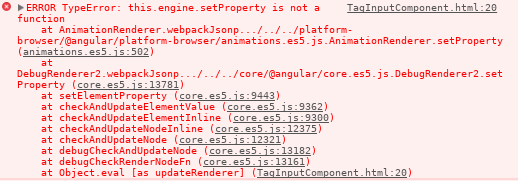
Changed the error now so missing this part, from here you could help me?
renanmoraes
on 10 Aug 2017
Try upgrading to 4,3,0 all the angular packages
Gbuomprisco
on 10 Aug 2017
Is there any command in which I can update everything automatically, without packege json?
renanmoraes
on 10 Aug 2017
What was the previous error caused by?
Gbuomprisco
on 10 Aug 2017
Yes but maybe Google it
Gbuomprisco
on 10 Aug 2017
It worked perfectly, thanks for the help.
I would just have one last doubt, I need to increment something the tag that is the following I would type 0000 it would put a time mask for me and the end would leave like this 00:00.
How do I do this?
renanmoraes
on 10 Aug 2017
Sorry I can't understand what you mean, can you phrase this a bit better?
Gbuomprisco
on 10 Aug 2017
I need to add a mask for when a string is submitted.
For example, I am going to type 1225 without the dots and it will automatically add the: then the result written in the input tag would look like 12:25.
renanmoraes
on 10 Aug 2017
You need to intercept the value and transform it. Check out the onAdding property. Remember you need to send an observable, so read the example carefully
Gbuomprisco
on 10 Aug 2017
Amigo esta acontescendo o seguinte problema:

My code is like this:
public transform(value: string): Observable<string> {
    const val = value.split('');
    const final = val[0] + val[1] + ':' + val[2] + val[3];
    this.items.push(final);
    console.log(this.items);
    return Observable.of('');
  }
and html:
<tag-input [(ngModel)]='items' [onAdding]="transform" name="items"></tag-input>
It is not working the way expected, but to try to match I am setting the value directly in the model, this is not the cause of the problem because if I shoot, it happens in the same way.
Could it be what this time?
renanmoraes
on 10 Aug 2017
Mate you're returning an observable of an empty string. Check out the example,
Gbuomprisco
on 10 Aug 2017
Also import the first operator from rxjs
Gbuomprisco
on 10 Aug 2017
I also did this:
  public transform(value: string): Observable<string> {
    const val = value.split('');
    const final = val[0] + val[1] + ':' + val[2] + val[3];
    this.items.push(final);
    console.log(this.items);
    return Observable.of(final);
  }
But you got the error
import { Observable } from 'rxjs/Observable';

import 'rxjs/add/observable/of';
import 'rxjs/add/operator/filter';
I already minded but continue with the error.
renanmoraes
on 10 Aug 2017
@renanmoraes
Add the operator "first" in the same way you imported those ones
import 'rxjs/add/operator/first';
and you should not be pushing to items, ngModel takes care of that. onAdding will just replace the value that will be added
Gbuomprisco
on 10 Aug 2017
@Gbuomprisco I have this same problem when I'm going to click on the autocomplete input in the browser, it would be very helpful if you know how I can solve it since I've looked for enough and the solutions they give me don't work.
big thanks

 duvangil
on 6 Jul 2018
duvangil
on 6 Jul 2018
Have you set formControlName or ngmodel?
Gbuomprisco
on 6 Jul 2018
I have established the formControlName.
duvangil
on 6 Jul 2018
check out the typo there (formControlNam)
Gbuomprisco
on 6 Jul 2018
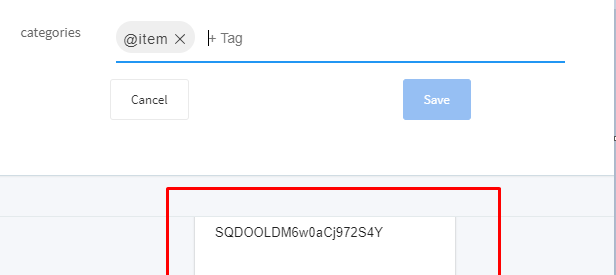
@Gbuomprisco I was able to fix the error that appeared in the chrome console, but now I have a problem with the complete car, which appears like this.
duvangil
on 9 Jul 2018
i'm facing same errors , and i'm importing the reactive from :
ERROR TypeError: this._onChangeCallback is not a function
and
ERROR TypeError: this._onTouchedCallback is not a function
any clue guys?
 HDaghash
on 19 Feb 2019
HDaghash
on 19 Feb 2019
Are you defining any model? That's what that error usually say. Either no ngmodel or no form control name. Check the examples
Gbuomprisco
on 19 Feb 2019
Thanks @Gbuomprisco it was ngModel issue
HDaghash
on 20 Feb 2019
@Gbuomprisco Im facing the similar issue with Angular 7:
this._onTouchedCallback is not a function
at TagInputComponent.push../node_modules/ngx-chips/esm5/ngx-chips.js.TagInputAccessor.onTouched (ngx-chips.js:192)
at TagInputComponent.push../node_modules/ngx-chips/esm5/ngx-chips.js.TagInputComponent.blur (ngx-chips.js:1126)
Im just using the below html with importing all the required dependencies:
 NaveenTula90
on 14 May 2019
NaveenTula90
on 14 May 2019
encountering much the same issue myself (Angular 9 in this case). I didn't lay out the original code, so I am coming at it dark. I'm using a TagInputDropdown tied to a TagInputComponent. The dropdown loads fine, but when selecting an entry, or even mousing over it, I get
TypeError: this._onTouchedCallback is not a function
The code was recently upgraded to angular 9 (from 4 I think), so the difference there is where this issue first came up. I get I probably need to register an event listener, but I'll be baffled if I can sort out where.
 mikepictor
on 19 Aug 2020
mikepictor
on 19 Aug 2020
Related issues
 EnochGao
·
4Comments
EnochGao
·
4Comments
 anikets43
·
4Comments
anikets43
·
4Comments
 rspandi1985
·
4Comments
rspandi1985
·
4Comments
 RaghulXander
·
3Comments
RaghulXander
·
3Comments
 neilharding
·
5Comments
neilharding
·
5Comments
Most helpful comment
@renanmoraes
Add the operator "first" in the same way you imported those ones
and you should not be pushing to items, ngModel takes care of that. onAdding will just replace the value that will be added