Ngx-charts: Number Cards chart not showing 'Value' label in Internet Explorer and label alignment is not proper
I'm submitting a ... (check one with "x")
[x] bug report => search github for a similar issue or PR before submitting
[ ] feature request
[ ] support request => Please do not submit support request here
Current behavior
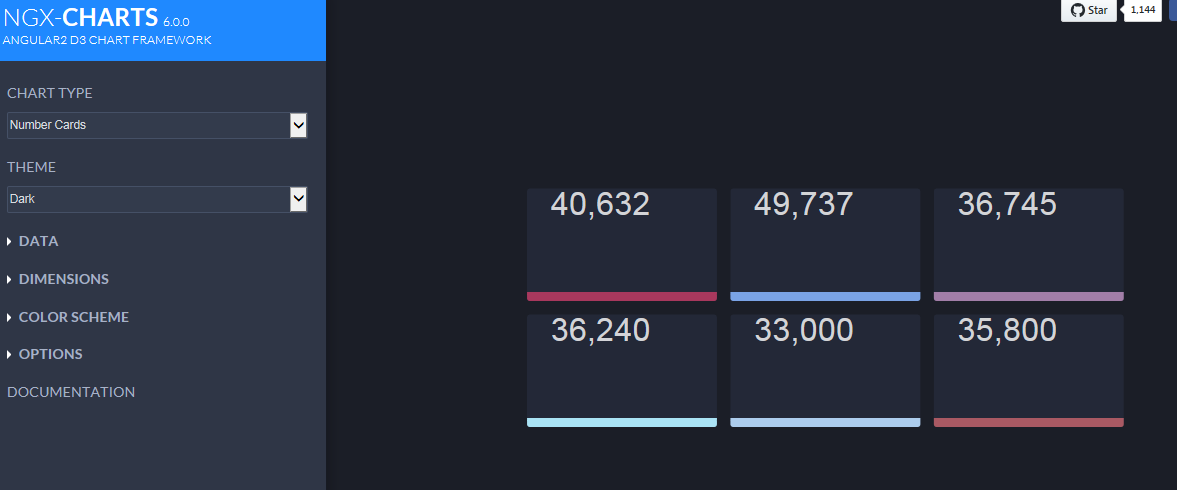
Number Card chart in Internet Explorer only showing 'Name' label but NOT showing 'value' label after rendering and label alignment is also not proper. But same is working fine in Chrome browser.
Expected behavior
'Value' label also should be shown in I.E after rendering.
Reproduction of the problem
For below sample data Number Cards charts shows only 'Name' label in I.E but both 'Name' & 'Value' labels are properly shown in Chrome browser. Also label alignment is not proper in case of 'Name' label in Internet Explorer.
[
  {
    "name": "Germany",
    "value": 40632
  },
  {
    "name": "United States",
    "value": 49737
  },
  {
    "name": "France",
    "value": 36745
  },
  {
    "name": "United Kingdom",
    "value": 36240
  }
]
For above data Number Cards rendering screenshot in Chrome Browser

For above data Number Cards rendering screenshot in Internet Explorer
Please tell us about your environment:
OS: Windows 7
ngx-charts version: 6.0.0
angular-cli version: 1.2.1
Angular version: 4.2.6
Browser: Chrome 60.0.3112.90 | Internet Explorer 11
Language: TypeScript 2.4.1 | ES5
 rishi-ios
All 9 comments
+1
 Darshan-popin
on 12 Sep 2017
Darshan-popin
on 12 Sep 2017
+1
 neerajmenon1412
on 29 Sep 2017
neerajmenon1412
on 29 Sep 2017
Hey guys,
just wanted to ask if anything happened.
It obviously still does not work in IE11 even for the demo.
Main issue seems to be the foreignObject which is not supported by IE 11
<foreignObject xmlns="http://www.w3.org/2000/svg" class="trimmed-label" alignment-baseline="hanging" x="20.25" y="97" width="122" height="82">
        <p style="color: rgb(211, 212, 215); line-height: 15px; font-size: 15px;">LabelText blabla</p>
      </foreignObject>
Did anyone find a short term fix using javascript or any polyfill that can be used ?
 pharindoko
on 23 Jun 2018
pharindoko
on 23 Jun 2018
if (typeof SVGElement.prototype.contains === 'undefined') {
SVGElement.prototype.contains = HTMLDivElement.prototype.contains;
}
Add the Javascript code into the polyfill.ts that should work,.. I know it's a dirty fix but works for now
Darshan-popin
on 25 Jun 2018
Hi,
thanks for your reply Darshan
I checked my polyfills.ts - I had already included this one but it didnt help.
The numbercard itself is available - its just the label in the numbercard which does not appear.
Same as described above (see screenshots from rishi-ios)
polyfills.ts
/**
 * This file includes polyfills needed by Angular and is loaded before the app.
 * You can add your own extra polyfills to this file.
 *
 * This file is divided into 2 sections:
 *   1. Browser polyfills. These are applied before loading ZoneJS and are sorted by browsers.
 *   2. Application imports. Files imported after ZoneJS that should be loaded before your main
 *      file.
 *
 * The current setup is for so-called "evergreen" browsers; the last versions of browsers that
 * automatically update themselves. This includes Safari >= 10, Chrome >= 55 (including Opera),
 * Edge >= 13 on the desktop, and iOS 10 and Chrome on mobile.
 *
 * Learn more in https://angular.io/docs/ts/latest/guide/browser-support.html
 */

/***************************************************************************************************
 * BROWSER POLYFILLS
 */

/** IE9, IE10 and IE11 requires all of the following polyfills. **/
import 'core-js/es6/symbol';
import 'core-js/es6/object';
import 'core-js/es6/function';
import 'core-js/es6/parse-int';
import 'core-js/es6/parse-float';
import 'core-js/es6/number';
import 'core-js/es6/math';
import 'core-js/es6/string';
import 'core-js/es6/date';
import 'core-js/es6/array';
import 'core-js/es6/regexp';
import 'core-js/es6/map';
import 'core-js/es6/weak-map';
import 'core-js/es6/set';
import 'core-js/es7/array';

/** IE10 and IE11 requires the following for NgClass support on SVG elements */
 import 'classlist.js';  // Run `npm install --save classlist.js`.

/** Evergreen browsers require these. **/
import 'core-js/es6/reflect';
import 'core-js/es7/reflect';


/**
 * Required to support Web Animations `@angular/animation`.
 * Needed for: All but Chrome, Firefox and Opera. http://caniuse.com/#feat=web-animation
 **/
 import 'web-animations-js';  // Run `npm install --save web-animations-js`.


/***************************************************************************************************
 * Zone JS is required by Angular itself.
 */
import 'zone.js/dist/zone';  // Included with Angular CLI.


/***************************************************************************************************
 * APPLICATION IMPORTS
 */

/**
 * Date, currency, decimal and percent pipes.
 * Needed for: All but Chrome, Firefox, Edge, IE11 and Safari 10
 */
 import 'intl';  // Run `npm install --save intl`.
/**
 * Need to import at least one locale-data with intl.
 */
// import 'intl/locale-data/jsonp/en';
if (typeof SVGElement.prototype.contains === 'undefined') {
    SVGElement.prototype.contains = HTMLDivElement.prototype.contains;
}
index.html -> additional script used for line-chart
<!doctype html>
<html lang="en">

<head>
    <meta http-equiv="X-UA-Compatible" content="IE=EDGE" />
    <meta charset="utf-8">
    <title>---</title>
    <base href="/">

    <meta name="viewport" content="width=device-width, initial-scale=1, user-scalable=0">
    <link rel="icon" type="image/x-icon" href="favicon.ico">
    <link href="http://fonts.googleapis.com/icon?family=Material+Icons" rel="stylesheet">
    <script>
        (function (window) {
            try {
                new MouseEvent('test');
                return false; // No need to polyfill
            } catch (e) {
                // Need to polyfill - fall through
            }

            // Polyfills DOM4 MouseEvent

            var MouseEvent = function (eventType, params) {
                params = params || { bubbles: false, cancelable: false };
                var mouseEvent = document.createEvent('MouseEvent');
                mouseEvent.initMouseEvent(eventType, params.bubbles, params.cancelable, window, 0, 0, 0, 0, 0, false, false, false, false, 0, null);

                return mouseEvent;
            }

            MouseEvent.prototype = Event.prototype;

            window.MouseEvent = MouseEvent;
        })(window);
    </script>
</head>

<body class="">
    <app-root></app-root>
</body>

</html>
Hey guys, I have the same issue, and none of the above solutions worked so far.
Could anyone please give a hint how to fix that?
 dave0688
on 3 Jul 2018
dave0688
on 3 Jul 2018
Hey,
I would be also interested.
 denssle
on 4 Oct 2018
denssle
on 4 Oct 2018
I also had this problem of the values not lining up. I eventually tracked it down to IE & Edge not supporting the alignment-baseline="hanging" attribute on the SVG template. So when the template placed the value in Chrome it correctly set the position using the Y as the top of the text and then in IE / Edge the Y is the bottom of the text instead.
To get around the issue I modified the SVG template to use alignment-baseline="baseline" instead and then adjusted the Y value accordingly, i.e. [attr.y]="textPadding[0] + textFontSize" the + textFontSize being the important bit
 Confusedfish
on 24 Jan 2019
Confusedfish
on 24 Jan 2019
@Confusedfish, may I know where exactly to apply those changes (where to find the SVG template). My html has only <ngx-charts-number-card> with property bindings?
 deepdev1
on 28 Nov 2020
deepdev1
on 28 Nov 2020
Related issues
 Enngage
·
22Comments
Enngage
·
22Comments
 ChrisDevinePimss
·
32Comments
ChrisDevinePimss
·
32Comments
 72gm
·
22Comments
72gm
·
22Comments
 allensutton
·
24Comments
allensutton
·
24Comments
 ChitrajanDhiman
·
23Comments
ChitrajanDhiman
·
23Comments
Most helpful comment
Hey guys, I have the same issue, and none of the above solutions worked so far.
Could anyone please give a hint how to fix that?