Ngx-admin: Add JWT automatically for every HTTP request
Is it possible to add a JWT to the HTTP header for every request? How can I achieve this? I need every request to be authenticated with an authorization token by my backend.
Any help is appreciated!
 WerVbn
All 31 comments
You have to roll-out your own service that intercepts all HTTP/S calls and
do inyect the token headers.
Take a look at the @angular/http lib and the Httpclient module. There are
plenty of examples on github about that topic.
On Tue, Nov 7, 2017 at 2:30 PM, WerVbn notifications@github.com wrote:
Is it possible to add a JWT to the HTTP header for every request? How can
I achieve this? I need every request to be authenticated with an
authorization token by my backend.Any help is appreciated!
—
You are receiving this because you are subscribed to this thread.
Reply to this email directly, view it on GitHub
https://github.com/akveo/ngx-admin/issues/1375, or mute the thread
https://github.com/notifications/unsubscribe-auth/ABK1hpY-AH48C5ELvPCRX03OZzpNCiK1ks5s0GmJgaJpZM4QU331
.
 rbetancor
on 7 Nov 2017
rbetancor
on 7 Nov 2017
You already have this service that handle this in the AuthModule service.
 i-hanuman
on 7 Nov 2017
i-hanuman
on 7 Nov 2017
@WerVbn
src/app/app.module.ts
```js
providers: [
....
{ provide: HTTP_INTERCEPTORS, useClass: TokenInterceptor, multi: true},
....
src/app/token.interceptor.ts
```js
import {Injectable, Injector} from '@angular/core';
import {HttpEvent, HttpHandler, HttpInterceptor, HttpRequest} from '@angular/common/http';
import {Observable} from 'rxjs/Observable';
import {NbAuthJWTToken, NbAuthService} from '@nebular/auth';
/**
* TokenInterceptor
* @see https://angular.io/guide/http#intercepting-all-requests-or-responses
*/
@Injectable()
export class TokenInterceptor implements HttpInterceptor {
private authService: NbAuthService;
private tokenService: NbAuthJWTToken;
constructor(private injector: Injector) {
}
// public getToken(): string {
// return localStorage.getItem('auth_app_token');
// }
intercept(request: HttpRequest<any>, next: HttpHandler): Observable<HttpEvent<any>> {
this.authService = this.injector.get(NbAuthService); // get it here within intercept
this.authService.isAuthenticated().subscribe((result) => {
if (result) {
// console.log('logged');
}
});
return next.handle(request);
}
}
 codex-corp
on 7 Nov 2017
codex-corp
on 7 Nov 2017
@WerVbn or even simpler you can just inject the built-in Nebular interceptor https://github.com/akveo/nebular/blob/master/src/framework/auth/services/interceptors/jwt-interceptor.ts the way @codex-corp described. We will add it to the documentation some time soon
 nnixaa
on 8 Nov 2017
nnixaa
on 8 Nov 2017
Yes just like the below,
{ provide: HTTP_INTERCEPTORS, useClass: NbAuthJWTInterceptor, multi: true},
codex-corp
on 8 Nov 2017
Be careful with this (You could introduce a CSRF scenario). Only add the Token to calls you know are triggered by the user when performing a manual event like clicking a button or a link that you know is safe.
 oleersoy
on 8 Nov 2017
oleersoy
on 8 Nov 2017
Thank you very much!
WerVbn
on 13 Nov 2017
I added the same code suggested by @codex-corp and I don't see the token being passed.
Can you please help?
providers: [
AuthGuard,
{ provide: APP_BASE_HREF, useValue: '/' },
{ provide: NB_AUTH_TOKEN_WRAPPER_TOKEN, useClass: NbAuthJWTToken },
{ provide: HTTP_INTERCEPTORS, useClass: NbAuthJWTInterceptor, multi: true},
],
 nsankaranarayanan
on 3 Jan 2018
nsankaranarayanan
on 3 Jan 2018
@nsankaranarayanan can you provide more information about why this doesn't work for you?
 danshou
on 8 Feb 2018
danshou
on 8 Feb 2018
Can any one help me?
I can see the token being passed, but I want to pass in another auth type like "x-auth": "token" instead of "Authorization" : "Bearer token".
 lucasrgsilva
on 13 Feb 2018
lucasrgsilva
on 13 Feb 2018
@lsilv064 , how did you manage to get it work? Could you please show the providers section in app.module.ts?
 vbyno
on 24 Feb 2018
vbyno
on 24 Feb 2018
@nsankaranarayanan, probably, you have the same issue I had.
Interceptors don't work with Http module. So, instead of using it in your services:
import { Http } from '@angular/http';
...
constructor(private http: Http) {}
You should use HttpClient:
import { HttpClient } from '@angular/common/http';
...
constructor(private http: HttpClient) {}
I implemented the same code @codex-corp suggest and I get the same result as @nsankaranarayanan.
I search a refenrence as said vbyno in relation http --> https but i have no reference to this module
Has any one discover the reason?
 victorlm125
on 6 May 2018
victorlm125
on 6 May 2018
Yes just like the below,
{ provide: HTTP_INTERCEPTORS, useClass: NbAuthJWTInterceptor, multi: true},
I do that, and Autorization header is added to request, but add this Autorization: 'Bearer [object Object]'
 cjfigueiras
on 26 Oct 2018
cjfigueiras
on 26 Oct 2018
FYI if you are using this solution check out my other reply:
https://github.com/akveo/ngx-admin/issues/1375#issuecomment-453969740
I couldn't get this to work, I added
{
      provide: HTTP_INTERCEPTORS,
      useClass: NbAuthJWTInterceptor,
      multi: true
    },
to my app.module.ts but it still didn't add the Authorization header.
After some time I figured out that it was because of the NB_AUTH_TOKEN_INTERCEPTOR_FILTER which always returned true.
By default it is set in the auth.module.js:
{ provide: NB_AUTH_TOKEN_INTERCEPTOR_FILTER, useValue: nbNoOpInterceptorFilter },
And that function returns true:
export function nbNoOpInterceptorFilter(req) {
    return true;
}
Not sure if I did something wrong or that this is a flaw, nevertheless: I fixed it by setting my own NB_AUTH_TOKEN_INTERCEPTOR_FILTER value which always returns false:
{
      provide: NB_AUTH_TOKEN_INTERCEPTOR_FILTER,
      useValue: function () {
        return false;
      },
    },
Thanks to this the header will be set by the NbAuthJWTInterceptor as so:
if (!this.filter(req)) {
            return this.authService.isAuthenticatedOrRefresh()
 Vighough
on 21 Dec 2018
Vighough
on 21 Dec 2018
I couldn't get this to work, I added
{
      provide: HTTP_INTERCEPTORS,
      useClass: NbAuthJWTInterceptor,
      multi: true
    },
to my app.module.ts but it still didn't add the Authorization header.
After some time I figured out that it was because of the
NB_AUTH_TOKEN_INTERCEPTOR_FILTERwhich always returned true.By default it is set in the auth.module.js:
{ provide: NB_AUTH_TOKEN_INTERCEPTOR_FILTER, useValue: nbNoOpInterceptorFilter },And that function returns true:
export function nbNoOpInterceptorFilter(req) {
    return true;
}
Not sure if I did something wrong or that this is a flaw, nevertheless: I fixed it by setting my own
NB_AUTH_TOKEN_INTERCEPTOR_FILTERvalue which always returns false:
{
      provide: NB_AUTH_TOKEN_INTERCEPTOR_FILTER,
      useValue: function () {
        return false;
      },
    },
Thanks to this the header will be set by the
NbAuthJWTInterceptoras so:if (!this.filter(req)) { return this.authService.isAuthenticatedOrRefresh()
yeah you right . and thanks you save my time
 rahmatputrawiranata
on 8 Jan 2019
rahmatputrawiranata
on 8 Jan 2019
For the people who encountered the same problem as me when the token is expired..
My solution results in a loop when the token is expired and the
if (!this.filter(req)) {
            return this.authService.isAuthenticatedOrRefresh()
calls the refresh API endpoint.
For an explanation check this issue: https://github.com/akveo/nebular/issues/677
The solution is to add the refreshToken endpoint to the filter:
   {
      provide: NB_AUTH_TOKEN_INTERCEPTOR_FILTER,
      useValue: function (req: HttpRequest<any>) {
        if (req.url === '/api/auth/refresh-token') {
          return true;
        }
        return false;
      },
    },
Using
{ provide: NB_AUTH_TOKEN_INTERCEPTOR_FILTER, useValue: function () { return false; }, },
I get this error when I complete the login:
RangeError: Maximum call stack size exceeded
Any help please?
 Luca1991
on 1 Apr 2019
Luca1991
on 1 Apr 2019
Please, use the solution provided by @Vighough above!
 JairoMarques
on 16 Apr 2019
JairoMarques
on 16 Apr 2019
@Luca1991 I'm not sure if it's the best solution but it worked by skipping the call on the refresh call itself. Otherwise, you get an infinite loop.
     provide: NB_AUTH_TOKEN_INTERCEPTOR_FILTER, useValue: (req) => {
        if (req.url === 'https://your-url.com/auth/refresh') {
          return true;
        }
        return false;
      },
 malletjo
on 9 Jun 2019
malletjo
on 9 Jun 2019
@Vighough
the solution you've posted works great!
however, it could be simplified:
{
  provide: NB_AUTH_TOKEN_INTERCEPTOR_FILTER,
  useValue: function (req: HttpRequest<any>) {
    return req.url === '/api/auth/refresh-token';
  },
},
 zagi
on 31 Oct 2019
zagi
on 31 Oct 2019
providers: [
AuthGuard,
{ provide: NB_AUTH_TOKEN_INTERCEPTOR_FILTER, useClass: NbAuthJWTInterceptor, multi: true }
],
Headers are not being passed with JWT token. I don't know what was the problem. Anyone suggest me how to fix this.
 sudhakare18
on 17 Dec 2019
sudhakare18
on 17 Dec 2019
I have followed the nebular document. Still, I didn't get any solution.
sudhakare18
on 17 Dec 2019
in my case importing Ng2SmartTableModule was breaking the code.
This overwrites HTTP_INTERCEPTORS (from the root module) in the submodule.
it is mentioned here: https://github.com/oferh/ng2-completer/issues/393
 anarbek
on 22 Dec 2019
anarbek
on 22 Dec 2019
You can also improve that by whitelisting instead of filtering the token refresh endpoint. This only works if you have your auth-server / endpoint under different host (for us it's auth.yourdomain.tld). For me for example i wouldn't like to have the bearer token exposed to the outside world. E.g. when someone makes a call to a foreign api endpoint. There shouldn't be the bearer token in the header!
I solved it by filtering for whitelisted hosts / string parts in the request url. These hosts are configured for each environment by environment.ts. So only calls to our api (api.yourhost.tld) contain the bearer token.
{ provide: NB_AUTH_TOKEN_INTERCEPTOR_FILTER,
      useValue: function (req: HttpRequest<any>) {
        return !req.url.includes(environment.oauth2.bearerHeader.urlContains);
      },
},
In environment.ts:
....
... bearerHeader: {
      urlContains: '://api.yourdomain.tld',
    },
.....
 PatrickHuetter
on 21 Feb 2020
PatrickHuetter
on 21 Feb 2020
i have followed all the examples and instructions above but still can't pass the token in the header to my NestJS back-end, any solid solution to this yet?
 beshad
on 24 Feb 2020
beshad
on 24 Feb 2020
reading the Token Validation section of documentation it states that Nebular Auth Module puts JWT token as a header to each request. my request header when checked at NestJS back-end (using JWT) does not have neither the token nor the Authorization, what am i missing here? front end logins and i can easily secure paths, but having problem with back-end requests
{
  host: 'localhost:4000',
  connection: 'keep-alive',
  pragma: 'no-cache',
  'cache-control': 'no-cache',
  accept: 'application/json, text/plain, */*',
  'user-agent': 'Mozilla/5.0 (Macintosh; Intel Mac OS X 10_15_1) AppleWebKit/537.36 (KHTML, like Gecko) Chrome/79.0.3945.130 Safari/537.36',
  'sec-fetch-site': 'same-origin',
  'sec-fetch-mode': 'cors',
  referer: 'http://localhost:4000/users',
  'accept-encoding': 'gzip, deflate, br',
  'accept-language': 'en-NZ,en-GB;q=0.9,en-US;q=0.8,en;q=0.7',
  cookie: '_ga=GA1.1.1776295785.1573694674; _hjid=e3099f5d-5627-4ddb-acb6-ef3203f490a1; __insp_uid=1485044647; __distillery=6f0e7c0_fa43ec1b-5c83-4055-a5b5-52fd9656853e-40d1b6441-2d3509e0e579-c1b8; __insp_wid=1507668823; __insp_nv=false; __insp_targlpu=aHR0cDovL2xvY2FsaG9zdDo4ODg4Lw%3D%3D; __insp_targlpt=QmVoc2hhZCBHaG9yYmFuaSB8IEZ1bGwtU3RhY2sgV2ViIERldmVsb3BlciAmIFRlYWNoZXI%3D; __insp_sid=2041939979; __insp_pad=2; __insp_slim=1580671935732; _hjIncludedInSample=1; connect.sid=s%3A-p418GlxtbnGIRWIRqYWAK3m3MKgVSzP.%2FZeXUjZTa8StNBE%2FI6IVd5sRwbbA1qTnrlEOcbntOPE; ts-session=%7B%22user%22%3A%225cc23e108264e06e434f4357%22%2C%22lastModified%22%3A1582067788221%2C%22_id%22%3A%225e4c652ab3707f3c411a469b%22%7D; io=GbQC1liNhHCNeceQAAAI'
}
and this is my auth.module strategy section:
NbAuthModule.forRoot({
      strategies: [
        NbPasswordAuthStrategy.setup({
          name: 'email',
          token: {
            class: NbAuthJWTToken,
          },
          baseEndpoint: 'api',
          login: {
            endpoint: '/users/login',
            method: 'post',
          },
          register: {
            endpoint: '/users/register',
            method: 'post',
          },
          logout: {
            endpoint: '',
          },
        }),
      ],
do other back-end endpoint needed to be added here? like GET 'api/users/all' etc etc
beshad
on 25 Feb 2020
i just changed {
provide: HTTP_INTERCEPTORS,
useClass: NbAuthJWTInterceptor,
multi: true
} to
{
      provide: HTTP_INTERCEPTORS,
      useClass: NbAuthSimpleInterceptor,
      multi: true
    }
and that started attaching the authorization to my header.
{
  host: 'localhost:4000',
  connection: 'keep-alive',
  pragma: 'no-cache',
  'cache-control': 'no-cache',
  accept: 'application/json, text/plain, */*',
  authorization: 'eyJhbGciOiJIUzI1NiIsInR5cCI6IkpXVCJ9.eyJlbWFpbCI6ImJlaHNoYWRAZXhhbXBsZS5jb20iLCJpYXQiOjE1ODI2Nzk0MTIsImV4cCI6MTU4Mjc2NTgxMn0._MFKkuLLk9bLet7ZMynxfVG-7u0r1JpCDGjHE0EymDk',
  'user-agent': 'Mozilla/5.0 (Macintosh; Intel Mac OS X 10_15_1) AppleWebKit/537.36 (KHTML, like Gecko) Chrome/79.0.3945.130 Safari/537.36',
  'sec-fetch-site': 'same-origin',
  'sec-fetch-mode': 'cors',
  referer: 'http://localhost:4000/users',
  'accept-encoding': 'gzip, deflate, br',
  'accept-language': 'en-NZ,en-GB;q=0.9,en-US;q=0.8,en;q=0.7',
  cookie: '_ga=GA1.1.1776295785.1573694674; _hjid=e3099f5d-5627-4ddb-acb6-ef3203f490a1; __insp_uid=1485044647; __distillery=6f0e7c0_fa43ec1b-5c83-4055-a5b5-52fd9656853e-40d1b6441-2d3509e0e579-c1b8; __insp_wid=1507668823; __insp_nv=false; __insp_targlpu=aHR0cDovL2xvY2FsaG9zdDo4ODg4Lw%3D%3D; __insp_targlpt=QmVoc2hhZCBHaG9yYmFuaSB8IEZ1bGwtU3RhY2sgV2ViIERldmVsb3BlciAmIFRlYWNoZXI%3D; __insp_sid=2041939979; __insp_pad=2; __insp_slim=1580671935732; _hjIncludedInSample=1; connect.sid=s%3A-p418GlxtbnGIRWIRqYWAK3m3MKgVSzP.%2FZeXUjZTa8StNBE%2FI6IVd5sRwbbA1qTnrlEOcbntOPE; ts-session=%7B%22user%22%3A%225cc23e108264e06e434f4357%22%2C%22lastModified%22%3A1582067788221%2C%22_id%22%3A%225e4c652ab3707f3c411a469b%22%7D; io=GbQC1liNhHCNeceQAAAI'
}
this i guess excludes the JWT so obviously my end-point still doesn't work:
@Get('all')
  // @UseGuards(AuthGuard('jwt'))
  async getAllUser(@Headers() headers, @Req() req, @Res() res) {
    console.log(headers)
    const Users = await this.UserService.getAllUser()
    return res.status(HttpStatus.OK).json(Users)
  }
beshad
on 26 Feb 2020
@Vighough
the solution you've posted works great!
however, it could be simplified:{ provide: NB_AUTH_TOKEN_INTERCEPTOR_FILTER, useValue: function (req: HttpRequest<any>) { return req.url === '/api/auth/refresh-token'; }, },
Hi, just to help starters like me who struggled with this, the check against req.url must be your base endpoint e.g. /api and the word refresh-token so in my case my check was against /api/refresh-token as my base endpoint was only /api and not /api/auth
Hope this helps someone :-)
 jonastandinco
on 19 May 2020
jonastandinco
on 19 May 2020
@Vighough
the solution you've posted works great!
however, it could be simplified:{ provide: NB_AUTH_TOKEN_INTERCEPTOR_FILTER, useValue: function (req: HttpRequest<any>) { return req.url === '/api/auth/refresh-token'; }, },Hi, just to help starters like me who struggled with this, the check against req.url must be your base endpoint e.g. /api and the word _refresh-token_ so in my case my check was against /api/refresh-token as my base endpoint was only /api and not /api/auth
Hope this helps someone :-)
@Vighough
no solution worked for me
still getting RangeError: Maximum call stack size exceeded
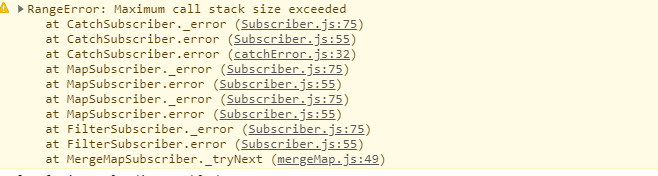
donno what to do :(
 dnamyslak
on 16 Jul 2020
dnamyslak
on 16 Jul 2020
@dnamyslak
Same issue for me, i finaly go for an easier solution =>
I created a classic angular interceptor which just add Bearer token to header.
import { Injectable } from '@angular/core';
import {
  HttpInterceptor,
  HttpRequest,
  HttpHandler,
  HttpEvent,
} from '@angular/common/http';
import { Observable } from 'rxjs';

@Injectable()
export class BearerInterceptor implements HttpInterceptor {
  intercept(
    req: HttpRequest<any>,
    next: HttpHandler
  ): Observable<HttpEvent<any>> {
    const token = JSON.parse(localStorage.getItem('auth_app_token'));

    if (token) {
      const cloned = req.clone({
        headers: req.headers.set('Authorization', 'Bearer ' + token.value),
      });

      return next.handle(cloned);
    } else {
      return next.handle(req);
    }
  }
}
 ```

Then provide it like NbAuthJWTInterceptor
providers: [
{
provide: HTTP_INTERCEPTORS,
useClass: NbAuthJWTInterceptor,
multi: true,
},
{
provide: HTTP_INTERCEPTORS,
useClass: BearerInterceptor,
multi: true,
}
],
```
That's doing the job for me :)
 Carbo20
on 28 Aug 2020
Carbo20
on 28 Aug 2020
Related issues
 nfdavenport
·
3Comments
nfdavenport
·
3Comments
 pulfabio
·
4Comments
pulfabio
·
4Comments
 tal-shahar
·
3Comments
tal-shahar
·
3Comments
 lopn
·
4Comments
lopn
·
4Comments
 argnist
·
4Comments
argnist
·
4Comments
Most helpful comment
FYI if you are using this solution check out my other reply:
https://github.com/akveo/ngx-admin/issues/1375#issuecomment-453969740
I couldn't get this to work, I added
to my app.module.ts but it still didn't add the Authorization header.
After some time I figured out that it was because of the
NB_AUTH_TOKEN_INTERCEPTOR_FILTERwhich always returned true.By default it is set in the auth.module.js:
{ provide: NB_AUTH_TOKEN_INTERCEPTOR_FILTER, useValue: nbNoOpInterceptorFilter },And that function returns true:
export function nbNoOpInterceptorFilter(req) { return true; }Not sure if I did something wrong or that this is a flaw, nevertheless: I fixed it by setting my own
NB_AUTH_TOKEN_INTERCEPTOR_FILTERvalue which always returns false:{ provide: NB_AUTH_TOKEN_INTERCEPTOR_FILTER, useValue: function () { return false; }, },Thanks to this the header will be set by the
NbAuthJWTInterceptoras so: