Ngx-admin: Sidebar link whose children are all hidden doesn't navigate to its default child page
I'm submitting a ...
[x] bug report
[ ] feature request
[ ] question about the decisions made in the repositoryDo you want to request a feature or report a bug?
In my opiniom it's a bug.
- What is the current behavior?
A sidebar link whose children are all hidden doesn't navigate to its default child page (as per the redirect settings in the routing.ts file). See detailed explanation, code snippets and screenshots below.
- If the current behavior is a bug, please provide the steps to reproduce and if possible a minimal demo of the problem via
https://plnkr.co or similar (you can use this template as a starting point: http://plnkr.co/edit/tpl:AvJOMERrnz94ekVua0u5).
Code snippets:
pages.menu.ts
{
    path: 'balance',
    data: {
      menu: {
        title: 'Bilancio',
        icon: 'fa fa-bar-chart fa-lg',
        selected: false,
        expanded: false,
        order: 50,
      }
    },
    children: [
      {
        path: 'monthly',
        data: {
          menu: {
            title: 'Bilancio-Mensile',
            hidden: true,
            pathMatch: 'prefix',
          }
        }
      },
      {
        path: 'annual',
        data: {
          menu: {
            title: 'Bilancio-Annuale',
            hidden: true,
            pathMatch: 'prefix',
          }
        }
      },
    ]
  },
balance.routing.ts
export const routes: Routes = [
  {
    path: '',
    component: Balance,
    children: [
      { path: '', redirectTo: 'monthly', pathMatch: 'full' },
      { path: 'monthly', component: Monthly },
      { path: 'annual', component: Annual }
    ]
  }
];
- What is the expected behavior?
A sidebar father-link whose children are all hidden should behave like a link with no children.
- What is the motivation / use case for changing the behavior?
The hidden children links are needed for title/breadcrumb purposes. The father link should navigate to its default child page as per the routing.ts page redirect settings.
Please tell us about your environment:
Angular version: 4.0.0-rc.X
- Browser: [Chrome XX ]
OS X 10.9.5
Other information (e.g. detailed explanation, stacktraces, related issues, suggestions how to fix, links for us to have context, eg. stackoverflow, gitter, etc)
I got a main/father element with some children. I don't want any of the children to show on the menu-bar (they are reached using tabs with routerLink within the father page), but I want to use their titles and breadcrumbs. Plus I want to navigate to a default child page when the father link in the menu sidebar is clicked; the default child page is provided by a redirect entry in the routing component. This should work like a sidebar link with no children.
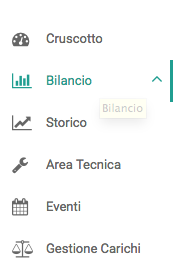
I used "pathMatch: 'prefix' and hidden: true" but I didn't quite achieve my goal: children pages titles and breadcrumbs are correctly working in the children views but when I click on the father's entry in the sidebar the app doesn't navigate to the default child view, it just seems to be opening and closing an empty sub-menu (the chevron next to the link - "Bilancio" - will switch from up to down and back, but no navigation to the relevant page takes place.). Screenshot:
On the other hand, if I don't include the children in pages.menu.ts at all, the father entry link in the menu is correctly navigating to the default child view, but titles and breadcrumbs obviously don't work (this behavior is correct).
Please find some code snippets above.
 pulfabio
All 4 comments
when will this bug be fixed ? @akveo-bot
 isasiluis28
on 13 Sep 2017
isasiluis28
on 13 Sep 2017
@pulfabio , i fixed it in my local version on the baMenuItem component, just needed to check that not all children are hidden:
baMenuItem.component.ts
import { Component, Input, Output, EventEmitter, OnInit } from '@angular/core';

@Component({
  // tslint:disable-next-line:component-selector
  selector: 'ba-menu-item',
  templateUrl: './baMenuItem.html',
  styleUrls: ['./baMenuItem.scss']
})
export class BaMenuItem implements OnInit {
  @Input() menuItem: any;
  @Input() child: boolean = false;

  @Output() itemHover = new EventEmitter<any>();
  @Output() toggleSubMenu = new EventEmitter<any>();

  allChildrenHidden = false;

  public onHoverItem($event): void {
    this.itemHover.emit($event);
  }

  public onToggleSubMenu($event, item): boolean {
    $event.item = item;
    this.toggleSubMenu.emit($event);
    return false;
  }

  public ngOnInit(): void {
    if (this.menuItem.children && this.menuItem.children.length) {
      this.allChildrenHidden = this.menuItem.children.filter(child => {
        return !child.hidden;
      }).length == 0;
    }
  }
}
baMenuItem.html
<li *ngIf="!menuItem.hidden" [title]="menuItem.title" [ngClass]="{'al-sidebar-list-item': !child, 'ba-sidebar-sublist-item': child, 'selected': menuItem.selected && !menuItem.expanded, 'with-sub-menu': menuItem.children, 'ba-sidebar-item-expanded': menuItem.expanded}">

  <a *ngIf="(!menuItem.children && !menuItem.url) || (menuItem.children && allChildrenHidden)" (mouseenter)="onHoverItem($event, item)" [routerLink]="menuItem.route.paths" class="al-sidebar-list-link">
    <i *ngIf="menuItem.icon" class="{{ menuItem.icon }}"></i><span >{{ menuItem.title }}</span>
  </a>

  <a *ngIf="!menuItem.children && menuItem.url" (mouseenter)="onHoverItem($event, item)" [href]="menuItem.url" [target]="menuItem.target" class="al-sidebar-list-link">
    <i *ngIf="menuItem.icon" class="{{ menuItem.icon }}"></i><span >{{ menuItem.title }}</span>
  </a>

  <a *ngIf="menuItem.children && !allChildrenHidden" (mouseenter)="onHoverItem($event, item)" href (click)="onToggleSubMenu($event, menuItem)" class="al-sidebar-list-link">
    <i *ngIf="menuItem.icon" class="{{ menuItem.icon }}"></i><span >{{ menuItem.title }}</span>
    <b class="fa fa-angle-down" [ngClass]="{'fa-angle-up': menuItem.expanded}"></b>
  </a>

  <ul *ngIf="menuItem.children" class="al-sidebar-sublist" [ngClass]="{'slide-right': menuItem.slideRight}">
    <ba-menu-item [menuItem]="subItem"
                  [child]="true"
                  (itemHover)="onHoverItem($event)"
                  (toggleSubMenu)="onToggleSubMenu($event, subItem)"
                  *ngFor="let subItem of menuItem.children"></ba-menu-item>
  </ul>

</li>
I just used that allChildrenHidden variable to differentiate between the case of having children with their own links and those like in this case where all children are hidden.
 devakone
on 25 Sep 2017
devakone
on 25 Sep 2017
i think this pr was the same result:
https://github.com/akveo/ngx-admin/pull/1161
but doen´t merge to ng2-admin
 Newan
on 26 Sep 2017
Newan
on 26 Sep 2017
@devakone It works! Excellent! Thanks a lot...
@nnixaa should I close this?
pulfabio
on 26 Sep 2017
Related issues
 fabltd
·
3Comments
fabltd
·
3Comments
 hoswey
·
3Comments
hoswey
·
3Comments
 maxlein
·
3Comments
maxlein
·
3Comments
 tal-shahar
·
3Comments
tal-shahar
·
3Comments
 yanyim
·
3Comments
yanyim
·
3Comments