Ng2-pdf-viewer: Support on IE & Edge
Bug Report or Feature Request (mark with an x)
- [ ] Regression (a behavior that used to work and stopped working in a new release)
- [ x ] Bug report -> please search issues before submitting
- [ ] Feature request
- [ ] Documentation issue or request
Hi
I noticed, that your PDF is not properly displayed on the Broswers IE and Edge.
Here are some Screenshots
IE11:
IE first page
IE second Page
Edge:
Edge first Page
Edge second Page
Is this a problem on my side?
 brokuto
All 44 comments
I can report that we are seeing this same behavior in IE11 with ng2-pdf-viewer 5.2.3. First page renders fine, subsequent pages render improperly (seem to be mostly blank, with some outlines like the examples above). No console errors, any insight/advice would be helpful.
 celloman
on 1 Jun 2019
celloman
on 1 Jun 2019
Also having the issue, only solution for now would be to show all pages..
 brianmarting
on 3 Jun 2019
brianmarting
on 3 Jun 2019
Interestingly, I just reverted back to the version we had previously used (5.1.2) and this problem seems to have resolved itself...
celloman
on 3 Jun 2019
Interestingly, I just reverted back to the version we had previously used (5.1.2) and this problem seems to have resolved itself...
Thank you so much this worked for me as well!
And finally someone replied to my issue we've been waiting for almost a month now.... and no one seemed to care helping. (Y)
brokuto
on 4 Jun 2019
Darn Internet Explorer, lol. I wonder if we should actually keep this issue open so the underlying problem can be fixed in newer versions of this package. We originally upgraded versions because this older version throws some warning about a zlib dependency, so it would be nice to be able to upgrade at some point.
celloman
on 4 Jun 2019
Agree, we shouldn't close this issue. Downgrading should not be a solution...
Also, version 5.1.2 does not seem to always work on edge, but it does work on IE 😞
brianmarting
on 5 Jun 2019
Alright, yes i reopened the issue but I doubt someone will care about this issue since IE and Edge are not commonly used anymore.
Or in my opinion shouldn't be used that much anymore. But it's still the default browser of my company so we need the support.
I even know what the problem or rather difference is from the version 5.1.2. and the newer one. In the older version all pages are loaded individually instead of only once when you visit the page.
brokuto
on 5 Jun 2019
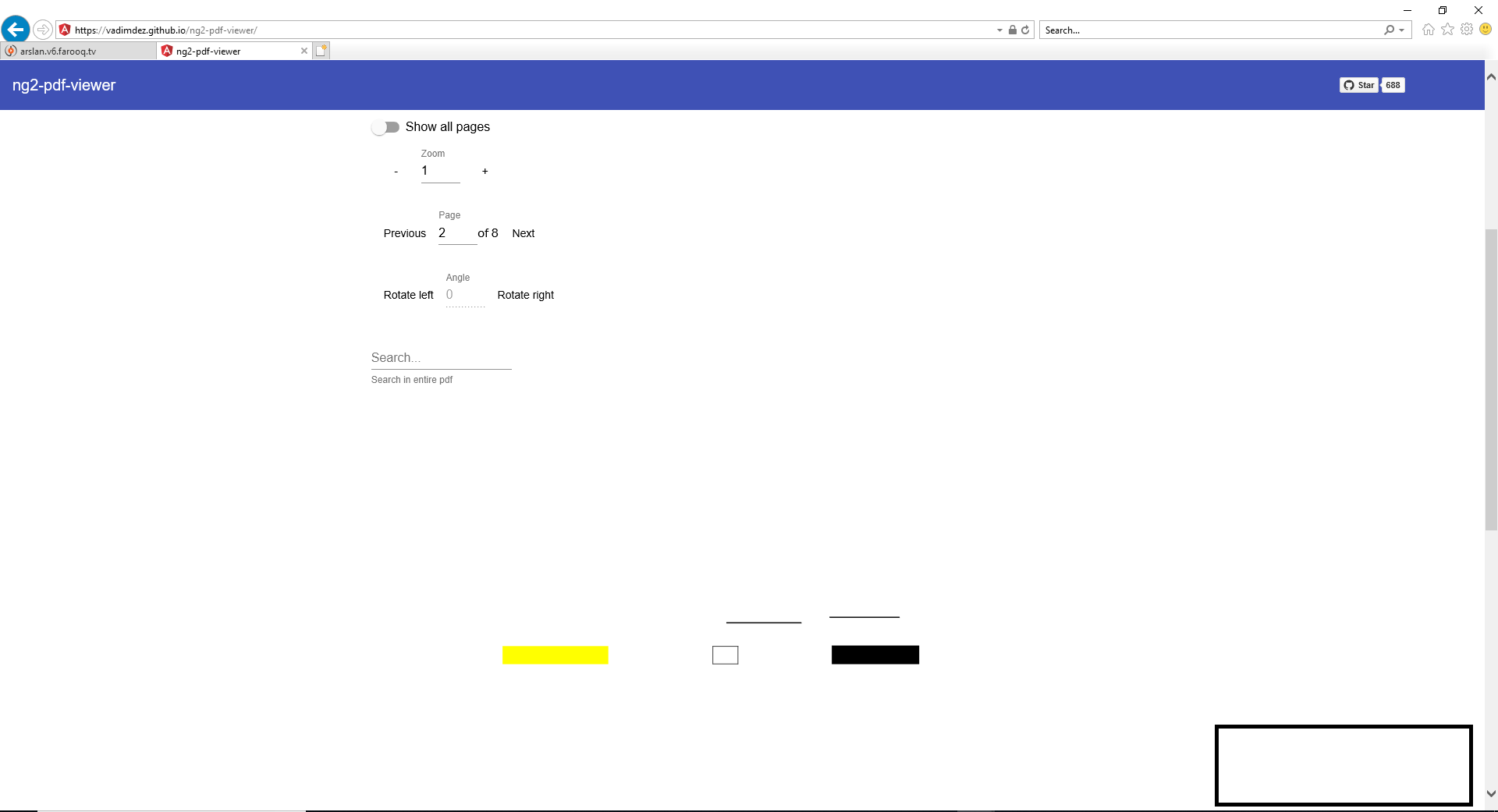
Document with graphics/table is getting corrupted in IE/Edge.
Version: 5.2.4
1- Playback a file which have some graphics/tables in it in IE/EDGE.
2- You will see that it is getting corrupted(See Image) or the table is blank. This ONLY happens in IE/EGDE and works fine in CHROME/FIREFOX
Weird behavior is that if the user clicks zoom/rotate button on the corrupted page the content begins to display correctly. This seems to be a problem in rendering of file.
 arslanahmed9
on 8 Jul 2019
arslanahmed9
on 8 Jul 2019
Can also report this behavior for IE 11.2608.14393.0 11.095. Still working fine on Chrome. Changing the zoom level will rerender the page correctly.
 mamichels
on 11 Jul 2019
mamichels
on 11 Jul 2019
I revert back to the version (5.1.2) and the problem still same
document which I upload
Interestingly, I just reverted back to the version we had previously used (5.1.2) and this problem seems to have resolved itself...
arslanahmed9
on 12 Jul 2019
Degra
Interestingly, I just reverted back to the version we had previously used (5.1.2) and this problem seems to have resolved itself...
Reverting back to 5.1.2 resolve this issue, but internal PDF navigation stop working in older version.
 asadmalik3
on 16 Jul 2019
asadmalik3
on 16 Jul 2019
I revert back to the version (5.1.2) and the problem still same
document which I upload
Interestingly, I just reverted back to the version we had previously used (5.1.2) and this problem seems to have resolved itself...
Also having the same issue can anyone please help
 faraz2116
on 28 Aug 2019
faraz2116
on 28 Aug 2019
Any updates on IE11 compatibility? I think reverting the version doesn't still solve the issue
 SeijiV13
on 29 Aug 2019
SeijiV13
on 29 Aug 2019
Any updates on IE11 compatibility? I think reverting the version doesn't still solve the issue
Sadly not... I am very disappointed no one does anything to resolve this issue, because some people in my company still use IE and we need this package.
brokuto
on 29 Aug 2019
reverting the version does solve the problem even the external link is also
not clickable by setting the external-traget as blank
On Thu, Aug 29, 2019 at 11:15 AM cel notifications@github.com wrote:
Any updates on IE11 compatibility? I think reverting the version doesn't
still solve the issueSadly not... I am very disappointed no one does anything to resolve this
issue, because some people in my company still use IE and we need this
package.—
You are receiving this because you commented.
Reply to this email directly, view it on GitHub
https://github.com/VadimDez/ng2-pdf-viewer/issues/478?email_source=notifications&email_token=AL4RECE4Y7XJP2FIMLUYYQTQG5O6XA5CNFSM4HMXUJC2YY3PNVWWK3TUL52HS4DFVREXG43VMVBW63LNMVXHJKTDN5WW2ZLOORPWSZGOD5NKCFA#issuecomment-526033172,
or mute the thread
https://github.com/notifications/unsubscribe-auth/AL4RECANKWGAQJVLGS4CJBLQG5O6XANCNFSM4HMXUJCQ
.
faraz2116
on 31 Aug 2019
@brokuto If your company heavily depend on the use of this package why dont you go ahead and do a favor for the community and fix the issue?
mamichels
on 1 Sep 2019
@brokuto If your company heavily depend on the use of this package why dont you go ahead and do a favor for the community and fix the issue?
Sorry, because I can't. I don't know how to because I'm not that experienced and I am not the only one with this issue so.... Also, your comment sounds a bit harsh, don't you think? I hope I am just misinterpreting this.
And as of now, it works fine with the reverted version. So in my case no one needs to fix the issue for the new version.
brokuto
on 3 Sep 2019
It should sound harsch. People mistake github issues as todo task list for the developers. This is rude.
 PurHur
on 3 Sep 2019
PurHur
on 3 Sep 2019
I do not have a possibility to test IE or Edge, so if anyone could overtake this part - that would be great!
 VadimDez
on 3 Sep 2019
VadimDez
on 3 Sep 2019
I just tested the demo page on IE11.0.9600.18860 and Edge 44.18362.1.0 but I did not see any problems.
BTW If somebody wants to test with IE or Edge, you can download a free virtual machine with different MS browser versions here: https://developer.microsoft.com/en-us/microsoft-edge/tools/vms/
For Edge you can also use the free account of Browserstack (https://www.browserstack.com/test-on-microsoft-edge-browser#).
 seopei
on 3 Sep 2019
seopei
on 3 Sep 2019
It should sound harsch. People mistake github issues as todo task list for the developers. This is rude.
Geez, you people are so rude all the time. I reopened the Issue because someone begged me to let it be open. Why are you all mad at me? What did I do wrong? This is kind of unfair of you... I just opened the issue because I am inexperienced and I needed help. I am so sorry that I'm not meeting all of your expectations...
brokuto
on 4 Sep 2019
I have the same issue with Edge & IE. Any news?
Document with graphics/table is getting corrupted in IE/Edge.
Version: 5.2.41- Playback a file which have some graphics/tables in it in IE/EDGE.
2- You will see that it is getting corrupted(See Image) or the table is blank. This ONLY happens in IE/EGDE and works fine in CHROME/FIREFOXWeird behavior is that if the user clicks zoom/rotate button on the corrupted page the content begins to display correctly. This seems to be a problem in rendering of file.
 davir85
on 4 Sep 2019
davir85
on 4 Sep 2019
@davir85 which file are you using? and what version of the browsers?
seopei
on 4 Sep 2019
EDGE version:
- Microsoft Edge 44.18362.267.0
- Microsoft EdgeHTML 18.18362
ng2-pdf-viewer version 5.3.4
I can't show you the file because it's from a customer, but sometimes, after loading the PDF on EDGE, the result is the following:

Sometimes the result is correct:

davir85
on 4 Sep 2019
@davir85 and the version of IE, or is on IE everything ok?
It would be nice the get a file which is not rendering correctly. Could you create one in order that someone can reproduce the bug?
You could also fork this repo and only downgrade the version of pdf.js in the package.json because I thing this bug is not really related to this project. Instead you could have a look into the bugs of pdf.js - maybe there is something that will help to fix the bug.
seopei
on 4 Sep 2019
This section seems to summarize the current PDF library situation: https://www.npmjs.com/package/ngx-extended-pdf-viewer#alternatives
It does seem pdf.js is dropping support for IE/Edge: https://github.com/mozilla/pdf.js/issues/11211
For IE support, the summary suggests either:
 ricksmt
on 15 Oct 2019
ricksmt
on 15 Oct 2019
Hello! @VadimDez will this issue be solved?
 Gromov-Roman
on 20 Nov 2019
Gromov-Roman
on 20 Nov 2019
Hello! @VadimDez will this issue be solved?
Yes, it seems so! Thanks!
davir85
on 20 Nov 2019
Hi.
If i set, [show-all]="true", than pdf text is rendered fine in IE.
Maybe it is a problem in
"New form of page changing"
https://github.com/VadimDez/ng2-pdf-viewer/blob/master/src/app/pdf-viewer/pdf-viewer.component.ts#L334
 sup3rcow
on 21 Nov 2019
sup3rcow
on 21 Nov 2019
any update on this?
 KasunGamage
on 20 Apr 2020
KasunGamage
on 20 Apr 2020
dear brokuto,what you said is not real.Because in China many companies are still using Internet Explorer11。Therefore, I hope your team can still maintain the support for Internet Explorer, thank you very much
 fireWinters
on 24 Jul 2020
fireWinters
on 24 Jul 2020
This library needs to have in big, bold letter at the top of its README.md
'DOES NOT WORK ON IE11 AND NON-CHROMIUM BASED EDGE'.
I don't like IE11 but it's still used in the MAJORITY of serious enterprises and companies. This library is useless for enterprise use without that support.
Maintainer, please make it clear about compatibility because we wasted a bunch of time integrating this before realizing and looking in the issues.
 jpike88
on 17 Aug 2020
jpike88
on 17 Aug 2020
faced same issue in angular 9 - https://github.com/VadimDez/ng2-pdf-viewer/issues/647
 MohamedSahir
on 17 Aug 2020
MohamedSahir
on 17 Aug 2020
@jpike88
mamichels
on 18 Aug 2020
@mamichels that's cute. But I have spent hundreds of hours contributing to OSS projects myself. It doesn't mean my work is immune from criticism.
I've moved to a different library that acknowledges the existence of IE11/Edge anyway.
jpike88
on 18 Aug 2020
@mamichels the library doesn't support ie also not a problem Edge Browser is a modern browser used everywhere mainly in an organization. even angular supports the modern browser, the library should support that, I have plan move out from this library.
Did you recommend any other library have well support for Edge browser.
Documentation needs to describe the browser support of the library which helps to meet the requirement at early statge.
Developing something and stuck in middle is a strange one.
MohamedSahir
on 18 Aug 2020
This issue has been automatically marked as stale because it has not had recent activity. It will be closed if no further activity occurs. Thank you for your contributions.
![stale[bot] picture](https://avatars.githubusercontent.com/in/1724?v=4&s=40) stale[bot]
on 17 Oct 2020
stale[bot]
on 17 Oct 2020
How to support ng2 pdf viwer in IE browser & edge. Can anyone tell me
Im using versions:
Angular 7.1.3
ng2-pdf-viewer 5.2.3
pdf-dist
Using above libs to generate pdf viewer & In chrome, firefox no issue. Please let me know if anyone solved this issue. Thanks in advance
 pradeepmu-kore
on 27 Oct 2020
pradeepmu-kore
on 27 Oct 2020
font{
    line-height: 1.6;
}
ul,ol{
    padding-left: 20px;
    list-style-position: inside;
}


    Use PDF. Js instead of NG2 PDF. PDF. Js has handling for Internet Explorer compatibility.The front-end technology stack we use is Vue, not Angular, and I'm sorry that won't help you.Use the lower version of PDF.js


                            1987567948


                                [email protected]


    签名由
    网易邮箱大师
    定制


On 10/27/2020 20:07,pradeepmu-kore<[email protected]> wrote:
How to support ng2 pdf viwer in IE browser & edge. Can anyone tell me
Im using versions:
Angular 7.1.3
ng2-pdf-viewer 5.2.3
pdf-dist
Using above libs to generate pdf viewer & In chrome, firefox no issue. Please let me know if anyone solved this issue. Thanks in advance
—You are receiving this because you commented.Reply to this email directly, view it on GitHub, or unsubscribe.
fireWinters
on 28 Oct 2020
We also have the same problem. We are trying to use this library but unfortunately 30% of our users are on IE because they work in older companies which use IE.
Any planned fixes for this?
 aivoric
on 12 Nov 2020
aivoric
on 12 Nov 2020
Since version 2.4.456 of PDF.js, es5 compatibility is no longer supported by default [1].
To support IE and Edge, it is necessary to use es5 compatible prebuilt. To use es5 compatible prebuilt, the following module paths should be pdfjs-dist/es5/* (See https://github.com/mozilla/pdfjs-dist).
https://github.com/VadimDez/ng2-pdf-viewer/blob/4958a535164eb5fbb320cfb17790a1b5dede87dc/src/app/pdf-viewer/pdf-viewer.component.ts#L37-L38
But this fix is not enough because the default CDN worker is not es5 compatible (es5 compatible pdf.worker.min.js seems to be available since v2.6.347).
https://github.com/VadimDez/ng2-pdf-viewer/blob/4958a535164eb5fbb320cfb17790a1b5dede87dc/src/app/pdf-viewer/pdf-viewer.component.ts#L249-L251
If this library doesn't officially support IE and Edge, I think it should raise the major version based on SemVer.
 softoika
on 24 Nov 2020
softoika
on 24 Nov 2020
ES5 prebuilt of pdf.worker.js in version 2.4.456 can be found here. It hasn't minified version.
The solution to run the ng2-pdf-viewer on IE and Edge is here.
 ewelinaolejnik
on 27 Nov 2020
ewelinaolejnik
on 27 Nov 2020
This issue has been automatically marked as stale because it has not had recent activity. It will be closed if no further activity occurs. Thank you for your contributions.
stale[bot]
on 28 Jan 2021
Related issues
 RahmatAliMalik5
·
5Comments
RahmatAliMalik5
·
5Comments
 xmran
·
4Comments
xmran
·
4Comments
 xyrintech
·
5Comments
xyrintech
·
5Comments
 kevinariasf
·
6Comments
kevinariasf
·
6Comments
 fncamm
·
4Comments
fncamm
·
4Comments
Most helpful comment
This library needs to have in big, bold letter at the top of its README.md
'DOES NOT WORK ON IE11 AND NON-CHROMIUM BASED EDGE'.
I don't like IE11 but it's still used in the MAJORITY of serious enterprises and companies. This library is useless for enterprise use without that support.
Maintainer, please make it clear about compatibility because we wasted a bunch of time integrating this before realizing and looking in the issues.