Ng-zorro-antd: Adjusting Tab Width (Module : Tabs)
What problem does this feature solve?
The Tabs module have certain set of useful features. I would like to have a fullWidth Tab set, where even if there are only 3 tabs, it covers the entire page. In the current set of options, there are lot of empty spaces, when the number of tabs are less.
What does the proposed API look like?
 sgokulnath
All 5 comments
You can achieve that by overriding CSS of .ant-tabs-nav and .ant-tabs-tab using flex.
You can clean up the CSS yourself. I guess !important is not necessary. You can also override it in less files. Whatever you like.
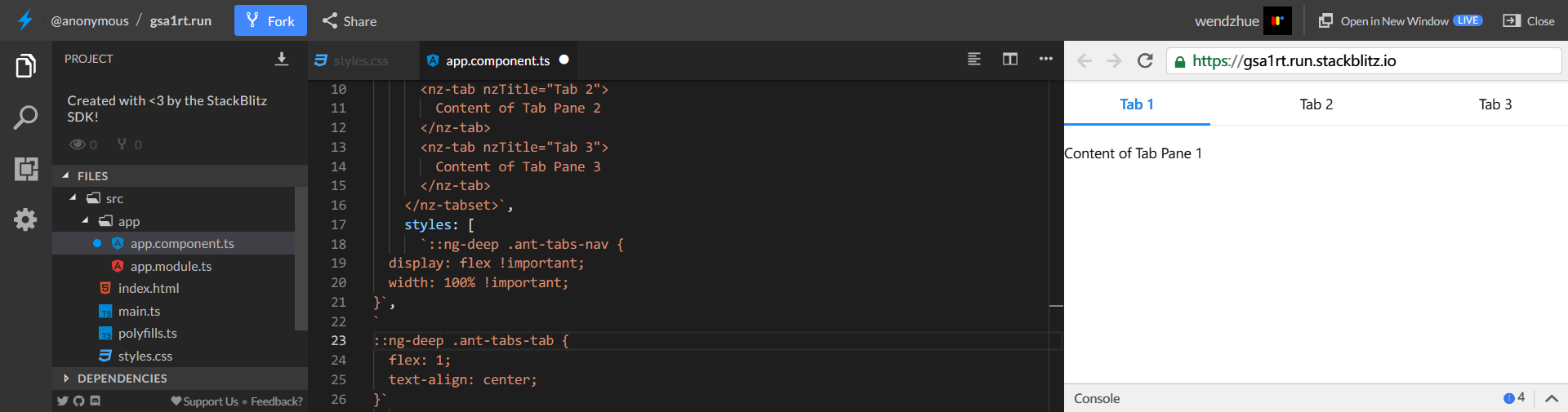
If you consider it a design problem, please refer it to Ant Design React.
 wendellhu95
on 5 Oct 2018
wendellhu95
on 5 Oct 2018
Hello @sgokulnath, we use GitHub issues to trace bugs or discuss plans of NG ZORRO.
So, please don't ask usage questions here. You can try to ask questions on Stack Overflow or Segment Fault, then apply tag 'ng-zorro-antd' to your question.
Maintaining open source projects is hard work, Thanks for your understanding!
你好 @sgokulnath,NG ZORRO的GitHub issue 列表严格地限制用于有具体目标和内容的工作(如提交Bug和提交requests)。使用问题和讨论应当发送到更适合它们的场合,去Stack Overflow 或者Segment Fault 提问并贴上 ng-zorro-antd 标签,让更多的开发者参与讨论。
维护开源项目是非常辛苦的工作,在开 issue 的时候,请抱着一种『一起合作来解决这个问题』的心态,不要期待我们单方面地为你服务。
感谢你的理解!
 ng-zorro-bot
on 5 Oct 2018
ng-zorro-bot
on 5 Oct 2018
You can achieve that by overriding CSS of
.ant-tabs-navand.ant-tabs-tabusing flex.You can clean up the CSS yourself. I guess
!importantis not necessary. You can also override it inlessfiles. Whatever you like.
If you consider it a design problem, please refer it to Ant Design React.
Thank you very much for your help. Works fine 👍
sgokulnath
on 5 Oct 2018

I've tried the same css style but It didn't work ! is there any changes in the new versions affect the style ? there is a div before the first tab without any style when I tried to give it display: flex !important; width: 100% !important; it works but still I can't catch it using simple css , any advice ?
 wessamyaacob
on 29 Aug 2020
wessamyaacob
on 29 Aug 2020
I managed a good solution for that by access the first div after ant-tabs-tab
::ng-deep .ant-tabs-nav {
  width: 100% !important;
}

::ng-deep .ant-tabs-tab {
  flex: 1;
  text-align: center;
}

::ng-deep .ant-tabs-nav > div:nth-of-type(1) {
  display: flex !important;
  width: 100% !important;
}
Related issues
 Svetomechc
·
20Comments
Svetomechc
·
20Comments
 JCqiu
·
20Comments
wendellhu95
·
17Comments
JCqiu
·
39Comments
JCqiu
·
20Comments
wendellhu95
·
17Comments
JCqiu
·
39Comments
 xiaoxiangmoe
·
25Comments
xiaoxiangmoe
·
25Comments
Most helpful comment
You can achieve that by overriding CSS of
.ant-tabs-navand.ant-tabs-tabusing flex.You can clean up the CSS yourself. I guess
!importantis not necessary. You can also override it inlessfiles. Whatever you like.If you consider it a design problem, please refer it to Ant Design React.