Ng-zorro-antd: 1.7.0 plus: Icon Upgrade Guide / Icon 升级指南
1.7.0 Icon Upgrade Guide
TL;DR
Are you an old user from 1.6.0 or earlier and want to upgrade with minimum operations? Try:
- Upgrade to 1.7.0 .
- Run
ng g ng-zorro-antd:fix-icon.
That's all!
An important change that ng-zorro-antd 1.7.0 introduces is the brand new icon component. The new components provides sharper SVG icons and many other new features. This guide would help you upgrade to 1.7.0 and use the new component correctly in your projects.
After 1.7.0 version, we synced to Ant Design 3.9.x and replaced font icons with SVG icons which bring benefits below:
- Complete offline usage of icon, no dependency of alipay CDN font icon file and no more empty square during downloading than no need to deploy icon font files locally either.
- Much more display accuracy in lower-level screens.
- Support multiple colors for icon.
- No need to change built-in icons with overriding styles by providing more props in component.
You can join in this discussion of Ant Design.
New Features
The new component provides the following features:
- Icon with three themes:
outline,fillandtwotone. - Use icons from IconFont in a convenient way.
- SVG formatter.

Please visit our official website to see the demo.
Upgrade Guide
Based on @ant-design/icons, we created @ant-design/icons-angular to provide icons resources design by Ant Design. And in ng-zorro-antd, we provide two means of importing these resources.
Static Importing
By explicitly registering icons to NzIconService you use static importing. These icons will be bundled into your .js Files. Do it in components' constructors or AppInitService (recommended).
import { Component, OnInit } from '@angular/core';
import { AccountBookFill } from '@ant-design/icons-angular/icons';
import { NzIconService } from 'ng-zorro-antd';
// import { IconDefinition } from '@ant-design/icons-angular';
// import * as AllIcons from 'ant-icons-angular/icons';


@Component({
  selector   : 'app-root',
  templateUrl: './app.component.html',
  styleUrls  : ['./app.component.css']
})
export class AppComponent implements OnInit {
  constructor(private _iconService: NzIconService) {
    // Import all. NOT RECOMMENDED. ❌
    // const antDesignIcons = AllIcons as {
      // [key: string]: IconDefinition;
    // };
    // this._iconService.addIcon(...Object.keys(antDesignIcons).map(key => antDesignIcons[key]));
    // Import want you need! ✔️
    this._iconService.addIcon(...[ AccountBookFill ]);
    this._iconService.twoToneColor = { primaryColor: '#1890ff' };
  }
}
After 1.8.0, we suggest to statically import icons with InjectionToken like this:
@NgModule({
  declarations: [
    AppComponent
  ],
  imports     : [
    NgZorroAntdModule,
  ],
  providers   : [
    { provide: NZ_ICON_DEFAULT_TWOTONE_COLOR, useValue: '#00ff00' },
    { provide: NZ_ICONS, useValue: icons }
  ],
  bootstrap   : [ AppComponent ]
})
export class AppModule {
}
Static importing would increase your bundle's size so we recommend using dynamic importing as much as you can. You can track this issue of Ant Design for more details. Luckily, @ant-design/icons-angular supports tree shake :tada:, so icons not imported statically will not be in your bundle!
However, if you use ng-zorro-antd on Electron, it would be a good idea to import all of them because you don't need to worry about that hundreds of bytes.
Icons used by
ng-zorro-antditself are imported statically to optimize loading speed. However, icons demonstrated on the official website are loaded dynamically.
Dynamic Importing
This way would not increase your bundle's size (i.e., our official website!). When ng-zorro-antd detects that the icon you want to render hasn't been registered, it would fire a HTTP request to load it. All you have to do is to config your angular.json like this:
{
  "assets": [
    {
      "glob": "**/*",
      "input": "./node_modules/@ant-design/icons-angular/src/inline-svg/",
      "output": "/assets/"
    }
  ]
}
We provide a schematic to fix this :laughing: . Just simply run ng g ng-zorro-antd:fix-icon and we would add this config above for you!
Declare to Render
When icon resources are loaded, you can render an icon like:
<i nz-icon type="account-book" theme="fill"></i>
We make this new component compatible to old API. So users can upgrade without pain. For example:
<i class="anticon anticon-star"></i>
would render a star icon with outline theme. Of course, if you want to use new features you should use new API.
Hint: click the icon and the HTML syntax would be copied into your clipboard.
Links
- The complete guide: our official website.
- The underlying dependency
@ant-design/icons-angular, where you can report icon missing issues.
 wendellhu95
All 17 comments
1.7.0 Icon 升级指南
太长不读版
做最小改动的升级,请按照如下操作:
- 升级到 1.7.0 版本。
- 运行
ng g ng-zorro-antd:fix-icon。
搞定,再见。
ng-zorro-antd 1.7.0 版本带来的一项较为重大的变更是 Icon 组件进行了完全的重构。新的 Icon 组件提供了更清晰的 SVG 图标,以及诸多新功能。这篇文章将会引导你升级到 1.7.0 版本,并在你的项目中正确地使用全新 Icon 组件。
从 1.7.0 版本开始,我们与 Ant Design React 3.9.x 同步,使用了 SVG 图标来替换之前基于字体文件的图标,这一升级带来了如下好处:
- 支持离线化使用,不需要从支付宝 cdn 下载字体文件,图标不会因为网络问题呈现方块,同时还支持本地部署。
- 在低端设备上 SVG 有更好的清晰度。
- 支持双色图标。
- 对于内建图标的更换可以提供更多 API,而不需要进行样式覆盖。
可参与 Ant Design 的相关讨论以了解更多。
全新功能
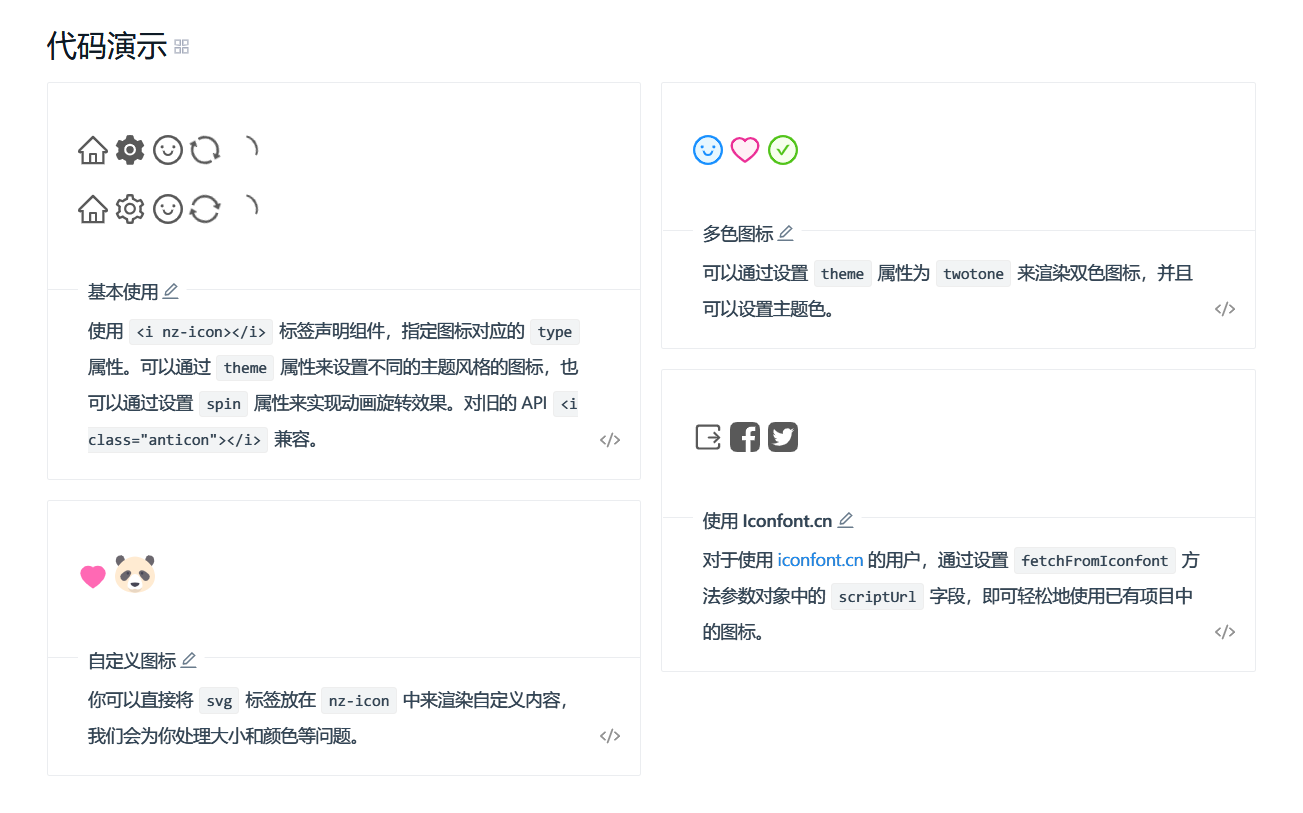
新版本 Icon 组件提供了以下新功能:
- 提供了 outline, fill, twotone 三种主题的图标,其中twotone 主题为双色图标。
- 在 IconFont 定义你的图标并方便的在项目中使用。
- 对用户自定义 SVG 图标的格式化。
升级指南
新版的图标使用,简单的来说可以分为两步,一是加载图标资源,二是声明渲染图标。
在 @ant-design/icons 库的基础上,我们写作了 @ant-design/icons-angular 库,用于提供 Ant Design 的图标资源,而在 ng-zorro-antd 中我们提供了两种方式来加载图标资源。
静态加载
通过在 NzIconService 中注册图标来实现静态引入,引入后的文件会被打包到 .js 文件中,在 constructor 里或者在 AppInitService 里(推荐),例如:
import { Component, OnInit } from '@angular/core';
import { AccountBookFill } from '@ant-design/icons-angular/icons';
import { NzIconService } from 'ng-zorro-antd';
// import { IconDefinition } from '@ant-design/icons-angular';
// import * as AllIcons from 'ant-icons-angular/icons';

@Component({
  selector   : 'app-root',
  templateUrl: './app.component.html',
  styleUrls  : ['./app.component.css']
})
export class AppComponent implements OnInit {
  constructor(private _iconService: NzIconService) {
    // 全量引入,不推荐 ❌
    // const antDesignIcons = AllIcons as {
      // [key: string]: IconDefinition;
    // };
    // this._iconService.addIcon(...Object.keys(antDesignIcons).map(key => antDesignIcons[key]));
    // 引入你需要的图标 ✔️
    this._iconService.addIcon(...[ AccountBookFill ]);
    this._iconService.twoToneColor = { primaryColor: '#1890ff' };
  }
}
对于 1.8.0 及之后的版本,我们推荐使用 InjectionToken 的注入方式,就像这样:
@NgModule({
  declarations: [
    AppComponent
  ],
  imports     : [
    NgZorroAntdModule,
  ],
  providers   : [
    { provide: NZ_ICON_DEFAULT_TWOTONE_COLOR, useValue: '#00ff00' },
    { provide: NZ_ICONS, useValue: icons }
  ],
  bootstrap   : [ AppComponent ]
})
export class AppModule {
}
静态加载会增加包体积,所以我们建议尽可能地使用动态加载。如果要静态加载,也请仅仅加载你需要用到的 icon,具体请看 Ant Design 的 issue。幸运的是,@ant-design/icons-angular 支持 tree shake 摇树优化 :tada:,没有被引入的 icon 不会进入打包出来的文件。
另外,如果你在 Electron 平台上使用 ng-zorro-antd,包体积不是很重要的话,全量引入则是比较理想的方案。
动态加载
这是为了减少包体积而提供的方式(比如升级后的官网就没有增加体积)。当 ng-zorro-antd 检测用户想要渲染的图标还没有静态引入时,会发起 HTTP 请求动态引入。你只需要配置 angular.json 文件:
{
  "assets": [
    {
      "glob": "**/*",
      "input": "./node_modules/@ant-design/icons-angular/src/inline-svg/",
      "output": "/assets/"
    }
  ]
}
我们为你提供了一条指令 :laughing:,升级到 1.7.0 之后,执行 ng g ng-zorro-antd:fix-icon 命令,就会自动添加以上配置。我们建议你一定要加上这条配置,这也是平滑升级的最小操作。
声明渲染
在图标资源被加载之后,你就可以在模板中创建一个 icon 了,例如:
<i nz-icon type="account-book" theme="fill"></i>
我们兼容旧的 API,使得 1.6.0 版本之前的用户可以无痛升级,比如:
<i class="anticon anticon-star"></i>
将会渲染出一个 outline 主题的 star 图标。当然,如果你想使用全新功能,务必请使用新的 API。
小提示:点击官网上的图标,就会复制 HTML 语法到你的剪贴板中。
链接
- 想获取更具体的 API 和使用引导,请访问我们的官方网站。
- 底层依赖
@ant-design/icons-angular,关于图标缺失的问题可以在这里告诉我们。
wendellhu95
on 19 Oct 2018
this is nice and powerful. Thanks guys for your hard working!
 wunaidage
on 19 Oct 2018
wunaidage
on 19 Oct 2018
Very cool!
thanks!
 Credo-Zhao
on 20 Oct 2018
Credo-Zhao
on 20 Oct 2018
ng-zorro 1.7 的icon 升级后,推荐使用动态加载,但是如果自身加载图标过多的场景(文件树形结构树),就会动态请求各个零散的svg文件,哪怕是同一个icon。如果这个树里面有300个文件夹,这时候会请求300次file.svg,哪怕都是同一个svg文件。打开ng-zorro官网对应的模块,发现页面渲染也慢了很多。
如果使用静态加载,又要逐个引入icon,这样对将来升级扩展带来诸多的不变。
请问有什么更好的方案吗? @wendzhue 谢谢!
 010204019
on 23 Oct 2018
010204019
on 23 Oct 2018
@010204019 我们也注意到了这个问题. 在即将发布的 1.7.1 版本中我们会优化对相同 icon 的动态加载, 就是说一个页面上如果有相同的图标, 也只会有一个 HTTP 请求.
已经发布. 这两个 comment 都将会被折叠.
wendellhu95
on 23 Oct 2018
1.7.x Icon 按需引入自动生成工具
https://github.com/HsuanXyz/nz-ssvgg
 hsuanxyz
on 24 Oct 2018
hsuanxyz
on 24 Oct 2018
使用 jhipster 生成的项目结构,当前使用 ng-zorro 1.6.0,想升级到1.8.0 ,在执行 ng g ng-zorro-antd:fix-icon时报错:Cannot determine project target configuration for: build.。
查看 angular.json,内容如下:
"projects": {
    "mirana": {
      "root": "",
      "sourceRoot": "src/main/webapp",
      "projectType": "application",
      "architect": {}
    }
  }
并且没 assets 目录,在 webapp 目录下创建 assets 目录,并修改 angular.json 如下:
      "architect": {
        "build": {
          "builder": "@angular-devkit/build-angular:browser",
          "options": {
            "outputPath": "dist",
            "index": "./src/main/webapp/index.html",
            "main": "./src/main/webapp/app/app.main.ts",
            "tsConfig": "./tsconfig.json",
            "polyfills": "./src/main/webapp/app/polyfills.ts",
            "assets": [
              "src/main/webapp/assets",
              "src/main/webapp/favicon.ico",
              "src/main/webapp/404.html",
              {
                "glob": "**/*",
                "input": "./node_modules/@ant-design/icons-angular/src/inline-svg/",
                "output": "/assets/"
              }
            ],
            "styles": [],
            "scripts": [
              "node_modules/hammerjs/hammer.min.js"
            ]
          },
          "configurations": {
            "production": {
              "fileReplacements": [
                {
                  "replace": "./webpack/webpack.dev.js",
                  "with": "./webpack/webpack.prod.js"
                }
              ],
              "optimization": true,
              "outputHashing": "all",
              "sourceMap": false,
              "extractCss": true,
              "namedChunks": false,
              "aot": true,
              "extractLicenses": true,
              "vendorChunk": false,
              "buildOptimizer": true
            }
          }
        },
        "serve": {
          "builder": "@angular-devkit/build-angular:dev-server",
          "options": {
            "browserTarget": "mirana:build"
          },
          "configurations": {
            "production": {
              "browserTarget": "mirana:build:production"
            }
          }
        },
        "lint": {
          "builder": "@angular-devkit/build-angular:tslint",
          "options": {
            "tsConfig": [
              "./tsconfig.app.json"
            ],
            "exclude": [
              "**/node_modules/**"
            ]
          }
        }
      }
执行:
ng g ng-zorro-antd:fix-icon
UPDATE angular.json (2867 bytes)
不过看了下 assets 目录,并没有生成任何新的文件,且执行 npm start,图标仍没有显示,求助该怎么解决?谢谢!
UPDATE: 目前以静态加载解决了显示问题。
 mattshma
on 29 Oct 2018
mattshma
on 29 Oct 2018
@mattshma 先升级,后执行命令,不要反过来
 vthinkxie
on 29 Oct 2018
vthinkxie
on 29 Oct 2018
@vthinkxie ng-zorro支持像material 那样引入一个custom svg icon set吗?然后用definition的id 使用: <mat-icon svgIcon="ic-handle-16"></mat-icon>
 daiyis
on 30 Oct 2018
daiyis
on 30 Oct 2018
@vthinkxie 是先升级的,然后执行的ng g ng-zorro-antd:fix-icon 报错。自己写尝试写 angular.json 动态加载,一直没成功,看哪位大神能解决了。
mattshma
on 31 Oct 2018
@daiyis 计划在底包内实现,可追踪:https://github.com/ant-design/ant-design-icons/tree/master/packages/icons-angular
wendellhu95
on 31 Oct 2018
@daiyis Namespace 已经实现: https://github.com/wendzhue/ant-design-icons/tree/angular-7/packages/icons-angular#namespace, 会跟着 ng-zorro 的下一个大版本进行更新.
wendellhu95
on 21 Nov 2018
@mattshma 先升级,后执行命令,不要反过来
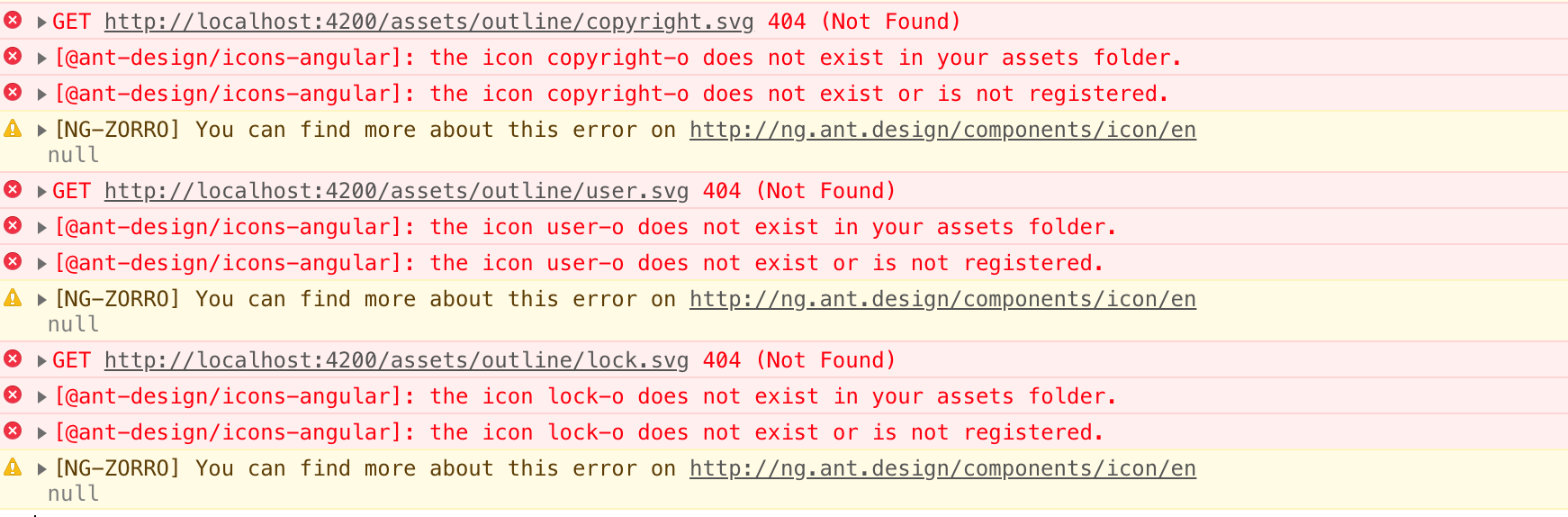
@vthinkxie 我遇到了和@mattshma 类似的问题,升级到1.8.1后assets目录下没有任何svg文件,
先升级后执行了,ng g ng-zorro-antd:fix-icon,
控制台报错,404
 colordove
on 5 Dec 2018
colordove
on 5 Dec 2018
@colordove
在 angular.json 中检查以下是否存在以下配置, 以及相对 angular.json 路径下是否存在 ./node_modules/@ant-design/icons-angular/src/inline-svg/
 {
     "glob": "**/*",
     "input": "./node_modules/@ant-design/icons-angular/src/inline-svg/",
     "output": "/assets/"
 }
@HsuanXyz Sorry,发现是因为@ant-design/icons-angular没有安装,安装后正常了,考虑在文档中补充下升级时需要安装@ant-design/icons-angular?
colordove
on 7 Dec 2018
@colordove 作为 dependency 的 icon 底包会被自动安装
wendellhu95
on 7 Dec 2018
@wendzhue 这个我看到了哈,但实际上要我在项目里安装才生效了。
colordove
on 14 Dec 2018
Related issues
 JCqiu
·
39Comments
JCqiu
·
39Comments
 luffySAMA
·
24Comments
luffySAMA
·
24Comments
 wisdomfusion
·
18Comments
wisdomfusion
·
18Comments
 102010cncger
·
15Comments
102010cncger
·
15Comments
 Svetomechc
·
20Comments
Svetomechc
·
20Comments
Most helpful comment
1.7.0 Icon 升级指南
太长不读版
做最小改动的升级,请按照如下操作:
ng g ng-zorro-antd:fix-icon。搞定,再见。
ng-zorro-antd1.7.0 版本带来的一项较为重大的变更是 Icon 组件进行了完全的重构。新的 Icon 组件提供了更清晰的 SVG 图标,以及诸多新功能。这篇文章将会引导你升级到 1.7.0 版本,并在你的项目中正确地使用全新 Icon 组件。从 1.7.0 版本开始,我们与 Ant Design React 3.9.x 同步,使用了 SVG 图标来替换之前基于字体文件的图标,这一升级带来了如下好处:
可参与 Ant Design 的相关讨论以了解更多。
全新功能
新版本 Icon 组件提供了以下新功能:
查看官网上的 demo。
升级指南
新版的图标使用,简单的来说可以分为两步,一是加载图标资源,二是声明渲染图标。
在
@ant-design/icons库的基础上,我们写作了@ant-design/icons-angular库,用于提供 Ant Design 的图标资源,而在ng-zorro-antd中我们提供了两种方式来加载图标资源。静态加载
通过在
NzIconService中注册图标来实现静态引入,引入后的文件会被打包到 .js 文件中,在 constructor 里或者在 AppInitService 里(推荐),例如:对于 1.8.0 及之后的版本,我们推荐使用
InjectionToken的注入方式,就像这样:静态加载会增加包体积,所以我们建议尽可能地使用动态加载。如果要静态加载,也请仅仅加载你需要用到的 icon,具体请看 Ant Design 的 issue。幸运的是,
@ant-design/icons-angular支持 tree shake 摇树优化 :tada:,没有被引入的 icon 不会进入打包出来的文件。另外,如果你在 Electron 平台上使用
ng-zorro-antd,包体积不是很重要的话,全量引入则是比较理想的方案。动态加载
这是为了减少包体积而提供的方式(比如升级后的官网就没有增加体积)。当
ng-zorro-antd检测用户想要渲染的图标还没有静态引入时,会发起 HTTP 请求动态引入。你只需要配置angular.json文件:我们为你提供了一条指令 :laughing:,升级到 1.7.0 之后,执行
ng g ng-zorro-antd:fix-icon命令,就会自动添加以上配置。我们建议你一定要加上这条配置,这也是平滑升级的最小操作。声明渲染
在图标资源被加载之后,你就可以在模板中创建一个 icon 了,例如:
我们兼容旧的 API,使得 1.6.0 版本之前的用户可以无痛升级,比如:
将会渲染出一个 outline 主题的 star 图标。当然,如果你想使用全新功能,务必请使用新的 API。
链接
@ant-design/icons-angular,关于图标缺失的问题可以在这里告诉我们。