Nextcloud-vue: Datepicker to narrow when show-week-numbers
The datepicker overflows when week-numbers are shown. Set :show-week-numbers="true" in the documentation to reproduce:
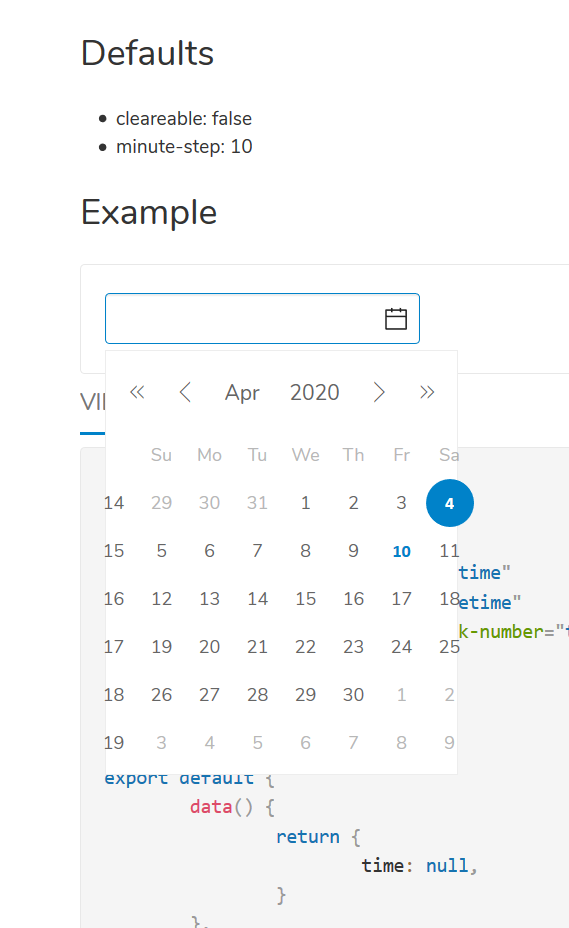
Happens in Calendar 2.0.3 now. @georgehrke @skjnldsv
 raimund-schluessler
All 13 comments
Should be fixed already with https://github.com/nextcloud/nextcloud-vue/pull/995
 skjnldsv
on 10 Apr 2020
skjnldsv
on 10 Apr 2020
skjnldsv
on 10 Apr 2020
skjnldsv
on 10 Apr 2020
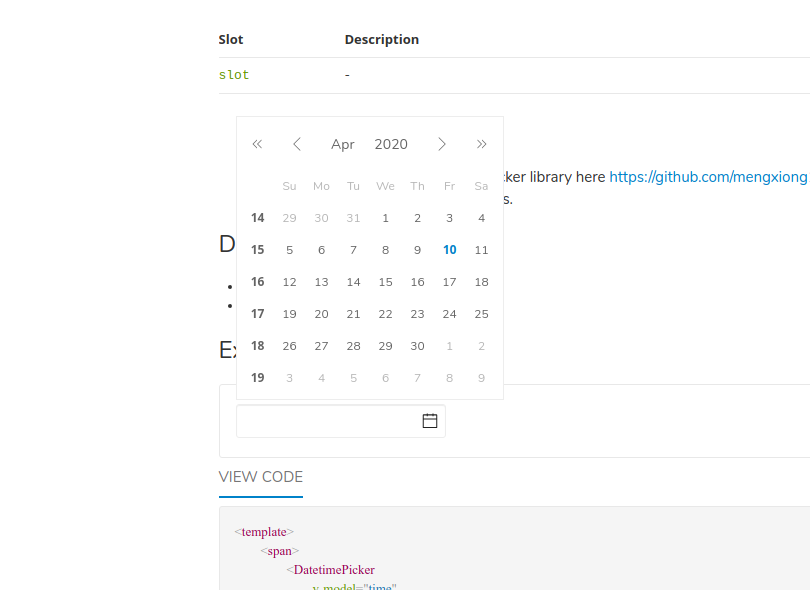
Yep, perfect for me in https://nextcloud-vue-components.netlify.com/#/Components/DatetimePicker
skjnldsv
on 10 Apr 2020
Aaah, ok, I fixed it for type="week", not show-week-numbers
skjnldsv
on 10 Apr 2020
I updated to 1.5.0 before releasing 2.0.3
 georgehrke
on 10 Apr 2020
georgehrke
on 10 Apr 2020
Well, I cannot reproduce with show-week-numbers="true" on the documentation, what template code are you using?
skjnldsv
on 10 Apr 2020
georgehrke
on 10 Apr 2020
Well, I cannot reproduce with
show-week-numbers="true"on the documentation, what template code are you using?
It's show-week-number="true", not show-week-numbers="true"
georgehrke
on 10 Apr 2020

georgehrke
on 10 Apr 2020
Still an issue in the latest version, i.e. the Calendar app.
raimund-schluessler
on 3 Aug 2020
The problem is this line https://github.com/nextcloud/nextcloud-vue/blob/master/src/components/DatetimePicker/index.scss#L63 which doesn't take the week number column into account. But I don't know how to overwrite it, because there is no class indicating if the week numbers are shown. @skjnldsv Any idea? Maybe I am missing something.
raimund-schluessler
on 29 Apr 2021
I added a feature request to the datepicker library to have a class set when show-week-number is enabled: https://github.com/mengxiong10/vue2-datepicker/issues/600
raimund-schluessler
on 29 Apr 2021
Fix is in #1917. Adjustments to the datepicker library were not necessary.
raimund-schluessler
on 4 May 2021
Related issues
 korelstar
·
8Comments
korelstar
·
8Comments
 rullzer
·
7Comments
korelstar
·
7Comments
rullzer
·
7Comments
korelstar
·
7Comments
 ma12-co
·
7Comments
skjnldsv
·
9Comments
ma12-co
·
7Comments
skjnldsv
·
9Comments
Most helpful comment
It's
show-week-number="true", notshow-week-numbers="true"