Nextcloud-vue: Raw JSON displayed when adding category to array of strings
When you use an array of strings and the tagging feature of the Multiselect component, it shows you raw JSON code in the dropdown after you searched for a category / want to add a new one.
This is how it looks like:
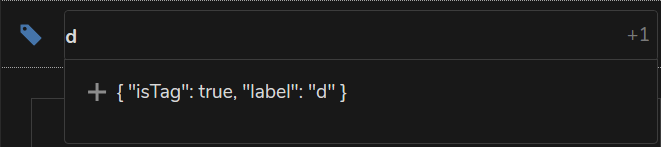
Corresponding demo code:
<template>
    <div>
        <Multiselect
            v-model="categories"
            :multiple="true"
            :searchable="true"
            :options="categories"
            :placeholder="'Select categories'"
            :taggable="true"
            :tag-placeholder="'Add this as a new category'"
            :close-on-select="false"
            class="multiselect-vue"
            @input="updateCategories"
            @tag="updateCategory"
        />
    </div>
</template>

<script>
import { Multiselect } from 'nextcloud-vue'

export default {
    components: {
        Multiselect,
    },
    data: function() {
        return {
            categories: ['a', 'b', 'c'],
        }
    },
    methods: {
        /**
         * Sets the categories of a task
         *
         * @param {Array} categories The new categories
         */
        updateCategories: function(categories) {
            console.debug('Set categories to ' + categories)
        },

        /**
         * Adds a category to the list of categories
         *
         * @param {String} category The name of the category to add
         */
        updateCategory: function(category) {
            console.debug('Add categoriy ' + category)
        },
    }
}
</script>
The same code works just fine with the upstream vue-multiselect:

Code (only the import statement is changed):
<template>
    <div>
        <Multiselect
            v-model="categories"
            :multiple="true"
            :searchable="true"
            :options="categories"
            :placeholder="'Select categories'"
            :taggable="true"
            :tag-placeholder="'Add this as a new category'"
            :close-on-select="false"
            class="multiselect-vue"
            @input="updateCategories"
            @tag="updateCategory"
        />
    </div>
</template>

<script>
import Multiselect from 'vue-multiselect'

export default {
    components: {
        Multiselect,
    },
    data: function() {
        return {
            categories: ['a', 'b', 'c'],
        }
    },
    methods: {
        /**
         * Sets the categories of a task
         *
         * @param {Array} categories The new categories
         */
        updateCategories: function(categories) {
            console.debug('Set categories to ' + categories)
        },

        /**
         * Adds a category to the list of categories
         *
         * @param {String} category The name of the category to add
         */
        updateCategory: function(category) {
            console.debug('Add categoriy ' + category)
        },
    }
}
</script>
Also see https://github.com/nextcloud/tasks/issues/416 where this was initially reported.
 raimund-schluessler
All 14 comments
I had the same issue in the vue-branch of notes, but I didn't tried to test with upstream Multiselect. This is how I fixed it, for now: https://github.com/nextcloud/notes/commit/b47e01bcbb5dba4f9cd442bbe24aec86be71a31c
 korelstar
on 22 May 2019
korelstar
on 22 May 2019
Weirdly there is already this check on the library: https://github.com/SidKwok/vue-multiselect/blob/6b64a6cc15350566af62bbfdd516dbd9bb638e9c/src/multiselectMixin.js#L465
 skjnldsv
on 16 Jun 2019
skjnldsv
on 16 Jun 2019
I guess in https://github.com/nextcloud/nextcloud-vue/blob/master/src/components/Multiselect/EllipsisedOption.vue#L44-L49 this.label evaluates to false for some reason.
raimund-schluessler
on 9 Jul 2019
@skjnldsv I would like to have a look here, but how do you develop the library? Can I somehow use the development version in an actual app? How do I start?
raimund-schluessler
on 12 Aug 2019
Yes, assuming you have both repos checked out run
npm installin both reposnpm linkin the nextcloud-vue reponpm link nextcloud-vuein your apps repo - this will be overwitten whenever you run install againnpm run watchin both repos
This will link the components repo to the node modules folder of your app and use that instead of the release.
 juliushaertl
on 12 Aug 2019
juliushaertl
on 12 Aug 2019
Thanks @juliushaertl. But when I do this, I get a lot of errors for ncvuecomponents.js when running npm run watch in the Tasks folder:
ERROR in ../nextcloud-vue/dist/ncvuecomponents.js
Module Error (from ./node_modules/eslint-loader/index.js):

/var/www/nextcloud/apps/nextcloud-vue/dist/ncvuecomponents.js
      2:2      error  Expected { after 'if' condition


                                                     curly
      2:2      error  Expected space(s) after "if"


                                                     keyword-spacing
      3:36     error  Strings must use singlequote


                                                     quotes
      3:43     error  Extra semicolon


                                                                                                                                     semi
      4:7      error  Expected space(s) after "if"                                                                                                                                                                                                                                                                                                                                                                                                                   keyword-spacing
      4:7      error  Expected { after 'if' condition                                                                                                                                                                                                                                                                                                                                                                                                                curly
      4:42     error  'define' is not defined                                                                                                                                                                                                                                                                                                                                                                                                                        no-undef
      5:3      error  'define' is not defined

...
@raimund-schluessler npm link never worked for me, I manually copy the dist folder to the node_modules/nextcloud-vue/ directory on the app I'm using
I'm usually using the vueexample app to dev on the vue library :)
skjnldsv
on 13 Aug 2019
@raimund-schluessler npm link never worked for me, I manually copy the dist folder to the node_modules/nextcloud-vue/ directory on the app I'm using
I'm usually using the vueexample app to dev on the vue library :)
Seems a bit cumbersome, but works for me as well 😄
Fix is in #538. I guess https://github.com/SidKwok/vue-multiselect/blob/6b64a6cc15350566af62bbfdd516dbd9bb638e9c/src/multiselectMixin.js#L465 is not called when using the EllipsisedOption component so I added a check there if the option object is a tag.
raimund-schluessler
on 13 Aug 2019
Thanks @juliushaertl. But when I do this, I get a lot of errors for ncvuecomponents.js when running npm run watch in the Tasks folder:
Looks like eslint is also running on the node modules. Adding an exclude to the eslint-loader rule in your webpack config should fix that:
{
  test: /\.(js|vue)$/,
  exclude: /node_modules/,
+  use: 'eslint-loader',
  enforce: 'pre'
},
npm link never worked for me, I manually copy the dist folder to the node_modules/nextcloud-vue/ directory on the app I'm using
You might need to run the npm link command with root permissions as it creates a symlink in /usr/lib/node_modules/
juliushaertl
on 13 Aug 2019
You might need to run the
npm linkcommand with root permissions as it creates a symlink in /usr/lib/node_modules/
sudo bad!!
You should use npm prefix to save the data in your home directory! :scream:
export NPM_PACKAGES="${HOME}/.npm-packages"
export NODE_PATH="$NPM_PACKAGES/lib/node_modules:$NODE_PATH"
https://github.com/sindresorhus/guides/blob/master/npm-global-without-sudo.md
--
When I say 'not working' I meant that I had the same issue than @raimund-schluessler. I'll add you config to the vueexample Julius :)
skjnldsv
on 13 Aug 2019
Thanks @juliushaertl. But when I do this, I get a lot of errors for ncvuecomponents.js when running npm run watch in the Tasks folder:
Looks like eslint is also running on the node modules. Adding an exclude to the eslint-loader rule in your webpack config should fix that:
{
  test: /\.(js|vue)$/,
  exclude: /node_modules/,
+  use: 'eslint-loader',
  enforce: 'pre'
},
This does not help somehow. I tried with
            {
                test: /\.(js|vue)$/,
                use: 'eslint-loader',
                exclude: '/node_modules/',
                enforce: 'pre'
            },
but it still runs eslint on the node_modules. Might be related to https://github.com/webpack/webpack/issues/943?
raimund-schluessler
on 13 Aug 2019
export NPM_PACKAGES="${HOME}/.npm-packages"
export NODE_PATH="$NPM_PACKAGES/lib/node_modules:$NODE_PATH"
Ah, nice :+1:
juliushaertl
on 13 Aug 2019
Thanks alot @raimund-schluessler :)
skjnldsv
on 15 Aug 2019
Related issues
 ma12-co
·
5Comments
korelstar
·
7Comments
ma12-co
·
5Comments
korelstar
·
7Comments
 janis91
·
5Comments
raimund-schluessler
·
9Comments
janis91
·
5Comments
raimund-schluessler
·
9Comments
 nicolad
·
4Comments
nicolad
·
4Comments