Nextcloud-snap: Apache php_errors log file getting really large
Describe the bug
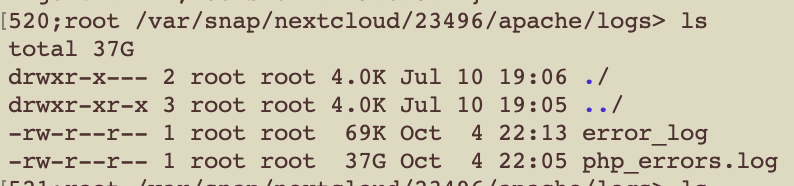
By analyzing why I used up my disk space so quickly I've noticed a strange behavior. The apache log was very large, 37 GB to be precise! Even worse, the snap update did create a backup of the log so it used twice the disk space.
Is there a setting to limit the file-size?
Screenshots
OS/snapd/snap version
Arch
19.0.3snap2
snap 2.45.1-1
 relikd
All 38 comments
Whoa, no, but I'll fix this ASAP, thank you. Is there something endlessly repeating, there?
 kyrofa
on 4 Oct 2020
kyrofa
on 4 Oct 2020
I only did a tail -100 on the file before deleting it, so I can't say for sure.
But here is the redacted output:
log.txt
relikd
on 4 Oct 2020
Not sure what richdocumentscode is doing there, I have a dedicated collabora (community edition) server running on the same machine.
relikd
on 5 Oct 2020
Yeah you might want to disable that app, looks like it's a bit unhappy.
kyrofa
on 7 Oct 2020
@relikd can you take a look at #1479? Think it'll solve this issue?
kyrofa
on 7 Oct 2020
I would not be able to test it. After deleting the log it was not recreated yet. But looking at the PR I did not find any filesize limiting config parameter. Would it be possible to have an additional script or function that will check that? I would be not surprised if the 37 GB were generated within 4 weeks, in fact my nextcloud instance is running only since Jul 10th (last richdocumentscode entry was Sept 21st).
I had a recent Wekan issue that was generating 256 MB logs per hour. I assume this issue did create similar amounts of data over an unknown time.
And regarding disabling the app. It seems I already did that but I can't say when. Maybe that was the reason why the log stopped on 9-21.
relikd
on 7 Oct 2020
My logs are about 7GB and I'll happily test the pr now.
And yes collabora office was the reason for me as well.
 Leptopoda
on 7 Oct 2020
Leptopoda
on 7 Oct 2020
Off-topic: @Leptopoda what a suprising coincidence. Your name and profile picture were shockingly familiar but it took me a while until I realize from where. I've spent way too much time on that Signal forum 😆 … different name, doesn't matter. Anyway, hello dear fellow 👋
relikd
on 7 Oct 2020
@relikd yeah I went back and forth for a while. I actually started with size limits, but then I realized that high-traffic installs will have a lot more logging, and it's possible that limiting by size wouldn't keep enough logs for any sort of reasonable analysis. For example, I started with rotating at 100M, and keeping 5 of them, which for you would only keep about 5 hours of logs, which isn't enough. So I went with the time span, thinking high-traffic installs could just make sure they have more disk space. Your critique is fair though, I'm not really sure how to solve both issues, particularly when we need to account for a misbehaving Nextcloud install, which is what I would call the slew of errors you were getting. What do you think?
kyrofa
on 7 Oct 2020
Can we have both? By default not limiting the filesize unless the user configures it. System logs usually allow both too. If there was an option I guess I would set it to 4 GB.
Or to make things less complicated that limit could be set for a single rotation file (currently one week?). And another question will arise, how often do you want to check the filesize? Daily may be too sporadic for what we would like to prevent.
relikd
on 7 Oct 2020
I'm not sure it makes sense to expose the maxsize as a configuration parameter without also exposing the number of rotations, etc. If we make this all configurable we have to support a lot of knobs for what is, to be honest, an edge case. Very few people will use those knobs. I'm not sure that makes sense, either.
kyrofa
on 7 Oct 2020
Another option would be to reuse the system log. Not sure how Wekan does that, but the docker image writes to syslog. That way, you would not need to worry about rotation at all. But I assume you need the log for the UI? For that reason, you could use a separate file storing only the last 5000 lines or so.
relikd
on 7 Oct 2020
Yeah Nextcloud supports that, but that won't be possible for all services in the snap, so it's still an issue. There's also something to be said for logging consistency (that's one the reasons for the PR, organizing all the logs into one place).
kyrofa
on 7 Oct 2020
~Shouldn't this run every day at 00:00??
For me at least it did not change anything.~
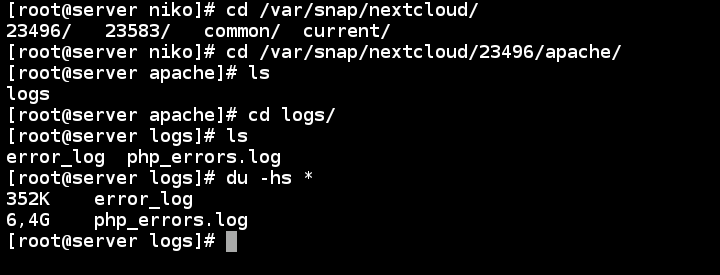
~But there isn't any new content in the php_error since Sep 27 (The day I disabled collabora office)~
EDIT:
My bad I didn't look inside the current dir and therefore saw the old version ... it seems to be working but gonna check back tomorrow if it rotates fine.
Leptopoda
on 8 Oct 2020
My bad I didn't look inside the current dir and therefore saw the old version ... it seems to be working but gonna check back tomorrow if it rotates fine.
Oh phew I saw the email notification and almost threw my laptop through a window, I worked hard on those darn migrations :stuck_out_tongue: .
Yeah, you shouldn't have an apache/ directory there at all anymore, ALL the logs should now be in /var/snap/nextcloud/current/logs/. Of course, your old revision is still there in case you want to revert, and it hasn't been changed which is why you still see that log file there.
kyrofa
on 8 Oct 2020
@Leptopoda how do things look today?
kyrofa
on 9 Oct 2020
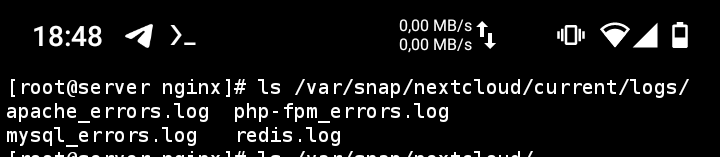
There where no new logs so dunno if anything works....
Gonna install collabora again and try to accumulate errors xD (never through I'll gonna say this)
Leptopoda
on 9 Oct 2020
Oh I'm silly, we're not rotating on size here, we're rotating once a week. Hold on, let me push an update that will do it daily just for testing purposes. You did test the migration though, that part looks good.
kyrofa
on 9 Oct 2020
Okay @Leptopoda, refresh from that PR channel and you'll get a new one that will rotate logs tonight.
kyrofa
on 10 Oct 2020
Snap already refreshed it.
But I will have to wait another 24 hours because of my timezone....
So I'll check back then.
Leptopoda
on 10 Oct 2020
Ah, those timezones are a pain :grinning: .
kyrofa
on 11 Oct 2020
TBH I really don't know what to look for :(
I seem to have the latest version (even the logrotate indicates this with the 2):
[root@server logs]# snap list
Name       Version                         Rev    Tracking       Publisher   Notes
core       16-2.46.1                       9993   latest/stable  canonical✓  core
core18     20200724                        1885   latest/stable  canonical✓  base
nextcloud  19.0.3snap2+git3.ed9f7b0-dirty  23622  latest/beta/…  nextcloud✓  -
[root@server logs]# sudo snap refresh nextcloud
snap "nextcloud" has no updates available
[root@server logs]# cat ../logrotate/status
logrotate state -- version 2
"/var/snap/nextcloud/23583/logs/php-fpm_errors.log" 2020-10-8-0:0:0
"/var/snap/nextcloud/23583/logs/redis.log" 2020-10-8-0:0:0
"/var/snap/nextcloud/23622/logs/redis.log" 2020-10-11-0:0:0
"/var/snap/nextcloud/23583/logs/apache_errors.log" 2020-10-8-0:0:0
"/var/snap/nextcloud/23622/logs/apache_errors.log" 2020-10-11-0:0:0
"/var/snap/nextcloud/23583/logs/mysql_errors.log" 2020-10-8-0:0:0
"/var/snap/nextcloud/23622/logs/php-fpm_errors.log" 2020-10-11-0:0:0
"/var/snap/nextcloud/23622/logs/mysql_errors.log" 2020-10-11-0:0:0
"/var/snap/nextcloud/23622/logs/nextcloud.log" 2020-10-11-0:0:0
"/var/snap/nextcloud/23622/logs/php_errors.log" 2020-10-11-0:0:0


md5-9ec4085bccef6541be27107d7bd8677f


[root@server logs]# ls -l /var/snap/nextcloud/current/logs/
-rw-r--r-- 1 root root    363033 10. Okt 19:34 apache_errors.log
-rw-r----- 1 root root    681316 10. Okt 19:15 mysql_errors.log
-rw------- 1 root root 204682364 10. Okt 19:34 php-fpm_errors.log
-rw-r--r-- 1 root root  24699257 11. Okt 09:34 redis.log
[root@server logs]# ls -l /var/snap/nextcloud/23583/logs/
-rw-r--r-- 1 root root    359967 10. Okt 06:55 apache_errors.log
-rw-r----- 1 root root    677409 10. Okt 06:55 mysql_errors.log
-rw------- 1 root root 204682142 10. Okt 06:55 php-fpm_errors.log
-rw-r--r-- 1 root root  24623024 10. Okt 06:55 redis.log
@Leptopoda can I see the output of snap logs nextcloud.logrotate, please?
kyrofa
on 11 Oct 2020
''"
2020-10-10T22:00:01Z nextcloud.logrotate[842598]: Last rotated at 2020-10-11 00:00 2020-10-10T22:00:01Z nextcloud.logrotate[842598]: log does not need rotating (log has been already rotated)
2020-10-10T22:00:01Z nextcloud.logrotate[842598]: rotating pattern: /var/snap/nextcloud/23622/logs/mysql_errors.log after 1 days (4 rotations) 2020-10-10T22:00:01Z nextcloud.logrotate[842598]: empty log files are not rotated, old logs are removed
2020-10-10T22:00:01Z nextcloud.logrotate[842598]: considering log /var/snap/nextcloud/23622/logs/mysql_errors.log
2020-10-10T22:00:01Z nextcloud.logrotate[842598]: Creating new state
2020-10-10T22:00:01Z nextcloud.logrotate[842598]: Now: 2020-10-11 00:00 2020-10-10T22:00:01Z nextcloud.logrotate[842598]: Last rotated at 2020-10-11 00:00
2020-10-10T22:00:01Z nextcloud.logrotate[842598]: log does not need rotating (log has been already rotated) 2020-10-10T22:00:01Z systemd[1]: snap.nextcloud.logrotate.service: Succeeded.
'''
Leptopoda
on 11 Oct 2020
@Leptopoda wait... this is weird:
# cat ../logrotate/status
logrotate state -- version 2
<snip>
"/var/snap/nextcloud/23583/logs/redis.log" 2020-10-8-0:0:0
"/var/snap/nextcloud/23622/logs/redis.log" 2020-10-11-0:0:0
<snip>
You have duplicate entries in the status file with different dates. I would expect to see only one line per file. Any chance you modified that file by hand?
EDIT: Oh heavens, those are different revisions, how terribly silly. I know what's happening, then. Update incoming, thanks for the patience! I suggest deleting that status file now.
kyrofa
on 11 Oct 2020
OK gonna delete that and feedback is coming tomorow ;)
Leptopoda
on 11 Oct 2020
Alright @Leptopoda refresh. You can speed up testing if you like by doing the following:
Force logrotate to run (you don't need to wait until midnight):
$ sudo snap run --shell nextcloud.logrotate -c run-logrotateUpdate status file and roll timestamps back. Basically, edit
/var/snap/nextcloud/current/logrotate/statusand make each timestamp be yesterday instead of today.Force logrotate to run again:
$ sudo snap run --shell nextcloud.logrotate -c run-logrotateObserve rotated logs:
$ sudo ls -lh /var/snap/nextcloud/current/logs
kyrofa
on 11 Oct 2020
[root@server current]# cat logrotate/status
logrotate state -- version 2
"/var/snap/nextcloud/current/logs/php_errors.log" 2020-10-10-21:0:0
"/var/snap/nextcloud/current/logs/mysql_errors.log" 2020-10-10-21:0:0
"/var/snap/nextcloud/current/logs/nextcloud.log" 2020-10-10-21:0:0
"/var/snap/nextcloud/current/logs/redis.log" 2020-10-10-21:0:0
"/var/snap/nextcloud/current/logs/php-fpm_errors.log" 2020-10-10-21:0:0
"/var/snap/nextcloud/current/logs/apache_errors.log" 2020-10-10-21:0:0
I've changed the date to yesterday (2020-10-10) and re run the logrotate command (it finished instantly not even a second)
[root@server current]# ls -lh logs
insgesamt 220M
-rw-r--r-- 1 root root 357K 11. Okt 22:01 apache_errors.log
-rw-r----- 1 root root 681K 11. Okt 22:01 mysql_errors.log
-rw------- 1 root root 196M 11. Okt 22:01 php-fpm_errors.log
-rw-r--r-- 1 root root  24M 11. Okt 22:01 redis.log
My logs seem to be from the second logrotate (22:01)
What I did:
- I deleted the status file
- refreshed the snap 21:00
- an hour passed and I run logrotate (about 21:50)
- I adjusted the date in the status file (note it was 21:00 I think the refresh rotated the log and the 21:50 run didn't do anything...)
- I reran the logrotate (as the date was adjusted in the step before)
- my current status
Is this the intended behaviour
Leptopoda
on 11 Oct 2020
Hmm, you don't have any rotations yet, but I don't quite understand what you did, so let me walk you through what I did, and see if you can duplicate. First of all, note that I have some rotated logs because I've been playing with this as well:
$ sudo ls -lh /var/snap/nextcloud/current/logs
total 11M
-rw-r----- 1 root root 1.3K Oct 11 12:40 apache_errors.log
-rw-r----- 1 root root 3.0K Oct 11 12:38 apache_errors.log.1
-rw-r--r-- 1 root root 1.6M Oct 11 09:06 apache_errors.log.2.gz
-rw-r----- 1 root root    0 Oct 11 12:38 mysql_errors.log
-rw-r----- 1 root root 7.4K Oct 11 12:35 mysql_errors.log.1
-rw-r----- 1 root root  47K Oct 11 08:29 mysql_errors.log.2.gz
-rw-r----- 1 root root    0 Oct 11 09:06 php_errors.log
-rw-r--r-- 1 root root 1.1M Feb 21  2020 php_errors.log.1
-rw-r----- 1 root root    0 Oct 11 12:38 php-fpm_errors.log
-rw-r----- 1 root root  115 Oct 11 12:35 php-fpm_errors.log.1
-rw------- 1 root root  21K Oct 11 12:35 php-fpm_errors.log.2.gz
-rw-r----- 1 root root 1.8K Oct 11 13:10 redis.log
-rw-r----- 1 root root  17K Oct 11 12:35 redis.log.1
-rw-r--r-- 1 root root 7.8M Oct 11 09:04 redis.log.2.gz
Delete the status file:
$ sudo rm /var/snap/nextcloud/current/logrotate/status
Run logrotate:
$ sudo snap run --shell nextcloud.logrotate -c run-logrotate
reading config file /tmp/tmp.DeYp3YTdVg
Reading state from file: /var/snap/nextcloud/23672/logrotate/status
Allocating hash table for state file, size 64 entries

Handling 4 logs

rotating pattern: /var/snap/nextcloud/current/logs/apache_errors.log  after 1 days (4 rotations)
empty log files are not rotated, old logs are removed
considering log /var/snap/nextcloud/current/logs/apache_errors.log
Creating new state
  Now: 2020-10-11 13:24
  Last rotated at 2020-10-11 13:00
  log does not need rotating (log has been already rotated)

rotating pattern: /var/snap/nextcloud/current/logs/php_errors.log /var/snap/nextcloud/current/logs/php-fpm_errors.log /var/snap/nextcloud/current/logs/nextcloud.log  after 1 days (4 rotations)
empty log files are not rotated, old logs are removed
considering log /var/snap/nextcloud/current/logs/php_errors.log
Creating new state
  Now: 2020-10-11 13:24
  Last rotated at 2020-10-11 13:00
  log does not need rotating (log has been already rotated)
considering log /var/snap/nextcloud/current/logs/php-fpm_errors.log
Creating new state
  Now: 2020-10-11 13:24
  Last rotated at 2020-10-11 13:00
  log does not need rotating (log has been already rotated)
considering log /var/snap/nextcloud/current/logs/nextcloud.log
  log /var/snap/nextcloud/current/logs/nextcloud.log does not exist -- skipping
Creating new state

rotating pattern: /var/snap/nextcloud/current/logs/redis.log  after 1 days (4 rotations)
empty log files are not rotated, old logs are removed
considering log /var/snap/nextcloud/current/logs/redis.log
Creating new state
  Now: 2020-10-11 13:24
  Last rotated at 2020-10-11 13:00
  log does not need rotating (log has been already rotated)

rotating pattern: /var/snap/nextcloud/current/logs/mysql_errors.log  after 1 days (4 rotations)
empty log files are not rotated, old logs are removed
considering log /var/snap/nextcloud/current/logs/mysql_errors.log
Creating new state
  Now: 2020-10-11 13:24
  Last rotated at 2020-10-11 13:00
  log does not need rotating (log has been already rotated)
Since I removed the status file, all logrotate does here is create it and record timestamps. It now looks like this:
$ sudo cat /var/snap/nextcloud/current/logrotate/status
logrotate state -- version 2
"/var/snap/nextcloud/current/logs/php_errors.log" 2020-10-11-13:0:0
"/var/snap/nextcloud/current/logs/mysql_errors.log" 2020-10-11-13:0:0
"/var/snap/nextcloud/current/logs/nextcloud.log" 2020-10-11-13:0:0
"/var/snap/nextcloud/current/logs/redis.log" 2020-10-11-13:0:0
"/var/snap/nextcloud/current/logs/php-fpm_errors.log" 2020-10-11-13:0:0
"/var/snap/nextcloud/current/logs/apache_errors.log" 2020-10-11-13:0:0
I update that status file and roll the status back by a day, so now it looks like this:
$ sudo cat /var/snap/nextcloud/current/logrotate/status
logrotate state -- version 2
"/var/snap/nextcloud/current/logs/php_errors.log" 2020-10-10-13:0:0
"/var/snap/nextcloud/current/logs/mysql_errors.log" 2020-10-10-13:0:0
"/var/snap/nextcloud/current/logs/nextcloud.log" 2020-10-10-13:0:0
"/var/snap/nextcloud/current/logs/redis.log" 2020-10-10-13:0:0
"/var/snap/nextcloud/current/logs/php-fpm_errors.log" 2020-10-10-13:0:0
"/var/snap/nextcloud/current/logs/apache_errors.log" 2020-10-10-13:0:0
I run logrotate again, and you can see from its output that it rotates stuff:
$ sudo snap run --shell nextcloud.logrotate -c run-logrotate
reading config file /tmp/tmp.n5uJS0rvyl
Reading state from file: /var/snap/nextcloud/23672/logrotate/status
Allocating hash table for state file, size 64 entries
Creating new state
Creating new state
Creating new state
Creating new state
Creating new state

Handling 4 logs

rotating pattern: /var/snap/nextcloud/current/logs/apache_errors.log  after 1 days (4 rotations)
empty log files are not rotated, old logs are removed
considering log /var/snap/nextcloud/current/logs/apache_errors.log
  Now: 2020-10-11 13:28
  Last rotated at 2020-10-10 13:00
  log needs rotating
rotating log /var/snap/nextcloud/current/logs/apache_errors.log, log->rotateCount is 4
dateext suffix '-20201011'
glob pattern '-[0-9][0-9][0-9][0-9][0-9][0-9][0-9][0-9]'
compressing log with: /bin/gzip
renaming /var/snap/nextcloud/current/logs/apache_errors.log.4.gz to /var/snap/nextcloud/current/logs/apache_errors.log.5.gz (rotatecount 4, logstart 1, i 4),
old log /var/snap/nextcloud/current/logs/apache_errors.log.4.gz does not exist
renaming /var/snap/nextcloud/current/logs/apache_errors.log.3.gz to /var/snap/nextcloud/current/logs/apache_errors.log.4.gz (rotatecount 4, logstart 1, i 3),
old log /var/snap/nextcloud/current/logs/apache_errors.log.3.gz does not exist
renaming /var/snap/nextcloud/current/logs/apache_errors.log.2.gz to /var/snap/nextcloud/current/logs/apache_errors.log.3.gz (rotatecount 4, logstart 1, i 2),
renaming /var/snap/nextcloud/current/logs/apache_errors.log.1.gz to /var/snap/nextcloud/current/logs/apache_errors.log.2.gz (rotatecount 4, logstart 1, i 1),
renaming /var/snap/nextcloud/current/logs/apache_errors.log.0.gz to /var/snap/nextcloud/current/logs/apache_errors.log.1.gz (rotatecount 4, logstart 1, i 0),
old log /var/snap/nextcloud/current/logs/apache_errors.log.0.gz does not exist
log /var/snap/nextcloud/current/logs/apache_errors.log.5.gz doesn't exist -- won't try to dispose of it
renaming /var/snap/nextcloud/current/logs/apache_errors.log to /var/snap/nextcloud/current/logs/apache_errors.log.1
creating new /var/snap/nextcloud/current/logs/apache_errors.log mode = 0640 uid = 0 gid = 0
running postrotate script

rotating pattern: /var/snap/nextcloud/current/logs/php_errors.log /var/snap/nextcloud/current/logs/php-fpm_errors.log /var/snap/nextcloud/current/logs/nextcloud.log  after 1 days (4 rotations)
empty log files are not rotated, old logs are removed
considering log /var/snap/nextcloud/current/logs/php_errors.log
  Now: 2020-10-11 13:28
  Last rotated at 2020-10-10 13:00
  log does not need rotating (log is empty)
considering log /var/snap/nextcloud/current/logs/php-fpm_errors.log
  Now: 2020-10-11 13:28
  Last rotated at 2020-10-10 13:00
  log does not need rotating (log is empty)
considering log /var/snap/nextcloud/current/logs/nextcloud.log
  log /var/snap/nextcloud/current/logs/nextcloud.log does not exist -- skipping
Creating new state

rotating pattern: /var/snap/nextcloud/current/logs/redis.log  after 1 days (4 rotations)
empty log files are not rotated, old logs are removed
considering log /var/snap/nextcloud/current/logs/redis.log
  Now: 2020-10-11 13:28
  Last rotated at 2020-10-10 13:00
  log needs rotating
rotating log /var/snap/nextcloud/current/logs/redis.log, log->rotateCount is 4
dateext suffix '-20201011'
glob pattern '-[0-9][0-9][0-9][0-9][0-9][0-9][0-9][0-9]'
compressing log with: /bin/gzip
renaming /var/snap/nextcloud/current/logs/redis.log.4.gz to /var/snap/nextcloud/current/logs/redis.log.5.gz (rotatecount 4, logstart 1, i 4),
old log /var/snap/nextcloud/current/logs/redis.log.4.gz does not exist
renaming /var/snap/nextcloud/current/logs/redis.log.3.gz to /var/snap/nextcloud/current/logs/redis.log.4.gz (rotatecount 4, logstart 1, i 3),
old log /var/snap/nextcloud/current/logs/redis.log.3.gz does not exist
renaming /var/snap/nextcloud/current/logs/redis.log.2.gz to /var/snap/nextcloud/current/logs/redis.log.3.gz (rotatecount 4, logstart 1, i 2),
renaming /var/snap/nextcloud/current/logs/redis.log.1.gz to /var/snap/nextcloud/current/logs/redis.log.2.gz (rotatecount 4, logstart 1, i 1),
renaming /var/snap/nextcloud/current/logs/redis.log.0.gz to /var/snap/nextcloud/current/logs/redis.log.1.gz (rotatecount 4, logstart 1, i 0),
old log /var/snap/nextcloud/current/logs/redis.log.0.gz does not exist
log /var/snap/nextcloud/current/logs/redis.log.5.gz doesn't exist -- won't try to dispose of it
renaming /var/snap/nextcloud/current/logs/redis.log to /var/snap/nextcloud/current/logs/redis.log.1
creating new /var/snap/nextcloud/current/logs/redis.log mode = 0640 uid = 0 gid = 0

rotating pattern: /var/snap/nextcloud/current/logs/mysql_errors.log  after 1 days (4 rotations)
empty log files are not rotated, old logs are removed
considering log /var/snap/nextcloud/current/logs/mysql_errors.log
  Now: 2020-10-11 13:28
  Last rotated at 2020-10-10 13:00
  log does not need rotating (log is empty)
You'll notice from the above output that some of the logs were empty, and thus not rotated. However, both the Apache and Redis logfiles were:
$ sudo ls -lh /var/snap/nextcloud/current/logs
total 11M
-rw-r----- 1 root root 1.1K Oct 11 13:28 apache_errors.log
-rw-r----- 1 root root 1.5K Oct 11 13:28 apache_errors.log.1
-rw-r----- 1 root root  652 Oct 11 12:38 apache_errors.log.2.gz
-rw-r--r-- 1 root root 1.6M Oct 11 09:06 apache_errors.log.3.gz
-rw-r----- 1 root root    0 Oct 11 12:38 mysql_errors.log
-rw-r----- 1 root root 7.4K Oct 11 12:35 mysql_errors.log.1
-rw-r----- 1 root root  47K Oct 11 08:29 mysql_errors.log.2.gz
-rw-r----- 1 root root    0 Oct 11 09:06 php_errors.log
-rw-r--r-- 1 root root 1.1M Feb 21  2020 php_errors.log.1
-rw-r----- 1 root root    0 Oct 11 12:38 php-fpm_errors.log
-rw-r----- 1 root root  115 Oct 11 12:35 php-fpm_errors.log.1
-rw------- 1 root root  21K Oct 11 12:35 php-fpm_errors.log.2.gz
-rw-r----- 1 root root  349 Oct 11 13:28 redis.log
-rw-r----- 1 root root 2.1K Oct 11 13:23 redis.log.1
-rw-r----- 1 root root 2.4K Oct 11 12:35 redis.log.2.gz
-rw-r--r-- 1 root root 7.8M Oct 11 09:04 redis.log.3.gz
OK what happened earlier was that the logrotate command didn't do anything (as I said it finished instantly with no output) now it works again...
I'm checking it now....
Leptopoda
on 11 Oct 2020
OK I can't seem to attach a photo now...
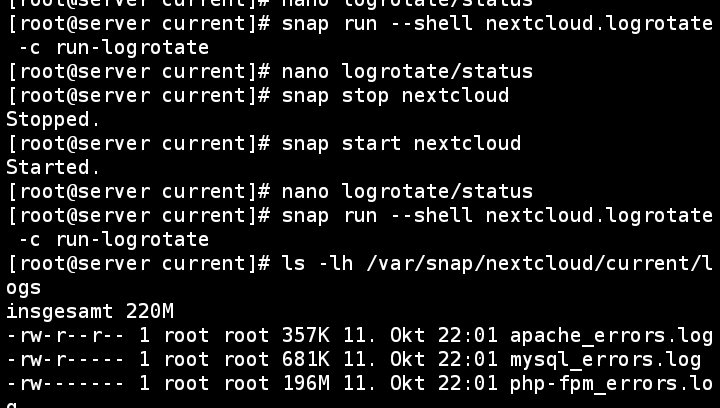
Here you see. I even tried restarting nextcloud and nothing happened. The last part of this image shows the output I posted above...
Leptopoda
on 11 Oct 2020
Huh, you're right, this is weird. What is the exit code?
$ sudo snap run --shell nextcloud.logrotate -c run-logrotate
<snip>
$ echo $?
0
How should I check?
So it works now. Ill check tomorrow. My girlfriend wants so sleep now so checking soon......
Leptopoda
on 11 Oct 2020
How should I check?
It's the echo $? there after the command exits.
kyrofa
on 11 Oct 2020
Tracing it would be helpful as well:
$ sudo snap run --shell nextcloud.logrotate -c 'sh -x $SNAP/bin/run-logrotate'
So as I said in my last post it works now.
And it seems that I cant reproduce it anymore....
The strange thing is that it worked the first time after I updated the snap. Then it didn't work anymore (see my screenshot) and then it worked again 😒🙃
Leptopoda
on 12 Oct 2020
Okay that was odd. I'm going to go ahead and get this in, then. It doesn't solve the problem of a misbehaving Nextcloud logging way too much, but I think it will solve this problem for the majority of folks. I need to continue mulling over how to handle huge logs.
kyrofa
on 12 Oct 2020
Just adding that it seems to be working fine now
Leptopoda
on 13 Oct 2020
Related issues
 mo-seph
·
6Comments
mo-seph
·
6Comments
 srkunze
·
6Comments
srkunze
·
6Comments
 tinokizis
·
8Comments
tinokizis
·
8Comments
 pachulo
·
4Comments
pachulo
·
4Comments
 RadZaeem
·
8Comments
RadZaeem
·
8Comments
Most helpful comment
Okay that was odd. I'm going to go ahead and get this in, then. It doesn't solve the problem of a misbehaving Nextcloud logging way too much, but I think it will solve this problem for the majority of folks. I need to continue mulling over how to handle huge logs.