Nextcloud-snap: nextcloud: update to v17
Waiting until the first point release, but we expect there will be some work involved; making an issue now to track it.
 kyrofa
All 76 comments
Looks like anyone using the groupfolders app is going to have some problems accessing the web interface after the upgrade. Not good for the snap's automatic update situation:
https://github.com/nextcloud/server/issues/17338#issuecomment-537002340
This issue arises when group folders app was enabled before the update.
The big issue is, that group folders app in version 5.0 is not compatible to NC16 and therefore users cannot update to group folder 5.x before updating to NC17. In return all users who didn't disable the app before the update, will get stuck in HTTP 500.
For users without ssh access this may become a serious issue.
 the-sane
on 1 Oct 2019
the-sane
on 1 Oct 2019
"Serious issue" is a sweet description for a messed up NextCloud-instance.
Any helpful advise for people who have already put a foot into this trap?
 DaCryptor
on 1 Oct 2019
DaCryptor
on 1 Oct 2019
@DaCryptor If you've upgraded the snap and it broke on you, you can revert back to the stable channel and wait things out a bit.
the-sane
on 1 Oct 2019
@DaCryptor you already upgraded to 17/edge? Yeah, try sudo snap revert nextcloud to get back to the revision you were just using (which I hope was based on either stable or 16/stable?). Note that this will toss any database changes you made during your time in v17, but if you were getting 500's I doubt that was much.
kyrofa
on 1 Oct 2019
Looks like anyone using the groupfolders app is going to have some problems accessing the web interface after the upgrade.
Shouldn't that be a non-issue given the upgrade fix (see my most recent comment)?
Not good for the snap's automatic update situation [...]
Not good at all. We won't ship that. If we do, we'll automatically disable/update/re-enable if necessary, as we discussed for v16.
kyrofa
on 1 Oct 2019
Shouldn't that be a non-issue given the upgrade fix
Yeah, I was surprised to see people having this problem. And yet there they are 🤷♀
the-sane
on 2 Oct 2019
Well... if the blocking issue trend continues, we'll feel safe to upgrade the snap to v17 when v18 comes out :cry: . I'm afraid we might miss that boat and end up on an unsupported release just because they keep forging ahead so fast and not fixing stuff.
kyrofa
on 2 Oct 2019
@kyrofa That sounds like it might make more work for you. I know you were supporting the v16 candidate channel throughout this whole ordeal with timely security updates, etc, but I got the impression you don't typically do that. If there continue to be these kinds of upstream delays, I see a lot of people updating to the candidate release once it's available and applying whatever manual workarounds are required.
I guess pointing that out doesn't really help anything. I suppose I'm just sympathizing.
the-sane
on 2 Oct 2019
I know you were supporting the v16 candidate channel throughout this whole ordeal with timely security updates, etc, but I got the impression you don't typically do that.
Indeed, I only did that because I realized it was unclear to people who _did_ make that jump, and I definitely didn't want to leave them in a lurch, but I can't reliably keep that up. I updated the release strategy wiki page to clarify this with bold letters:
Note that the only channels that receive significant testing and support are the ones that contain "stable" in their name. The others are only here for your convenience.
So please allow me to make sure folks realize: that statement ^ applies to v17. Please don't upgrade your production snap instances to non-stable releases unless you're willing to go it alone, I just don't spread that thin, and I'm very sorry about that. Obviously if you want to test them out and report issues, please do, that's tremendously helpful. Just don't do it in production, okay?
If there continue to be these kinds of upstream delays, I see a lot of people updating to the candidate release once it's available and applying whatever manual workarounds are required.
Yeah me too. I'm not quite sure what to do about it. We actually have a few possibilities, here, I'm just not thrilled with any of them. Totally off-topic for this issue, but hey, where else are we gonna have this discussion?
- Stop updating the
latesttrack. Each channel follows a format, which for our purposes we'll define as<track>/<risk>. There are four<risk>s:edge,beta,candidate, andstable. By default, when you don't specify a track, you getlatest. By default, if you don't specify a risk, you getstable. Thelatesttrack is the only one that actually forces major Nextcloud upgrades on its users. If we could get rid of it, the only way for snap users to upgrade major versions would be tosnap refresh nextcloud --channel=<desired track>, and they'd have to deal with the ramifications of that decision (perhaps by immediately reverting if they ran into issues).
- Advantages:
- Simplicity. You get automatic minor version updates, but you know that you have to do something special to jump major versions, and that's it.
- Disadvantages:
- Virtually everyone uses
latest/stable(it's the default, after all). No matter how we announce this, virtually no one will hear that we're no longer maintaining it. - The default experience is terrible for new users. If you
snap install nextcloud, you get a channel that is unmaintained. We could make it display a "you don't want this, use a track" message, but you don't want to smack existing users with that.
- Virtually everyone uses
- Advantages:
- Start using snap epochs. Essentially splitting each channel into subchannels. We can make it such that folks who are installing Nextcloud fresh get the latest major release (assuming it works in general), but folks who installed the previous major release won't automatically upgrade until we've verified that such a path works.
- Advantages:
- Allows us to continue using the
latest/stablechannel without forcing broken upgrades on people, only making new major versions available to new users or folks who opt in until we verify that the upgrade process works.
- Allows us to continue using the
- Disadvantages:
- Is crazy complicated.
- Is completely unclear to users: "why haven't I upgraded yet?"
- I don't know anyone else using them and I don't want my users to be the guinea pig.
- Advantages:
Both of these paths allow us to (more closely) stay on the latest major Nextcloud release, as typically the blocking issues tend to follow the upgrade process more than problems immediately obvious in the new release. We would continue supporting only the releases that are also supported upstream (like we do today), so the workload wouldn't be different. The downside of that is that I feel like we tend to be the only folks who throw up a flag when things are broken, and if we march on with the rest of them, I'm afraid things will just stay broken. Ignoring that, I wanted to at least open the floor for discussion. I'm not sold on either path.
kyrofa
on 2 Oct 2019
I'm going to mull it over in my mind for a bit before I give my thoughts on the above but, in the meantime, a question:
Wouldn't either of those two options mean you'd be supporting two different versions? The most up-to-date major version for new installs as well as the previous version up until the point that a stable upgrade path exists. Basically exactly what you were doing for v16 which you said you don't want to keep doing? And if the current situation is any indication, it could be a near constant thing with the stable upgrade path only finally existing once the next next major version is released.
the-sane
on 2 Oct 2019
Wouldn't either of those two options mean you'd be supporting two different versions? The most up-to-date major version for new installs as well as the previous version up until the point that a stable upgrade path exists. Basically exactly what you were doing for v16 which you said you don't want to keep doing?
Oh duh, good question, I didn't address that at all, huh :roll_eyes: . No, included with either path is to only support the versions of the snap that use the versions of Nextcloud that are supported upstream. For example, even if v16 never gets a decent upgrade path to v17, once upstream drops support for v16 so will we (that's exactly what we do today-- the 15 track will continue to get updates until upstream Nextcloud drops support for it). That's not to say that the 16 track would disappear (indeed, we have tracks going all the way back to 11), but it would no longer receive updates. I tried to update the above response to reflect this.
kyrofa
on 2 Oct 2019
I'm guessing you would have already thought of this if you could, but I don't suppose you have control over which release gets assigned to latest/stable? So far I'm not really loving either of the two options you presented above any more than you are so I'm trying to come up with a third option.
If you can't control that, maybe make it work with a new risk level between candidate and stable called version/stable-ish? :laughing: Or, more seriously, maybe version/official denoting an official (and supported) Nextcloud release but not a stable Snap release.
Reasons why I don't like the other two options:
- Option 1 represents a dramatic change in how the snap handles updates. Users have an expectation of fully automatic, and that's a hard thing to ask them to give up.
- Snap's epochs seem like they're meant to solve our exact problems, but I'd also wait for someone else to do it first and see how it goes for them.
the-sane
on 2 Oct 2019
I'm guessing you would have already thought of this if you could, but I don't suppose you have control over which release gets assigned to latest/stable? So far I'm not really loving either of the two options you presented above any more than you are so I'm trying to come up with a third option.
Well, yes, but I'm not quite clear what you mean when you ask this. I can release any revision I want into latest/stable, but I don't feel like that's what you're asking. Can you clarify?
If you can't control that, maybe make it work with a new risk level between candidate and stable called version/stable-ish? laughing Or, more seriously, maybe version/official denoting an official (and supported) Nextcloud release but not a stable Snap release.
I'm afraid that, while we can create new tracks, we cannot create new risks (snaps don't support such a thing).
Option 1 represents a dramatic change in how the snap handles updates. Users have an expectation of fully automatic, and that's a hard thing to ask them to give up.
Agreed 100%.
Snap's epochs seem like they're meant to solve our exact problems[...]
Kinda. Small history lesson: this snap was actually one of the main drivers behind the feature, but not because of the ability to split channels into effective sub-channels. The primary reason epochs came into existence was to give developers a say over update paths. Specifically, we were in the situation of shipping the Nextcloud Box with NC10 pre-baked. That was fine as long as Nextcloud stayed on v10, and also fine for v11, but as soon as v12 came out it meant that as soon as someone purchased the Box the snap updated from v10 straight to v12, which Nextcloud doesn't support. Epoch's were created to allow the developer to specify that v10 can only update to v11, and v11 can only update to v12, and so on. With epochs, if someone purchased a Box once v12 was released, the snap would update to v11 before finally refreshing to v12. Sadly, the feature kept getting re-engineered, and its priority kept getting pushed, and it only recently came into being, long after the Box stopped shipping. We don't really need it for that purpose anymore, but we can still abuse it if we want.
[...] but I'd also wait for someone else to do it first and see how it goes for them.
Heh, yep.
kyrofa
on 2 Oct 2019
I can release any revision I want into latest/stable, but I don't feel like that's what you're asking. Can you clarify?
Maybe I'm missing something or maybe I'm trying to solve a different problem. Let me know if I've got something backwards:
My thinking is this would be a bit of a compromise between the two options you listed. It would allow you to maintain fully automatic updates for most users whenever it's guaranteed to go smoothly (option 2), while also giving a supported release option for those who want to take responsibility for whatever manual interventions are required (option 1). The downside is new installs don't get the latest release even if the blocking bug wouldn't affect them. But that's why it's a compromise. It would work like so:
- A new Nextcloud version has been released and you feel it's ready except for one little problem that requires manual intervention, so you don't want to break everyone's installs.
- You push it out to
version/stablebut notlatest/stable. - The previous release would remain on
latest/stableuntil the problem is fixed and you're sure the upgrade will go smoothly. - Anyone who is able to apply the manual intervention and wants the new release can refresh to
version/stableand apply their fixes.
the-sane
on 2 Oct 2019
Yeah we could probably swing that. Only two major versions tend to ever be supported, so mostly why it didn't work that way with v16 is simply because I didn't have the branches structured appropriately-- every v16 build was a one-off. It doesn't _have_ to be that way though, you're right.
However, that isn't significantly different from what we do today, and as far as I can see it has the same problem: what happens if whatever is on latest/stable ends up falling out of support because the upgrade process was broken for two major releases without a fix (very nearly what happened with v16)?
kyrofa
on 2 Oct 2019
You're right, that wouldn't necessarily solve the EOL problem but, really, neither would either of the other two solutions:
- If I'm understanding the epoch solution correctly, it would work the same way for existing users, leaving them on an older version until an upgrade path works. New installs get the newest version, so maybe it's slightly better in that sense, but then they join the pool of waiters when the next version is released.
- For the first option of offloading that responsibility to the users, normal users are bad at keeping themselves secure and up to date. I think it would result in even more servers left on outdated versions. At least with the epoch option 2 or compromise option 3, we know they would eventually be updated automatically. Take a look at what Nextcloud themselves found when they decided to scan all Nextcloud instances on the Internet:
https://nextcloud.com/blog/nextcloud-releases-security-scanner-to-help-protect-private-clouds/
We quickly realized a VERY large percentage was insecure. Many hundreds of servers had such severe vulnerabilities they could be taken over entirely. Data from thousands can be downloaded trivially and tens of thousands more are vulnerable with only a little bit of work on part of the attacker, like obtaining a sharing link. About two-thirds of the servers we looked at were vulnerable. With an estimated 200K servers out there it extrapolates to a scary large number. We did not feel any better looking at the specific URLs, seeing political parties, hospitals, universities, large corporations and governments in the list of insecure servers.
So to summarize, compromise option number 3 is also not ideal but maybe it's better than the other two options?
- The epoch option gets slightly more users on the latest version more quickly, but adds complexity which the compromise avoids.
- The first option goes full manual in the other direction, an option that exists with the compromise but most users will remain on the automatic path.
Let's see if anyone else can come up with an even better option number 4. Maybe ping some of your normal testers to get their thoughts?
the-sane
on 2 Oct 2019
v17.0.1 is scheduled for release this week. I haven't come up with any better options than the ones we've already discussed above. Are we going to have to pick the least bad of the bad options?
They also haven't made any progress upstream on our web root issue affecting the new text editor. I've tried looking at it myself but this one is a bit too complicated for my current skillset.
the-sane
on 4 Nov 2019
I'm a bit far from the subject, but I have the feeling that you are trying to solve a code issue with a release management change, and I honestly don't see how that could work. We can't have both automatic updates and a broken update path. So either we drop automatic updates, and that would be a shame, or we find a way to have the code fixed by doing it or helping / encouraging / forcing upstream to fix things.
 Flaburgan
on 5 Nov 2019
Flaburgan
on 5 Nov 2019
v17.0.1 is out. Look forward to it since they fixed a big bug with syncing s3 buckets.
 crypdick
on 9 Nov 2019
crypdick
on 9 Nov 2019
I would love to see the v17 update to get the Mail-Addon running
 Urs-O
on 14 Nov 2019
Urs-O
on 14 Nov 2019
I'm a bit far from the subject, but I have the feeling that you are trying to solve a code issue with a release management change, and I honestly don't see how that could work. We can't have both automatic updates and a broken update path. So either we drop automatic updates, and that would be a shame, or we find a way to have the code fixed by doing it or helping / encouraging / forcing upstream to fix things.
@kyrofa I think this comment nails it.
IMO automatic updates shouldn't never be dropped but if the code isn't fixed upstream before the current nextcloud-snap version isn't supported anymore, then you have to evaluate whether the risk of breaking the instances of your users is higher then the security flaws that come with waiting longer and providing a no longer supported version.
So concerning the web root issue for v17, I would say as long as you aren't using the dark mode it will work quite well and will be usable. So IMO you can wait for this issue beeing fixed upstream but when v16 isn't supported anymore and the issue isn't fixed then, I think you should update all users to v17, because security is more important, than a not working dark mode. And this way all appearing upstream issues should be handled in the future, I would say.
But the only really good option IMO for doing updates in the future is, as @Flaburgan already wrote, to find a way to have the code fixed by doing it or helping / encouraging / forcing upstream to fix things.
 szaimen
on 14 Nov 2019
szaimen
on 14 Nov 2019
@szaimen bugs are one thing. Migration is another. I think what's blocking @kryofa and @the-sane here aren't bugs in the new version, it is that upstream nextcloud doesn't provide a compatible-with-snap way to migrate from one version to another.
Flaburgan
on 14 Nov 2019
@Flaburgan I don't think so but even if they meant "a compatible-with-snap way to migrate" and not upstream bugs, I think @kyrofa has to evaluate whether the risk of breaking the instances of his users is higher then the security flaws that come with waiting longer and providing a no longer supported version, if no way is found to have the code fixed by doing it or helping / encouraging / forcing upstream to fix things.
I would like to add, but I hope this will never be the case: if the risk is actually higher of breaking the instances of his users then the security flaws that come with waiting longer, then only new users should automatically get a new nextcloud version but all other should be left on the old (and no longer updated snap-)version but able to manually switch to the new update, although it may break their instances. But this will be their risk then.
On the other hand: admins should then get informed, that the auto-update of nextcloud-snap is no longer working. I have currently no idea how you could do that.
szaimen
on 14 Nov 2019
@Flaburgan is right, the situation we're trying to find a good solution for is when automatically updating folks to a new version could result in a completely broken instance that can only be manually repaired via shell access. This has been the case with the last two updates to v16 and v17. On the other hand, security is paramount in this modern age of the zero-day exploit and leaving users who expect automatic security updates on an unsupported release is also a bad situation.
I know there's a long discussion above, so allow me to summarize the three options we came up with so far that way you can all comment and suggest workable alternatives:
Stop updating the
latesttrack. Each channel follows a format, which for our purposes we'll define as<track>/<risk>. There are four<risk>s:edge,beta,candidate, andstable. By default, when you don't specify a track, you getlatest. By default, if you don't specify a risk, you getstable. Thelatesttrack is the only one that actually forces major Nextcloud upgrades on its users. If we could get rid of it, the only way for snap users to upgrade major versions would be tosnap refresh nextcloud --channel=<desired track>, and they'd have to deal with the ramifications of that decision (perhaps by immediately reverting if they ran into issues).- Advantages:
- Simplicity. You get automatic minor version updates, but you know that you have to do something special to jump major versions, and that's it.
- Disadvantages:
- Virtually everyone uses
latest/stable(it's the default, after all). No matter how we announce this, virtually no one will hear that we're no longer maintaining it. - The default experience is terrible for new users. If you
snap install nextcloud, you get a channel that is unmaintained. We could make it display a "you don't want this, use a track" message, but you don't want to smack existing users with that.
- Virtually everyone uses
- Advantages:
Start using snap epochs. Essentially splitting each channel into subchannels. We can make it such that folks who are installing Nextcloud fresh get the latest major release (assuming it works in general), but folks who installed the previous major release won't automatically upgrade until we've verified that such a path works.
- Advantages:
- Allows us to continue using the
latest/stablechannel without forcing broken upgrades on people, only making new major versions available to new users or folks who opt in until we verify that the upgrade process works.
- Allows us to continue using the
- Disadvantages:
- Is crazy complicated.
- Is completely unclear to users: "why haven't I upgraded yet?"
- I don't know anyone else using them and I don't want my users to be the guinea pig.
- Advantages:
Use
version/stableandlatest/stableslightly differently. Push out new releases toversion/stablewhen they're stable upstream so that those who want to manually apply the update and deal with any workarounds or manual interventions can. Meanwhile,latest/stablewon't get the new release until we are sure the automatic migration will go smoothly for all users.- Advantages:
- Provides a way for admins to manually update to new versions as they are released, which has not currently been the case with v16 and v17.
- Continues to prevent automatic updates from breaking instances.
- Disadvantages:
- It's still possible that
latest/stablefalls out of support if it takes too long to fix the upgrade problems.
- It's still possible that
- Advantages:
To summarize my current feelings on these options, none are ideal. With all three options, some set of users can potentially fall out of support with no automatic upgrade path until problems are fixed upstream.
- Option 1 represents far too dramatic a shift in the way the snap has been operating.
- Option 2, snap epochs, is probably the best of the three (the least number of users potentially facing an unsupported release) except nobody is using them yet and it's probably best to let someone else test the waters first.
- Option 3 is basically what we do now, but allows admins to manually apply version updates.
So far, I'm in favor of option 3 because at least some people will be able to manually stay up to date. If the snap can send out notifications to admins as @szaimen suggests, that number can be increased. But please put your thinking caps on and try to come up with better options!
the-sane
on 14 Nov 2019
@the-sane one thing that I'm missing is: how Option #2 could help us when problems upstream “break” the update path? If we can't really update users to a major because some upstream bug, wouldn't we be in the same disjunctive (as in Option #3) of upgrading users to a broken release or leaving them in an unsupported release?
Apart from that, I've been thinking about this and I'm with @the-sane (and others) that Option #3 is our best option right now, even though this won't solve the main problem; as @kyrofa said:
...I feel like we tend to be the only folks who throw up a flag when things are broken, and if we march on with the rest of them, I'm afraid things will just stay broken.
@kyrofa do you know how can we make these kind of problems more visible to nextcloud developers?
 pachulo
on 16 Nov 2019
pachulo
on 16 Nov 2019
@pachulo Yes, all three options have that exact problem to varying degrees. With option 2, the number of people in that situation would be minimized more than with the other options; all new installs would be given the latest stable version since those upstream upgrade problems wouldn't affect them. But this comes at a cost of complexity and obscurity, as @kyrofa mentioned.
I suppose when I said "best" I just meant "the least number of people facing potentially unsupported versions".
the-sane
on 16 Nov 2019
Regarding making these issues more visible upstream, users already do to some degree. I believe for both cases with v16 and v17, we were alerted to these problems by upstream bug reports well before the snap was ever going to migrate users to the new version. @kyrofa commented in those reports, letting the nextcloud developers know that the snap was prevented from migrating its users. For v16, it seemed to take a bit of nagging to get the fix pushed through. For v17, I haven't noticed any momentum on a solution.
My assumption is that, since a standard nextcloud install requires manual updates and has shell access, the developers are only really concerned with that scenario.
the-sane
on 16 Nov 2019
With option 2, the number of people in that situation would be minimized more than with the other options; all new installs would be given the latest stable version since those upstream upgrade problems wouldn't affect them.
Ah, OK, I was missing the part of “new users get the latest version even when there's a problem with the upgrade path”. Thanks!
My assumption is that, since a standard nextcloud install requires manual updates and has shell access, the developers are only really concerned with that scenario.
If true, this is totally beyond me...getting the Web access blocked after an upgrade should be regarded as a top priority issue in my world.
pachulo
on 18 Nov 2019
Sorry folks, I've been on work travel, let me catch up.
I have the feeling that you are trying to solve a code issue with a release management change, and I honestly don't see how that could work. We can't have both automatic updates and a broken update path. So either we drop automatic updates, and that would be a shame, or we find a way to have the code fixed by doing it or helping / encouraging / forcing upstream to fix things.
You're spot on, @Flaburgan, and that's the exact struggle we're having here. As @the-sane mentioned, we've had various blocking issues for the last several major releases, and virtually every one of them I've personally fixed, either by spending days diving into the Nextcloud codebase or by backporting fixes from master, etc. My spare time is limited and sporadic, though, and Nextcloud's test coverage is around 50%. It's not unusual for me to fix something only to see it regress in the next release (e.g. the whole webroot thing). In my professional opinion, the project's codebase is not that healthy and that concerns me outside of this entire conversation; I'm starting to question how smart it is to trust it with my data.
Basically, the helping/encouraging bit is not working as well as I would hope, and we don't have the political capital to force anything. If you folks have the ability to help me on the helping/encouraging, though, we could scale a bit better. @the-sane, you've done an amazing job of keeping tabs on this stuff, do you feel like you could dive into code?
@kyrofa do you know how can we make these kind of problems more visible to nextcloud developers?
@pachulo I hate to say it, but it may be simply that we're not a squeaky enough wheel. It would help to chase people in IRC, continue commenting on the upstream issues, etc.
I think what's blocking @kyrofa and @the-sane here aren't bugs in the new version, it is that upstream nextcloud doesn't provide a compatible-with-snap way to migrate from one version to another.
That's not quite right. Nextcloud has a fine migration path, the problem we keep hitting are bugs in the new version that apparently only we care about. One could debate one ends up with the same thing, but I just want to be clear.
admins should then get informed, [...]. I have currently no idea how you could do that.
@szaimen I've investigated this in the past; it's not feasible right now. There's no simple way from occ to send a notification to the admins.
[...] a standard nextcloud install requires manual updates and has shell access, the developers are only really concerned with that scenario.
I agree, this is the primary use-case with which upstream developers are concerned. They're even moving away from it being a manual process requiring shell access: they have an updater app now so Nextcloud can update itself. I personally find a web app having write permission to itself terrifying, but that's neither here nor there, and not something that's completely impossible with the snap either (you can still install/update apps, for example).
kyrofa
on 19 Nov 2019
@kyrofa hope your work travels were productive!
you've done an amazing job of keeping tabs on this stuff
aw, thanks!
do you feel like you could dive into code?
I have been slowly getting my feet wet and have made one minor contribution to the project so far, but a lot of it like the webroot issue is beyond my current abilities. I've sadly let my coding skills atrophy quite a bit over the years in pursuit of other endeavors. I don't expect to be much help, unfortunately.
So before I go off on a tangent, I have a question. @kyrofa, you were once working on writing your own update scripts for v16. I assume this means it's possible for you to launch a script during the snap's update process. I use systemd (edit: brainfart) pacman on my Arch Linux desktop and it runs pre- and post-transaction scripts as hooks to perform certain actions as necessary during the update process. Could the snap do something similar? Call it option number 4.
All of the automatic update blockers we've experienced for v16 and v17 are easily solvable with a bit of manual intervention, so what if we bypassed all the frustrations with upstream and just apply the manual workarounds in a set of scripts? For v17, disable group folders pre-update, update the app and re-enable post-update. Yes, I know we wouldn't be good citizens by not fixing the upstream problems but the concern I'm picking up is that we just don't have the resources to do that. Add to that the fact that the upstream devs are leaving us to fend for ourselves anyway and I say why not.
And now the tangent:
In my professional opinion, the project's codebase is not that healthy and that concerns me outside of this entire conversation; I'm starting to question how smart it is to trust it with my data.
Like you said, it may be outside the scope of this conversation, but I've been wondering similar things and am really curious about your thoughts (and anyone else's). I originally chose Nextcloud over Owncloud because it seemed more actively developed, completely free and feature-complete, and completely open-source. Maybe what seemed like more active development at the time is actually not so great a thing if they aren't testing it properly? Also, there doesn't seem to be anything else that does the job of these two solutions so what else would any of us switch to?
On the other hand, I want to temper even my own concerns a little bit. The current situation is that the groupfolders app was updated without providing a proper upgrade path, but it's easily solvable manually by disabling it before the upgrade and re-enabling it afterwards. For v16, end-to-end encryption wasn't compatible but it's also only in beta. The other issue that held it up was that the calendar app would get disabled during the upgrade and not update itself. But, again, manually updating and enabling it solved the problem. In short, I don't think any of these specific problems are enormous "abandon Nextcloud" style problems. My own personal concerns revolve more around the types of bugs I've been seeing, especially as I began looking into Nextcloud's encryption systems, and the developer responses and attitudes I've been seeing toward those bugs. That's entirely unrelated to upgrade issues but it's easy to let the two issues compound each other in my mind.
Here's me trying to be as level-headed as possible about the situation: From the perspective of the Nextcloud devs, the snap is running a non-standard configuration both with its automatic updates and the webroot issue. Userbase size doesn't seem to count for much, unfortunately. In that sense, if we don't have the resources to contribute fixes upstream for our configuration then we have to change how updates are going to work.
The concerns I'm getting are:
1) We don't have the resources to contribute fixes upstream for the growing number of automatic update issues.
- Even when we do, the Nextcloud devs aren't proving to be very responsive.
2) At the same time, it would be a darn shame to switch to a fully manual update process for the snap.
Despite the sadness of switching to manual updates, it may end up being the only solution given the first concern and I want to suggest that maybe this is okay. Automatic updates from the snap has been a nice bonus up to this point, but if it's not maintainable then switching to manual updates is no worse than a standard Nextcloud install.
the-sane
on 20 Nov 2019
I've investigated this in the past; it's not feasible right now. There's no simple way from occ to send a notification to the admins.
@kyrofa I don't know but couldn't admin-notifications work for this usecase?
https://github.com/nextcloud/notifications/blob/master/docs/admin-notifications.md
szaimen
on 20 Nov 2019
@szaimen
https://github.com/nextcloud/admin_notifications/blob/master/README.md
The functionality of the "admin_notifications" app has been merged into the default notifications app for Nextcloud 14. You can savely uninstall and delete the "admin_notifications" app, because it does not do anything anymore.
As of right now there's no ability to send notifications to a group, ie all admins. Here's the issue tracking that feature request: https://github.com/nextcloud/notifications/issues/121
the-sane
on 20 Nov 2019
In short, what is the status of NextCloud 16 & 17 snap? What would you recommend for a fresh deployment?
I’m getting ready to deploy NextCloud at a small organization. Since this is a new deployment, would you recommend going with NC17? (no need to worry about the 16->17 upgrade).
Thus far, I’ve been evaluating 16, which seems great. But, if it is stable enough, 17 might be preferable to delay any migration(s) in the near future.
 arlinsandbulte
on 4 Dec 2019
arlinsandbulte
on 4 Dec 2019
I recommend v16. It's stable and still supported. 17 still has some kinks that need to be worked out, at which time you'll automatically update assuming you install from the default channel.
kyrofa
on 4 Dec 2019
@arlinsandbulte Here's some extra info to help with your decision: NC16 is on version 16.0.6, meaning it has had 6 additional security/bugfix patches after the main release. NC17 is still on its first at 17.0.1, with 17.0.2 is due out in two more weeks. I don't believe there's currently a way to get NC17 in the snap unless you install the bleeding edge daily build, which I don't think any sane person would recommend for production.
As far as migrations, @kyrofa has been doing a fantastic job with keeping an eye out for any migration issues and only pushing out upgrades once it's going to go smoothly. As mentioned, that's the reason for the holdup with v17. That said, if you've read any of the above conversation, a lot of things about upgrades in the future are up in the air at the moment. Regardless of how things pan out here, if you have shell access to your deployment you don't have too much to worry about. Keep an eye on this thread to see what decisions get made.
Out of an abundance of caution, since the snap's migration strategy is so up in the air at the moment, my own personal suggestion would be to track 16 (instead of latest) to get automatic updates for that, and schedule a reminder for yourself to manually refresh to v17 at some point when you're convinced it's ready for your deployment. Use the release schedule I linked above to make sure you do this before v16 reaches end of life. You can deal with any manual interventions at that point (ie disabling incompatible apps from the command line), then repeat for the next version.
Hope that helps!
the-sane
on 4 Dec 2019
Out of an abundance of caution, since the snap's migration strategy is so up in the air at the moment, my own personal suggestion would be to track 16 (instead of latest) to get automatic updates for that, and schedule a reminder for yourself to manually refresh to v17 at some point when you're convinced it's ready for your deployment. Use the release schedule I linked above to make sure you do this before v16 reaches end of life. You can deal with any manual interventions at that point (ie disabling incompatible apps from the command line), then repeat for the next version.
This is also a very sensible recommendation.
kyrofa
on 4 Dec 2019
@arlinsandbulte you also have the solution to not use the snap package to deploy nextcloud and go with the "classic" install. In that case, 17 being the current stable version, I would recommend to go with it.
Flaburgan
on 4 Dec 2019
OK, thanks for the quick and informative replies!
I’ll plan to stay with the NC16 Snap.
I’m a noob/hobbyist Linux admin. My first snap install was a piece of cake (fresh lubuntu 18.04 install and these instructions). Even got SSL working on my locally hosted server behind a dynamic IP (using DDNS).
The ‘classic’ Nextcloud install seems above my head.
Question: To “to track 16 (instead of latest)” I should install with this command:
$ sudo snap install nextcloud --channel= 16/stable
Is that the right?
arlinsandbulte
on 4 Dec 2019
Question: To “to track 16 (instead of latest)” I should install with this command:
$ sudo snap install nextcloud --channel= 16/stable
Is that the right?
You got it! Shorthand would be sudo snap install nextcloud --channel=16.
kyrofa
on 4 Dec 2019
@arlinsandbulte and to switch channels after Nextcloud is already installed, use the refresh command like so:
sudo snap refresh nextcloud --channel=17/stable
When you're ready for 17, that's how you'll do the upgrade.
Run snap info nextcloud to see all the information about which versions have been released to which channels.
Welcome to club penguin :)
the-sane
on 4 Dec 2019
@kyrofa I'm curious to get your current thoughts on this whole situation, given that we've now found ourselves in a place where even the stable v16 channel is going to be two versions out of date tomorrow due to a blocking update issue that hasn't seen any traction in a while. It doesn't seem like this situation is going to be getting any better. I feel like we're reaching the point where we shouldn't continue with the current release system and one of the four options discussed should be chosen.
Personally, I like two of the options: I like the idea of the snap applying the required manual workarounds in a pre/post-update script since it means we'd no longer be dependent on upstream choosing to care about us. Option 3 also appeals to me where an admin would be able to refresh to the next version once it is "upstream stable" (ie. 17/stable) even if it's not "snap stable" (latest/stable) yet. This would be for cases where the release gets delayed because the snap isn't able to apply the necessary workarounds in an update script.
My vote is for a combination of those two things. For me, personally, there's one feature in each of v17 and v18 that will make a huge difference in how I use Nextcloud and I'm willing to accept some manual update responsibilities to get those. For other times when I'm fine letting it ride on latest/stable, it'd be nice to know that the snap can handle any update issues on its own while upstream ignores us.
the-sane
on 18 Dec 2019
@pachulo Oh is that the blocker? Well that's good news at least. I was going based on this comment: https://github.com/nextcloud/nextcloud-snap/issues/1164#issuecomment-562250960
the-sane
on 18 Dec 2019
Sorry @the-sane, I think I was wrong: the blocker to update to 16.0.6 should be solved by this backport by @kyrofa (thanks again) https://github.com/nextcloud/server/pull/18259 so I guess that the snap can be updated to 16.0.7 once it's out...but then I read your message again and I understood that you were talking about the latest/stable stuck at v16 when the latest nextcloud version is going to be v18.
pachulo
on 18 Dec 2019
It was about both issues, but mostly the larger issue being discussed in this thread about what, if anything, should be done moving forward to minimize us being stuck in these situations waiting on upstream. But thanks for letting me know about the fix for v16! That makes me feel a bit better.
the-sane
on 18 Dec 2019
I'm afraid that backport _doesn't_ solve the issue blocking us from 16.0.6. I'm still at a loss to what's causing it.
kyrofa
on 19 Dec 2019
@kyrofa Have you made any decisions about the discussion here?
the-sane
on 19 Dec 2019
What is the status of the NextCloud Snap version? Will it be stuck at 16.05 forever?
16.0.7 & 17.0.2 were released about 3 weeks ago. And, 18.0.0 is planned for release in little over a week.
arlinsandbulte
on 6 Jan 2020
@kyrofa it would be nice to have a summary about what's blocking the upgrade to v17 indeed, as I'm now a bit lost in all that discussion. And maybe we can have a look at it and find a fix?
Flaburgan
on 8 Jan 2020
@Flaburgan you're right, I regret starting that higher-level discussion in this issue, I'm sorry about that. The issue with v17 is that the default text editor doesn't have a toolbar. You can see what I'm talking about by installing v17:
$ sudo snap install nextcloud --channel=17/edge
And editing a text document. Compare what you see:

To what it's apparently supposed to look like:
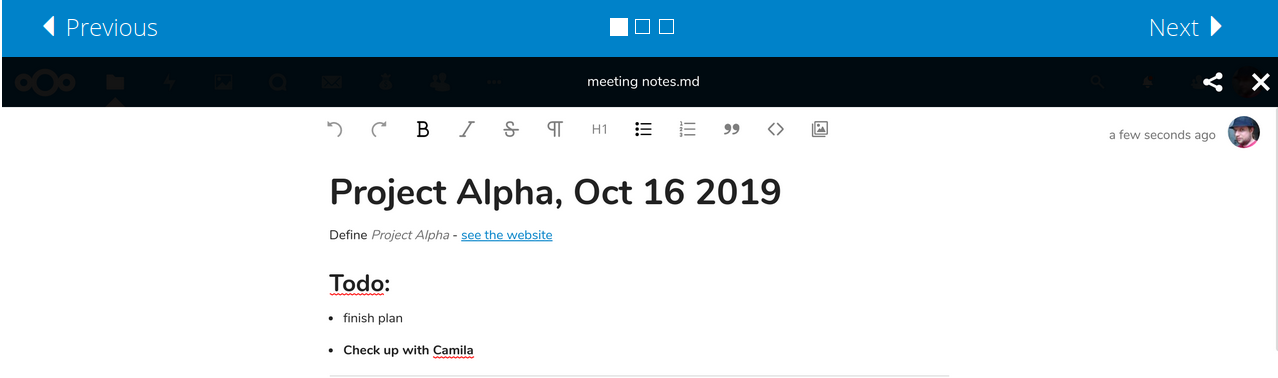
kyrofa
on 9 Jan 2020
And is it also like that in v17 installed without snap?
Flaburgan
on 10 Jan 2020
That bug may not actually be specific to the snap, actually. Dare I say it may not be a bug at all, just an unmet expectation given the app screenshot. @the-sane, is that ridiculous of me to say?
Is that the only currently known bug?
Yes, although we don't tend to continue searching for issues once a big one is found.
If so I mean I can live with that
I could as well. However, we take the fact that the snap automatically updates very seriously. We will not automatically break anyone if we can help it, and this has become the default text editor in v17.
kyrofa
on 13 Jan 2020
Also, @the-sane I've started adding hackarounds to see if we can unblock things, by the way. That will only work for a subset of the issues we've discovered in the past, but little "apps aren't compatible" or "the upgrade process is kinda busted" issues should no longer be blocking. The text app looks like a JS or SCSS issue that we probably can't hack around here, but we'll see if that bug goes anywhere.
kyrofa
on 13 Jan 2020
little "apps aren't compatible" or "the upgrade process is kinda busted" issues should no longer be blocking.
That's the news I've been hoping for, and it is indeed fantastic news. Thank you for taking the time to add those hackarounds. Those are exactly the issues that I suspect upstream doesn't care about since they consider our automatic upgrade situation a special, non-standard configuration. Hopefully this gets the snap's updates rolling along more smoothly. A million thanks!
That bug may not actually be specific to the snap, actually. Dare I say it may not be a bug at all, just an unmet expectation given the app screenshot. @the-sane, is that ridiculous of me to say?
Unless you're saying that happens on a "standard install" as well as the snap, then to my knowledge the problem is specific to any install where the apps directory is in a different location than the "standard install", such as the snap. Recall that this problem is caused by the same bug that spams "ResourceLocator cannot find web root" in our logs. See #902 and my upstream summary of everything we know so far at https://github.com/nextcloud/server/issues/13556#issuecomment-518293309. (Side note: I don't want to hijack your issue report in the text app's github by posting that there without your input, just in case you're trying to get more visibility outside of the upstream bug report. If you want me to mention it there let me know and I will.)
As a reminder,
@juliushaertl directed us here:
https://github.com/nextcloud/nextcloud-snap/issues/902#issuecomment-510387708
This is most likely an issue of https://github.com/nextcloud/server/blob/0eebff152a177dd59ed8773df26f1679f8a88e90/lib/private/Template/ResourceLocator.php#L128 that doesn't detect the webroot properly if the apps directory is in a different place.
As far as whether we should continue blocking v17 for this, I think we're at the point where we can't. (edit: I forgot that there was finally some forward momentum on that issue and maybe was overly harsh in my initial wording here) I think we should push out the update even if the toolbar is going to be broken for everyone. To me, keeping everyone's security up to date is more important than risking broken features.
the-sane
on 13 Jan 2020
Unless you're saying that happens on a "standard install" as well as the snap
That's actually exactly what I'm saying. I tried to look into why this is happening, and fired up my nextcloud dev environment to do so. It happens on the stable17 branch straight out of the box with the default configuration. The screenshot on that bug report is from that Nextcloud install, not the snap.
kyrofa
on 13 Jan 2020
That's actually exactly what I'm saying.
Oh, that's a new development then. I wonder what has changed to cause it because it was working in v17 at some point based on the old comments in that upstream issue. I also forgot that there was finally some forward momentum there. I don't think any of those changes have been integrated yet though so they can't be responsible, right?
the-sane
on 13 Jan 2020
Even if that gets solved though, it will probably just return us to the place we were before where it works on the standard install but is broken for the snap because of the web root issue.
In any case, my current opinion is that, as much as that web root issue frustrates me, I don't want to be left on an unsupported release because of it. I would rather have a broken toolbar than broken security.
the-sane
on 13 Jan 2020
Yeah I'm pretty surprised myself. The dev setup is about as simple as a PHP app can get, but maybe I did something stupid. We'll see what they say on the bug. Until I can confirm that the real-deal upstream Nextcloud DOESN'T have that problem, I can't really continue experimenting with patches to fix it here :stuck_out_tongue: . @kesselb might be able to help us test that out as well.
kyrofa
on 13 Jan 2020
In any case, my current opinion is that, as much as that web root issue frustrates me, I don't want to be left on an unsupported release because of it. I would rather have a broken toolbar than broken security.
Agreed. We're not quite there yet, 15 16 and 17 are still all supported.
kyrofa
on 13 Jan 2020
@the-sane did you test out the text app on a .txt file? Or a .md file? The toolbar doesn't appear for .txt files, but _does_ for .md files. Both from source and in the snap.
kyrofa
on 13 Jan 2020
@kyrofa Understood, but now switch to the dark theme and watch your toolbar disappear again for .md files. The missing toolbar was originally reported by @szaimen over here: https://github.com/nextcloud/text/issues/187#issuecomment-514387337 and then tied back to the snap's webroot issue by @juliushaertl.
I know there's a lot of information to keep track of with this problem across several different issue reports, which is why I tried to compile it all into that one comment for everyone. All roads lead back to this upstream issue: https://github.com/nextcloud/server/issues/13556#issuecomment-518293309.
the-sane
on 13 Jan 2020
Ah ha! Okay confirmed, dark mode is where it breaks. Okay I actually feel a lot better about that, now. It means that the text app is NOT broken in a default install, which in my mind downgrades that issue from a blocker to an annoyance. Thoughts?
kyrofa
on 13 Jan 2020
At this point, because v18.0 is now days away, I agree let's not block on this issue any longer. I do, however, want to echo a lot of other folks who have commented on various webroot threads and say that it's not merely an annoyance, it is incredibly annoying. My logs are all but unreadable with every app generating a webroot error on every page load, and I do use dark mode for everything so the missing toolbar will kinda suck when I want to edit my markdown files on the web.
In short, as long as we don't throw the problem by the wayside then yes, let's call it an annoyance and get everyone up to date :)
the-sane
on 13 Jan 2020
Oh yes, this is very very annoying, that's my highest score for something that's not blocking :stuck_out_tongue: . We have a good bug logged for it, and now that I actually know what I'm testing I can properly take @kesselb's patches for a spin.
kyrofa
on 13 Jan 2020
Good news. Now that I finally understand the issue here, I can confirm that the patches in https://github.com/nextcloud/server/issues/13556 solve the issue.
kyrofa
on 14 Jan 2020
That's great news! Thank you, @kyrofa, and I'm sorry I wasn't able to be more helpful testing those patches. That's usually right in my wheelhouse but these past few months have been absolute chaos for me. The lack of time is one of the main reasons I stick with the snap, knowing that you and the others here have a handle on things so I don't have to worry about managing that part of my server. Your efforts here are hugely appreciated!
the-sane
on 14 Jan 2020
Oh I totally get it, my schedule has been the same lately. Just talking through things is very helpful, too, so I appreciate it!
kyrofa
on 14 Jan 2020
Just read through this thread and want to throw a hip-hip-hooray to our auto update heroes. Do yall have a tip jar or a opencollective or somerthing?
 ryanprior
on 15 Jan 2020
ryanprior
on 15 Jan 2020
On the other hand: admins should then get informed, that the auto-update of nextcloud-snap is no longer working. I have currently no idea how you could do that.
There is a working script that informs all admin users in the Nextcloud VM now. Maybe it could also get used here?
szaimen
on 15 Jan 2020
@szaimen I don't think we need it anymore for the v17 update, but I'd like to have a look at that script because it could be useful for other updates or issues. Can you link it?
the-sane
on 15 Jan 2020
The current version was merged here but we are currently reworking the function to make it more efficient here.
szaimen
on 15 Jan 2020
@szaimen I like this, thanks for bringing it up. Since this issue will be going away soon (hopefully), can you plop it into a new feature request so it has its own place to live for future reference?
Heads up, @kyrofa, this could be useful down the line if admins really need to be notified of something. At its core, it's just looping through all users and grepping for that admin tag, then using the existing occ notification:generate feature to create a web notification for each of those found users. It could take a while on large instances, so I see it being used as a last resort only if we know an update will break something but there's nothing we can do about it and the update has to be pushed out anyway.
the-sane
on 16 Jan 2020
@szaimen I like this, thanks for bringing it up. Since this issue will be going away soon (hopefully), can you plop it into a new feature request so it has its own place to live for future reference?
I opened https://github.com/nextcloud/nextcloud-snap/issues/1220 for that 👍
szaimen
on 16 Jan 2020
Hey @kyrofa (and others), just wanted to say I wandered to this issue via a Google search, a little bit salty about how my Nextcloud snap is always so far behind. I had no idea the lengths you all were having to go through to keep things updated, but safe, but also working. Cheers, you all are doing great.
Looking forward to getting 17 and (eventually) 18 and beyond. Thanks for all you do!
 hexydes
on 18 Jan 2020
hexydes
on 18 Jan 2020
In my professional opinion, the project's codebase is not that healthy and that concerns me outside of this entire conversation; I'm starting to question how smart it is to trust it with my data.
@kyrofa that's a big statement! Should we all start looking for alternatives or were you just feeling gloomy that day?
 auberginepop
on 20 Jan 2020
auberginepop
on 20 Jan 2020
@auberginepop I wish I could say that I was just in a bad mood that day, but I stand by that statement. In the interest of not pulling this issue too far off topic (as I already did), anyone is welcome to shoot me an email to discuss that further.
kyrofa
on 20 Jan 2020
🎉
szaimen
on 24 Feb 2020
Related issues
 dutchievj
·
4Comments
dutchievj
·
4Comments
 pilsnerbeer
·
6Comments
pilsnerbeer
·
6Comments
 edrohler
·
3Comments
edrohler
·
3Comments
 WereCatf
·
3Comments
WereCatf
·
3Comments
 mo-seph
·
6Comments
mo-seph
·
6Comments
Most helpful comment
Hey @kyrofa (and others), just wanted to say I wandered to this issue via a Google search, a little bit salty about how my Nextcloud snap is always so far behind. I had no idea the lengths you all were having to go through to keep things updated, but safe, but also working. Cheers, you all are doing great.
Looking forward to getting 17 and (eventually) 18 and beyond. Thanks for all you do!