Nextcloud-snap: No office suite on 18.0.4?
Describe the bug
After updating to NC18, I tried to get the Collabora office suite working but I couldn't. I tried following this article but no help. On a fresh snap install, I found the office working out of the box. What gives?
To Reproduce
Steps to reproduce the behavior:
- update to 18.0.4 snap
- no office
OS/snapd/snap version
What OS and version are you running? Please also include the output of the
following commands:
$ snap list nextcloud
18.0.4snap1 rev 20498 latest/stable
and:
$ snap version
snap 2.44.3
snapd 2.44.3
series 16
ubuntu 19.10
kernel 5.3.0-46-generic
 pilsnerbeer
All 6 comments
Your linked article is about OnlyOffice, this is a different thing than Collabora.
Could you explain more specifically, what you want to do and what you already tried?
 derhagen
on 25 Apr 2020
derhagen
on 25 Apr 2020
I didn't realize that. I am trying to install the Word/sheet editing capabilities on my NC instance. I was led to believe the office programs would come preinstalled in NC 18 but I am not able to open or create any word documents from web.
pilsnerbeer
on 25 Apr 2020
I was expecting that, too, somehow. Nevertheless, since v18 it is pretty easy to install OnlyOffice. You need to install these two apps:
- https://apps.nextcloud.com/apps/onlyoffice
- https://apps.nextcloud.com/apps/documentserver_community
The Document Server App is known to timeout if you install it from the web and have a slow internet connection, but this is worked on. If you experience timeout problems, I described a workaround in https://github.com/nextcloud/nextcloud-snap/issues/1228#issuecomment-614667514
derhagen
on 25 Apr 2020
Works great. Thanks a lot!
pilsnerbeer
on 25 Apr 2020
I was led to believe the office programs would come preinstalled in NC 18 but I am not able to open or create any word documents from web.
I was expecting that, too, somehow.
When you install Nextcloud fresh, the install a.k.a. "create admin account" screen looks like this:
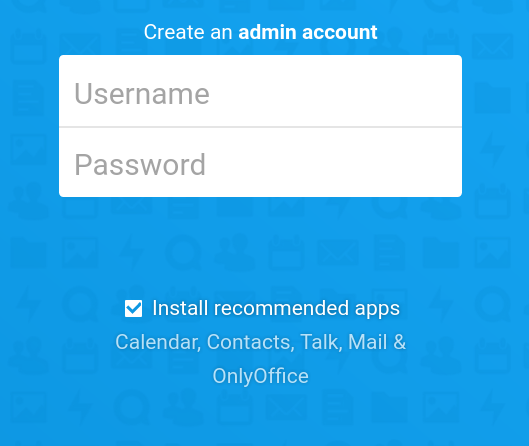
If you leave that "Install recommended apps" box checked, you do indeed end up with office programs preinstalled. However, if you uncheck it, you don't get them. Nextcloud also doesn't force these upon users who upgraded from a previous release (a smart move, I think), which means if you upgraded to v18 you'll need to install them yourself.
Thank you @derhagen for the helpful comment, this wasn't the only issue opened about this and I'm referring folks to your comment.
 kyrofa
on 25 Apr 2020
kyrofa
on 25 Apr 2020
@derhagen @kyrofa Thanks for the great information about what's happening behind the scenes!
I think I'm getting close on this one, I was able to install OnlyOffice via the normal app install method, however when I try to install Document Community Server from the CLI, I get this
The current PHP memory limit is below the recommended value of 512MB.
I was getting that same error message when I viewed the log when trying to install via the web interface. Any idea how I can fix that?
EDIT: UPDATE, GOT IT WORKING
Do the following:
- Log in to server via CLI
- Run command 'sudo snap set nextcloud php.memory-limit=512M'
- Go back to NextCloud >> User icon in corner >> Apps >> (search) Community Document Server >> Install
- Wait a little bit (took a minute or two on mine)
- (maybe optional?) I left the screen thinking it had timed out, but looks like it installed. When I searched for "Community Document Server" again, it looked like it was installed but not enabled, so I enabled it.
- Log out, log back in.
- Try making a new item, you should see Document, Spreadsheet, and Presentation as options now.
Thanks for the help everyone!
 hexydes
on 25 Apr 2020
hexydes
on 25 Apr 2020
Related issues
 pheiduck
·
8Comments
pheiduck
·
8Comments
 WereCatf
·
3Comments
WereCatf
·
3Comments
 JWise1203
·
5Comments
JWise1203
·
5Comments
 edrohler
·
3Comments
edrohler
·
3Comments
 tinokizis
·
8Comments
tinokizis
·
8Comments
Most helpful comment
I was expecting that, too, somehow. Nevertheless, since v18 it is pretty easy to install OnlyOffice. You need to install these two apps:
The Document Server App is known to timeout if you install it from the web and have a slow internet connection, but this is worked on. If you experience timeout problems, I described a workaround in https://github.com/nextcloud/nextcloud-snap/issues/1228#issuecomment-614667514