Nextcloud-deck: Labels in cards are added with every save action
Please use GitHub reactions 👍 to show that you are affected by the same issue. Please don't comment if you have no relevant information to add!
Describe the bug
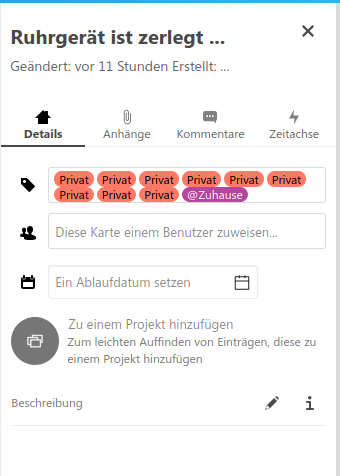
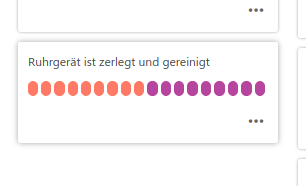
When a card is created from the Android app, every "save" adds another one to all existing labels, so that the label is included multiple times. The effect does not show when a card is created in the web interface and then saved from Android.
To reproduce
Issue is reproducible with an account from try.nextcloud.com:
- [X] Yes
- [ ] No
Steps to reproduce the behavior:
- Create a card (in any board)
- Click on 'Label' and pick one or more labels
- Click 'Save' in the top right corner of the card editor window
- Check labels in web interface
- Click 'Save' in the top right corner of the card editor window
- Check labels in web interface -> there are now two labels of each previously selected labels
... on any save action, one more label of previous selected labels is added
Expected behavior
A save action should only save what's on the editor screen
Screenshots
Versions
- Nextcloud: 18.0.7
- Nextcloud Deck: 1.0.5
- Nextcloud Android: 3.12.1
- Nextcloud Android Deck: 1.9.3
Smartphone (please complete the following information):
- Device: Xiaomi Poco F1
- Android-Version: 10
- App-Store:
- [X] Google Play Store
- [ ] Google Play Store (Beta channel)
- [X] F-Droid
- [ ] Huawei AppGallery
Are you using LDAP?
- [ ] Yes
- [X] No
Stacktrace
 JoergPalmer
All 12 comments
Thank you for the report. While i agree that the Android app has clearly a bug here, i still would like to mention @juliushaertl as this should be fetched at least at the API 😄
 stefan-niedermann
on 4 Aug 2020
stefan-niedermann
on 4 Aug 2020
on the web app it is really weird how to get rid of the multiple labels. If you click on the label in the list one dissappears at a time, not all at once...
 reox
on 5 Aug 2020
reox
on 5 Aug 2020
on the web app it is really weird how to get rid of the multiple labels. If you click on the label in the list one dissappears at a time, not all at once...
True .. also for me all Android app created cards get labels added, not just the one I'm saving.
JoergPalmer
on 5 Aug 2020
@reox In the Web UI, click on the tags, you will see your tag with a check in front of it. You can click multiple times on it (without leaving the edit mode or save the card). Click as often as you need to remove all the wrong tags as a workaround.
stefan-niedermann
on 5 Aug 2020
For me, all cards created from the Android app get additional labels, not just the one I'm saving.
JoergPalmer
on 5 Aug 2020
Ok, I was able to reproduce it. Most likely my fault, I'll fix that as soon as possible.
 desperateCoder
on 5 Aug 2020
desperateCoder
on 5 Aug 2020
Yep, I found it, it is the same as here: #640
Root cause:
https://github.com/nextcloud/Android-SingleSignOn/issues/231
I guess we're blocked here.
desperateCoder
on 5 Aug 2020
Can I get confirmation of one thing? Until there is fix for this issue, I should avoid creating cards within the Android app, correct? My understanding is that cards created from the web app don't have the same issue.
 aproposnix
on 7 Aug 2020
aproposnix
on 7 Aug 2020
@aproposnix almost, you can create cards as many as you want, the problem relies in the labels assignment
what actually happens:
- you create a card (no problem)
- the label is assigned -> call to server
- server assigns, but doesn't return any data (ok so far)
- the SSO-Library fails internally, telling our app it didn't work
- so at the next sync (!) the card is still marked as "not synced yet", so it tries again (procedure starts again at the second point)
-> you end up with a sh*itload of assigned labels
Again: @juliushaertl yep, we have a bug here, but the backend should answer 200 or 204 and not do anything else, if the label is already assigned.
EDIT:
@aproposnix i guess you are asking for a quickfix? clone the card, delete the original one and do not assign a label via app, assignments done in web-UI are safe. do the steps from web ui, since deleting cards has the same issue (no answer, SSO error, still marked as "to delete")
desperateCoder
on 7 Aug 2020
Fix shipped with 1.9.7.
stefan-niedermann
on 9 Aug 2020
thank you everyone who worked to resolve this! I can confirm from my side that I'm not getting duplicated tags.
aproposnix
on 11 Aug 2020
@aproposnix you're welcome 😄, sorry for the inconveniences!
desperateCoder
on 11 Aug 2020
Related issues
 simonspa
·
5Comments
simonspa
·
5Comments
 jancborchardt
·
7Comments
stefan-niedermann
·
7Comments
jancborchardt
·
7Comments
stefan-niedermann
·
7Comments
 Aquariu
·
5Comments
Aquariu
·
5Comments
 mbousq
·
5Comments
mbousq
·
5Comments