Nextcloud-deck: Crash on Oneplus 3T on new task
Describe the bug
Unpon creating a new task, crash on method getLocalId()
To Reproduce
Steps to reproduce the behavior:
- Open App
- Click on + (new task)
- Enter a name
- Click on checkmark to save task
- App crashes
Expected behavior
App does not crash
Screenshots
Smartphone (please complete the following information):
- Device: Oneplus 3T (device immobile since opening app, occuring on mobile data or Wifi)
- Android-Version: 9
- App-Store:
- [X] Google Play Store
- [ ] F-Droid
Stacktrace
App Version: 1.0.2

App Version Code: 1000002

App Flavor: play


Files App Version Code: 30110190


---


OS Version: 3.18.120-perf+(1911042108)

OS API Level: 28

Device: OnePlus3T

Manufacturer: OnePlus

Model (and Product): ONEPLUS A3003 (OnePlus3)


---


java.lang.NullPointerException: Attempt to invoke virtual method 'java.lang.Long it.niedermann.nextcloud.deck.model.User.getLocalId()' on a null object reference

at it.niedermann.nextcloud.deck.persistence.sync.SyncManager.lambda$createFullCard$20$SyncManager(SyncManager.java:672)

at it.niedermann.nextcloud.deck.persistence.sync.-$$Lambda$SyncManager$MEPZX8q8wYD3alWT5IsyKZLrs-o.run(Unknown Source:12)

at java.lang.Thread.run(Thread.java:764)
 Chluz
Chluz
All 40 comments
Dear @Chluz,
to fix this, we need some more information:
- thank you for the bug report. Does this only happen on new tasks or also on editing?
- which server version exactly are you using?
- does it also happen on other boards / accounts?
- how is the setup of this board? are you the owner? did people share it with you (which permissions are granted for you)
Thank you in advance
 stefan-niedermann
on 7 May 2020
stefan-niedermann
on 7 May 2020
Hi Stefan,
thanks for the quick reply:
- It only happens on new tasks
- I'm using version 1.0.0 of Deck, selfhosted on Nextcloud 18.0.4
- It happens on other boards as well. I could not test other accounts.
- I am testing on board that I have created and own. They are not shared.
Chluz
on 7 May 2020
Did you use the 1.0.0-beta of the server app before? There was a bug regarding to the user-representation in the servers responses. If you upgraded the afterwards, this could be the cause...
 desperateCoder
on 7 May 2020
desperateCoder
on 7 May 2020
I don't think I used that version.
For good measure, I fully deleted the app on the server (including all deck tables) and then reinstalled and reenabled the app; same result.
Chluz
on 7 May 2020
Have you tried to clear the storage of the android app, too?
Android settings → Apps → Nextcloud Deck → Storage → Delete storage
If this doesn't help either we will need an test account to reproduce this issue.
stefan-niedermann
on 7 May 2020
Clearing the storage did not work. I can create a test account on my server if required
Chluz
on 7 May 2020
This would help a lot! You can be sure, we wouldn't release the app, if we also had this kind of issues on our instances.
desperateCoder
on 7 May 2020
you can send the credentials of the test account to [email protected] i will share them with @desperateCoder only.
stefan-niedermann
on 7 May 2020
Done, thanks again
Chluz
on 7 May 2020
Received. Could log in, create a new task and sync it to the server successfully at the first glance, will investigate further...
Might be a local / environment issue.
stefan-niedermann
on 7 May 2020
I suspect something specific to oneplus devices, there was another bug that was identical a while back from another user, I think with a oneplus device
Chluz
on 7 May 2020
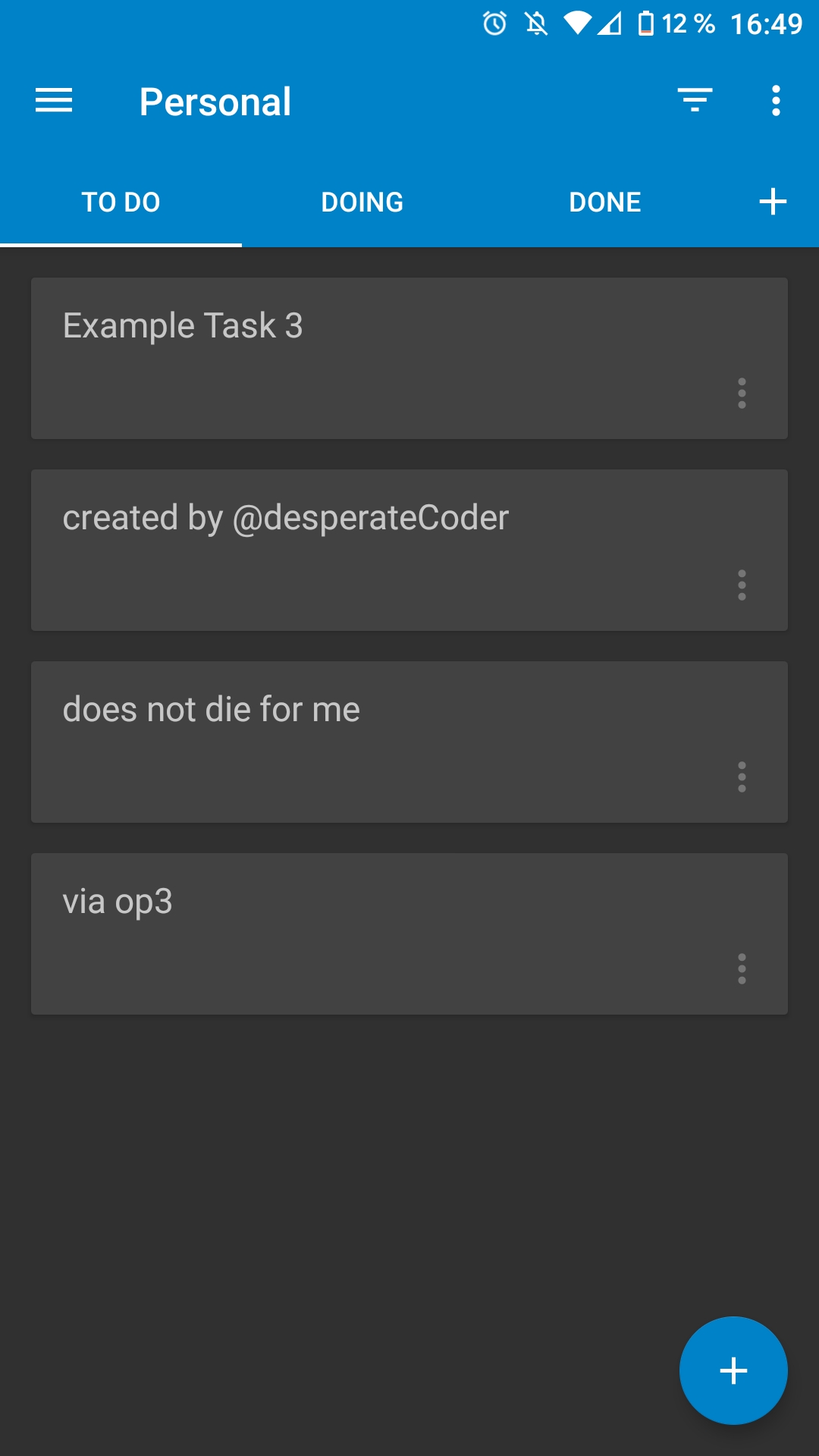
Mine is a OnePlus 3 (no T), but with a custom rom (Android 10), hold on, I'll give it a try.
desperateCoder
on 7 May 2020
No issues. 😞
desperateCoder
on 7 May 2020
ok, I tested with the test account I created for you, and no issues.
I am using LDAP and SSO for the main account. I will check with another account on that. Thanks for your help
Chluz
on 7 May 2020
@Chluz this is quite insteresting, i don't think we ever tested it this way. We use the Nextcloud SSO library for network communication. Maybe our friends @tobiasKaminsky and @David-Development are able to tell us, if this should generally be working in this constellation?
If they say it should generally work, we could investigate it further by building special APKs for you to gather more information. Also, if you say your data isn't critical, you could capture the logs of the app with another app like MatLog, so we can tell if the users are validly (is this even a word?) delivered by the server.
desperateCoder
on 7 May 2020
@Chluz said, he can edit task but not create tasks. Therefore i assume the SSO bridge itself is working well.
How do we determine the userId when create a new card? I think we use the username of the current account, no? This might be wrong in case of using LDAP on the server.
stefan-niedermann
on 7 May 2020
I think @juliushaertl can tell us what we have to consider when creating new cards in a LDAP scenario regarding the user.
stefan-niedermann
on 7 May 2020
@stefan-niedermann absolutely valid point. The uid of a user should match the userName of the account. Does anyone know an easy way to look into our SQLite DB? Sure, ADB would work, but i dont know if @Chluz is fimiliar with ADB and Android stuff. Are you?
desperateCoder
on 7 May 2020
I'm familiar with ADB enough to allow me to flash bootloaders and recoveries :)
Chluz
on 7 May 2020
Ok, I have tested the following:
- New account on LDAP and SSO: working fine
- Old account (different non admin user) on LDAP and SSO: working fine.
Only my account seems to not be working...
Chluz
on 7 May 2020
Only my account seems to not be working...
is this an admin?
What other apps do you have enabled on NC server?
 tobiasKaminsky
on 7 May 2020
tobiasKaminsky
on 7 May 2020
This is indeed an admin.
These are the enabled apps:
Accessibility   1.4.0   Featured
Activity    2.11.0  Featured
Auditing / Logging  1.8.0   Featured
Bookmarks   3.0.11
Calendar    2.0.3   Featured
Carnet  0.20.0
Circles 0.18.5  Featured
Collaborative tags  1.8.0   Featured
Comments    1.8.0   Featured
Contacts    3.3.0   Featured
Deck    1.0.0   Featured
Draw.io 0.9.5
External storage support    1.9.0   Featured
Federation  1.8.0   Featured
File sharing    1.10.1  Featured
First run wizard    2.7.0   Featured
Group folders   6.0.6   Featured
LDAP user and group backend 1.8.0   Featured
Log Reader  2.3.0   Featured
Maps    0.1.6   Featured
Mind Map    0.0.21
Monitoring  1.8.0   Featured
Nextcloud announcements 1.7.0   Featured
Notifications   2.6.0   Featured
ONLYOFFICE  4.1.4   Featured
Password policy 1.8.0   Featured
PDF viewer  1.7.0   Featured
Photos  1.0.0   Featured
Polls   1.4.3
Privacy 1.2.0   Featured
Recommendations 0.6.0   Featured
Right click 0.15.2  Featured
Share by mail   1.8.0   Featured
SSO & SAML authentication   3.0.1   Featured
Support 1.1.0   Featured
Talk    8.0.8   Featured
Tasks   0.12.2  Featured
Text    2.0.0   Featured
Theming 1.9.0   Featured
Two-Factor TOTP Provider    4.1.3   Featured
Update notification 1.8.0   Featured
Usage survey    1.6.0   Featured
Versions    1.11.0  Featured
Video player    1.7.0   Featured
Default encryption module   2.6.0   Featured
Deleted files   1.8.0   Featured
@stefan-niedermann absolutely valid point. The
uidof a user should match theuserNameof the account.
@desperateCoder what is userName for you? The one he logged in with?
Then this might be the reason, as this can be anything in a ldap scenario (and elsewhere).
E.g. you can have
- userId: tobi
- loginName: [email protected] OR tobi OR telephoneNumber (in LDAP)
- pass: will be app token
Why does it need to match?
tobiasKaminsky
on 7 May 2020
@tobiasKaminsky sorry for the late response!
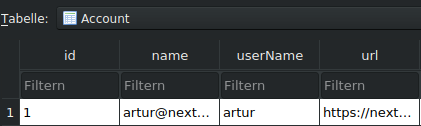
this is userName:
SingleAccountHelper.setCurrentAccount(getApplicationContext(), account.name);
syncManager.createAccount(new Account(account.name, account.userId, account.url));
(where account is the SingleSignOnAccount selected by the user in your dialog)
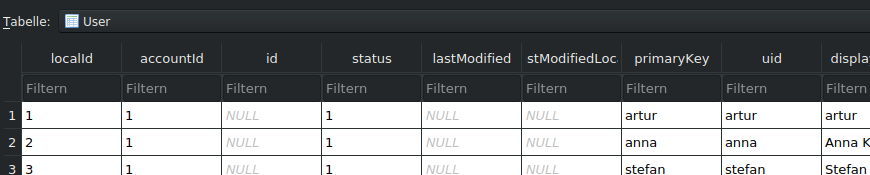
The other question is: is this the username returned by the server (@juliushaertl) in the participants / acl / comments / assigned users?
This is the data in our database:
(Account:)
(User:)
desperateCoder
on 8 May 2020
If you need any further info on that specific account of mine which is failing, by running a special APK with more logging for example, do tell me. I'm very much interested in helping out to determine what is going wrong as this is my personal account :).
Chluz
on 9 May 2020
@Chluz can you please download and install this test app: https://github.com/stefan-niedermann/nextcloud-deck/suites/674209484/artifacts/6123043 ?
It should give us a better error message in this scenario.
stefan-niedermann
on 12 May 2020
@Chluz the app will crash, but provide your account ID and the known user IDs. just post the exception message as you initially did, as you created this issue.
desperateCoder
on 12 May 2020
Thanks very much for that version. the crash trace is below.
It's showing the user ID that was previously created from the ldap UUID attribute. I some time ago changed that setup using the option Internal Username Attribute = sAMAccountName in the LDAP and corrected the database accordingly. I'm now going t look through the database to see why this user ID is coming up.
App Version: 1.3.0
App Version Code: 1003000
App Flavor: dev

Files App Version Code: 30110190

---

OS Version: 3.18.120-perf+(1911042108)
OS API Level: 28
Device: OnePlus3T
Manufacturer: OnePlus
Model (and Product): ONEPLUS A3003 (OnePlus3)

---

java.lang.NullPointerException: unable to gather owner information for account "D6A285EE-6F69-47A0-8B33-1BED5552623E", available usernames are: "chluz | chluz",
at it.niedermann.nextcloud.deck.persistence.sync.SyncManager.lambda$createFullCard$20$SyncManager(SyncManager.java:708)
at it.niedermann.nextcloud.deck.persistence.sync.-$$Lambda$SyncManager$MEPZX8q8wYD3alWT5IsyKZLrs-o.run(Unknown Source:12)
at java.lang.Thread.run(Thread.java:764)
Well, this helps already a lot. I'd like to add, that "chluz | chluz" is not the actual username, "chluz" is. I output two database columns separated by “ | ". So keep that in mind, in case you correct your database.
@tobiasKaminsky any clue, what went wrong here?
desperateCoder
on 12 May 2020
I've gone through the database, and cannot find any relevant tables where D6A285EE-6F69-47A0-8B33-1BED5552623E appears. If anyone has a tip on where to look i'd be happy to look again
Chluz
on 12 May 2020
Have a look at oc_deck_cards, there should be a column named "owner"
desperateCoder
on 12 May 2020
Oh, I should also mention, that this column should say "chluz". This means, that you could replace that by D6A285EE-6F69-47A0-8B33-1BED5552623E, not the other way. To change the account name, I have no clue where to do so. Maybe @tobiasKaminsky or @juliushaertl can tell? I am only the Android-sync-guy, so pardon me, if this isn't very helpful.
desperateCoder
on 12 May 2020
Thanks desperateCoder. I check, and I see a few cards, but they are all owned by 'chluz' (and some of our test users)
Chluz
on 12 May 2020
Haha, too fast :D thanks for the insight in any case. Lets see if someone has an idea of another table to look into
Chluz
on 12 May 2020
Well, our messages kind of collided. 😄
desperateCoder
on 12 May 2020
Changing something manually in database always asks for trouble…
If every userID was replaced correctly in DB, I suspect that still the old value is stored in NC Files Android app, so maybe try remove and re-add the account…
tobiasKaminsky
on 14 May 2020
Hi TobiasKaminsky, thanks for the input. I know that its always a bad idea to do this, but I needed to reorganise the usernames I believe to get sso working (from memory).
I have tried to delete the account in NC app and readd, same issue. I will take another look at the database. Maybe I missed something.
Chluz
on 14 May 2020
@Chluz have a look at this one: https://github.com/stefan-niedermann/nextcloud-deck/issues/503#issuecomment-630324302
This seems to be a magic hack or something, maybe it solves it for you as well?
desperateCoder
on 19 May 2020
That worked ! I did as suggested in the comment above (deleted the storage rather than cache just to be safe) and everything is working now. Thanks @desperateCoder !
I had tried to delete the account before, but never from both the Deck and Nextcloud apps at the same time.
Chluz
on 19 May 2020
😆 I guess we have some kind of atomic bomb for those bugs now.
Glad it worked out for you @Chluz, you're welcome!
desperateCoder
on 19 May 2020
Related issues
 mbousq
·
5Comments
mbousq
·
5Comments
 cappuMUC
·
3Comments
cappuMUC
·
3Comments
 mithodin
·
7Comments
mithodin
·
7Comments
 timkrief
·
3Comments
stefan-niedermann
·
7Comments
timkrief
·
3Comments
stefan-niedermann
·
7Comments