Next-plugins: next-css doesn't support server side rendering
In this small repo I've illustrated next-css not working with SSR, this is a blocker from my team moving off of https://github.com/traveloka/styled-modules which we're super eager to do.
Great work on Next.js 5.0! Can't wait to fully migrate to it :)
I would mind if Next.js apps had to have a custom _document.js to support this, but I guess thats more of an implementation detail.
 hanford
All 27 comments
Noticed this as well. As a temporary workaround, it's possible to disable the ExtractTextPlugin after it's been added by next-css via your next.config.js so it operates the same as in dev mode:
const withCSS = require('@zeit/next-css');
const ExtractTextPlugin = require('extract-text-webpack-plugin')

module.exports = withCSS({
  webpack: (config) => {
    config.plugins = config.plugins.map((p) => {
      if (p instanceof ExtractTextPlugin) {
        p.options.disable = true
      }
      return p
    })

    return config
  },
})
 ScottPolhemus
on 6 Feb 2018
ScottPolhemus
on 6 Feb 2018
Running into this issue as well
 Jarred-Sumner
on 6 Feb 2018
Jarred-Sumner
on 6 Feb 2018
As far as I can tell, there are two issues preventing the extract plugin from working as intended:
- The CSS file is extracted to
/.next/static/style.css, but static files aren't served from that directory or copied to the output folder when using theexportcommand. Moving the file up to/static/style.css(relative to the project root) would resolve that issue, though ideally next would support static assets from both directories. - In the SSR/static export environment, you will need a
<style>tag that references the CSS file somewhere in your app's<head>. This could be accomplished by adding some code to a custom document component (/pages/_document.js), which may or may not be within the scope of the plugin. For example this would include the appropriate style tag outside the dev environment:
<Head>
  {!this.props.dev && (
    <link rel="stylesheet" href={`${this.props.__NEXT_DATA__.assetPrefix}/static/style.css`} />
  )}
</Head>
@ScottPolhemus https://github.com/zeit/next-plugins/tree/master/packages/next-css#production-usage
 timneutkens
on 6 Feb 2018
timneutkens
on 6 Feb 2018
Having this issue also. Any CSS file that I import causes the FOUC.
 flippidippi
on 6 Feb 2018
flippidippi
on 6 Feb 2018
@timneutkens This is great, thanks! Those instructions work well for SSR, so I think the only remaining issue is that the /.next/static directory is not copied to the output folder when running next export.
For anyone following along, this just means you'll need to run cp -r .next/static out/_next after next export for this to work with the static export function for the time being (replacing out with your output folder if you specified a different one for export).
ScottPolhemus
on 6 Feb 2018
Running next build && next start with cssModules enabled, the generated class names do not match the HTML/JS output.
 thomaslindstrom
on 7 Feb 2018
thomaslindstrom
on 7 Feb 2018
I’ve made a PR for SSR support btw 👍🏻
timneutkens
on 7 Feb 2018
I seem to be experiencing the same issue as @thomaslindstrom. Any luck with that?
 maeertin
on 8 Feb 2018
maeertin
on 8 Feb 2018
Hey all,
I was trying to reproduce the bare minimum setup when I got unmatching classnames but ended up perhaps finding a another issue of component styles not getting bundled if not imported from the startpage (index.js) route. I tried to follow the instructions in the readme but perhaps I'm doing something wrong, any clues?
In the example repo I'm trying to use the<Button /> component (with it's styles) on the about.js route. However, the <Nav /> component is styled correctly on both routes.
Almost forgot, getting this issue when running next build && next start with cssModules: true.
Here's the repo https://github.com/maeertin/next-css-modules
maeertin
on 8 Feb 2018
For those that are reading this after version 0.1.0 (when https://github.com/zeit/next-plugins/pull/50 got merged), you no longer need to do what @ScottPolhemus is suggesting with !this.props.dev. After 0.1.0 the style.css file is now also generated in dev mode so you can just put a <link rel='stylesheet' href='/_next/static/style.css' /> in _document.js and you should be good to go in both dev and prod without FOUC. Thanks to @timneutkens for the PR!
 mitchellhuang
on 18 Feb 2018
mitchellhuang
on 18 Feb 2018
Subbing to this. The following doesn't work:
module.exports = withCss(
  withLess({
    cssModules: true,
  })
);
Removing withCss wrapper and it works fine, just I'm trying to pull in some external css from node_modules.
 Ehesp
on 18 Feb 2018
Ehesp
on 18 Feb 2018
I am experiencing an issue where my external css file doesnt get updated on client side page transitions. It only works flawless on ssr. What could cause this issue? Only way to get it properly working for me at the moment is to prefetch every css file.
 Marvin1003
on 2 Mar 2018
Marvin1003
on 2 Mar 2018
@hanford have you had a chance to see if the PR works for you?
Ehesp
on 6 Mar 2018
@Ehesp Did you get it working?
 crushy26
on 9 Mar 2018
crushy26
on 9 Mar 2018
@Ehesp Same for me 😕 I ended up with my own withSass Next plugin
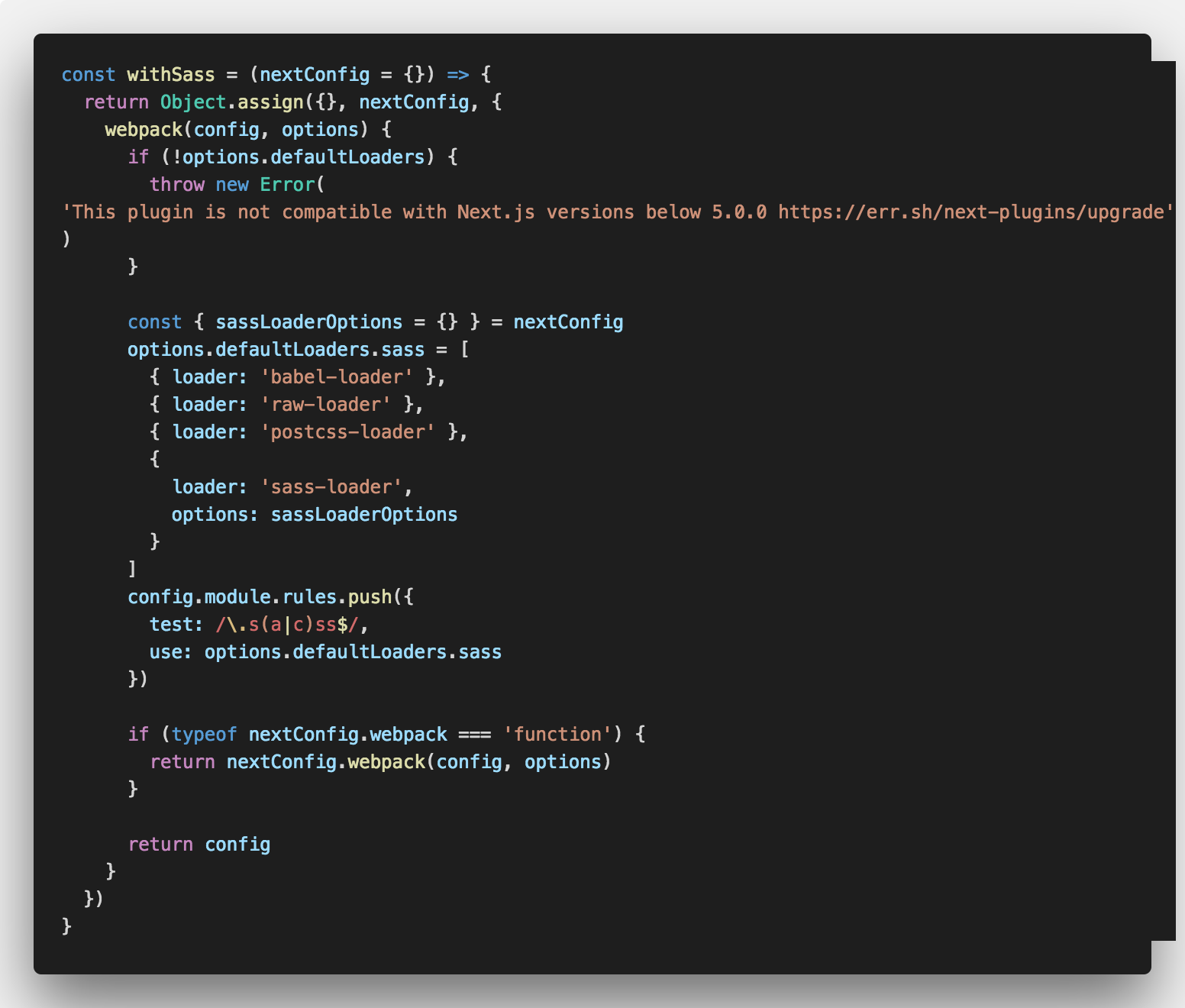
Then how I use it in my app

I sill have a specific rule to handle my css files
      config.module.rules.push({
        test: /\.css$/,
        use: ['babel-loader', 'raw-loader', 'postcss-loader']
      })
I am not sure it's 100% optimized though
 emyann
on 13 Mar 2018
emyann
on 13 Mar 2018
@Marvin1003 - Did you fix this? I am having same problem with next-sass. Client side transitions are not loading the updated style.css file. I have to reload the whole page in order to update the style.css file.
 prabu-ramaraj
on 13 Apr 2018
prabu-ramaraj
on 13 Apr 2018
@prabu-ramaraj sadly no.
I use external styled components now with which i can approach the same.
Marvin1003
on 13 Apr 2018
Just referencing this issue: https://github.com/zeit/next.js/issues/4184
 krokhale
on 23 Apr 2018
krokhale
on 23 Apr 2018
Nearly half a year.. Any updates about this "OMG Maximum" priority issue?
 breeswish
on 13 Jul 2018
breeswish
on 13 Jul 2018
Feel free to implement it yourself and contribute back with a plugin/example.
timneutkens
on 13 Jul 2018
I got this error when exporting a NextJS app with Antd + Less.
 revskill10
on 16 Jan 2019
revskill10
on 16 Jan 2019
@timneutkens Any clue where to start?
 stephankaag
on 7 Mar 2019
stephankaag
on 7 Mar 2019
You'll probably want to use https://github.com/zeit/styled-jsx#styles-in-regular-css-files instead of next-css.
timneutkens
on 7 Mar 2019
I was able to get this working using styled-jsx plugins. This example is for antd, probably similar for others:
.babelrc
{
  "presets": [
    [
      "next/babel",
      {
        "styled-jsx": {
          "plugins": ["styled-jsx-plugin-less"]
        }
      }
    ]
  ]
}
next.config.js
module.exports = {
  webpack: (config, { defaultLoaders }) => {
    config.module.rules.push({
      test: /\.less/,
      use: [
        defaultLoaders.babel,
        {
          loader: require('styled-jsx/webpack').loader,
          options: {
            type: 'global'
          }
        }
      ]
    });

    return config;
  }
};
_document.js
import React from 'react';
import Document, { Html, Head, Main, NextScript } from 'next/document';

import antdCustom from '../antd-custom.less';

class MyDocument extends Document {
  static async getInitialProps(ctx) {
    const initialProps = await Document.getInitialProps(ctx);
    return { ...initialProps };
  }

  render() {
    return (
      <Html>
        <Head>
          <style>{`body { margin: 0 } /* custom! */`}</style>
          <meta
            name="viewport"
            content="width=device-width, initial-scale=1, maximum-scale=1.0, user-scalable=no"
          />
          <meta name="apple-mobile-web-app-capable" content="yes" />
          <style>{antdCustom}</style>
        </Head>
        <body>
          <Main />
          <NextScript />
        </body>
      </Html>
    );
  }
}

export default MyDocument;
antd-custom.less
@import 'node_modules/antd/dist/antd.less';

@primary-color: #1890ff;
 tuckerconnelly
on 13 Jun 2019
tuckerconnelly
on 13 Jun 2019
I'm new to next-css. What exactly is wrong with server-side rendering and this plugin?
 bugproof
on 26 Aug 2019
bugproof
on 26 Aug 2019
Hi, thanks for creating an issue. We currently recommend using nextjs.org/docs/basic-features/built-in-css-support as the plugins have been deprecated in favor of the built-in support.
timneutkens
on 18 Dec 2020
Related issues
 eugeneross
·
34Comments
eugeneross
·
34Comments
 furedal
·
30Comments
furedal
·
30Comments
 Jauny
·
20Comments
Jauny
·
20Comments
 trusktr
·
27Comments
trusktr
·
27Comments
 romainquellec
·
12Comments
romainquellec
·
12Comments
Most helpful comment
Feel free to implement it yourself and contribute back with a plugin/example.