Next-plugins: CSS is imported in different order between dev and production
Bug report
Describe the bug
I am using scss and css-modules.
In my root directory, I have a styles-directory that is excluded from css-modules and imported in _app. These are my global styles.
When running npm run dev, my global styles and component-styles are all concatenated in to a single file, where my global styles comes first in this css. However, when I run npm run buildmy styles are first separated into two files (chunks) where the first imported file is my component-styles and the second file is the global styles. They are then imported by next in that order.
The order they are imported screws up the css as the global styles is expected to be imported first.
While playing around, i tested to turn off chunking by setting config.optimization.splitChunks = false in my webpack settings. I also moved the global styles in to my index-file just to see what happened when making next compile all css in to a single file.
The file resulted in a single file where the global styles where concatenated last, resulting with the same issue.
To Reproduce
- Setup project with sass and css-modules
- create a global styles
- exclude the global styles from css-modules
- import global styles-folder in _app
- create a component with css-module styling
Expected behavior
The global-styles should be imported before the component-styles
Alt. Css from Dev and Production mirror each others import-order
System information
- OS: macOS
- Version of Next.js: 7.0.3
 furedal
All 30 comments
same problem here
 adrienWeiss
on 10 Apr 2019
adrienWeiss
on 10 Apr 2019
Also encountered this issue during a prod deploy today. Of the two expected behaviors included in the issue, I'd say that "Css from Dev and Production mirror each others import-order" is more important.
 mkadin
on 25 Apr 2019
mkadin
on 25 Apr 2019
+1 for this issue.
And this is not an issue due to next-css. It's an issue of the webpack configuration somehow. I disabled the plugin and added the rules/plugins myself but I still get a strange order or the styles.
 ematipico
on 29 May 2019
ematipico
on 29 May 2019
I found the problem. In my case it's how my components are imported. _app and _error are two distinct components that work at the same level and if the same component is imported in both files, it's more likely that the styles imported inside _error will have more priority. I found it the hard way and this should be explained inside their documentation.
ematipico
on 30 May 2019
@timneutkens, why is it so hard to choose the cascading order of CSS files that an author wants?
I understand that as @ematipico points out that this is a webpack issue, but Next is built on webpack.
 morganfeeney
on 28 Aug 2019
morganfeeney
on 28 Aug 2019
@morganfeeney I'm not sure what your question is? It comes over as "Fix it"
 timneutkens
on 28 Aug 2019
timneutkens
on 28 Aug 2019
We're soon going to build css imports into Next.js by default and include a bunch of constraints that will make it really hard for ordering to go wrong, with the tradeoff of less flexibility, but solving the majority case.
timneutkens
on 28 Aug 2019
No @timneutkens it was more along the lines of, HELP!!!!
Mainly because it's extremely frustrating trying to do _Cascading Style Sheets_ using static / dynamic files simultaneously because of the lack of control over the order of stylesheets.
Next-css uses mini-css-extract-plugin, however the author of said plugin, which apparently _appends_ the stylesheet in the <head> states that it's not his responsibility (I can't remember the issue number but there is one) to provide options for things such as the order of stylesheets. The thing is, unless someone picks it up it's going to remain a problem, because as you know the order of CSS is fundamental to how CSS works.
Just so I can go back to my colleagues with some info on this, and maybe a way around this being a long-term issue within our codebase, how long is _soon_, roughly?
If you know of a good way to do this using next-css could you possibly provide an example in the next-css repo?
Also, what is the _majority case_? Is there a PR open?
morganfeeney
on 28 Aug 2019
We're currently writing up a RFC, I'm not going to make promises on a timeline.
In the case that you're using next-css it'll most likely require rewriting bits.
Current plan is to enforce css imports without css modules inside _app.js. Then pages are only allowed to have css modules (as those can be imported in any order).
Then eventually we can have separate css bundles for pages.
You can already only import one css file in _app that would solve it for the most part.
timneutkens
on 28 Aug 2019
Mainly because it's extremely frustrating trying to do Cascading Style Sheets using static / dynamic files simultaneously because of the lack of control over the order of stylesheets.
I understand that things can be frustrating. But I don't understand going into a certain tone just because of that. Especially when asking for help on software that you're using and is bringing value to the team that you work on.
The alternative could have been to make known you have the issue and ask how you can get involved in fixing the issue 🙏
timneutkens
on 28 Aug 2019
That is how we are structuring things currently, _app.js for global custom properties needed by all pages and components. Then CSS modules for anything that is a component, I think that could work out well.
The issue I am facing is that there is a static stylesheet added via <link> in <Head> in _app.js.
Either the order of that <link> or the order of the _chunk_ <link> is what me, and judging by the number of related issues, other folks want control over, but without having to study the inner workings of webpack, especially since you are essentially saying what should / should not be altered by enabling the next.config.js as means of control.
I am more than happy to assist you in helping others who have faced similar issues to myself, and I believe that seeing as CSS is my main thing maybe I could be of use.
How can I help out with this issue Tim?
morganfeeney
on 28 Aug 2019
In this case what I outlined wouldn't solve this issue. Why is the static stylesheet not imported into the css file? That solves both the ordering and avoids an extra roundtrip.
timneutkens
on 28 Aug 2019
We have multiple brands, and want to have a single codebase but use it as a base that can be themed based on the host URL. I don't seem to be able to import CSS in any way that allows me to change the path to the CSS file based on the host, for example here's the code we are using in _app.js:
import React from 'react';
import Head from 'next/head';
import App, { Container } from 'next/app';
import getBrandFromUrl from '../src/lib/urlHelper.js';

/* CSS needed by every page and component, uses resolve.alias */
import 'css/essential.css';

class MyApp extends App {
  static async getInitialProps({ Component, ctx }) {
    let pageProps = {};

    const isServer = typeof window === 'undefined';

    if (isServer) {
      pageProps.brand = getBrandFromUrl(ctx.req.headers.host);
    } else {
      pageProps.brand = getBrandFromUrl(window.location.host);
    }

    pageProps.themePath = `/static/themes/theme-${pageProps.brand}/style.css`;

    if (Component.getInitialProps) {
      pageProps = await Component.getInitialProps(ctx);
    }

    return {
      pageProps,
    };
  }

  render() {
    const { Component, pageProps } = this.props;

    return (
      <Container>
        <Head>
          <link rel="stylesheet" href={pageProps.themePath} />
        </Head>
        <Component {...pageProps} />
      </Container>
    );
  }
}

export default MyApp;
If there is a way to pass in the host then I could achieve what I want, something like:
import 'css/essential.css';
import `css/theme-${brand}/style.css`;
...It would produce a single stylesheet dynamically, and due to @import give me the control I want, as opposed to:
import 'css/essential.css';
...
<link rel="stylesheet" href={pageProps.themePath} />
...which produces a stylesheet dynamically, and a static link, but I have no control over the order of the <link> tags in the HTML.
morganfeeney
on 28 Aug 2019
@timneutkens where we can read more about this new way?
 egemon
on 3 Oct 2019
egemon
on 3 Oct 2019
@egemon I think this release covers it all: https://github.com/zeit/next.js/releases/tag/v9.0.7
morganfeeney
on 3 Oct 2019
I solved this issue by importing CSS in correct order.
import React from 'react';
import '../style.css';
import Menu from '../Components/Menu';
import Footer from '../Components/Footer';
style.css will be Imported first and them Menu and Footer components CSS will come after style.css.
I hope this will help.
One more thing. Never import css in _app.js or _document,js.
 sunnychevli
on 26 Dec 2019
sunnychevli
on 26 Dec 2019
Hello Team
I have facing issues regarding the next-CSS . I have using next-CSS but they are giving me a warning and when I removed the next-CSS from next.config file. my style CSS has not loaded chunks in the production. and my CSS is out of order in a production build.
Can you plz help me.
 ebs-PriyankaKanwar
on 4 May 2020
ebs-PriyankaKanwar
on 4 May 2020
we have updated next JS, all things are working fine except one the CSS is not loaded in proper order in production mode, however, it's working fine in dev mode.
Here are the versions
Node: v13.7.0
React:^16.12.0
NextJs:9.1.6
OS: Linux - ubuntu
Here is what I got when did build:
├ static/pages/_app.js 16.1 kB
├ chunks/1899c3d08f1d4a9ab6e4e22050e66cd1600464e8.b9ea19.js 3.53 kB
├ chunks/48183758.ede116.js 65 B
├ chunks/57a5805a715b88beb8aec3ac43d8f962ef8879cc.53c4e4.js 2.34 kB
├ chunks/9ed67fcaced240be487e7a2880bfff868999eacb.76e83a.js 8.29 kB
├ chunks/ab68c4ca07cacf4e3048ee2d6f69810106b4b489.68a8b3.js 10.4 kB
├ chunks/d32b6132cd0996134c9f87f7274f553f791cd563.18dde5.js 6.39 kB
├ chunks/d6e4d54ae3ad4e326943499c7720eb830c61721b.b7693f.js 4.41 kB
├ chunks/framework.4dd100.js 40.3 kB
├ runtime/main.d3f0e8.js 13.2 kB
├ runtime/webpack.361a6a.js 1.59 kB
├ css/16c4518f007189356065.css 54.9 kB
└ css/f93669f8200e9712e425.css 30.6 kB
Here is my next.config :
const withFonts = require('next-fonts');
const withImages = require('next-images');
// const withCSS = require('@zeit/next-css')
const withPlugins = require('next-compose-plugins');
const nextEnv = require('next-env');
const dotenvLoad = require('dotenv-load');
dotenvLoad();
withFonts({
webpack(config, options) {
// config.plugins.push(new webpack.EnvironmentPlugin(localEnv))
return config;
}
})
module.exports = withPlugins([
nextEnv({
staticPrefix: 'CUSTOM_STATIC_',
publicPrefix: 'CUSTOM_PUBLIC_',
}),withFonts, withImages
]);
I have two things here
1 - why we are having two files of CSS when created build? How can we merge into one CSS file?
2 - How I can fix it so that it will work in the same manner as in dev mode?
Any suggestions will be helpful.
ebs-PriyankaKanwar
on 5 May 2020
Not really a fix, but a temporary solution is to directly copy and paste the source files into one document to prevent Next from re-ordering them in the build files.
I am on Next v9.5.2. This is preventing me from using next for future projects. Could you please advise when this will be fixed? Or is there a way to specify the order of imports for css and scss files?
 ysthedood
on 11 Aug 2020
ysthedood
on 11 Aug 2020
Same problem here. Different styling results in development and production builds due to the order in which CSS is compiled. This will prevent our use of Next for future projects.
 pixel-mattp
on 13 Aug 2020
pixel-mattp
on 13 Aug 2020
Same issue here. Just leaving comment to follow up this issue. Hope this get resolved soon.
 SirMauri
on 4 Sep 2020
SirMauri
on 4 Sep 2020
Same here. Any updates?
 gluhovroma
on 14 Sep 2020
gluhovroma
on 14 Sep 2020
Same
 wesleytian
on 7 Oct 2020
wesleytian
on 7 Oct 2020
In my case,In production mode component module css bundle load after component js,css module bundle often loaded last, resulting in weird styles.
 rumsky
on 14 Oct 2020
rumsky
on 14 Oct 2020
Did anyone find any solution for this?
 usamamashkoor
on 17 Oct 2020
usamamashkoor
on 17 Oct 2020
same problem here on last version 10.0.1
 abaddonGIT
on 9 Nov 2020
abaddonGIT
on 9 Nov 2020
I doubt you could call this suggestion from me a fix, but I found that the cascade issues which affected me could be resolved by baking all component variations into the CSS files local to components. I've been using BEM as it's simple, and keeps specificity low, also next-css. For comparison, I have a few Next projects on the go, the other 2 use CSS Modules.
Example
I use a <Button /> component which has 2 styles baked into it:
primarysecondary
I use a prop that belongs to the component which decides what type of button it will be when implemented (it just picks a class):
// ProductTemplate.jsx
<Button importance="primary" />
/* Button.css */
.ButtonPrimary {}
output HTML
<button class="buttonPrimary">Text</button>
I then start to extend the component on pages that need variations of this button, e.g. different colours, so I then add a className prop to accept a new class name.
e.g.
// ProductTemplate.jsx
<Button importance="primary" className="ProductTemplate__productButton" />
output HTML
<button class="buttonPrimary ProductTemplate__productButton">Text</button>
I then add a custom colour local to the page where the button component gets used, I see no problem in dev mode due to the order of the cascade, however in production mode the cascade is somehow affected and my new custom style gets overridden by the default components color style, e.g. it goes from
/* Button.css */
.ButtonPrimary {
 background: blue;
}
```css
/* ProductTemplate.css */
.ProductTemplate__productButton {
 background: green;
}
```css
/* ProductTemplate.css */
.ProductTemplate__productButton {
background: green;
}
```css
/* Button.css */
.ButtonPrimary {
background: blue;
}
Because I'm using BEM the specificity is flat, and this is where order of files really matters, I don't want to start increasing the specificity to get around this issue.

What I realised here is that, because the specificity is flat, the only thing I can do is write the CSS like this for the button:

```css
/* Button.css */
.ButtonPrimary {
 background: blue;
}

.ButtonTertiary {
 background: green;
}
And then add a new importance to the list available:
primarysecondarytertiary
Then where I call the button I pass in the new prop:
// ProductTemplate.jsx
<Button importance="tertiary" />
output HTML
<button class="ButtonTertiary">Text</button>
I'm going eventually get around to migrating the codebase to use CSS Modules where this strictness will be enforced, but until then it's down to communication with various team-members and possibly updating some documentation detailing that being strict about this stuff will stop these bugs from occurring.
morganfeeney
on 9 Nov 2020
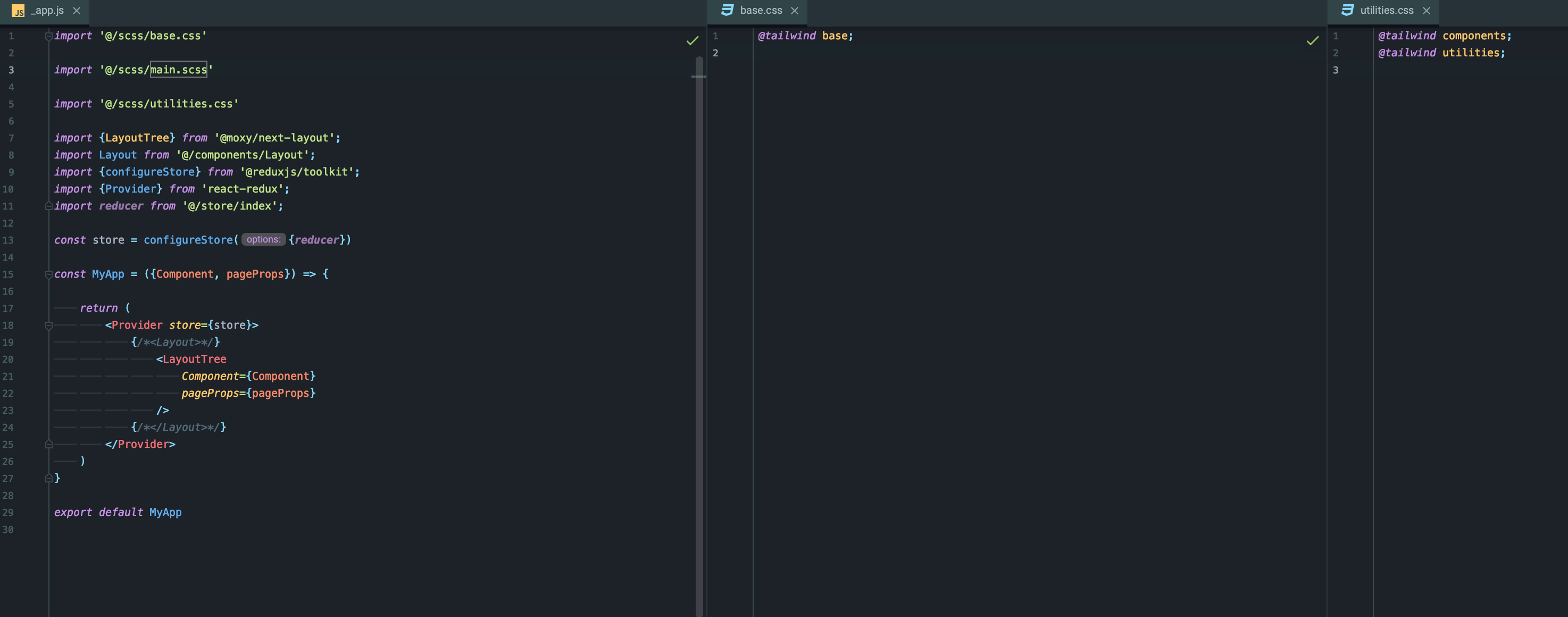
Its happening to me with tailwind on latest Next
 TomasSestak
on 1 Dec 2020
TomasSestak
on 1 Dec 2020
Hi, thanks for creating an issue. We currently recommend using https://nextjs.org/docs/basic-features/built-in-css-support as zeit/next-css and zeit/next-sass have been deprecated in favor of the built-in support.
timneutkens
on 17 Dec 2020
@r-glukhov any reason why that would be bad? I noticed you downvoted tim's response
 murilozilli
on 18 Dec 2020
murilozilli
on 18 Dec 2020
Related issues
 danilofuchs
·
12Comments
danilofuchs
·
12Comments
 vijayst
·
13Comments
vijayst
·
13Comments
 Splendith
·
18Comments
Splendith
·
18Comments
 selique
·
12Comments
selique
·
12Comments
 Tyguy160
·
39Comments
Tyguy160
·
39Comments
Most helpful comment
same problem here