Next-i18next: Many probably unnecessary renders
Describe the bug
After some time working in dev, my app with next-i18next started to get sluggish on page reloads and language changes. I installed 'why-did-you-update' to investigate and found loads of seemingly unnecessary rerenders of the same components happening. The additional renders pile up with reloads and language changes and don't happen again afterwards.
It seems the number of rerenders depend on the number of components using withNamespaces. While it is understandable that a change of language causes a rerender of every connected component, it looks like every time the HOC triggers a render in one connected component, it causes all connected components to render.
Word of warning: It might be that why-did-you-update is not suited to debug server-side rendering.
To Reproduce
Steps to reproduce the behaviour:
- Clone or download this repository.
- Install why-did-you-update for the example:
cd example
yarn add why-did-you-update
- Init
why-did-you-updatein_app.jsin/example/pages:
import React from 'react'
import App, {Container} from 'next/app'

if (process.env.NODE_ENV !== 'production') {
  const { whyDidYouUpdate } = require('why-did-you-update');
  whyDidYouUpdate(React);
}
...
- Run the example:
yarn run run-example
Expected behaviour
The console in the browser should print (ideally only once)
LoadNamespace(Title)
LoadNamespace(Link)
LoadNamespace(Footer)
Actual behaviour
The console in the browser prints the three lines six times.
When clicking Change locale it outputs the three lines ten times.
OS (please complete the following information):
- Device: MacBook Pro (15-inch, 2017)
- Browser: Chrome Version 70.0.3538.110
Additional Information
–
 tizzle
All 12 comments
Thanks for another thorough report.
In general this is going to be some sort of shouldComponentUpdate optimisation. In the next-i18next codebase, we are not doing anything except making a note of the namespace used, and then returning the withNamespaces HOC directly from react-i18next.
So, this might be an issue to open over there.
I do see a usePureComponent option. Maybe try that?
I don't think there's anything here for next-i18next to fix Perhaps @jamuhl has some advice?
 isaachinman
on 4 Dec 2018
isaachinman
on 4 Dec 2018
every withNamespaces reacts to a language change and triggers a rerender. https://github.com/i18next/react-i18next/blob/master/src/NamespacesConsumer.js#L76
That's why if possible only use the HOC on pagelevel, container components and sparsely the road down - if your applications pages are huge with endless levels of nested HOCs that's a problem indeed -> so passing down t as props is most time a good practice.
 jamuhl
on 5 Dec 2018
jamuhl
on 5 Dec 2018
I've still this issue.
Is there any better way to not pass t method in all the children ? It's awful this way.
 otroboe
on 18 Apr 2019
otroboe
on 18 Apr 2019
Hi @otroboe - not sure exactly what you're asking for. As far as I know, all relevant questions have already been answered in regards to this topic.
isaachinman
on 18 Apr 2019
@otroboe react? you have all freedom...use react-context, create a component mapping all children cloning element and appending t to props....use your developer skills 👍
jamuhl
on 18 Apr 2019
I'm using the given hoc withNamespaces, why should I write another hoc on top of this hoc? I'm just surprised there is no documentation to help these unnecessary rerenders when you use more than one namespace :thinking:
But I guess I'll find a way myself :+1:
otroboe
on 18 Apr 2019
As a general pattern it probably makes sense to connect your containers to the i18n props via the HOC, and then pass those as props to children. This is the same pattern you'd see with connected containers in typical Redux setups, for example.
I understand your concern @otroboe, but unfortunately it's not a reasonable expectation to hope a package like react-i18next can predict the structure of end users' React trees. Optimisation is always going to be left up to the end user.
isaachinman
on 18 Apr 2019
Also as a general note to everyone - don't optimise prematurely.
isaachinman
on 18 Apr 2019
@isaachinman Thank you ;-)
I wanted to investigate because my brand new component was doing already 7 rendering, so I was worry. And all of them because of the i18n lib.
otroboe
on 18 Apr 2019
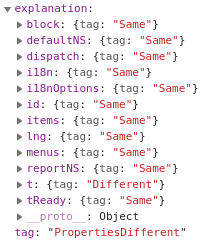
I noticed that the "problem" is t method, which is not shallow equal, so I would not say that passing this method down to other components solve the problem. All of them will be rerendered anyway.
 oMatej
on 12 May 2019
oMatej
on 12 May 2019
@oMatej the t function is equal until languageChange or any other bound event to trigger a rerender: https://github.com/i18next/react-i18next/blob/v9.x.x/src/NamespacesConsumer.js#L92
jamuhl
on 13 May 2019
Ok, thank you for the explanation. In that case, it looks like I need to somehow fix my configuration because it behaves strangely with default values of browserLanguageDetection and serverLanguageDetection. When I disabled language detection it seems to work correctly.
My application supports two languages and it looks like when I tried to connect with different locale than the supported ones, for some reason, it did fire too many languageChanged events.
oMatej
on 13 May 2019
Related issues
 slava-lu
·
6Comments
slava-lu
·
6Comments
 Jonesus
·
6Comments
Jonesus
·
6Comments
 revskill10
·
5Comments
revskill10
·
5Comments
 joaolavoierfh
·
6Comments
joaolavoierfh
·
6Comments
 dohomi
·
5Comments
dohomi
·
5Comments