Newpipe: Minimized player interferes with gestures
Checklist
- [v] I checked, but didn't find any duplicates of this issue in the repo.
- [v] I have read the contribution guidelines given at https://github.com/TeamNewPipe/NewPipe/blob/HEAD/.github/CONTRIBUTING.md.
- [v] This issue contains only one feature request. I will open one issue for every feature I want to request.
Describe the feature you want
The new minimized in-app player in the bottom of the page should be bigger or pushed up a little bit in my opinion
Is your feature request related to a problem? Please describe it
The minimized player as it is now sometimes conflicts with android's swipe-based gestures to go home
Additional context
here is how it looks now
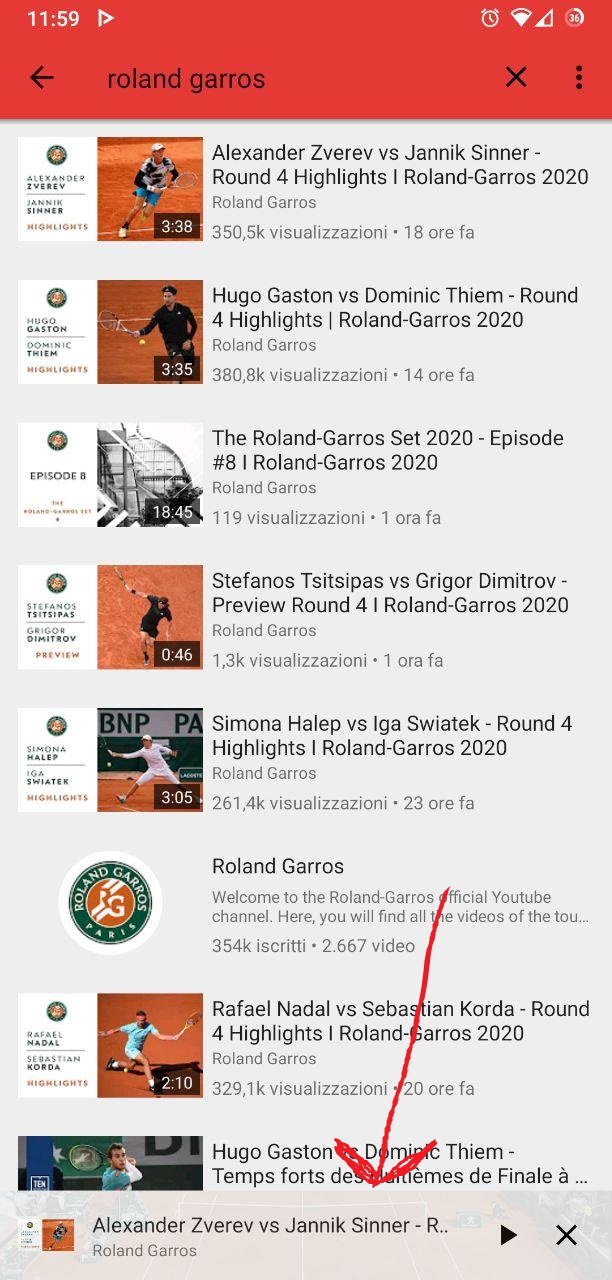
and here is an idea of how it might look
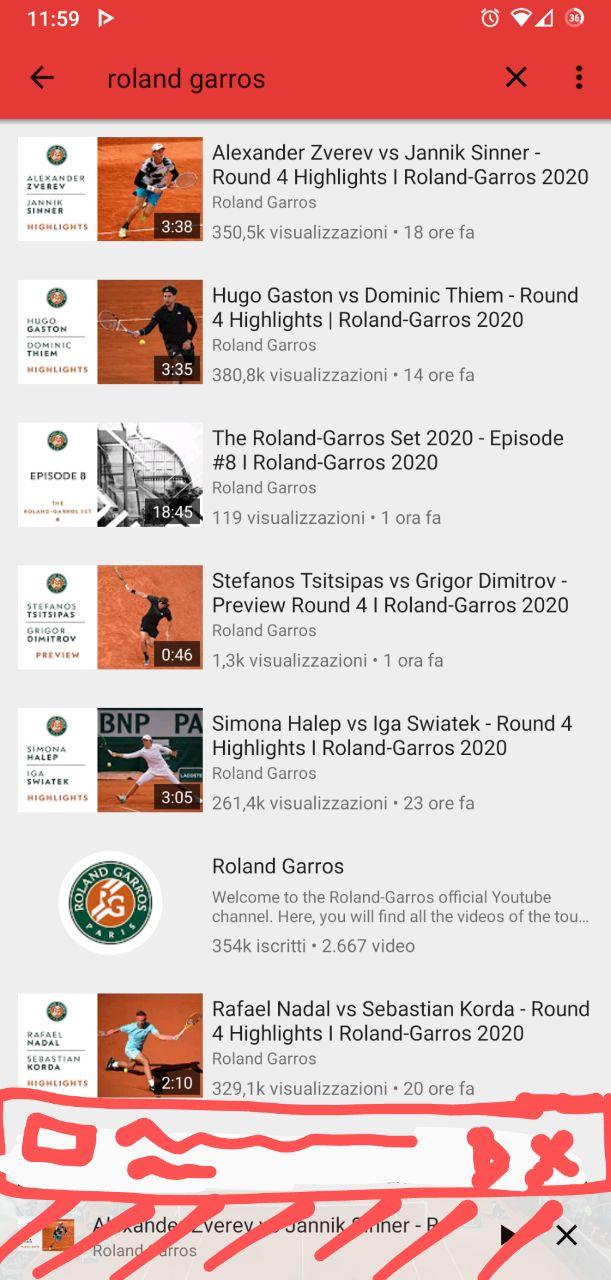
under the player you could have a blank space or the extension of the list we now have above the player
How will you/everyone benefit from this feature?
this feature would help everyone who uses a gestures system to navigate its device's UI
 andrespalumbo311
All 25 comments
If it interferes with gestures, then that seems like a bug, not a feature request.
 opusforlife2
on 5 Oct 2020
opusforlife2
on 5 Oct 2020
If it interferes with gestures, then that seems like a bug, not a feature request.
ok, i hadn't flagged it as a bug because it's a behaviour that can be avoided by paying some attention to where you put your finger when you start the swipe. it's just something that would be more convenient
andrespalumbo311
on 5 Oct 2020
An option to turn off this feature would be highly appreciated.
 leacha69
on 5 Oct 2020
leacha69
on 5 Oct 2020
@andrespalumbo311 you can just tap on it to make it bigger, there is no need to swipe. Unfortunately I don't think making it larger or higher would be an option, since people with no gestures already have no problems with the smaller one, and making it bigger would just use up more space on their screen. Do you have any other solution that would suit everyone? Otherwise I'd close this, since as I said you can already tap on the minimized player to bring it up, without needing to swipe or drag.
 Stypox
on 5 Oct 2020
Stypox
on 5 Oct 2020
I'm just looking to keep it off. That feature was/is an annoying part of
YT. If I want something to continue playing I'll use the pop up or
background. When I close I want it off.
On Mon, Oct 5, 2020, 10:04 AM Stypox notifications@github.com wrote:
@andrespalumbo311 https://github.com/andrespalumbo311 you can just tap
on it to make it bigger, there is no need to swipe. Unfortunately I don't
think making it larger or higher would be an option, since people with no
gestures already have no problems with the smaller one, and making it
bigger would just use up more space on their screen. Do you have any other
solution that would suit everyone? Otherwise I'd close this, since as I
said you can already tap on the minimized player to bring it up, without
needing to swipe or drag.—
You are receiving this because you commented.
Reply to this email directly, view it on GitHub
https://github.com/TeamNewPipe/NewPipe/issues/4405#issuecomment-703728934,
or unsubscribe
https://github.com/notifications/unsubscribe-auth/AOLUKZYZNSJ3UEZ4B6NRACDSJHVBVANCNFSM4SEPK4GA
.
leacha69
on 5 Oct 2020
@leacha69 you can already press the X in the upper left of the screen, and you will achieve the result you are looking for, that is stop playing.
Stypox
on 5 Oct 2020
Ok I'll reload the new app and double check.
Thank you!
On Mon, Oct 5, 2020, 10:23 AM Stypox notifications@github.com wrote:
@leacha69 https://github.com/leacha69 you can already press the X in
the upper left of the screen, and you will achieve the result you are
looking for, that is stop playing.—
You are receiving this because you were mentioned.
Reply to this email directly, view it on GitHub
https://github.com/TeamNewPipe/NewPipe/issues/4405#issuecomment-703739963,
or unsubscribe
https://github.com/notifications/unsubscribe-auth/AOLUKZ75O3VA3III4U644ETSJHXIRANCNFSM4SEPK4GA
.
leacha69
on 5 Oct 2020
you can just tap on it to make it bigger, there is no need to swipe.
@Stypox Still, that's a workaround, not a fix. Either we disable swipe on the minimised player and only allow tapping, or we remove the conflict with OS gestures.
opusforlife2
on 5 Oct 2020
@andrespalumbo311 you can just tap on it to make it bigger, there is no need to swipe. Unfortunately I don't think making it larger or higher would be an option, since people with no gestures already have no problems with the smaller one, and making it bigger would just use up more space on their screen. Do you have any other solution that would suit everyone? Otherwise I'd close this, since as I said you can already tap on the minimized player to bring it up, without needing to swipe or drag.
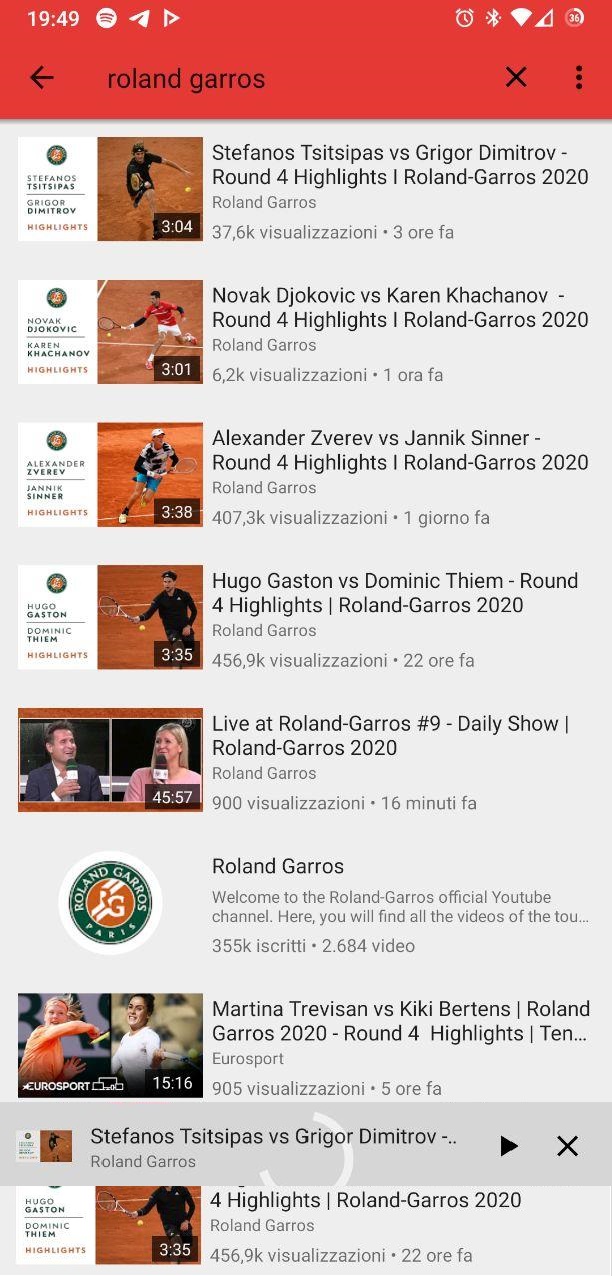
i think that obtaining something kinda like this would be good. the "wasted" space for the player would remain exactly the same
andrespalumbo311
on 5 Oct 2020
@andrespalumbo311 you can just tap on it to make it bigger, there is no need to swipe. Unfortunately I don't think making it larger or higher would be an option, since people with no gestures already have no problems with the smaller one, and making it bigger would just use up more space on their screen. Do you have any other solution that would suit everyone? Otherwise I'd close this, since as I said you can already tap on the minimized player to bring it up, without needing to swipe or drag.
i think that obtaining something kinda like this would be good. the "wasted" space for the player would remain exactly the same
obviously something more polished, this is a bad microsoft paint 2 minutes work. it's just to give you an idea
andrespalumbo311
on 5 Oct 2020
i think that obtaining something kinda like this would be good. the "wasted" space for the player would remain exactly the same
In my opinion that's a bad UI: lists should not be hovered with something in between.
Still, that's a workaround, not a fix.
Well, it would not be a workaround, since it is one of the intended ways to expand the minimized player. If one of the intended ways has limitations under specific circumstances, but usually feels a little bit more comfortable, to me it does not seem like a workaround to use the other way. Similarly to the SAF-nonSAF filesystems: SAF is the best way, but on phones where SAF is not supported it is not a workaround to use nonSAF, but the expected behaviour. Though maybe this comparison is not well built, I'll have to find another one ;-)
Stypox
on 5 Oct 2020
@Stypox I mean it doesn't address the issue that swiping on the player conflicts with OS gestures. Tapping is fine, but we need to find a fix for the gesture conflict somehow. I'm perfectly fine with removing the swipe gesture completely.
opusforlife2
on 5 Oct 2020
But removing the gesture would remove a comfortable action for people who do not have navigation gestures
Stypox
on 5 Oct 2020
Can Newpipe detect if the user has OS gestures enabled and disable swipe only for that case?
opusforlife2
on 5 Oct 2020
Timebar?
opusforlife2
on 6 Oct 2020
We're talking about the minimised player here, though? Where is the seekbar?
opusforlife2
on 6 Oct 2020
We're talking about the minimised player here, though? Where is the seekbar?
Oh sorry... I got the wrong issue report.
 ghost
on 6 Oct 2020
ghost
on 6 Oct 2020
You were thinking of #4419, probably. :P
opusforlife2
on 6 Oct 2020
The changes in 0.20 are super annoying and confusing. Were can I disable the minimized player?
 streaps
on 10 Oct 2020
streaps
on 10 Oct 2020
@opusforlife2
I'm perfectly fine with removing the swipe gesture completely.
You often tries to find a solution for new issues without thinking of people who like current behavior and whom this behavior is made for. It's kind of wrong solution, isn't it?
 avently
on 14 Oct 2020
avently
on 14 Oct 2020
Hey, no issues with discussion though, right? It's not like the moment I post my comment the behaviour will be changed. These are just possibilities. Since you say you want this behaviour, I might think of a different solution at some point. Or someone else will.
opusforlife2
on 15 Oct 2020
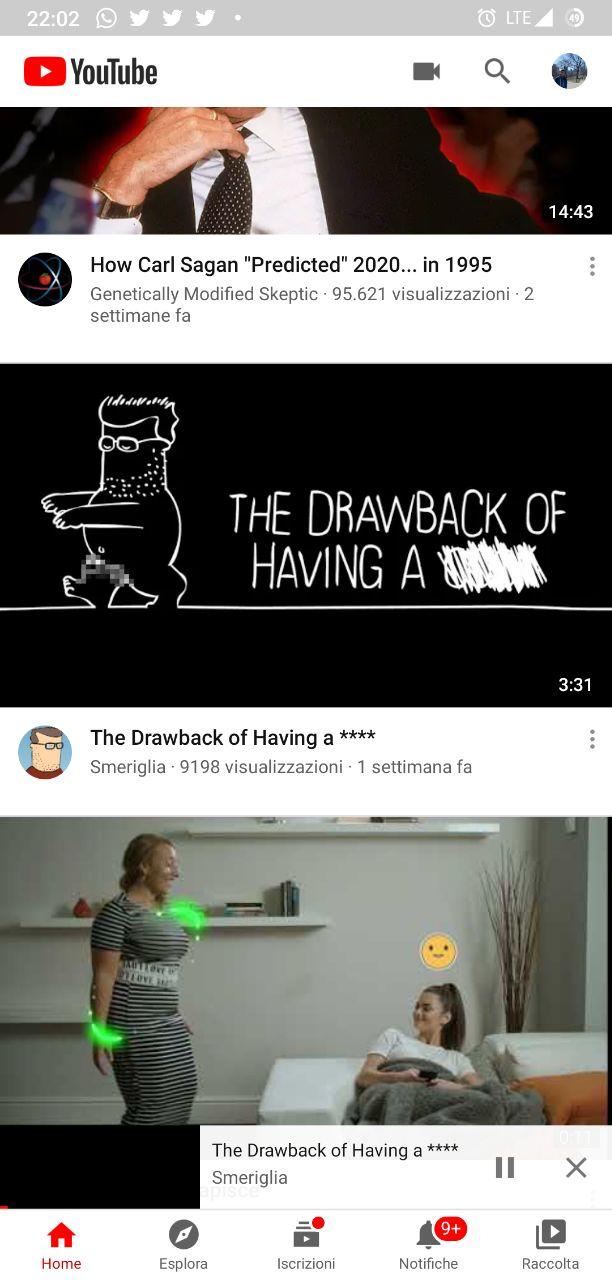
@andrespalumbo311 may I ask you how YouTube handles this situation? If they do it the same way NewPipe currently does it, I think we should not change this behaviour as probably a team of ui experts decided it was good and standardized it
Stypox
on 16 Oct 2020
@andrespalumbo311 may I ask you how YouTube handles this situation? If they do it the same way NewPipe currently does it, I think we should not change this behaviour as probably a team of ui experts decided it was good and standardized it
andrespalumbo311
on 17 Oct 2020
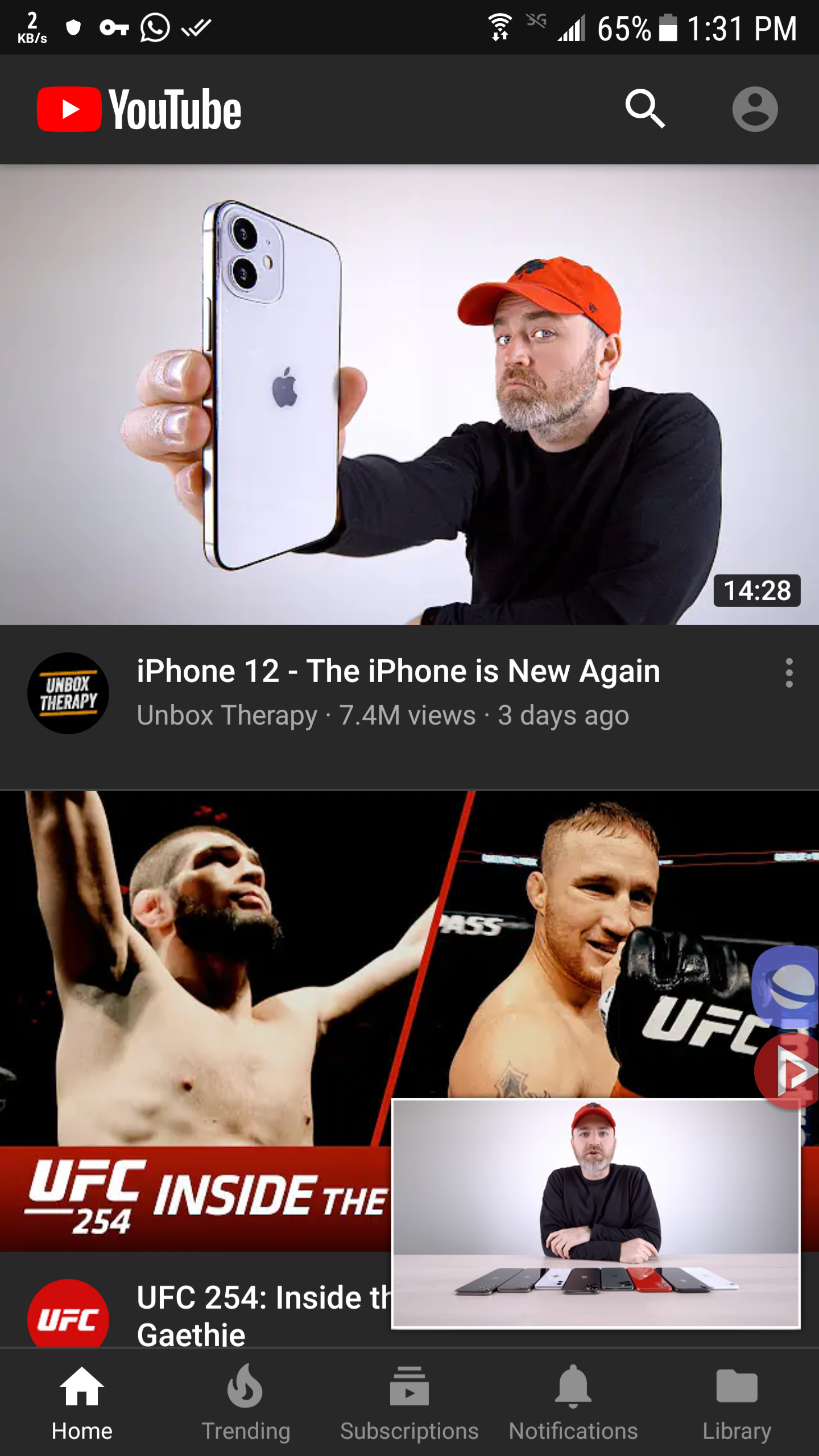
@Stypox
@andrespalumbo311 may I ask you how YouTube handles this situation? If they do it the same way NewPipe currently does it, I think we should not change this behaviour as probably a team of ui experts decided it was good and standardized it
i think this is the best middle solution, using minimize video... its big enough that we can make it only 2/3 swipable from the top...
but isn't so wasteful as you benefit from seeing complete video
 MD77MD
on 17 Oct 2020
MD77MD
on 17 Oct 2020
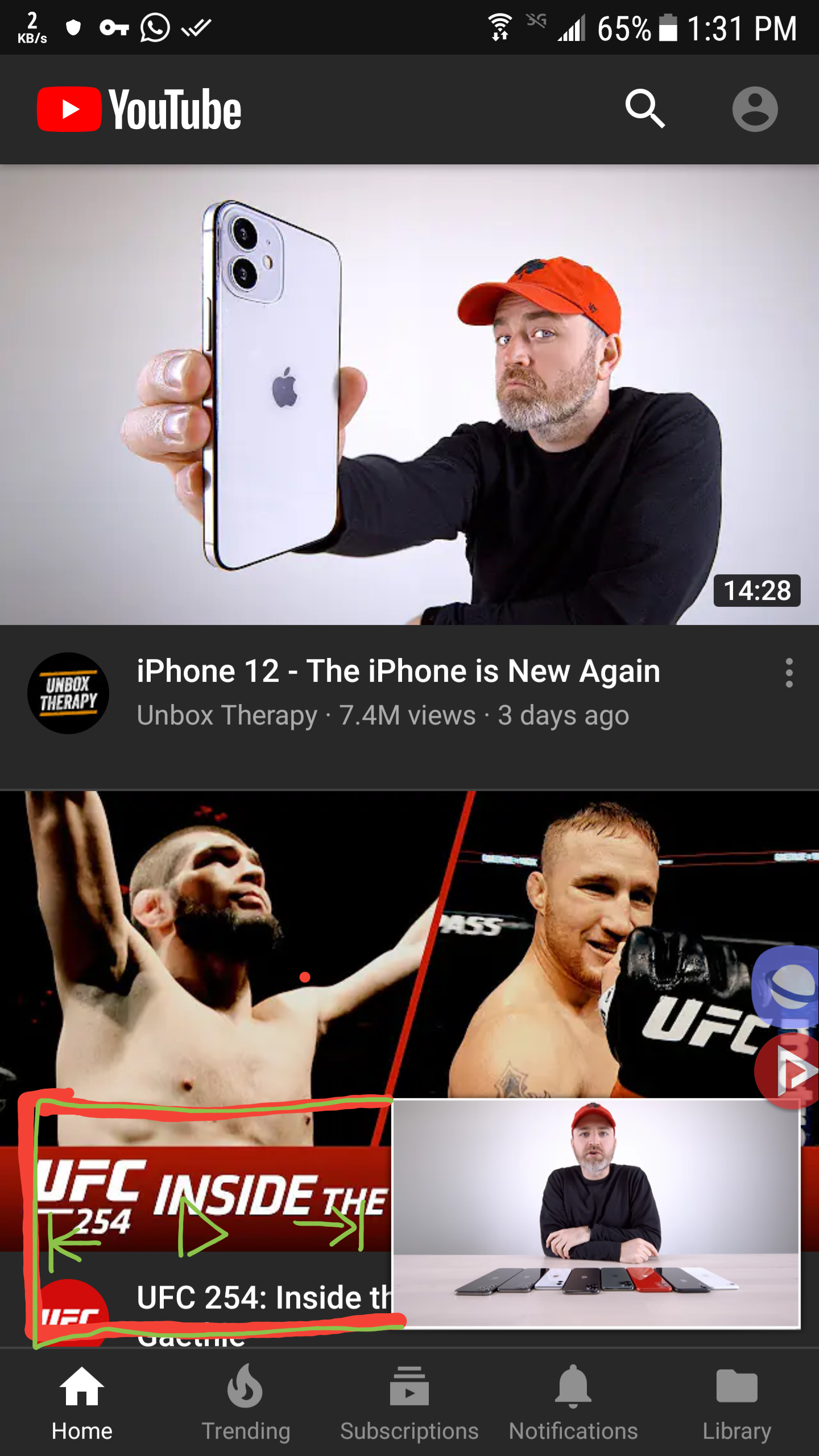
we could also do this
MD77MD
on 17 Oct 2020
Related issues
 probonopd
·
3Comments
ghost
·
3Comments
probonopd
·
3Comments
ghost
·
3Comments
 hassanseoul123
·
3Comments
hassanseoul123
·
3Comments
 desmonk
·
3Comments
desmonk
·
3Comments
 danialbehzadi
·
3Comments
danialbehzadi
·
3Comments