Newpipe: Can't enable "Documents" for 0.17.0 on Android 5.x
- [x] I carefully read the contribution guidelines and agree to them.
- [x] I checked if the issue/feature exists in the latest version.
- [ ] I did use the incredible bugreport to markdown converter to paste bug reports.
After upgrading from 0.16.2 to 0.17.0 NewPipe start asking for:
Turn on Documents in Settings > Installed apps first


But when I open permissions of NewPipe in "Installed apps" I see that there NO "Documents".

How should I allow downloading for 0.17.0?
Android: 5.1.1 (Redmi 3)
 Symbian9
All 24 comments
@kapodamy Do we need to ask for a different storage permission on Android 5?
 TobiGr
on 12 Aug 2019
TobiGr
on 12 Aug 2019
@TobiGr @Symbian9
not sure, but appears a MIUI restriction. You need enable an app called Documents, because is disabled/desactivated/freezed by default.
edit: no more permissions is required
 kapodamy
on 13 Aug 2019
kapodamy
on 13 Aug 2019
MIUI restriction. You need enable an app called Documents, because is disabled/desactivated/freezed by default.
Is it possible fix it in 0.17.x? With 0.16.x I had not such "MIUI dependency".
Symbian9
on 13 Aug 2019
@Symbian9
NO is not related to newpipe is an android issue and cannot be fixed. a workarround should use Java IO API in lollipop and lower
kapodamy
on 14 Aug 2019
So we need to add legecy support @kapodamy how vomplicated will it be?
 theScrabi
on 14 Aug 2019
theScrabi
on 14 Aug 2019
@theScrabi is not complicated
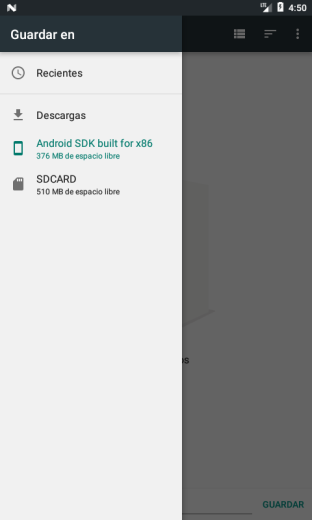
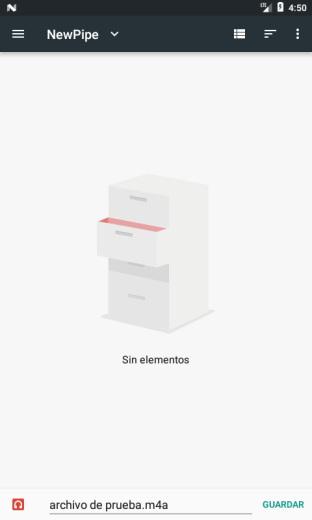
@Symbian9 please try this:
- check the option "Ask where to download"
- try download something
- choose save the file in somewhere
if you not see this screen "save as" dialog, please tell me:
kapodamy
on 14 Aug 2019
please try this
What build should I use? As 0.17.0 release files removed.
Symbian9
on 14 Aug 2019
yes with the 0.17 version. the files are here https://github.com/TeamNewPipe/NewPipe/issues/2483
kapodamy
on 14 Aug 2019
please try this:
- check the option "Ask where to download"
- try download something
- choose save the file in somewhere
if you not see this screen "save as" dialog, please tell me:
NOT work! Just tried 0.17.0-RC4 build but has same behavior as described in first message in this thread — NewPipe start show me warning "Turn on Documents in Settings > Installed apps first" and I can't reach file chooser window.
Symbian9
on 14 Aug 2019
@Symbian9 Can you please test the apk, I linked in https://github.com/TeamNewPipe/NewPipe/pull/2521#issuecomment-521547093?
TobiGr
on 15 Aug 2019
Can you please test the apk, I linked in https://github.com/TeamNewPipe/NewPipe/pull/2521#issuecomment-521547093 ?
Just tried - still has same behaviour as described above.
This solution NOT work :-(
Think, need revert filesystem access as it was in 0.16.x (atleast for Android 5.x with MIUI)
Symbian9
on 15 Aug 2019
I tried it on android 5, for me it worked. Also java IO is back, so maybe just the filepicker is missing.
theScrabi
on 15 Aug 2019
It looks like I uploaded the wrong apk... :man_facepalming: Sorry.
Next try: app-debug.apk.zip
TobiGr
on 15 Aug 2019
It should look like this:

@TobiGr The other apk you uploaded worked equally well on my side. Maybe this is an issue related to MIUI phones, as they always do things that brakes android.
theScrabi
on 15 Aug 2019
It should look like this:
On my Androud 5.1.1 with MIUI I reached floated warning "Turn on Documents in Settings > Installed apps first" and can't reach file manager window :-(
Symbian9
on 15 Aug 2019
try this once more:
app-release.apk.zip
theScrabi
on 16 Aug 2019
However the more I think about this the more I get the feeling this is more of a problem by MIUI. Chinese phone producers, and especially Xiaumi tend to brake Android compatibility. Especially Xiaumi, as we had trouble with their phones before in other parts.
I took a look around, for your phone is a never version for MIUI available:
http://c.mi.com/oc/miuidownload/detail?device=1700298
LOS 14.1 (android 7) seemed to be the last supported Lineage os version, however they stopped support so you can't even download it anymore.
Here seems an AOSP rom for playin android 6, however I'd be carefull with custom builds:
https://forum.xda-developers.com/redmi-3/development/rom-pixelexperience-ido-t3742977
theScrabi
on 16 Aug 2019
try this once more:
NO luck :-( Still reached floated warning message (tried with and without "Ask download location")
Symbian9
on 16 Aug 2019
Well it seems to me that this asf filepicker acticity is not available on MIUI, which otherwise is on other android 5.x+ phones. @kapodamy was it complicated to activate that internal filepicker activity again, or did you do this already, and on @Symbian9 it still does show this error? If so we would need to add a manual setting for which IO to use.
theScrabi
on 17 Aug 2019
@Symbian9 ok
kapodamy
on 17 Aug 2019
ok
@kapodamy, should I test some nightly build?
Symbian9
on 17 Aug 2019
@Symbian9 app-debug.apk.zip
TobiGr
on 17 Aug 2019
@TobiGr It's working! 🎉
Symbian9
on 17 Aug 2019
instand merge huraaay
theScrabi
on 18 Aug 2019
Related issues
 fnadde42
·
3Comments
fnadde42
·
3Comments
 PanderMusubi
·
3Comments
PanderMusubi
·
3Comments
 f242
·
3Comments
f242
·
3Comments
 ghost
·
3Comments
ghost
·
3Comments
ghost
·
3Comments
ghost
·
3Comments
Most helpful comment
@Symbian9 app-debug.apk.zip