Netlify-cms: Date format changed -> old dates not sorting correctly in 2.10.52
Describe the bug
After updating to 2.10.52 posts with strict iso dates (2020-07-02T06:17:54.924Z) and older posts with iso formatting (2020-06-12 14:02:29+00:00) are incorrectly sorted. It seems the date handling/parsing has changed in 2.10.52.
Minimal code to reproduce: https://github.com/lbischof/netlify-cms-issues-3973
To Reproduce
- Start a webserver:
python -m SimpleHTTPServer - Start a local proxy:
npx netlify-cms-proxy-server - Navigate to localhost:8000/admin
- Sort posts in descending order
- Posts are sorted as follows: 2, 1, 3, 4, 5 (Firefox) and 4,2,1,5,3 (Chrome)
- Decrement the version to 2.10.51 in
admin/index.html - Posts are sorted as follows: 5, 4, 3, 2, 1
Expected behavior
All date formats (not just 100% correctly formatted) should be sorted correctly when possible.
Applicable Versions:
- Netlify CMS version: [e.g. 2.0.4]
- Git provider: Gitlab (git-gateway)
- OS: Ubuntu
- Browser version: Firefox 77.0.1
 lbischof
All 18 comments
Hi @lbischof, thanks for opening this.
Can you share an example content for each file?
We should actually only parse the strict version as a date object:
https://github.com/netlify/netlify-cms/blob/c33db099ac56edfd993de0212a8085d8d9243ce4/packages/netlify-cms-core/src/formats/yaml.js#L20
 erezrokah
on 2 Jul 2020
erezrokah
on 2 Jul 2020
The following post does not appear in the CMS (only when I search for it) when I update to 2.10.52:
---
title: Non-working
date: 2020-07-01T15:20:00.000Z
---
This does not appear in 2.10.52
This format works with both versions:
---
date: 2020-06-12 14:02:29+00:00
title: Working
---
Old post
Can you share your full config.yml?
Also, how many posts are there is total? The fact that searching shows it might be related a pagination bug.
erezrokah
on 2 Jul 2020
There are 180 posts of which the 20 newest posts do not appear in 2.10.52.
backend:
  name: git-gateway
  identity_url: https://website.ch/.netlify/identity
  gateway_url: https://website.ch/.netlify/git
  site_domain: https://website.ch/
  branch: develop

local_backend: true

media_folder: "static/images/uploads"
public_folder: "/images/uploads"
display_url: https://website.ch
logo_url: https://brand.website.ch/images/logo_classic.svg
slug:
  encoding: "ascii"
  clean_accents: true

collections:
  - name: "posts" # Used in routes, e.g., /admin/collections/blog
    label: "Posts" # Used in the UI
    label_singular: "Post"
    folder: "content/posts" # The path to the folder where the documents are stored
    create: true # Allow users to create new documents in this collection
    slug: "{{year}}-{{month}}-{{day}}-{{slug}}" # Filename template, e.g., YYYY-MM-DD-title.md
    view_filters:
      - label: Drafts
        field: draft
        pattern: true
    fields: # The fields for each document, usually in front matter
      - label: "Title"
        name: "title"
        widget: "string"
      - label: "Publish Date"
        name: "date"
        widget: "datetime"
      - label: "Author"
        name: "author"
        widget: "relation"
        collection: "authors"
        searchFields: ["name"]
        valueField: "author"
        displayFields: ["name"]
      - label: "Tags"
        name: "tags"
        widget: "list"
        required: false
      - label: "Categories"
        name: "categories"
        widget: "select"
        multiple: true
        options:
          - { label: "Geschäftsbereiche", value: "business-divisons" }
          - { label: "Prozesse", value: "processes" }
      - label: "Draft"
        name: "draft"
        widget: "boolean"
        required: false
        default: true
      - label: "Featured Image"
        name: "featured_image"
        widget: "image"
        required: false
      - label: "Body"
        name: "body"
        widget: "markdown"
  - name: "tools" # Used in routes, e.g., /admin/collections/blog
    label: "Tools" # Used in the UI
    label_singular: "Tool"
    folder: "content/tools" # The path to the folder where the documents are stored
    create: true # Allow users to create new documents in this collection
    slug: "{{slug}}" # Filename template, e.g., YYYY-MM-DD-title.md
    fields: # The fields for each document, usually in front matter
      - {label: "Title", name: "title", widget: "string"}
      - {label: "Subtext", name: "subtext", widget: "string"}
      - {label: "Link", name: "external_link", widget: "string"}
      - {label: "Featured Image", name: "featured_image", widget: "image"}
      - {label: "Body", name: "body", widget: "markdown"}
  - name: "authors" # Used in routes, e.g., /admin/collections/blog
    label: "Authors" # Used in the UI
    label_singular: "Author"
    format: yml
    folder: "data/authors" # The path to the folder where the documents are stored
    create: true # Allow users to create new documents in this collection
    slug: "{{author}}" # Filename template, e.g., YYYY-MM-DD-title.md
    identifier_field: name
    fields: # The fields for each document, usually in front matter
      - label: "Name"
        name: "name"
        widget: "string"
      - label: "Kürzel"
        name: "author"
        widget: "string"
        pattern: ['^[a-z]+$', "Bitte das Kürzel eingeben"]
Tried creating a reproduction here:
https://github.com/erezrokah/netlify-cms-reproductions/tree/netlify_cms/issue_3973
Created 2 files based on the content you provided and also a new one via the CMS:
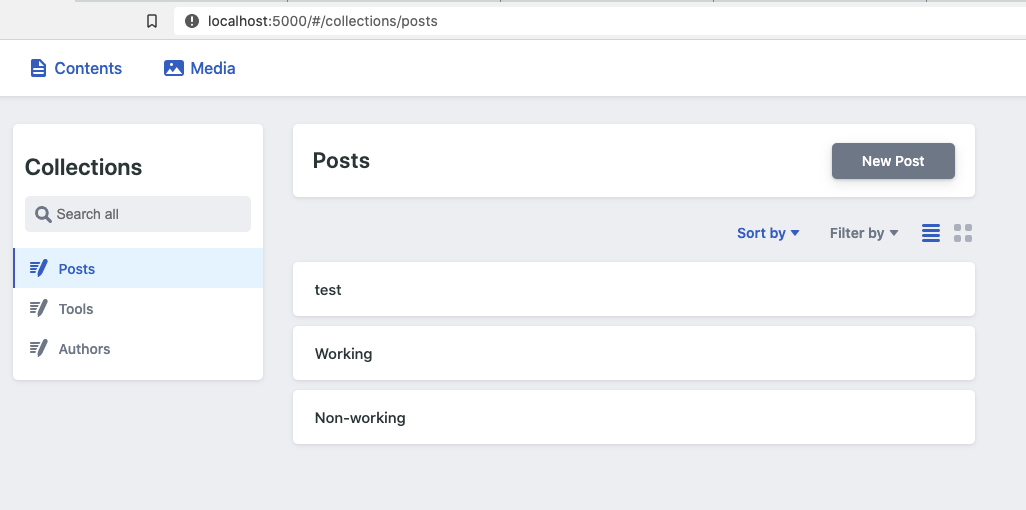
Follow up question - does sorting the entries make them appear?
erezrokah
on 2 Jul 2020
No, the posts were already sorted by publish date and sorting them again makes no difference. I also tried in a private browser window (because of the cache).
lbischof
on 2 Jul 2020
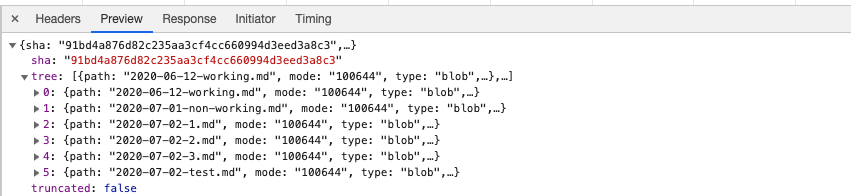
Can you please share the network traffic from the CMS while loading the posts?
Specifically there should be a request that ends with :content/posts to retrieve the posts list.
Also, can you please make sure no view filters are active?
erezrokah
on 2 Jul 2020
If you cannot reproduce the issue, then i will try and isolate the problem and report back. Thanks for your time
lbischof
on 2 Jul 2020
Closing, please comment if relevant
erezrokah
on 6 Jul 2020
@erezrokah I have created a minimal repository where I was able to reproduce the issue: https://github.com/lbischof/netlify-cms-issues-3973
lbischof
on 9 Jul 2020
@lbischof, can you update the issue to reflect the problem described in the repo?
Posts are not sorted correctly vs posts not shown
erezrokah
on 9 Jul 2020
Only some of those dates are in ISO format thus being parsed to a Date object.
Non ISO format dates are parsed into a string.
See https://github.com/lbischof/netlify-cms-issues-3973/pull/1
erezrokah
on 9 Jul 2020
I updated the issue description. Is there a reason that the date handling was changed? I see this as a regression, because the date has to be formatted 100% correctly in a format that only a computer could generate. I have not tested with formats like: 2020-07-09 without specifying the time, but would expect these to also sort correctly.
lbischof
on 9 Jul 2020
I updated the example repository, so that the titles are equal to the dates. What is interesting is that Firefox and Chrome both sort differently and that even the correctly formatted dates are not sorted in descending order.
edit: dates formatted like 2020-07-09 are not correctly sorted. Personally I think these should be supported, because I would think they are often used, when dates are entered manually (instead of via CMS)
lbischof
on 10 Jul 2020
Hello, @lbischof
I made that pull request. There are 2 reasons:
There are 2 kinds of date: custom formatted dates and ISO dates. These formatted dates need to be parsed as strings, while ISO dates need to be parsed as date object. Otherwise formatted dates will become ISO dates. (See #3702)
Date-like strings are also parsed into date objects even if they are not in datetime / date widgets. It causes some problems like #3737.
So I limited the formats that will be parsed into date objects.
 vrabe
on 10 Jul 2020
vrabe
on 10 Jul 2020
I made that pull request. There are 2 reasons:
- There are 2 kinds of date: custom formatted dates and ISO dates. These formatted dates need to be parsed as strings, while ISO dates need to be parsed as date object. Otherwise formatted dates will become ISO dates. (See #3702)
- Date-like strings are also parsed into date objects even if they are not in datetime / date widgets. It causes some problems like #3737.
⬆️
Parsing of dates should be aligned with the way they are saved.
The datetime widget saves a string if a format is specified, otherwise a date object:
https://github.com/netlify/netlify-cms/blob/07f47824e960332d9be20588829d3895b32f000b/packages/netlify-cms-widget-datetime/src/DateTimeControl.js#L87
Ideally I think it would be better to always save the same type (probably a string) to avoid confusing, but that would be a breaking change.
erezrokah
on 12 Jul 2020
Closing this as this is the intended behaviour
erezrokah
on 13 Jul 2020
I do not think that this behaviour is intended. As soon as someone uses
NetlifyCMS for non-technical users, but also allows direct editing in the
repository the sorting completely breaks.
The advanced user creates a post with 2020-07-10 via Git. Then someone
else logs into the CMS and creates a post. This post then has an ISO date.
As far as I understand the issues mentioned above mainly apply to when the
user edits and then saves a post the date format (compared to what was
originally in the file) could change. But why not interpret all dates as
either string or datetime when listing the posts? The parsing of the dates
does not have to be the same when listing and editing posts.
This would allow correct sorting, while also correctly parsing the date
while editing.
On Monday, July 13, 2020, Erez Rokah notifications@github.com wrote:
Closed #3973.
—
You are receiving this because you were mentioned.
Reply to this email directly, view it on GitHub, or unsubscribe.<
https://ci3.googleusercontent.com/proxy/Tgu9k-nnfpHlGzlk_3TG7j72myycLMCSEilYPJggeKtqDpQkKQJjFhg3d4P02c2PVl5tgjZY-xQ01qxJ4Df9RdBcZ26AGVy1Eziap-m76pAufz6DfAc0wA_OGXparcJjOwteMpk_7ycAtNSLg-TRj4gHk7tIQGwF6irOzA_-tBi_8u7LMxnPjIPN9xJuypslk43Isx2vLAk6ZdClNkM60zjGpy78GReIOceCsIcdXrwJWrghuxoeSRW39HAFNrA=s0-d-e1-ft#https://github.com/notifications/beacon/AAOAVHODYUE5FVDUXPTRB6DR3MMURA5CNFSM4OOTYMJ2YY3PNVWWK3TUL52HS4DFWZEXG43VMVCXMZLOORHG65DJMZUWGYLUNFXW5KTDN5WW2ZLOORPWSZGO2L7EFHI.gif>
lbischof
on 13 Jul 2020
Related issues
 BerkeleyTrue
·
3Comments
BerkeleyTrue
·
3Comments
 tech4him1
·
3Comments
tech4him1
·
3Comments
 noelmace
·
3Comments
noelmace
·
3Comments
 Narno
·
3Comments
Narno
·
3Comments
 emckay
·
3Comments
emckay
·
3Comments