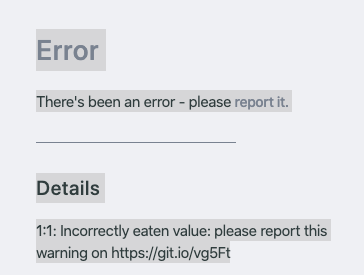
Netlify-cms: Error while opening post: 1:1 Incorrectly eaten value
Describe the bug
If I tap on any post, I get the following error:
To Reproduce
Repo is here: https://github.com/destination-unknown/destination-unknown-frontend.
If you login and then you click on any post, it shows this error.
Expected behavior
Show me post.
Screenshots
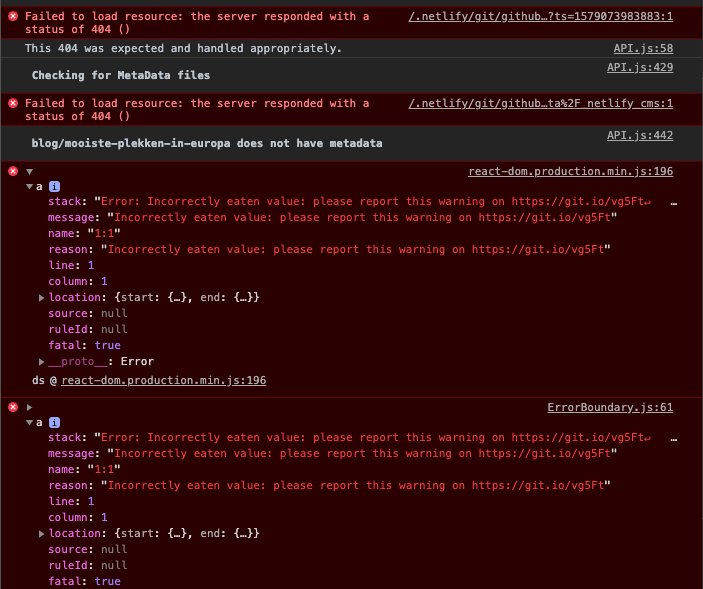
This is a screenshot of the errors in the console.
Applicable Versions:
- Netlify CMS version: 2.10.6
- Git provider: GitHub
- OS: MacOS
- Browser version: Brave Version 1.2.42 Chromium: 79.0.3945.117 (Official Build) (64-bit) & Chrome Version 79.0.3945.117 (Official Build) (64-bit)
CMS configuration
backend:
  name: git-gateway
  branch: master # Branch to update (optional; defaults to master)
publish_mode: editorial_workflow
media_folder: 'static/images/uploads' # Media files will be stored in the repo under static/images/uploads
public_folder: '/images/uploads' # The src attribute for uploaded media will begin with /images/uploads
collections:
  - name: 'blog' # Used in routes, e.g., /admin/collections/blog
    label: 'Blog' # Used in the UI
    folder: '_posts/blog' # The path to the folder where the documents are stored
    create: true # Allow users to create new documents in this collection
    slug: '{{slug}}' # Filename template, e.g., YYYY-MM-DD-title.md
    fields: # The fields for each document, usually in front matter
      - { label: 'Layout', name: 'layout', widget: 'hidden', default: 'blog' }
      - { label: 'Title', name: 'title', widget: 'string' }
      - {
          label: 'Short description',
          name: 'short_description',
          widget: 'string',
        }
      - { label: 'Publish Date', name: 'date', widget: 'datetime' }
      - { label: 'Featured Image', name: 'thumbnail', widget: 'image' }
      - { label: 'Body', name: 'body', widget: 'markdown' }
 jkaan
jkaan
All 6 comments
I have the same issue
thanks @erezrokah for referring.
What I found is that it only happens to pages with images for me!
 alexanderroidlhhs
on 15 Jan 2020
alexanderroidlhhs
on 15 Jan 2020
Yes, I have the same problem - any page with an image shows the exact same error as the one reported.
 JasonTame
on 15 Jan 2020
JasonTame
on 15 Jan 2020
But how do I update now to have this fixed?
I still have it in the backend.
alexanderroidlhhs
on 15 Jan 2020
@alexanderroidlhhs As far as I could see they tagged a new release which is 2.15.2, so if you are using version 2.15.2 this will be solved.
How are you adding the Netlify CMS? Perhaps I could help with some instructions on how to update
jkaan
on 15 Jan 2020
Updating depends on your setup, either update your package.json to [email protected]or [email protected] and run yarn install or npm run install.
If you're loading via unpkg it should auto update if you're using a ^ like so:
<script src="https://unpkg.com/netlify-cms@^2.0.0/dist/netlify-cms.js"></script>
 erezrokah
on 15 Jan 2020
erezrokah
on 15 Jan 2020
Works again, thanks a lot!
jkaan
on 15 Jan 2020
Related issues
 BerkeleyTrue
·
3Comments
BerkeleyTrue
·
3Comments
 calavera
·
3Comments
calavera
·
3Comments
 noelmace
·
3Comments
noelmace
·
3Comments
 dur41d
·
3Comments
dur41d
·
3Comments
 TomPichaud
·
3Comments
TomPichaud
·
3Comments