Netlify-cms: Microsoft Team Services / Azure as a backend?
Is there in the roadmap also support for team services (https://www.visualstudio.com/team-services/)? It is based on git and free for small companies and startups (private repositories), so very attractive for me.
 arheom
All 46 comments
It's not on the roadmap, but you can definitely create a backend to support it! We're currently reworking how backends are made, so probably best to wait a bit if you're interested in doing that.
For now, GitLab and Bitbucket both have PR's that are close to completion, and they also offer free private repos.
 erquhart
on 19 Mar 2018
erquhart
on 19 Mar 2018
I could use this too as some of my repos are in VSTS which has pretty cool build pipelining and also has good support for webhooks etc. (better than GitHub)
 tomgron
on 17 May 2018
tomgron
on 17 May 2018
VSTS by Microsoft was recently rebranded as DevOps and it looks really promising. I would also like an integration to Microsoft DevOps repositories https://dev.azure.com
 ronnidc
on 26 Oct 2018
ronnidc
on 26 Oct 2018
For sure, we're certainly open to it if someone is up for opening a PR 👍
erquhart
on 1 Nov 2018
+1
 nadafsak
on 8 Nov 2018
nadafsak
on 8 Nov 2018
+1
 chaunceyau
on 22 Dec 2018
chaunceyau
on 22 Dec 2018
I see that this was discussed, but left as a "feel free to implement it yourself and put in a PR"
Are there any plans to roll this out "officially" or is this stance current?
 draeath
on 12 Mar 2019
draeath
on 12 Mar 2019
I'm also interested
 chrismade
on 16 Mar 2019
chrismade
on 16 Mar 2019
@draeath Netlify CMS is a community driven project. If there is a strong demand from the community to officially support a feature then that's being respected by the maintainers, but we usually do need community effort to make things happen. If anyone wants to put in a PR we are more than willing to support your efforts though!
 tomrutgers
on 16 Mar 2019
tomrutgers
on 16 Mar 2019
I started working, as time permits, on an Azure back end. My company recently deployed a Gatsby site to Azure and Netlify really does appear to be the best headless CMS option for our future needs... aside from there being no existing Azure backend.
 jeepwran
on 17 Apr 2019
jeepwran
on 17 Apr 2019
@jeepwran did you make a fork somewhere - so we can join forces (if time permits) ? I cannot find a repo under your name
chrismade
on 17 Apr 2019
@chrismade I've been working from a free Azure tenant since I need one to test against anyway. I'll move my current changes and future work to a public GitHub repo. I'll let you know when that's available.
jeepwran
on 17 Apr 2019
@chrismade fork is https://github.com/jeepwran/netlify-cms-backend-azure. All work related to the Azure backend is currently in branch netlify-cms-backend-azure. Backend package is under the packages folder of the same name. OAuth is working and API path should be correct for Azure DevOps at this point. Work remaining is on the actual calls.
jeepwran
on 18 Apr 2019
thanks @jeepwran for the update - will try to make it work in my dev.azure environment - then try to contribute
chrismade
on 18 Apr 2019
@jeepwran @chrismade Awesome, thanks! If you need anything, just drop a comment here or find one of the maintainers on Gitter
tomrutgers
on 18 Apr 2019
@jeepwran I'm afraid I need your help - as you did already the heavy lifting in packages/netlify-cms-backend-azure/src/ - I was preparing to contribute at least a little bit by testing and creating a comprehensive README to make it easier for others to follow our path - however - I'm blocked at the moment - maybe you can help me out:
I managed to get 'tenant_id" and "app_id" for my "Azure DevOps" - but I cannot login in receiving this message:
AADSTS700051: response_type 'token' is not enabled for the application.
Usually one can fix this with
az ad app update --id=49999999-1111-4444-aaaa-222222222222 --oauth2-allow-implicit-flow=true
which is NOT working in case of App = Azure DevOps saying:
Resource '49999999-1111-4444-aaaa-222222222222' does not exist or one of its queried reference-property objects are not present.
which is true - because there is no attribute like oauth2-allow-implicit-flow for this app.
The URL
https://login.microsoftonline.com/ffffffff-aaae-4444-9999-555555555555/oauth2/authorize?client_id=49999999-1111-4444-aaaa-222222222222&redirect_uri=http%3A%2F%2Flocalhost%3A8080%2F&response_type=token&scope=vso.code_full&resource=https%3A%2F%2Fapp.vssps.visualstudio.com%2F&state=1139febc-850e-43a6-9ed7-b13ce56542fe
seems to the correct because varying tenant_id and app_id throws
AADSTS700016: Application with identifier 'ee...99' was not found in the directory '77..dddd'.
indicating that this is no valid combination
With the dev.azure.com/myorganisation/ I don't find anything allowing me to enable tokens - I did myname > security > add personal access token PAT - now I have a PAT but the login still doesn't work saying again AADSTS700051: response_type 'token' is not enabled for the application.
Documentation at
https://docs.microsoft.com/en-us/azure/active-directory/develop/v2-oauth2-implicit-grant-flow
says: Important - To successfully request an ID token, the app registration in the Azure portal - App registrations page must have the implicit grant flow enabled correctly, by selecting Access tokens and ID tokens under the Implicit grant section. ...
But at
https://portal.azure.com/#blade/Microsoft_AAD_RegisteredApps/ApplicationsListBlade
I cannot find anything at all with my app_id so I cannot change any settings here.
Question: How did you manage to enable OAUTH2 tokens for your "Azure DevOps" ?
chrismade
on 22 Apr 2019
Yeah, the hard part here certainly isn't the Netlify code, its figuring
out/finding things in Azure...
Azure Active Directory
App Registrations (Preview)
Select your app (Add your app if not already listed here)
Under the "Manage" heading select "Authentication"
Under "Advanced settings" check "Access tokens".
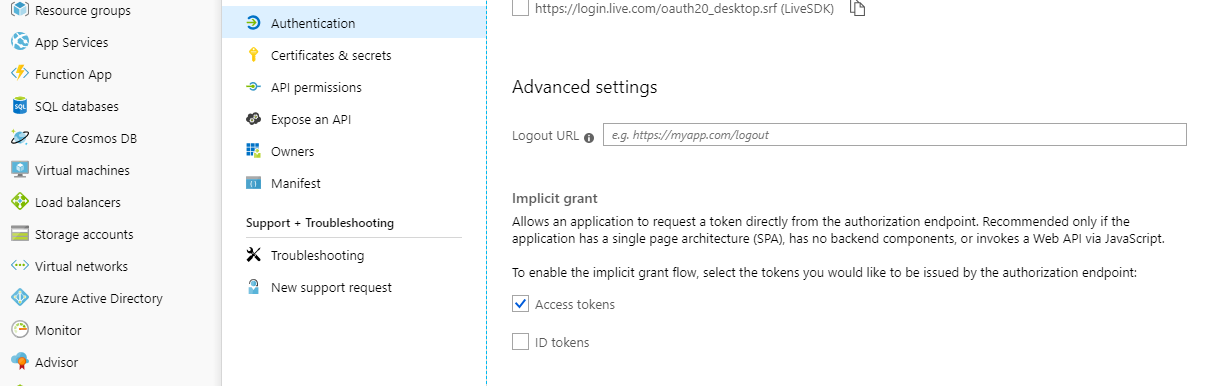
Oh, and just above that section is Redirect URIs. For our purposes of developing netlify-cms that would simply be http://localhost:8080.
On Mon, Apr 22, 2019 at 2:33 PM chrismade notifications@github.com wrote:
@jeepwran https://github.com/jeepwran I'm afraid I need your help - as
you did already the heavy lifting in
packages/netlify-cms-backend-azure/src/ - I was preparing to contribute at
least a little bit by testing and creating a comprehensive README to make
it easier for others to follow our path - however - I'm blocked at the
moment - maybe you can help me out:I managed to get 'tenant_id" and "app_id" for my "Azure DevOps" - but I
cannot login in receiving this message:
AADSTS700051: response_type 'token' is not enabled for the application.Usually one can fix this with
az ad app update --id=49999999-1111-4444-aaaa-222222222222
--oauth2-allow-implicit-flow=truewhich is NOT working in case of App = Azure DevOps saying:
Resource '49999999-1111-4444-aaaa-222222222222' does not exist or one of
its queried reference-property objects are not present.which is true - because there is no attribute like
oauth2-allow-implicit-flow for this app.The URL
seems to the correct because varying tenant_id and app_id throws
AADSTS700016: Application with identifier 'ee...99' was not found in the
directory '77..dddd'.indicating that this is no valid combination
With the dev.azure.com/myorganisation/ I don't find anything allowing me
to enable tokens - I did myname > security > add personal access token PAT
- now I have a PAT but the login still doesn't work saying again
AADSTS700051: response_type 'token' is not enabled for the application.Documentation at
https://docs.microsoft.com/en-us/azure/active-directory/develop/v2-oauth2-implicit-grant-flow
says: Important - To successfully request an ID token, the app
registration in the Azure portal - App registrations page must have the
implicit grant flow enabled correctly, by selecting Access tokens and ID
tokens under the Implicit grant section. ...
But athttps://portal.azure.com/#blade/Microsoft_AAD_RegisteredApps/ApplicationsListBlade
I cannot find anything at all with my app_id so I cannot change any
settings here.Question: How did you manage to enable OAUTH2 tokens for your "Azure
DevOps" ?—
You are receiving this because you were mentioned.
Reply to this email directly, view it on GitHub
https://github.com/netlify/netlify-cms/issues/1181#issuecomment-485524483,
or mute the thread
https://github.com/notifications/unsubscribe-auth/AGEV7WUZTO6OR74XXYPCGFLPRYHH3ANCNFSM4EV4QHAA
.
jeepwran
on 22 Apr 2019
@chrismade And there's still plenty of work to do on the actual repo calls in Implementation.js and API.js - those there now are entirely copy-paste of the GitHub backend to make sure we maintain the same interface.
jeepwran
on 22 Apr 2019
@jeepwran thanks - it wasn't exactly what you pointed at but very helpful to find the other missing pieces - and I confirm login is now working up to the netlify-cms edit screen -
chrismade
on 23 Apr 2019
for those who are interested ... some baby steps are already made now - still a long way to go -
but we have a connection now to the API and can see a list of files from the repo and open one for edit (not save yet).
Also identified some open issues (still authentication, firefox etc) - if anyone has some expertise in these fields feel welcome to contribute or advise - currently it is in my fork only https://github.com/chrismade/netlify-cms-backend-azure --> change branch to 'netlify-cms-backend-azure' - then go to 'packages/netlify-cms-backend-azure/' and 'README' has the details / current status
chrismade
on 6 May 2019
Super glad to see progress being made here. I need this integration because my employer requires me to store my repo in Azure DevOps.
 Daeruin
on 28 Jun 2019
Daeruin
on 28 Jun 2019
I still need to ask for patience - can't promise any ETA yet - I digested into the API which is fundamentally different from github - but I'm also a bit limited in capacity at the moment due to my daytime job
chrismade
on 28 Jun 2019
@erquhart is this going to be an external or cms supported internal/external backend. I guess it could be community maintained in the mono-repo and published, but require registration if wanted.
@chrismade thanks for taking this on!
 talves
on 28 Jun 2019
talves
on 28 Jun 2019
Backends are pretty lightweight so I think it's fine for major services like Azure to be included just like GitHub/GitLab/Bitbucket.
erquhart
on 28 Jun 2019
This issue has been automatically marked as stale because it has not had recent activity. It will be closed if no further activity occurs. Thank you for your contributions.
![stale[bot] picture](https://avatars3.githubusercontent.com/in/1724?v=4&s=40) stale[bot]
on 29 Oct 2019
stale[bot]
on 29 Oct 2019
@chrismade - looks like your branch is still the latest. I'm interested in assisting with this. @erquhart, is there any additional documentation we should look at to understand how to implement the Azure DevOps backend?
 nathankitchen
on 17 Jan 2020
nathankitchen
on 17 Jan 2020
@nathankitchen awesome! I'm going to mostly defer to @erezrokah, who recently rewrote, improved, and consolidated almost all of our backend code.
For reference, the GitLab backend should serve as a solid,current example: https://github.com/netlify/netlify-cms/tree/master/packages/netlify-cms-backend-gitlab
Backend testing is documented in the readme for the cypress directory: https://github.com/netlify/netlify-cms/tree/master/cypress
erquhart
on 17 Jan 2020
I'm happy to restart this if there is someone out there who is also willing to invest some time here - my activitity has stopped at 12-June-2019 re-working the netlify-cms-metadata from github to Azure - github allows to keep custom data in a /refs structure, Azure doesn't - creating a global /meta/ branch seems to be a promising workaround but I had to stop the activity as way too time consuming when I realized that I could not understand the meaning of the metatags and could not find any documentation what the tokens with in the metadata represent - I started to reverse engineer by creating objects on github - and then stopped.
maybe as a team effort we have a better chance - still interested ?
chrismade
on 17 Jan 2020
The GitLab backend doesn't do metadata the way GitHub does - it just uses pull request labels, no metadata stuff. Should be much easier to handle.
erquhart
on 17 Jan 2020
@chrismade The backends code is now in TypeScript, so a new backend needs to implement https://github.com/netlify/netlify-cms/blob/07fa5b316c142da7493eda16ae48ae8cd24b9606/packages/netlify-cms-lib-util/src/implementation.ts#L93
Hopefully that makes it easier to know what the backend should return.
As @erquhart mentioned the GitLab backend makes a much better reference (also the BitBucket one which uses comments to handle unpublished entry status).
We're planning on updating the GitHub back to use pull requests labels instead of an orphan ref soon.
 erezrokah
on 19 Jan 2020
erezrokah
on 19 Jan 2020
Started working on this here, if anyone is interested in tracking it:
https://github.com/nathankitchen/netlify-cms-backend-azure/tree/netlify-cms-backend-azure
Had a bit of fun pulling all the various strands of work together and updating to the latest netlify-cms/master, plus fixing a few headaches following the jump to TypeScript. Auth seems to be working.
Going to document what I've done and look at the core API next.
nathankitchen
on 27 Jan 2020
seems you cloned from jeepwram which doesn't include any of my work as he (she?) never responded to any PR - you may want to consider also my branch here:
https://github.com/chrismade/netlify-cms-backend-azure/tree/netlify-cms-backend-azure
branch "netlify-cms-backend-azure" - maybe the API.js and implementation.js are useful still (even if never completed) - I also spend some time to create a README which contains some basic doc
I also spend some time to look into the recent code of the gitlab implementation as it was suggested by @erquhart and @erezrokah but I just extended this code on the local disk only to the extend to get a better understanding how it works (now) -
typescript is for sure the right thing to get a better code - but for me it is an extra mile and a kind of entry barrier
chrismade
on 27 Jan 2020
@chrismade - Yeah, I realised your repo was more up-to-date after I'd cloned. I set up both netlify/master and chrismade/netlify-cms-backend-azure as remotes, checked out both branches, and then merged both over the top of @jeepwran before fixing the auth issues I was having. I have your comprehensive README too, so thanks for that.
nathankitchen
on 27 Jan 2020
Sorry never saw any PRs. Good to see the continued interest but simply have
no time to continue myself.
On Mon, Jan 27, 2020 at 6:42 AM chrismade notifications@github.com wrote:
seems you cloned from jeepwram which doesn't include any of my work as he
(she?) never responded to any PR - you may want to consider also my branch
here:https://github.com/chrismade/netlify-cms-backend-azure/tree/netlify-cms-backend-azure
branch "netlify-cms-backend-azure" - maybe the API.js and
implementation.js are useful still (even if never completed) - I also spend
some time to create a README which contains some basic docI also spend some time to look into the recent code of the gitlab
implementation as it was suggested by @erquhart
https://github.com/erquhart and @erezrokah
https://github.com/erezrokah but I just extended this code on the local
disk only to the extend to get a better understanding how it works (now) -
typescript is for sure the right thing to get a better code - but for me
it is an extra mile and a kind of entry barrier—
You are receiving this because you were mentioned.
Reply to this email directly, view it on GitHub
https://github.com/netlify/netlify-cms/issues/1181?email_source=notifications&email_token=AGEV7WTBWWA7LZAQ5FFNYWTQ73JDVA5CNFSM4EV4QHAKYY3PNVWWK3TUL52HS4DFVREXG43VMVBW63LNMVXHJKTDN5WW2ZLOORPWSZGOEJ7LMDI#issuecomment-578729485,
or unsubscribe
https://github.com/notifications/unsubscribe-auth/AGEV7WXAYPVD62H4BNNTSKDQ73JDVANCNFSM4EV4QHAA
.
jeepwran
on 28 Jan 2020
@nathankitchen seems you are making good progress - does it make sense to follow your path and to start testing already - or support on a specific task ? If so could you kindly provide a sample of config.nrk.yml as (it looks like) new config properties have been introduced
chrismade
on 2 Feb 2020
Thanks everyone for pushing this through, I'll take care of adding cypress e2e tests (if you haven't done it yet) once you're done.
erezrokah
on 2 Feb 2020
@chrismade I'd love another set of eyes on it if you have time. I've committed a few more changes today which have enabled basic read/write capability: no workflow, just media and simple file edits.
I've also updated the readme in the Azure backend package with instructions for setup, including updated instructions on how to create your config.yml.
Code-wise it's still a little messy. I've added a few comments and a load of classes, will go back and tidy them up later as they're still evolving.
@erezrokah I've not looked at or added any cypress tests yet, nor checked whether I've broken anything in the other backends! That said, there are only a few changes outside the Azure package but most aren't material (icons, etc). The biggest one was a tweak to webpack.config.js in the proxy package as my Windows dev environment wasn't serving CSS. That can be ignored, though I suspect it might be the call .map(moduleNameToPath) not working with Windows paths. I stopped investigating once I got it working, but don't plan to submit that change in a PR.
Not sure how much more change will be required to get the editorial workflow going, so I imagine validating the existing changes would be useful, though new Azure-specific automated tests might not be on super-stable ground quite yet.
nathankitchen
on 4 Feb 2020
@nathankitchen config seems to work now but I run into lots of CORS problems (safari and chrome on MacOS) - are you using any browser-to-ignore-cors plugin or settings - or is it only me having these issues? I remember CORS was always a problem with local development
chrismade
on 7 Feb 2020
@chrismade No idea, I've not got any plugins running, just vanilla Safari. Current status is that editorial workflow is also now working, but it's really rough and I'm aware of several bugs that need addressing. After that I'll do some more comprehensive browser testing.
Pull my latest and try again, and if you're still having issues then post the details of your error messages? Also please double-check that your AD app is set up correctly - dare say you'd get CORS issues if that wasn't right. I updated the readme with a section called "Manual version", have a read of that to sanity-check your setup.
nathankitchen
on 17 Feb 2020
@nathankitchen plain vanilla safari allows to simply switch-off CORS checking in menu dev options - I've done this - for Chrome I added an extension to enable/disable CORS checking.
I also followed your instructions for 'manual setup' to create a new "App" - and changed this in config.yml (actually config.nrk.yml)
On my end MacOS 10.15.2 I see a lot of these errors:
API_ERROR: text/html; charset=utf-8 is not a valid JSON Content-Type
which is usually an indicator that the API does not accept my token and return a detailed HTML error page instead of the expected API result. Will try to extract the actual call from debug info to get more clarity what is going wrong here on my end.
chrismade
on 17 Feb 2020
confirmed ... the API call URL is valid and returns the expected results in an isolated call (e.g. browser or cURL) but within netlify-cms localhost:8080 it returns 302 and redirects into revalidation https://spsprodweu3.vssps.visualstudio.com/_signin?realm=dev.azure.com&reply_to... even I sent a bearer token which looks ok -
chrismade
on 17 Feb 2020
@chrismade Struggling to think of a reason why an identical call wouldn't work in the dev environment versus browser/cURL. I'm on 10.15.3, Safari, no plugins, nothing disabled in dev options (should work fine with CORS checks enabled). Drop your cache, delete everything in local storage, and try a fresh browser session?
Edit: also installed Chrome and confirmed no issues. Fresh install, no config changes, plugins, etc.
nathankitchen
on 18 Feb 2020
@nathankitchen I think it is obvious that the token I get after sucessful login with localhost:8080 has still insufficient permissions to make an (Azure devOps) API call. In browser I have a valid cookie so the same call is working here - hence I need to review the AAD "manual setup" instructions if I missed out anything - or if you could spare 10mins ... you can create a new app and check if anything missing in the "manual setup" sequence documented in README.
chrismade
on 19 Feb 2020
@nathankitchen I found the issue - there is one more check that we need to add to the README: In dev.azure.com (Azure DevOps) in Settings / General there is a left-hand-menu item called "Azure-Active-Directory" - owners/admins need to check if it is really connected to the AAD which is in portal.azure.com - the same tenant ID must be in both views - in mine it was different for whatever reason, so I connected dev.azure.com with the tenant ID now - and by doing so I disconnected all my team members that had been invited earlier to DevOps - luckily I can reinvite later, however that is a separate step -
long story short: check as early as possible that dev.azure.com uses the same tenant ID as in portal.azure.com - because there might be setups where this is not the case.
Now after resync every new post appears in the repository, the cross-site-error messages are gone now
chrismade
on 22 Feb 2020
@nathankitchen @chrismade I've got a project that I'm going to need some sort of solution like netlifycms and needs to use Azure. I'm on a relatively tight timeline though. I'm more than happy to put time into getting this working. I'm pretty new to Azure but I've done similar things before. How can I best help out? Are there outstanding tasks that need to get done to get this up and running? Would it be more useful to pull the code and see if it works for me? I can also help write automated tests if that is needed? I have the next week or two of time at work that I can dedicate to getting this production ready so I can jump in whereever it would be most useful.
 jburich
on 23 Feb 2020
jburich
on 23 Feb 2020
I've submitted a pull request (#3318) after a short chat to @erezrokah who recommended getting one submitted for initial/early feedback. It's still missing Cypress tests which he's kindly offered to look at, and I haven't figured out how to get preview links working either.
One thing I totally missed was that my forks from @chrismade and @jeepwran were w-a-y behind master, so had a heck of a merge to do! I am now working here, if anyone's interested. All commits squashed.
@jburich feel free to take a look at the PR and finish off the preview links. If you want to set it up, please see the setup instructions, bearing in mind to make sure you're in the same Azure AD tenant linked to your Azure DevOps instance.
nathankitchen
on 25 Feb 2020
Related issues
 tech4him1
·
3Comments
tech4him1
·
3Comments
 BerkeleyTrue
·
3Comments
BerkeleyTrue
·
3Comments
 dur41d
·
3Comments
dur41d
·
3Comments
 jake-101
·
3Comments
jake-101
·
3Comments
 TomPichaud
·
3Comments
TomPichaud
·
3Comments
Most helpful comment
VSTS by Microsoft was recently rebranded as DevOps and it looks really promising. I would also like an integration to Microsoft DevOps repositories https://dev.azure.com