Netlify-cms: Git Gateway + private repo
Hi,
Is it possible to use the Git Gateway with Netlify Identity to push changes to a private repo with the CMS?
 iamjesper
All 36 comments
Yes, it is. Are you having problems getting it working?
 tech4him1
on 29 Dec 2017
tech4him1
on 29 Dec 2017
Yes, it doesn't work for me unfortunately.
If I duplicate and deploy the gatsby-starter-netlify-cms repo and change the repository to private, all files disappear from the CMS. I can still sign in, but no files are visible. It works fine as long as the repo is public.
Would appreciate any help or tips. Thanks!
iamjesper
on 29 Dec 2017
After you change the repo to private, go into your Git Gateway settings in Netlify, and try re-issuing the token.
tech4him1
on 29 Dec 2017
That did the trick, thanks a lot!
iamjesper
on 29 Dec 2017
I just ran into this issue as well. Going to the Netlify Identify page and reissuing the token worked.
 MCDELTAT
on 20 Mar 2018
MCDELTAT
on 20 Mar 2018
@erquhart @verythorough I'm thinking we should document this. Maybe on Netlify.com, and then the CMS links to it?
tech4him1
on 21 Mar 2018
Agreed, it should definitely be documented. It used to be in the Netlify docs, but it seems to have been removed.
 erquhart
on 27 Mar 2018
erquhart
on 27 Mar 2018
After you change the repo to private, go into your Git Gateway settings in Netlify, and try re-issuing the token.
I did so, but I'm getting Cannot read property 'hasWriteAccess' of undefined error because of {domain}/.netlify/git/settings 404 (Not Found)
 mkozhukharenko
on 28 Jul 2018
mkozhukharenko
on 28 Jul 2018
@mkozhukharenko You often need to trigger a new deploy after you have made changes to the Git Gateway settings. If you try that and are still having problems, can you open a new issue?
tech4him1
on 28 Jul 2018
hm.. I didn't try.
I've delete whole netlify site and created from scratch. It helped
mkozhukharenko
on 29 Jul 2018
I have a Netlify site on a private GitHub repo. The private repo was recently transferred to new ownership on GitHub under me (still private).
I've reissued the Git Gateway with the one click feature and triggered a deploy. Try to log into my site at /admin and doesn't work - get Git Gateway Error: Please make sure Git Gateway is enabled on your site. (401 "Bad credentials")
I tried adding a GitHub Personal API token with full access (except delete repo!) into the Git Gateway and triggered a deploy. Same error.
I've emailed Netlify for help. Any debugging ideas?
One other thing - on Netlify, the owner is still the person with the original GitHub repo. But I'm an admin.
 amyrlam
on 21 Sep 2018
amyrlam
on 21 Sep 2018
Emailed Netlify support. To fix https://github.com/netlify/netlify-cms/issues/971#issuecomment-423424844, I had to re-link the repo to the site. This can be done from https://app.netlify.com/sites/
amyrlam
on 25 Sep 2018
@amyrlam Sorry we missed this! If you can submit a pull request to add that to our docs, that would be great!
tech4him1
on 25 Sep 2018
@tech4him1 sure I can take a stab at that, what is the repo? I just see the mailto here https://www.netlify.com/docs/git-gateway/.
amyrlam
on 25 Sep 2018
@amyrlam This repo, just a subdirectory: https://github.com/netlify/netlify-cms/tree/master/website/content/docs
tech4him1
on 26 Sep 2018
@amyrlam That would be awesome! The netlify.com docs repo is closed, so I just added a section there that you can link to from the netlifycms.org docs:
https://www.netlify.com/docs/git-gateway/#reconnect-after-changing-repository-permissions
In terms of where to add, I think maybe a similar sub-section at the end of the "Git Gateway with Netlify Identity" section of https://www.netlifycms.org/docs/authentication-backends/. What do you think?
 verythorough
on 27 Sep 2018
verythorough
on 27 Sep 2018
@tech4him1 @verythorough Sorry for the delay!
Since I mentioned a note re: https://www.netlify.com/docs/git-gateway/#reconnect-after-changing-repository-permissions, I didn't rewrite the instructions in netlify-cms, but I can if that is preferred, let me know!
amyrlam
on 2 Oct 2018
This is now documented thanks to @amyrlam in #1783. 🎉
verythorough
on 3 Oct 2018
Please i need help here...
After setting up my CMS, i try to log into it, this is what i got (Your Git Gateway backend is not returning valid settings. Please make sure it is enabled.)...
Any way around this?
 offre2010
on 13 Jun 2020
offre2010
on 13 Jun 2020
Hi @offre2010, can you please open a new issue and follow the template?
 erezrokah
on 15 Jun 2020
erezrokah
on 15 Jun 2020
Good, thanks...
offre2010
on 15 Jun 2020
I've been trying to debug this for a couple hours now. I happened to change the repo from private to public and I was suddenly able to access the CMS. I changed it back and was redirected to the login screen with API_ERROR: Not Found. I've tried reconnecting the repo multiple times, even though it was private to begin with, and I've generated a new access token multiple times. The only thing I haven't done is generate a personal access token in GitHub because I'm creating something for clients and want everything tied to the repo and not my profile.
Am I missing something or is this just not going to work without a personal access token?
Here's the config.yml backend settings btw:
backend:
  name: git-gateway
  branch: master
 timbomckay
on 22 Nov 2020
timbomckay
on 22 Nov 2020
Try resetting your Git Gateway access token under Identity/Services in the Netlify admin console under the site if you have not tried that yet.
Here are the docs: https://www.netlify.com/docs/git-gateway/
 talves
on 22 Nov 2020
talves
on 22 Nov 2020
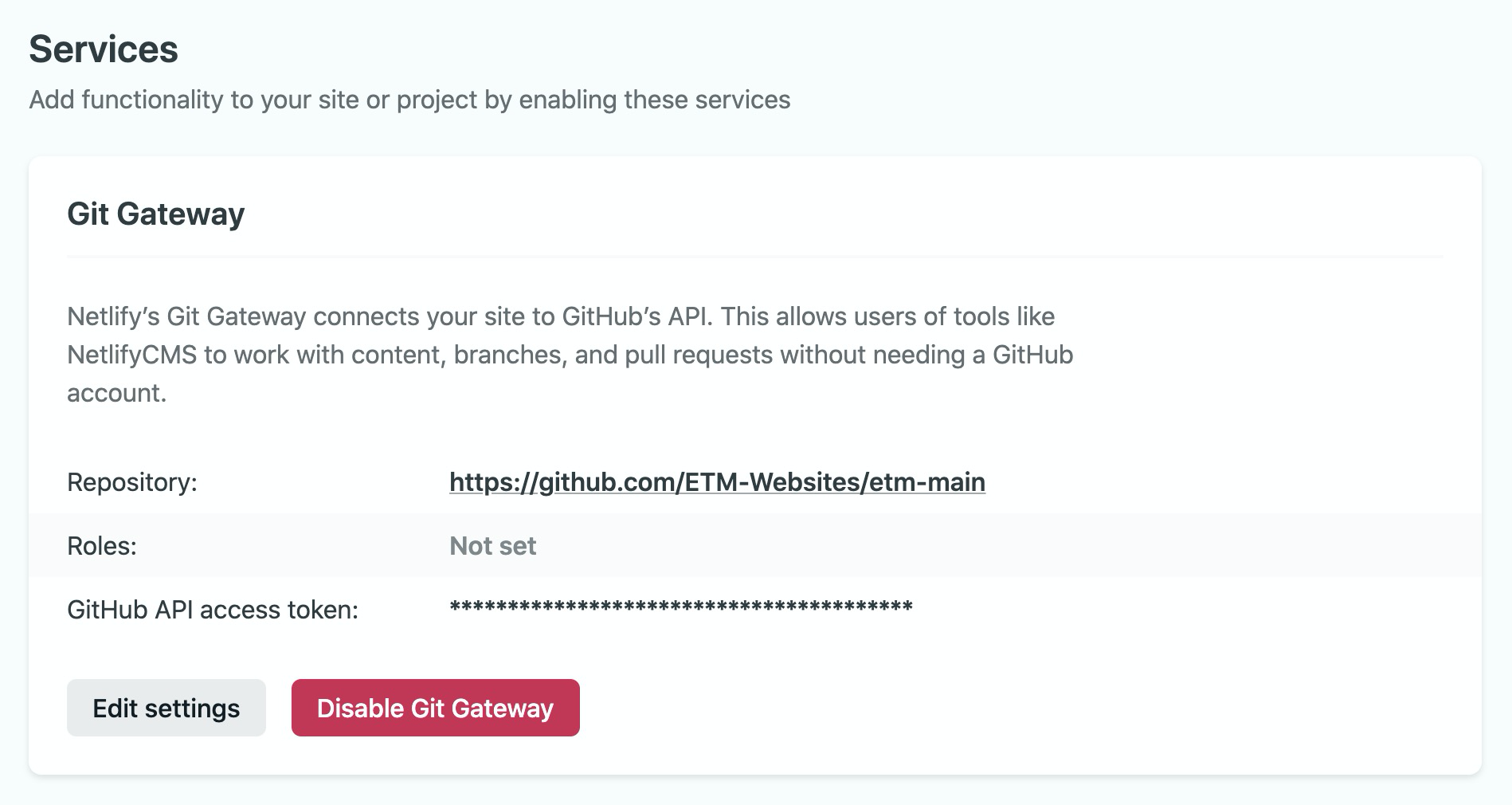
I've done this multiple times.
(Also had the wrong error message previously, it's giving API_ERROR: Not Found)
timbomckay
on 22 Nov 2020
The only thing I haven't done is generate a personal access token in GitHub because I'm creating something for clients and want everything tied to the repo
You have to create a new private token, I believe once you flip the repo to public. I think the token is not valid any longer.
talves
on 22 Nov 2020
A private token being a personal one and not one tied to the repo? I can't find a way to generate a repo specific token, when I follow the links it takes me to my github profile to generate a personal access token.
timbomckay
on 22 Nov 2020
Right. Needs to be created once you flip it back to private.
talves
on 22 Nov 2020
Click the link to generate a token, or you may supply your own Personal Access Token. Be sure the token is generated for a user with sufficient permission on your linked repository to perform the actions you want to pass through the Gateway.
So _"you may supply your own"_ should really say _"a private repo requires a Personal Access Token"_?
And the _Generate access token in GitHub_ button in the Netlify admin is irrelevant when it's a private repo?
Am I understanding this correctly?
timbomckay
on 22 Nov 2020
I don't change my site from public to private often, so can't remember everything exactly. There is something about making sure you reconnect the repo.
https://docs.netlify.com/visitor-access/git-gateway/#reconnect-after-changing-repository-permissions
talves
on 22 Nov 2020
Yeah I've done that nearly every time as well. Guess I'll just have to keep it public.
timbomckay
on 22 Nov 2020
Is the repo part of an organization account?
 tomrutgers
on 23 Nov 2020
tomrutgers
on 23 Nov 2020
It is
timbomckay
on 23 Nov 2020
Try this: https://github.com/netlify/netlify-cms/issues/1703#issuecomment-622334889
tomrutgers
on 23 Nov 2020
Good recommend @tomrutgers . Forgot all about the organization rights.
talves
on 23 Nov 2020
Thanks for that. I'll check it out. I was wonder last night if that was a factor. haha. I'll get back to you.
timbomckay
on 23 Nov 2020
Thanks for pointing me in the direction. This comment in #1816 worked for me. At least until I hand the repo over to a client, might have to just disable restrictions if I remove myself as a member for the org.
Thanks again.
timbomckay
on 25 Nov 2020
Related issues
 jake-101
·
3Comments
jake-101
·
3Comments
 TomPichaud
·
3Comments
TomPichaud
·
3Comments
 marcojakob
·
3Comments
marcojakob
·
3Comments
 BerkeleyTrue
·
3Comments
BerkeleyTrue
·
3Comments
 papandreou
·
3Comments
papandreou
·
3Comments
Most helpful comment
After you change the repo to private, go into your Git Gateway settings in Netlify, and try re-issuing the token.
https://www.netlify.com/docs/git-gateway/#getting-started