Netlify-cms: better handle Identity token expiry
- Do you want to request a feature or report a bug?
not sure where this one fits. It's an improvemet to the experience, but it felt like a bug when I hit it.
- What is the current behavior?
If your Identity authentication expires while you are editing a post, you are unable to save the post AND the messaging is barely there to tell you why. You get a too-brief flash of something like "API Error: failed to persist" that fades within seconds, and then the save button just doesn't do anything and you are left scratching your head about what happened.
- If the current behavior is a bug, please provide the steps to reproduce.
On an identity-gated CMS instance, open the editor on an existing doc. Make a change.
Wait >12h (without restarting browser).
You may login in other tabs - that doesn't affect THIS tab.
- What is the expected behavior?
An obvious, actionable, persistent error message is generated giving guidance as to what is wrong. I kind of figured it out but that "failed to persist" error is both too briefly displayed and non-obvious in "what to do about it" not even makes it clear that your entry didn't really save (though the UI controls it is unsaved after that for the astute reader).
- Please mention your CMS, node.js, and operating system version.
cms 1.0.2 running on Netlify
 fool
fool
All 21 comments
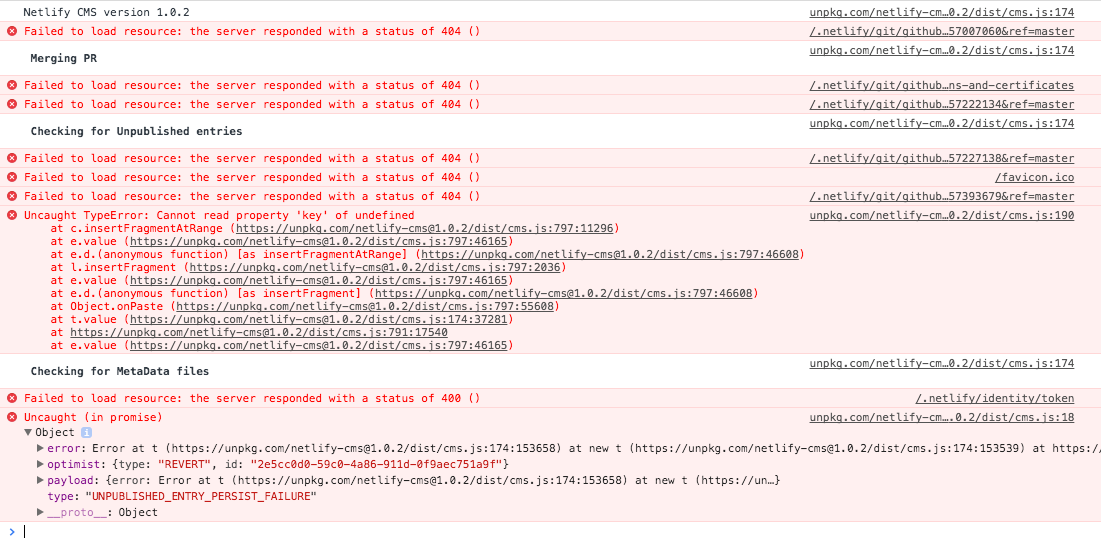
Here's what I saw in my browser dev tools, not sure if it is useful:
fool
on 19 Dec 2017
Additional context:
We have the CMS behind a JWT protected route, so the CMS client running in the browser won't be able to access any netlify resources after the JWT expires.
Suggestion: The CMS can check if the expiration on the JWT/user is expired, and if it's expired, it'll refresh the token or prompt you to login again. another option, which would require more work, would be to save the post in the browsers localstorage and then load it again after you log back in so you don't lose what you're working on.
 futuregerald
on 19 Dec 2017
futuregerald
on 19 Dec 2017
What do you guys think of https://github.com/netlify/netlify-cms/pull/560? It's not working for Git Gateway yet, but what it does is ask the user to log in again.
If there is a possibility that we could refresh the token automatically, I think that would be even better.
 tech4him1
on 19 Dec 2017
tech4him1
on 19 Dec 2017
Yes, there's a gotrue.js method that refreshes the token. It just has to be tested since it's currently not used in the netlifyIdentity widget. The updated token also has to be saved in the nf_jwt cookie, not sure if it does that currently on a refresh.
@tech4him1 that PR is what we're looking for here. Thanks.
futuregerald
on 19 Dec 2017
Looking at Chris' dev console there, what HTTP code does GoTrue return for an invalid token. I assumed it would be a 401, but maybe it is the 400?
tech4him1
on 19 Dec 2017
So I was just told that gotrue automatically refreshes the token with requests, but there's an issue that is causing that to fail. Something we have to work on.
futuregerald
on 19 Dec 2017
@futuregerald if I'm understanding your last comment correctly, this is a gotrue bug. If so, we should link the gotrue issue here when/if it's opened.
Even with this issue fixed, the save button should not have been disabled, and the saved changes indicator should have continued showing "Unsaved changes". It sounds like we're not handling the error within state if a save fails - that plus the gotrue fix are needed to close this issue.
 erquhart
on 24 Dec 2017
erquhart
on 24 Dec 2017
@erquhart yea, Mat said that that is a gotrue bug with the token refresh not working. So fool's request still stands which is just that if the token is expired, the CMS should handle that failure state properly. Right now it errors out and you lose anything that you were typing. One thing that we can do when you use identity is to first try to refresh the token using the built in method:
netlifyIdentity.gotrue.currentUser().jwt().then((token)=>{console.log(token)})
I put the console log there so you can see what the token is. it'll only return a new token if it's been a certain amount of time since the last token was issued, if you just got a new token it'll return the old token again. In either case it should refresh the currentUser object. the CMS can check the expiration date of the token in the currentUser object using user.token.expires_at from the netlifyIdentity widget in an event handler, or through the original goTrue method netlifyIdentity.gotrue.currentUser().token.expires_at . just compare the date to see if Date.now() > expires_at, and if the expiration date for Date.now() is greater, that means the current token is expired and for whatever reason did not refresh. Then provide the error state in the CMS, or for a better user experience, you can just call netlifyIdentity.logout() to clear the expired session, immediately followed by netlifyIdentity.open() to popup the login modal and prompt the user to log back in. When they successfully login, it will update the currentUser so the next time you do a session check date comparison, it should successfully go through and allow the user to save the post and/or perform other actions with the CMS.
@biilmann please let me know if this makes sense to you, or if you have a better idea.
futuregerald
on 27 Dec 2017
We now have multiple instances of lost data due to this bug, we'll need to fix asap.
erquhart
on 30 Jan 2018
Hi! Just checking in here. Seems like in the linked issue there is a configuration option for the session lifespan. Any idea on how to configure it so it's another value other than an hour? Thanks!
 rbvea
on 12 Mar 2018
rbvea
on 12 Mar 2018
I got around this in one of our production sites by using snippet injection to add the following code block in a <script> tag:
    const maxRefresh = 30;
    let iteration = 0;
    let currentExpiry;
    const refreshAttempt = () => {
    if (netlifyIdentity.gotrue.currentUser()) {
        if (iteration <= maxRefresh) {
        netlifyIdentity.gotrue
            .currentUser()
            .jwt(true)
            .then(jwt => {
            currentExpiry = netlifyIdentity.currentUser().token.expires_at;
            if (!currentExpiry) {
                throw new Error('looks like it errored out when getting you a new token');
            }
            iteration++;
            console.log(
                `just attempted to refresh the token. Currently on iteration: ${iteration}. We're refreshing every 50 minutes`
            );
            console.log(jwt);
            })
            .catch(err => {
            console.log(err);
            netlifyIdentity.logout();
            netlifyIdentity.open();
            });
        } else {
        clearInterval(beginCycle);
        console.log('The cycle is over');
        }
    }
    };

    const beginCycle = setInterval(refreshAttempt, 3000000);
That just refreshes the token every 50 minutes for 24 hours, and checks if there is an error refreshing the token to force a logout/login, however, you shouldn't have to do it that way for the CMS. I do it that way because my site is protected by JWT which means I can't allow it to expire at all. What I recommend for the CMS is to instead call jwt() to refresh the token before every request. I'm just not familiar with the CMS codebase or I'd PR a fix. just haven't had time to dig in.
futuregerald
on 14 Mar 2018
@futuregerald if you need a walkthrough of the cms codebase, all you have to do is ask :trollface:
erquhart
on 15 Mar 2018
Experiencing this as well. What's the current status?
 lukeburns
on 18 Dec 2018
lukeburns
on 18 Dec 2018
We're open to someone contributing toward this for sure - no movement as of yet.
erquhart
on 19 Dec 2018
@erquhart This is a little time bomb... just popping up now. We have clients accessing the CMS with no content. 😱Could there be an email alert to notify the notify users the git gateway has expired/disconnect? It's so easy to fix (delete then enable) I just don't know when it's broken until I get a panic phone call.
 Firthir
on 26 Jun 2019
Firthir
on 26 Jun 2019
It should only require refreshing the page, have you tried that?
erquhart
on 26 Jun 2019
This issue has been automatically marked as stale because it has not had recent activity. It will be closed if no further activity occurs. Thank you for your contributions.
![stale[bot] picture](https://avatars3.githubusercontent.com/in/1724?v=4&s=40) stale[bot]
on 29 Oct 2019
stale[bot]
on 29 Oct 2019
Just ran into this today. After clicking the save button, an error message pops up with something along the lines of "Failed to persist entry: cannot read property 'expires_at' of null". As a user, I didn't want to refresh for fear of losing my data.
I opened a new tab and logged in to the CMS again, created a new entry of the same type, and fortunately I could restore from local backup, so I didn't lose any of the data. But it is definitely still a scary experience from a UX point of view and can probably be prevented.
 cleanfooddiary
on 22 Mar 2020
cleanfooddiary
on 22 Mar 2020
Hi @cleanfooddiary, can you share your config.yml or your backend type for documentation?
 erezrokah
on 22 Mar 2020
erezrokah
on 22 Mar 2020
@erezrokah here is my backend definitions in config.yml:
backend:
  name: git-gateway
  branch: master
media_folder: public/img
public_folder: img
publish_mode: editorial_workflow
collections:
  [...]
Update: I was able to create a reproduction of this issue based on https://github.com/netlify/netlify-identity-widget/issues/142#issuecomment-395894548
- Publish a site with
git-gateway, Netlify Identity and Netlify CMS. - Serve the site locally and login to the CMS.
- Go to the live site and login to the CMS in a new browser window/tab.
- Go back to the browser window with the local version of the CMS and open a browser console.
- In the browser console, run the following commands (this is what the CMS does, just without the
trueargument that forces a token refresh).
const user = netlifyIdentity.currentUser()
const tokenPromise = user.jwt.bind(user)
// This will force a token refresh but will fail since the refresh token
// is no longer valid due to the login to the live site
// as a side effect it will set the token property to null
await tokenPromise(true)
// this will error trying to access the null token property
tokenPromise() //
Might be other scenarios that will generate the error.
Underlying issue - user.jwt automatically tries to refresh the token, but that operation fails if the refresh token is no longer valid.
The CMS should be able to handle that failure
erezrokah
on 28 May 2020
Related issues
 TomPichaud
·
3Comments
TomPichaud
·
3Comments
 dur41d
·
3Comments
dur41d
·
3Comments
 papandreou
·
3Comments
papandreou
·
3Comments
 andresalerno
·
3Comments
andresalerno
·
3Comments
 chriskirknielsen
·
3Comments
chriskirknielsen
·
3Comments
Most helpful comment
We now have multiple instances of lost data due to this bug, we'll need to fix asap.