Netlify-cms: Netlify CMS "authorized popup"
Hi!
I've met a weird CMS behaviour. I have a private repo on github and the website is stored on AWS with a custom domain.
After setting up the custom domain (like it is in placeholder
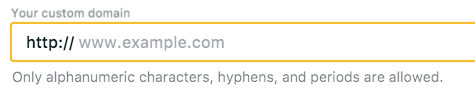
) I could go to /admin page and see a "login with github" button. But after authorization process was complete I only had a hanging popup window with a line "Authorized". No errors, console was clean.
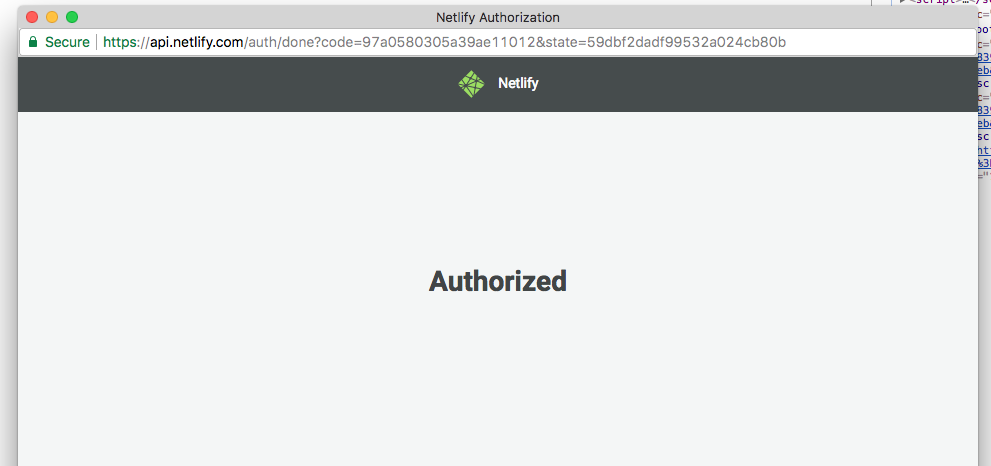
Finally I've found the way to complete the process - I had to remove "www." from custom domain field, and it worked well. (Thanks to https://github.com/erquhart)
But solution wasn't obvious without any warnings or errors. And placeholder has "www" prefix.
Thanks!
 VitaliiZhukov
All 17 comments
I know this has been closed, but I have a site that is hosted on a subdomain (not www) and I am having the same issue. I cannot remove the "www" because there is none, and I cannot remove the subdomain because that is the root of the site (dcv.ampul.com). Can we find out what the issue is here and why removing www in VitaliiZhukov's case worked, so that we can fix this problem on other sorts of domains?
 delwin
on 13 Jan 2018
delwin
on 13 Jan 2018
@delwin for sure - we just need to be able to reproduce the issue live. Can you share the link to your site? (dcv.ampul.com doesn't appear to be live.)
 erquhart
on 20 Jan 2018
erquhart
on 20 Jan 2018
same like delwin here,
My site has hosted with Netlify subdomain and I can't log into netlify-cms.
For your reproduce, below is site domain and repository.
Site: http://blog.kataba.me/
Repo: https://github.com/katabame/kataba.me/tree/blog
 katabame
on 29 Mar 2018
katabame
on 29 Mar 2018
Thank you so much for the repro case @katabame! I think I've found the issue.
The problematic code is on https://api.netlify.com/auth/done, the page that shows the "Authorized" screen.
console.log("Got host: %o", host);
if ( host === "katabame.netlify.com" ||  host === "kataba.me" ||  host == "localhost") {
  window.opener.postMessage(
    'authorization:github:success:{\"token\":\"an-example-token\",\"provider\":\"github\"}',
    e.origin
  );
}
The problem is that you are logging in from a subdomain, blog.kataba.me, but the Netlify authorization code only works for the root domain, kataba.me.
@erquhart @bcomnes @biilmann Can this code be fixed, or do logins need to be restricted to top-level domains only?
 tech4him1
on 29 Mar 2018
tech4him1
on 29 Mar 2018
Hmm not sure. @futuregerald?
erquhart
on 29 Mar 2018
from @futuregerald: one approach would be to use Identity and Git Gateway instead of the GitHub backend: https://www.netlifycms.org/docs/authentication-backends/#git-gateway-with-netlify-identity
erquhart
on 29 Mar 2018
@erquhart I assume that we'll still have a "real" fix at some point? Not everybody can or will use Git Gateway.
tech4him1
on 30 Mar 2018
Not really a bug, auth only works against your custom domain. @delwin would need to change his Netlify site domain to "dcv.ampul.com", and @katabame would change his to "blog.kataba.me".
To request improvements in functionality, or to get other ideas about how to work around this, reach out in Netlify's community Gitter or submit the request to [email protected].
Note: consider that every subdomain is really a completely separate domain. That being the case, I'd say create a separate Netlify site for each domain.
erquhart
on 2 Apr 2018
I leave a note for @delwin or who in similar situation.
As https://github.com/netlify/netlify-cms/issues/770#issuecomment-377334439 say, I need to auth with git-gateway.
Here is detailed steps that I did.
- Add
<script src="https://identity-js.netlify.com/v1/netlify-identity-widget.js"></script>in your CMSindex.htmlheader.
See this for example. - Rewrite your CMS
config.ymlbackend section.
You'll need specify branch if you're using subbranch for your site.
See this for example. - Add
Git-GatewayIdentity.
- From the Netlify Dashboard, Select 'Identity' and "Enable Identity".
- (Recommended) In the settings page that then opens up scroll down to Registration and set "Invite Only".
- Scoll further down to Services and click "Enable GitGateway".
- Invite yourself.
You'll receive email from netlify. When you clickAccept the invitelink, you'll jump toYourTopDomain.com/#invite_token=TOKEN(for me,https://kataba.me/#invite_token=TOKEN).
But that link will not work, you need to rewrite&access link toSubdomain.YourTopDomain.com/#invite_token=TOKEN(for me,https://blog.kataba.me/#invite_token=TOKEN)
Then netlify identity will ask you for set your password. - Now you can login to netlify-cms dashboard.
Thanks for edit suggesting: @Brondahl
katabame
on 3 Apr 2018
Same problem here, except in my case it's not "a different part of the site", it's staging.mySite.com
I assume this is still unresolved, and the official answers are still "Don't have subdomains" or "use GitGateway"? @erquhart
Suggesting that we should have a separate Netlify instance for the staging site seems pretty disappointing - it's a built in part of Netlify to be able to support multiple branches as subdomains. (I imagine it doesn't support preview branches either, which are another significant part of the Netlify product?)
If we're saying that direct GitHub integration just doesn't really work with Netlify hosting, then I feel like that should be loudly advertised in the documentation? This has eaten up a big chunk of time trying to diagnose - I assumed that it should JustWork and therefore that I'd done something wrong with my settings and permission. (This thread didn't immediately come up on my first searches)
 Brondahl
on 24 Oct 2018
Brondahl
on 24 Oct 2018
@katabame Thanks for that blow-by-blow; it's really helpful!
_EDIT: Deleted Obsolete content._
Brondahl
on 24 Oct 2018
@Brondahl
(If you could edit that into your post, I think it'll make this thread more useful for other devs - it's always annoying to trawl through a thread trying to piece together the necessary steps from multiple posts. :)
Yes, it's so annoying. I edited the post, no annoying anymore!
katabame
on 24 Oct 2018
@tech4him1 @Brondahl I think you're misunderstanding - Git Gateway and Netlify Identity aren't a temporary workaround, they're Netlify's answer for (among other things) authenticating against a Netlify site domain and it's subdomains. The GitHub/Bitbucket/GitLab backends on their own make use of an auth server that we provide for free at cms.netlify.com, but if you want to authenticate for all of your branch subdomains on Netlify, use Netlify Identity.
erquhart
on 1 Nov 2018
@erquhart , hi!
Please, is there a way to login on my staging domain using BitBucket? Thank you!
 robsonsobral
on 25 Nov 2018
robsonsobral
on 25 Nov 2018
@erquhart Will the "https://api.netlify.com/auth" server be deprecated then, and people be forced to us Git Gateway?
tech4him1
on 25 Nov 2018
@Brondahl Netlify's own auth works only for a single domain, you'll need to create a separate Netlify site for your staging domain.
@tech4him1 no, not at all, just not as robust as Identity, that's all.
erquhart
on 27 Nov 2018
Like some other users, I couldn't login to netlify-cms on my website, because after trying to login with my github account, the login popup said Authorized but then nothing happened. I was trying to setup a Jekyll website using github pages and github backend (and netlify authentication server). In my case, just adding the property site_domain: <username>.github.io to backend field in config.yml did not solve the problem. I also had to set <username>.github.io as my site domain in netlify dashboard. That solved the problem for me and I could login using my github account.
 n33m4
on 11 Apr 2019
n33m4
on 11 Apr 2019
Related issues
 Narno
·
3Comments
Narno
·
3Comments
 BerkeleyTrue
·
3Comments
BerkeleyTrue
·
3Comments
 andresalerno
·
3Comments
andresalerno
·
3Comments
 dur41d
·
3Comments
dur41d
·
3Comments
 TomPichaud
·
3Comments
TomPichaud
·
3Comments
Most helpful comment
Like some other users, I couldn't login to netlify-cms on my website, because after trying to login with my github account, the login popup said Authorized but then nothing happened. I was trying to setup a Jekyll website using github pages and github backend (and netlify authentication server). In my case, just adding the property
site_domain: <username>.github.iotobackendfield in config.yml did not solve the problem. I also had to set<username>.github.ioas my site domain in netlify dashboard. That solved the problem for me and I could login using my github account.