Netlify-cms: [FEATURE] Show Deploy Preview statuses and links in editorial workflow
- Do you want to request a feature or report a bug?
This is a feature that just crossed my mind.
- What is the current behavior?
Pages edited with the Editorial Workflow show up in the board, depending on their progress. If an editor wants to see the content rendered, they can see it with the builtin preview in the CMS. This is usually handy, but there is still a disconnection between what's rendered by the CMS and the actual page in its right domain.
If you use Netlify, you automatically get previews of the content edited in the right domain, the site deployed in our CDN. These previews are registered in GitHub's commit statuses.
So if an editor wants to check out the Deploy Preview, they need to know where the GitHub repository is, browse the list of pull requests, find the right one and click the link to open the Deploy Preview.
- What is the expected behavior?
GitHub provides an API to get information about those commit statuses:
https://developer.github.com/v3/repos/statuses/#get-the-combined-status-for-a-specific-ref
We could use it to check if there is a link to the Deploy Preview published there, then add it to the editorial workflow's card, and probably somewhere in the editor too. That way, if you want to check the edited content in the site, you only need to click a link that the CMS gives you.
As an initial implementation, I would not try to do anything super complicated, maybe not even for all cards, since all those calls to the GitHub API can be rate limited very fast. I would probably only check the content that's in "Waiting for Review", and only when the page is loaded. Polling data from GitHub's API can mark you as an abuser and you can lose access for up to 48 hours.
 calavera
All 17 comments
This would be totally awesome 💯
 josephearl
on 14 Apr 2017
josephearl
on 14 Apr 2017
Agreed, this would be absolutely great.
 anthonysapp
on 27 Apr 2017
anthonysapp
on 27 Apr 2017
Triple agree!
 alanontheweb
on 28 Apr 2017
alanontheweb
on 28 Apr 2017
We need to implement this in a way that is platform agnostic - I'm thinking we provide the same "checks" links and statuses that would show on the GitHub PR, which would include Netlify's Deploy Preview, CI tests from providers like Travis, etc. It makes sense to communicate whether all checks passed since publishing is merging a PR.
We can probably just pull this data for everything in the workflow on load, since most checks will complete at any given time, and then provide physical refresh buttons to avoid rate limits due to polling.
@calavera let me know if you disagree on any of that.
 erquhart
on 28 Jun 2017
erquhart
on 28 Jun 2017
Revisiting this: looks like I didn't thoroughly read the OP before responding - I agree that we should limit this by only checking items pending merge in the workflow. That said, there should be a button to manually check status for any unpublished item.
We would need to add status checking to the Backend API, and we'd need to figure out how to present it all in the UI, with the understanding that some projects have more than a few status checks. We'd also need to accept configuration for determining which checks to show.
This is a great contribution opportunity for both architecture and design. For reference, the status checks we're referring to look like this in GitHub:

They each link to a url from the status provider, e.g. Travis links to builds, Netlify links to deploys.
cc/ @neutyp @indysigner
erquhart
on 20 Dec 2017
I think we have two options here:
Option a) speaking freely of any technical constraints, and just focussing what would be ideal is this:
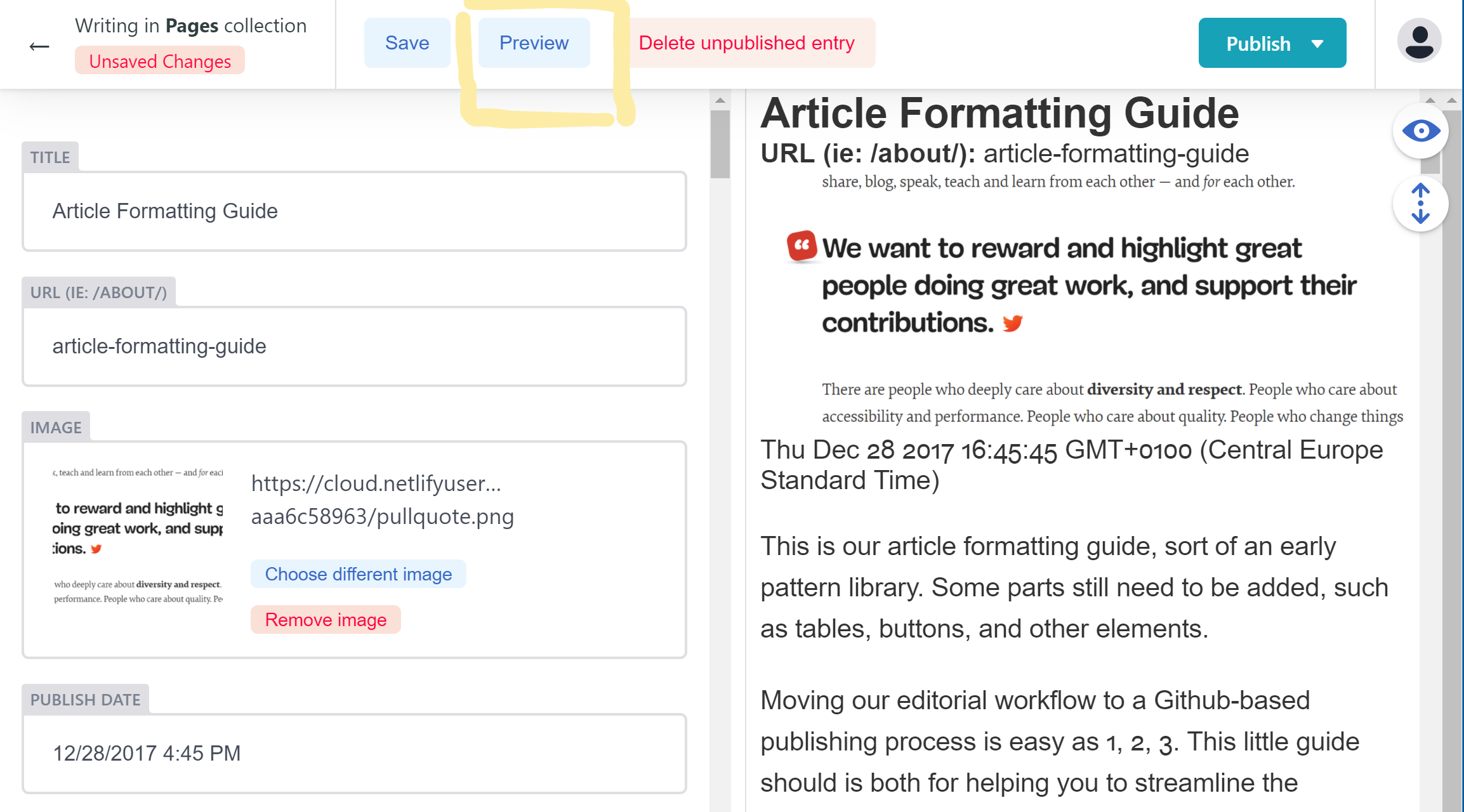
A Preview button next to the _Save_ button at the top of the editor. The button would trigger a _deploy preview_ of just this _one single article_, without processing the whole repository. Just one article, so that the deploy preview will be available instantly (similar to Browserstack in a local environment).
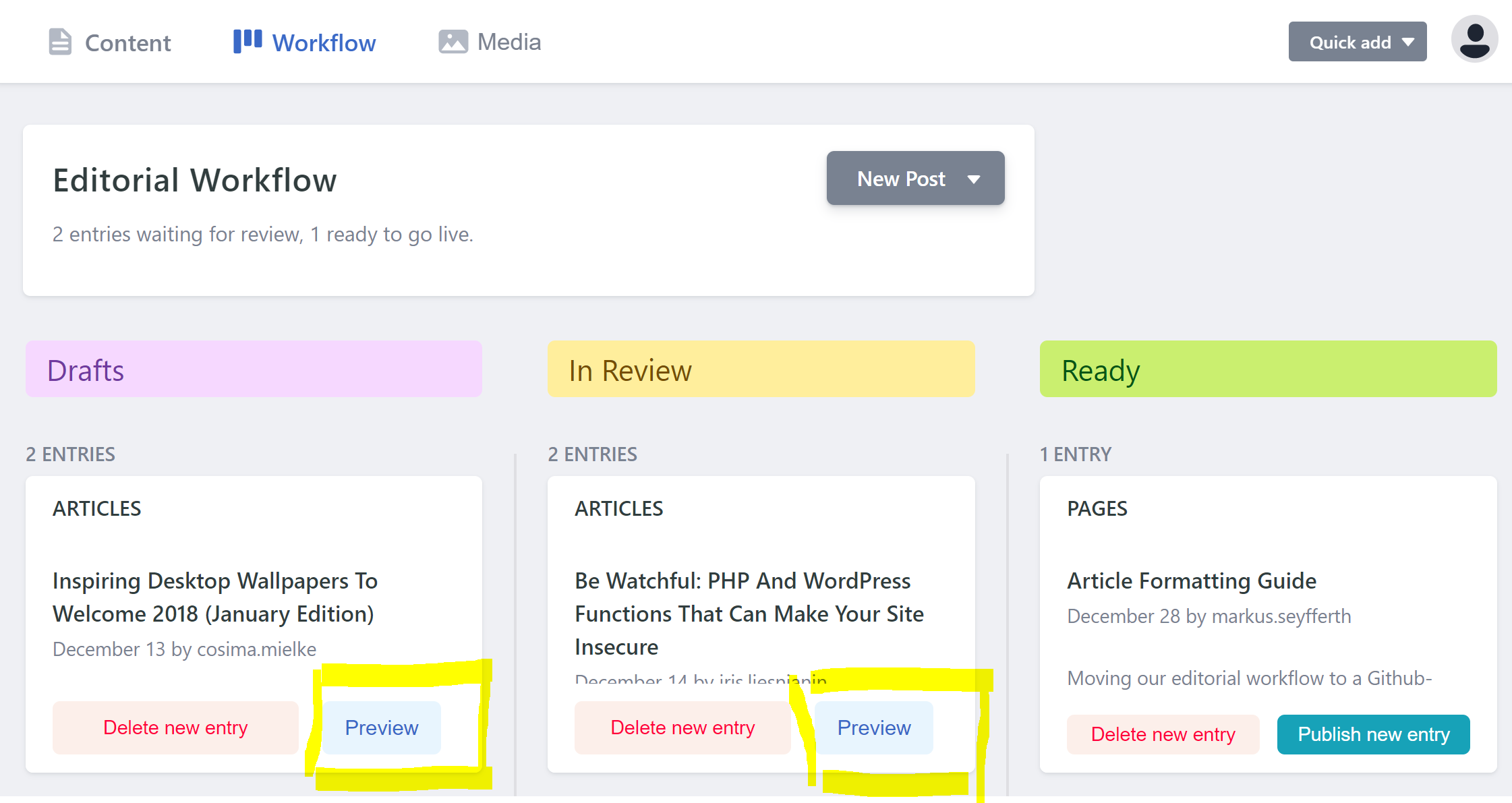
b) If processing only one article or e.g. the most recent 20 articles only is not an option for whatever reason, so that the deploy preview process would need considerably more time, I'd put the _Preview_ button in the main _Workflow dashboard,_ maybe only in the columns _Draft_ and _Review_, where the Publish button is being disabled anyway. Like this:
Thoughts? :-) @erquhart @biilmann @calavera
In any case, a preview button within the CMS would be highly appreciated since it’s not possible for us to get a live preview without leaving the CMS and looking it up via Github.
— Markus
 indysigner
on 29 Dec 2017
indysigner
on 29 Dec 2017
The idea is to lean on the Git provider, e.g. GitHub, for providing links to deploys. The CMS wouldn't have any control over what deployments have occurred or triggering them, it would just receive links from GitHub, which can then be used in the UI.
I like the idea of simplifying things and only allowing a preview link to be configured rather than trying to handle an arbitrary panel of various commit checks.
erquhart
on 2 Jan 2018
I like the idea of a preview button and I think we could get ok far by just specifying a preview url on the collection configuration. If we could have the branch name of the workflow as a replacement token I think we can configure it to match most deployment workflows.
 jballe
on 12 Dec 2018
jballe
on 12 Dec 2018
Yes please, it still is a feature that would make the CMS much more accessible to a wider audience, and to non-technical content editors in particular. Not every editor uses GIthub nor can it be expected from them, and going through Github still is only way of getting a deploy preview link. 🙏
indysigner
on 13 Dec 2018
This little guy is pretty much a dealbreaker in my experience. I can't imagine handing this off to stakeholders without giving them any easy way to see what things are going to look like. Preview buttons get used all the time by content editors.
I'd be happy to help with this if I can get some guidance on what folks have decided is the best way to accomplish this.
 sddaniels
on 1 Jan 2019
sddaniels
on 1 Jan 2019
Hi @erquhart sorry to bump and tag you, but my gut feeling turned out to be right and the lack of an easy preview link is a show stopper. I'd love to use the system internally, but we can't move forward without this. Is there a way that I can contribute this feature with a PR that will meet everyone's approval?
sddaniels
on 9 Jan 2019
@sddaniels I'm about to put up a PR for this, but first a question: are you using editorial workflow, and do you mostly need preview links for unpublished entries? Changes to published entries are viewable on your production site, and I'm thinking we don't _need_ preview links for something that editors can just navigate to themselves. Can you confirm whether this aligns with your requirements?
erquhart
on 24 Jan 2019
@erquhart that's lovely news, thank you! Yes, we're using the editorial workflow because we need to work on unpublished content. An example of this would be a content editor preparing a new page, previewing it to make sure it looks correct, and sending the preview link to our legal dept. for approval. After approval we would then publish the page. So this PR sounds like it would solve the most pressing issue there.
I will say that I think there's a separate but related issue regarding being able to view the deployed page you are currently working on, whether published or not. In my experience, content editors are typically used to working on an individual page's content (except in certain circumstances like global options, or content that gets embedded in several places, etc.). Because they're working on that single page, and in a traditional CMS that is linked directly to the front end, they are typically provided with a link to navigate directly to the published page and/or the preview of that specific page.
I understand the complications of that approach in a decoupled system like this, but the lack of the quick link makes my editors uneasy. I know they can navigate directly there themselves, but it's additional overhead and could be quite complicated in a large site. I've been brainstorming ways to solve that issue, even if it's just by adding hardcoded comments or links to the preview area or something along those lines.
Anyway, I do see this as separate concern, so we could move discussion of that somewhere else. Thanks again!!
sddaniels
on 24 Jan 2019
Awesome, glad this fits the bill! Providing links for published pages isn't more difficult, just a little more work. Let's go ahead and get this released for unpublished entries and take it from there.
erquhart
on 24 Jan 2019
Totally on board, sounds great! Thanks for putting up with my over-explanation :)
I found an existing issue that seems more directly related to what I was talking about in the second para, it's Issue 1337 (ha!). It looks like that links back to this issue. Does that mean that the preview/link will include the path of the page, or is it just always linking to the home page? Or maybe I misunderstood what that reporter was looking for.
Also wanted to say I'm happy to pitch in on something and contribute back, especially if we are using this in production. Doesn't have to be this issue, could be whatever. I have a fair bit of React under my belt and I need an open source project to adopt...
sddaniels
on 24 Jan 2019
Ah, thanks for tracking down that issue - it will be much easier to solve once this PR is merged, might even tack it on. We'll see.
The PR I just raised does provide a method for linking to the current entry rather than just linking to the preview site root.
Regarding pitching in/adopting an OS project, we'd love to have you! My recommendation is to do what you were trying to do here before I rudely interrupted 😅 - that is, find something you personally want to fix, the more it benefits you or your work, the better. For now, testing this feature (once released) and providing feedback would be immediately helpful. I'd also love to hear what you're using this for and how your team's experience with Netlify CMS has been! Reach out if you have the time :)
erquhart
on 24 Jan 2019
No worries! I'm in for all of the above and I'm just starting implementation, hopefully will have it live by the end of next week.
sddaniels
on 24 Jan 2019
Related issues
 andresalerno
·
3Comments
andresalerno
·
3Comments
 ghost
·
3Comments
calavera
·
3Comments
ghost
·
3Comments
calavera
·
3Comments
 mikecrittenden
·
3Comments
mikecrittenden
·
3Comments
 emckay
·
3Comments
emckay
·
3Comments
Most helpful comment
The idea is to lean on the Git provider, e.g. GitHub, for providing links to deploys. The CMS wouldn't have any control over what deployments have occurred or triggering them, it would just receive links from GitHub, which can then be used in the UI.
I like the idea of simplifying things and only allowing a preview link to be configured rather than trying to handle an arbitrary panel of various commit checks.