Netdata: Unable to start fping in CentOS 7.3
netdata -V
netdata v1.24.0-229-nightly


cat /etc/redhat-release
CentOS Linux release 7.3.1611 (Core)


2020-09-14 14:53:02: fping.plugin: INFO: Loading config file '/usr/lib/netdata/conf.d/fping.conf'...
2020-09-14 14:53:02: fping.plugin: INFO: Loading config file '/etc/netdata/fping.conf'...
2020-09-14 14:53:02: fping.plugin: INFO: starting fping: /usr/local/bin/fping -N -l -Q 1 -p 200 -R -b 56 -i 1 -r 0 -t 5000 10.0.4.1 10.0.4.2 10.0.4.3 10.0.4.4
2020-09-14 14:53:02: netdata ERROR : PLUGINSD[fping] : read failed: end of file (errno 9, Bad file descriptor)
2020-09-14 14:53:02: netdata INFO  : PLUGINSD[fping] : PARSER ended
2020-09-14 14:53:02: netdata ERROR : PLUGINSD[fping] : '/usr/libexec/netdata/plugins.d/fping.plugin' (pid 2873) disconnected after 0 successful data collections (ENDs).
2020-09-14 14:53:02: netdata ERROR : PLUGINSD[fping] : child pid 2873 exited with code 4.
2020-09-14 14:53:02: netdata ERROR : PLUGINSD[fping] : '/usr/libexec/netdata/plugins.d/fping.plugin' (pid 2873) exited with error code 4 and haven't collected any data. Disabling it.
2020-09-14 14:53:02: netdata INFO  : PLUGINSD[fping] : thread with task id 2870 finished
tried a few times to reinstall fping by /usr/libexec/netdata/plugins.d/fping.plugin install from /etc/netdata/fping.conf, and restarted netdata, but still out of luck
./fping -v
./fping: Version 4.2
./fping: comments to [email protected]
md5sum fping
b13658485cc8da14c30b3cf05cd6f042  fping
ls -lht
-rwsr-xr-x 1 root root 131K Sep 14 14:52 fping
 startryst
All 56 comments
Hi @startryst 👋 Netdata version? How did you install it?
edit: ok i see you are adding info to the OP
 ilyam8
on 14 Sep 2020
ilyam8
on 14 Sep 2020
Hi @startryst 👋 Netdata version? How did you install it?
netdata -V
netdata v1.24.0-229-nightly
I installed many weeks ago, by the one line bash script, and fping was running good where I barely can remember.
startryst
on 14 Sep 2020
I couldnt intall fping using
./fping.plugin install
[ilyam-pc plugins.d]# ./fping.plugin install
 > cd /usr/src
 > rm -rf fping-4.2
 > tar -zxvpf -
 > curl -s -L https://github.com/schweikert/fping/releases/download/v4.2/fping-4.2.tar.gz
fping-4.2/
fping-4.2/doc/
fping-4.2/doc/Makefile.am
fping-4.2/doc/Makefile.in
fping-4.2/doc/fping.pod
fping-4.2/doc/CHANGELOG.pre-v4
fping-4.2/doc/fping.8
fping-4.2/doc/README.1992
fping-4.2/depcomp
fping-4.2/aclocal.m4
fping-4.2/Makefile.am
fping-4.2/config.h.in
fping-4.2/COPYING
fping-4.2/Makefile.in
fping-4.2/compile
fping-4.2/CHANGELOG.md
fping-4.2/missing
fping-4.2/config.guess
fping-4.2/configure
fping-4.2/configure.ac
fping-4.2/INSTALL
fping-4.2/config.sub
fping-4.2/install-sh
fping-4.2/src/
fping-4.2/src/Makefile.am
fping-4.2/src/optparse.h
fping-4.2/src/Makefile.in
fping-4.2/src/fping.h
fping-4.2/src/fping.c
fping-4.2/src/seqmap.h
fping-4.2/src/socket6.c
fping-4.2/src/options.h
fping-4.2/src/socket4.c
fping-4.2/src/seqmap.c
fping-4.2/src/optparse.c
 > cd fping-4.2
 > ./configure --prefix=/usr/local
checking for gcc... gcc
checking whether the C compiler works... yes
checking for C compiler default output file name... a.out
checking for suffix of executables...
checking whether we are cross compiling... no
checking for suffix of object files... o
checking whether we are using the GNU C compiler... yes
checking whether gcc accepts -g... yes
checking for gcc option to accept ISO C89... none needed
checking whether gcc understands -c and -o together... yes
checking for netinet/icmp6.h... yes
checking whether SO_TIMESTAMP is declared... yes
checking build system type... x86_64-unknown-linux-gnu
checking host system type... x86_64-unknown-linux-gnu
checking target system type... x86_64-unknown-linux-gnu
checking for a BSD-compatible install... /usr/bin/install -c
checking whether build environment is sane... yes
/bin/sh: /root/missing: No such file or directory
configure: WARNING: 'missing' script is too old or missing
checking for a thread-safe mkdir -p... /usr/bin/mkdir -p
checking for gawk... gawk
checking whether make sets $(MAKE)... yes
checking for style of include used by make... GNU
checking whether make supports nested variables... yes
checking dependency style of gcc... gcc3
checking whether to enable maintainer-specific portions of Makefiles... no
checking for gcc... (cached) gcc
checking whether we are using the GNU C compiler... (cached) yes
checking whether gcc accepts -g... (cached) yes
checking for gcc option to accept ISO C89... (cached) none needed
checking whether gcc understands -c and -o together... (cached) yes
checking for gcc option to accept ISO C99... none needed
checking for gcc option to accept ISO Standard C... (cached) none needed
checking how to run the C preprocessor... gcc -E
checking for gethostbyname... yes
checking for connect... yes
checking for grep that handles long lines and -e... /usr/bin/grep
checking for egrep... /usr/bin/grep -E
checking for ANSI C header files... yes
checking for sys/types.h... yes
checking for sys/stat.h... yes
checking for stdlib.h... yes
checking for string.h... yes
checking for memory.h... yes
checking for strings.h... yes
checking for inttypes.h... yes
checking for stdint.h... yes
checking for unistd.h... yes
checking for unistd.h... (cached) yes
checking sys/file.h usability... yes
checking sys/file.h presence... yes
checking for sys/file.h... yes
checking for stdlib.h... (cached) yes
checking sys/select.h usability... yes
checking sys/select.h presence... yes
checking for sys/select.h... yes
checking that generated files are newer than configure... done
configure: creating ./config.status
config.status: creating Makefile
config.status: creating doc/Makefile
config.status: creating src/Makefile
config.status: creating config.h
config.status: executing depfiles commands
 > make clean
Making clean in doc
make[1]: Entering directory '/usr/src/fping-4.2/doc'
make[1]: Nothing to be done for 'clean'.
make[1]: Leaving directory '/usr/src/fping-4.2/doc'
Making clean in src
make[1]: Entering directory '/usr/src/fping-4.2/src'
test -z "fping" || rm -f fping
rm -f *.o
make[1]: Leaving directory '/usr/src/fping-4.2/src'
make[1]: Entering directory '/usr/src/fping-4.2'
make[1]: Nothing to be done for 'clean-am'.
make[1]: Leaving directory '/usr/src/fping-4.2'
 > make
make  all-recursive
make[1]: Entering directory '/usr/src/fping-4.2'
Making all in doc
make[2]: Entering directory '/usr/src/fping-4.2/doc'
make[2]: Nothing to be done for 'all'.
make[2]: Leaving directory '/usr/src/fping-4.2/doc'
Making all in src
make[2]: Entering directory '/usr/src/fping-4.2/src'
gcc -DHAVE_CONFIG_H -I. -I..    -Wall -Wextra -Wno-sign-compare -DIPV6 -g -O2 -MT fping-fping.o -MD -MP -MF .deps/fping-fping.Tpo -c -o fping-fping.o `test -f 'fping.c' || echo './'`fping.c
fping.c: In function 'sprint_tm':
fping.c:2599:28: warning: 'sprintf' may write a terminating nul past the end of the destination [-Wformat-overflow=]
 2599 |         sprintf(buf, "%d.%d", t / 100, (t % 100) / 10);
      |                            ^
fping.c:2599:9: note: 'sprintf' output between 4 and 11 bytes into a destination of size 10
 2599 |         sprintf(buf, "%d.%d", t / 100, (t % 100) / 10);
      |         ^~~~~~~~~~~~~~~~~~~~~~~~~~~~~~~~~~~~~~~~~~~~~~
fping.c:2595:26: warning: '%02d' directive writing 2 bytes into a region of size between 1 and 8 [-Wformat-overflow=]
 2595 |         sprintf(buf, "%d.%02d", t / 100, t % 100);
      |                          ^~~~
fping.c:2595:22: note: directive argument in the range [0, 99]
 2595 |         sprintf(buf, "%d.%02d", t / 100, t % 100);
      |                      ^~~~~~~~~
fping.c:2595:9: note: 'sprintf' output between 5 and 12 bytes into a destination of size 10
 2595 |         sprintf(buf, "%d.%02d", t / 100, t % 100);
      |         ^~~~~~~~~~~~~~~~~~~~~~~~~~~~~~~~~~~~~~~~~
fping.c: In function 'add_name':
fping.c:2340:82: warning: ')' directive output may be truncated writing 1 byte into a region of size between 0 and 510 [-Wformat-truncation=]
 2340 |                 snprintf(nameaddrbuf, sizeof(nameaddrbuf) / sizeof(char), "%s (%s)", printname, addrbuf);
      |                                                                                  ^
fping.c:2340:17: note: 'snprintf' output between 4 and 514 bytes into a destination of size 512
 2340 |                 snprintf(nameaddrbuf, sizeof(nameaddrbuf) / sizeof(char), "%s (%s)", printname, addrbuf);
      |                 ^~~~~~~~~~~~~~~~~~~~~~~~~~~~~~~~~~~~~~~~~~~~~~~~~~~~~~~~~~~~~~~~~~~~~~~~~~~~~~~~~~~~~~~~
mv -f .deps/fping-fping.Tpo .deps/fping-fping.Po
gcc -DHAVE_CONFIG_H -I. -I..    -Wall -Wextra -Wno-sign-compare -DIPV6 -g -O2 -MT fping-seqmap.o -MD -MP -MF .deps/fping-seqmap.Tpo -c -o fping-seqmap.o `test -f 'seqmap.c' || echo './'`seqmap.c
mv -f .deps/fping-seqmap.Tpo .deps/fping-seqmap.Po
gcc -DHAVE_CONFIG_H -I. -I..    -Wall -Wextra -Wno-sign-compare -DIPV6 -g -O2 -MT fping-socket4.o -MD -MP -MF .deps/fping-socket4.Tpo -c -o fping-socket4.o `test -f 'socket4.c' || echo './'`socket4.c
mv -f .deps/fping-socket4.Tpo .deps/fping-socket4.Po
gcc -DHAVE_CONFIG_H -I. -I..    -Wall -Wextra -Wno-sign-compare -DIPV6 -g -O2 -MT fping-optparse.o -MD -MP -MF .deps/fping-optparse.Tpo -c -o fping-optparse.o `test -f 'optparse.c' || echo './'`optparse.c
mv -f .deps/fping-optparse.Tpo .deps/fping-optparse.Po
gcc -DHAVE_CONFIG_H -I. -I..    -Wall -Wextra -Wno-sign-compare -DIPV6 -g -O2 -MT fping-socket6.o -MD -MP -MF .deps/fping-socket6.Tpo -c -o fping-socket6.o `test -f 'socket6.c' || echo './'`socket6.c
mv -f .deps/fping-socket6.Tpo .deps/fping-socket6.Po
gcc -Wall -Wextra -Wno-sign-compare -DIPV6 -g -O2   -o fping fping-fping.o fping-seqmap.o fping-socket4.o fping-optparse.o fping-socket6.o
/usr/bin/ld: fping-socket4.o:/usr/src/fping-4.2/src/fping.h:14: multiple definition of `random_data_flag'; fping-fping.o:/usr/src/fping-4.2/src/fping.h:14: first defined here
/usr/bin/ld: fping-socket6.o:/usr/src/fping-4.2/src/fping.h:14: multiple definition of `random_data_flag'; fping-fping.o:/usr/src/fping-4.2/src/fping.h:14: first defined here
collect2: error: ld returned 1 exit status
make[2]: *** [Makefile:350: fping] Error 1
make[2]: Leaving directory '/usr/src/fping-4.2/src'
make[1]: *** [Makefile:358: all-recursive] Error 1
make[1]: Leaving directory '/usr/src/fping-4.2'
make: *** [Makefile:298: all] Error 2
I have it installed from the distro repo
[ilyam@ilyam-pc ~]$ whereis fping
fping: /usr/bin/fping /usr/share/man/man8/fping.8.gz
[ilyam@ilyam-pc ~]$ fping -v
fping: Version 4.4
fping: comments to [email protected]
And it works for me
[ilyam-pc plugins.d]# ./fping.plugin
2020-09-14 10:12:41: fping.plugin: INFO: Loading config file '/opt/netdata/usr/lib/netdata/conf.d/fping.conf'...
2020-09-14 10:12:41: fping.plugin: INFO: Loading config file '/opt/netdata/etc/netdata/fping.conf'...
2020-09-14 10:12:41: fping.plugin: INFO: starting fping: /usr/bin/fping -N -l -Q 1 -p 200 -R -b 56 -i 1 -r 0 -t 5000 8.8.8.8
CHART fping.8_8_8_8_packets '' 'FPing Packets for host 8.8.8.8' packets '8_8_8_8' fping.packets line 110020 1
DIMENSION xmt sent absolute 1 1
DIMENSION rcv received absolute 1 1
BEGIN fping.8_8_8_8_packets
SET xmt = 5
SET rcv = 5
END
CHART fping.8_8_8_8_quality '' 'FPing Quality for host 8.8.8.8' percentage '8_8_8_8' fping.quality area 110010 1
DIMENSION returned '' absolute 1 1
BEGIN fping.8_8_8_8_quality
SET returned = 100
END
CHART fping.8_8_8_8_latency '' 'FPing Latency for host 8.8.8.8' ms '8_8_8_8' fping.latency area 110000 1
DIMENSION min minimum absolute 10 1000
DIMENSION max maximum absolute 10 1000
DIMENSION avg average absolute 10 1000
BEGIN fping.8_8_8_8_latency
SET min = 875
SET avg = 907
SET max = 1002
END
BEGIN fping.8_8_8_8_packets
SET xmt = 5
SET rcv = 5
END
BEGIN fping.8_8_8_8_quality
SET returned = 100
END
BEGIN fping.8_8_8_8_latency
SET min = 881
SET avg = 890
SET max = 915
END
^C8.8.8.8 : xmt/rcv/%loss = 13/13/0%, min/avg/max = 8.75/9.09/10.6
[ilyam-pc plugins.d]#
I see fping section on the dashboard.
@startryst try to run the plugin manually
./fping.plugin
ilyam8
on 14 Sep 2020
I see
fpingsection on the dashboard.@startryst try to run the plugin manually
./fping.plugin
working on the console:
/usr/libexec/netdata/plugins.d/fping.plugin
2020-09-14 15:22:34: fping.plugin: INFO: Loading config file '/usr/lib/netdata/conf.d/fping.conf'...
2020-09-14 15:22:34: fping.plugin: INFO: Loading config file '/etc/netdata/fping.conf'...
2020-09-14 15:22:34: fping.plugin: INFO: starting fping: /usr/local/bin/fping -N -l -Q 1 -p 200 -R -b 56 -i 1 -r 0 -t 5000 10.0.4.1 10.0.4.2 10.0.4.3 10.0.4.4
CHART fping.10_0_4_1_packets '' 'FPing Packets for host 10.0.4.1' packets '10_0_4_1' fping.packets line 110020 1
DIMENSION xmt sent absolute 1 1
DIMENSION rcv received absolute 1 1
BEGIN fping.10_0_4_1_packets
SET xmt = 5
SET rcv = 5
END
CHART fping.10_0_4_1_quality '' 'FPing Quality for host 10.0.4.1' percentage '10_0_4_1' fping.quality area 110010 1
DIMENSION returned '' absolute 1 1
BEGIN fping.10_0_4_1_quality
SET returned = 100
END

ignored...
my installation looks good:
/usr/libexec/netdata/plugins.d/fping.plugin install
 > cd /usr/src
 > rm -rf fping-4.2
 > tar -zxvpf -
 > curl -s -L https://github.com/schweikert/fping/releases/download/v4.2/fping-4.2.tar.gz
fping-4.2/
fping-4.2/doc/
fping-4.2/doc/Makefile.am
fping-4.2/doc/Makefile.in
fping-4.2/doc/fping.pod
fping-4.2/doc/CHANGELOG.pre-v4
fping-4.2/doc/fping.8
fping-4.2/doc/README.1992
fping-4.2/depcomp
fping-4.2/aclocal.m4
fping-4.2/Makefile.am
fping-4.2/config.h.in
fping-4.2/COPYING
fping-4.2/Makefile.in
fping-4.2/compile
fping-4.2/CHANGELOG.md
fping-4.2/missing
fping-4.2/config.guess
fping-4.2/configure
fping-4.2/configure.ac
fping-4.2/INSTALL
fping-4.2/config.sub
fping-4.2/install-sh
fping-4.2/src/
fping-4.2/src/Makefile.am
fping-4.2/src/optparse.h
fping-4.2/src/Makefile.in
fping-4.2/src/fping.h
fping-4.2/src/fping.c
fping-4.2/src/seqmap.h
fping-4.2/src/socket6.c
fping-4.2/src/options.h
fping-4.2/src/socket4.c
fping-4.2/src/seqmap.c
fping-4.2/src/optparse.c
 > cd fping-4.2
 > ./configure --prefix=/usr/local
checking for gcc... gcc
checking whether the C compiler works... yes
checking for C compiler default output file name... a.out
checking for suffix of executables...
checking whether we are cross compiling... no
checking for suffix of object files... o
checking whether we are using the GNU C compiler... yes
checking whether gcc accepts -g... yes
checking for gcc option to accept ISO C89... none needed
checking whether gcc understands -c and -o together... yes
checking for netinet/icmp6.h... yes
checking whether SO_TIMESTAMP is declared... yes
checking build system type... x86_64-unknown-linux-gnu
checking host system type... x86_64-unknown-linux-gnu
checking target system type... x86_64-unknown-linux-gnu
checking for a BSD-compatible install... /usr/bin/install -c
checking whether build environment is sane... yes
/bin/sh: /root/missing: No such file or directory
configure: WARNING: 'missing' script is too old or missing
checking for a thread-safe mkdir -p... /usr/bin/mkdir -p
checking for gawk... gawk
checking whether make sets $(MAKE)... yes
checking for style of include used by make... GNU
checking whether make supports nested variables... yes
checking dependency style of gcc... gcc3
checking whether to enable maintainer-specific portions of Makefiles... no
checking for gcc... (cached) gcc
checking whether we are using the GNU C compiler... (cached) yes
checking whether gcc accepts -g... (cached) yes
checking for gcc option to accept ISO C89... (cached) none needed
checking whether gcc understands -c and -o together... (cached) yes
checking for gcc option to accept ISO C99... -std=gnu99
checking for gcc -std=gnu99 option to accept ISO Standard C... (cached) -std=gnu99
checking how to run the C preprocessor... gcc -std=gnu99 -E
checking for gethostbyname... yes
checking for connect... yes
checking for grep that handles long lines and -e... /usr/bin/grep
checking for egrep... /usr/bin/grep -E
checking for ANSI C header files... yes
checking for sys/types.h... yes
checking for sys/stat.h... yes
checking for stdlib.h... yes
checking for string.h... yes
checking for memory.h... yes
checking for strings.h... yes
checking for inttypes.h... yes
checking for stdint.h... yes
checking for unistd.h... yes
checking for unistd.h... (cached) yes
checking sys/file.h usability... yes
checking sys/file.h presence... yes
checking for sys/file.h... yes
checking for stdlib.h... (cached) yes
checking sys/select.h usability... yes
checking sys/select.h presence... yes
checking for sys/select.h... yes
checking that generated files are newer than configure... done
configure: creating ./config.status
config.status: creating Makefile
config.status: creating doc/Makefile
config.status: creating src/Makefile
config.status: creating config.h
config.status: executing depfiles commands
 > make clean
Making clean in doc
make[1]: Entering directory `/usr/src/fping-4.2/doc'
make[1]: Nothing to be done for `clean'.
make[1]: Leaving directory `/usr/src/fping-4.2/doc'
Making clean in src
make[1]: Entering directory `/usr/src/fping-4.2/src'
test -z "fping" || rm -f fping
rm -f *.o
make[1]: Leaving directory `/usr/src/fping-4.2/src'
make[1]: Entering directory `/usr/src/fping-4.2'
make[1]: Nothing to be done for `clean-am'.
make[1]: Leaving directory `/usr/src/fping-4.2'
 > make
make  all-recursive
make[1]: Entering directory `/usr/src/fping-4.2'
Making all in doc
make[2]: Entering directory `/usr/src/fping-4.2/doc'
make[2]: Nothing to be done for `all'.
make[2]: Leaving directory `/usr/src/fping-4.2/doc'
Making all in src
make[2]: Entering directory `/usr/src/fping-4.2/src'
gcc -std=gnu99 -DHAVE_CONFIG_H -I. -I..    -Wall -Wextra -Wno-sign-compare -DIPV6 -g -O2 -MT fping-fping.o -MD -MP -MF .deps/fping-fping.Tpo -c -o fping-fping.o `test -f 'fping.c' || echo './'`fping.c
mv -f .deps/fping-fping.Tpo .deps/fping-fping.Po
gcc -std=gnu99 -DHAVE_CONFIG_H -I. -I..    -Wall -Wextra -Wno-sign-compare -DIPV6 -g -O2 -MT fping-seqmap.o -MD -MP -MF .deps/fping-seqmap.Tpo -c -o fping-seqmap.o `test -f 'seqmap.c' || echo './'`seqmap.c
mv -f .deps/fping-seqmap.Tpo .deps/fping-seqmap.Po
gcc -std=gnu99 -DHAVE_CONFIG_H -I. -I..    -Wall -Wextra -Wno-sign-compare -DIPV6 -g -O2 -MT fping-socket4.o -MD -MP -MF .deps/fping-socket4.Tpo -c -o fping-socket4.o `test -f 'socket4.c' || echo './'`socket4.c
mv -f .deps/fping-socket4.Tpo .deps/fping-socket4.Po
gcc -std=gnu99 -DHAVE_CONFIG_H -I. -I..    -Wall -Wextra -Wno-sign-compare -DIPV6 -g -O2 -MT fping-optparse.o -MD -MP -MF .deps/fping-optparse.Tpo -c -o fping-optparse.o `test -f 'optparse.c' || echo './'`optparse.c
mv -f .deps/fping-optparse.Tpo .deps/fping-optparse.Po
gcc -std=gnu99 -DHAVE_CONFIG_H -I. -I..    -Wall -Wextra -Wno-sign-compare -DIPV6 -g -O2 -MT fping-socket6.o -MD -MP -MF .deps/fping-socket6.Tpo -c -o fping-socket6.o `test -f 'socket6.c' || echo './'`socket6.c
mv -f .deps/fping-socket6.Tpo .deps/fping-socket6.Po
gcc -std=gnu99 -Wall -Wextra -Wno-sign-compare -DIPV6 -g -O2   -o fping fping-fping.o fping-seqmap.o fping-socket4.o fping-optparse.o fping-socket6.o
make[2]: Leaving directory `/usr/src/fping-4.2/src'
make[2]: Entering directory `/usr/src/fping-4.2'
make[2]: Leaving directory `/usr/src/fping-4.2'
make[1]: Leaving directory `/usr/src/fping-4.2'
 > mv -f /usr/local/bin/fping /usr/local/bin/fping.old
 > mv src/fping /usr/local/bin/fping
 > chown root:root /usr/local/bin/fping
 > chmod 4755 /usr/local/bin/fping

All done, you have a compatible fping now at /usr/local/bin/fping.
looks good for me, just to check - could you install fping using your distro package manager?
ilyam8
on 14 Sep 2020
my netdata is a little bit ahead, but i dont think it matters
[ilyam-pc netdata]# /opt/netdata/usr/sbin/netdata -v
netdata v1.24.0-236-g87bfcdf3
I see
fpingsection on the dashboard.
@startryst try to run the plugin manually./fping.plugin
working on the console:
/usr/libexec/netdata/plugins.d/fping.plugin
2020-09-14 15:22:34: fping.plugin: INFO: Loading config file '/usr/lib/netdata/conf.d/fping.conf'...
2020-09-14 15:22:34: fping.plugin: INFO: Loading config file '/etc/netdata/fping.conf'...
2020-09-14 15:22:34: fping.plugin: INFO: starting fping: /usr/local/bin/fping -N -l -Q 1 -p 200 -R -b 56 -i 1 -r 0 -t 5000 10.0.4.1 10.0.4.2 10.0.4.3 10.0.4.4
CHART fping.10_0_4_1_packets '' 'FPing Packets for host 10.0.4.1' packets '10_0_4_1' fping.packets line 110020 1
DIMENSION xmt sent absolute 1 1
DIMENSION rcv received absolute 1 1
BEGIN fping.10_0_4_1_packets
SET xmt = 5
SET rcv = 5
END
CHART fping.10_0_4_1_quality '' 'FPing Quality for host 10.0.4.1' percentage '10_0_4_1' fping.quality area 110010 1
DIMENSION returned '' absolute 1 1
BEGIN fping.10_0_4_1_quality
SET returned = 100
END

ignored...
Since it looks running good, I don't think the binary of fping come with issue, instead, it more of the way how netdata invoke fping with flaws? or something settings somewhere not fit?
Btw, my distro to install is a bit too old for fping:
yum info fping
Loaded plugins: fastestmirror
Repodata is over 2 weeks old. Install yum-cron? Or run: yum makecache fast
Determining fastest mirrors
Available Packages
Name        : fping
Arch        : x86_64
Version     : 3.10
Release     : 4.el7
Size        : 46 k
Repo        : epel/7/x86_64
Summary     : Scriptable, parallelized ping-like utility
URL         : http://www.fping.org/
License     : BSD with advertising
Description : fping is a ping-like program which can determine the accessibility of
            : multiple hosts using ICMP echo requests. fping is designed for parallelized
            : monitoring of large numbers of systems, and is developed with ease of
            : use in scripting in mind.
using your distro package manager?
Btw, my distro to install is a bit too old for fping:
you are right, i didnt take into account that centos7 is too stable to have latest fping, old version is not compatible with netdata
ilyam8
on 14 Sep 2020
@stelfrag any ideas why
2020-09-14 14:53:02: fping.plugin: INFO: starting fping: /usr/local/bin/fping -N -l -Q 1 -p 200 -R -b 56 -i 1 -r 0 -t 5000 10.0.4.1 10.0.4.2 10.0.4.3 10.0.4.4
2020-09-14 14:53:02: netdata ERROR : PLUGINSD[fping] : read failed: end of file (errno 9, Bad file descriptor)
2020-09-14 14:53:02: netdata INFO  : PLUGINSD[fping] : PARSER ended
the debug output looks ok
https://github.com/netdata/netdata/issues/9923#issuecomment-691871351
ilyam8
on 14 Sep 2020
@stelfrag can you take a look?
startryst
on 17 Sep 2020
@startryst you checked debug as netdata user?
ilyam8
on 17 Sep 2020
@startryst you checked debug as
netdatauser?
no, root.
startryst
on 17 Sep 2020
Try it as netdata user.
ilyam8
on 17 Sep 2020
Try it as
netdatauser.
Looks in good shape:
runuser -l netdata -c '/usr/libexec/netdata/plugins.d/fping.plugin'
2020-09-17 14:49:49: fping.plugin: INFO: Loading config file '/usr/lib/netdata/conf.d/fping.conf'...
2020-09-17 14:49:49: fping.plugin: INFO: Loading config file '/etc/netdata/fping.conf'...
2020-09-17 14:49:49: fping.plugin: INFO: starting fping: /usr/local/bin/fping -N -l -Q 1 -p 200 -R -b 56 -i 1 -r 0 -t 5000 10.0.4.1 10.0.4.2 10.0.4.3 10.0.4.4
CHART fping.10_0_4_1_packets '' 'FPing Packets for host 10.0.4.1' packets '10_0_4_1' fping.packets line 110020 1
DIMENSION xmt sent absolute 1 1
DIMENSION rcv received absolute 1 1
BEGIN fping.10_0_4_1_packets
SET xmt = 5
SET rcv = 5
END
CHART fping.10_0_4_1_quality '' 'FPing Quality for host 10.0.4.1' percentage '10_0_4_1' fping.quality area 110010 1
DIMENSION returned '' absolute 1 1
BEGIN fping.10_0_4_1_quality
SET returned = 100
END
CHART fping.10_0_4_1_latency '' 'FPing Latency for host 10.0.4.1' ms '10_0_4_1' fping.latency area 110000 1
DIMENSION min minimum absolute 10 1000
DIMENSION max maximum absolute 10 1000
DIMENSION avg average absolute 10 1000
BEGIN fping.10_0_4_1_latency
SET min = 1307
SET avg = 1350
SET max = 1424
END
I tried again restart netdata, and capturing the logs relatable to ping:
tail -f /var/log/netdata/error.log | grep fping
2020-09-17 14:51:39: netdata INFO  : MAIN : RRDSET: chart name 'fping.10_0_4_1_packets' on host 'alyhk4' already exists.
2020-09-17 14:51:39: netdata INFO  : MAIN : RRDSET: chart name 'fping.10_0_4_1_quality' on host 'alyhk4' already exists.
2020-09-17 14:51:39: netdata INFO  : MAIN : RRDSET: chart name 'fping.10_0_4_1_latency' on host 'alyhk4' already exists.
2020-09-17 14:51:39: netdata INFO  : MAIN : RRDSET: chart name 'fping.10_0_4_2_packets' on host 'alyhk4' already exists.
2020-09-17 14:51:39: netdata INFO  : MAIN : RRDSET: chart name 'fping.10_0_4_2_quality' on host 'alyhk4' already exists.
2020-09-17 14:51:39: netdata INFO  : MAIN : RRDSET: chart name 'fping.10_0_4_2_latency' on host 'alyhk4' already exists.
2020-09-17 14:51:39: netdata INFO  : MAIN : RRDSET: chart name 'fping.10_0_4_3_packets' on host 'alyhk4' already exists.
2020-09-17 14:51:39: netdata INFO  : MAIN : RRDSET: chart name 'fping.10_0_4_3_quality' on host 'alyhk4' already exists.
2020-09-17 14:51:39: netdata INFO  : MAIN : RRDSET: chart name 'fping.10_0_4_3_latency' on host 'alyhk4' already exists.
2020-09-17 14:51:39: netdata INFO  : MAIN : RRDSET: chart name 'fping.10_0_4_4_packets' on host 'alyhk4' already exists.
2020-09-17 14:51:39: netdata INFO  : MAIN : RRDSET: chart name 'fping.10_0_4_4_quality' on host 'alyhk4' already exists.
2020-09-17 14:51:39: netdata INFO  : MAIN : RRDSET: chart name 'fping.10_0_4_4_latency' on host 'alyhk4' already exists.
2020-09-17 14:51:39: netdata INFO  : PLUGINSD[fping] : thread created with task id 22191
2020-09-17 14:51:39: netdata INFO  : PLUGINSD[fping] : set name of thread 22191 to PLUGINSD[fping]
2020-09-17 14:51:39: netdata INFO  : PLUGINSD[fping] : connected to '/usr/libexec/netdata/plugins.d/fping.plugin' running on pid 22195
2020-09-17 14:51:39: fping.plugin: INFO: Loading config file '/usr/lib/netdata/conf.d/fping.conf'...
2020-09-17 14:51:39: fping.plugin: INFO: Loading config file '/etc/netdata/fping.conf'...
2020-09-17 14:51:39: fping.plugin: INFO: starting fping: /usr/local/bin/fping -N -l -Q 1 -p 200 -R -b 56 -i 1 -r 0 -t 5000 10.0.4.1 10.0.4.2 10.0.4.3 10.0.4.4
2020-09-17 14:51:39: netdata ERROR : PLUGINSD[fping] : read failed: end of file (errno 9, Bad file descriptor)
2020-09-17 14:51:39: netdata INFO  : PLUGINSD[fping] : PARSER ended
2020-09-17 14:51:39: netdata ERROR : PLUGINSD[fping] : '/usr/libexec/netdata/plugins.d/fping.plugin' (pid 22195) disconnected after 0 successful data collections (ENDs).
2020-09-17 14:51:39: netdata ERROR : PLUGINSD[fping] : child pid 22195 exited with code 4.
2020-09-17 14:51:39: netdata ERROR : PLUGINSD[fping] : '/usr/libexec/netdata/plugins.d/fping.plugin' (pid 22195) exited with error code 4 and haven't collected any data. Disabling it.
2020-09-17 14:51:39: netdata INFO  : PLUGINSD[fping] : thread with task id 22191 finished
i am not really sure it makes much sense, but lets check executing fping directly as netdata user
/usr/local/bin/fping -N -l -Q 1 -p 200 -R -b 56 -i 1 -r 0 -t 5000 10.0.4.1 10.0.4.2 10.0.4.3 10.0.4.4
ilyam8
on 17 Sep 2020
I can't see anything from the logs that would indicate a problem with the parser (it would have written something appropriate in the errror.log). The plugin must be shutting down for some, strange, reason.
 stelfrag
on 17 Sep 2020
stelfrag
on 17 Sep 2020
i am not really sure it makes much sense, but lets check executing
fpingdirectly asnetdatauser/usr/local/bin/fping -N -l -Q 1 -p 200 -R -b 56 -i 1 -r 0 -t 5000 10.0.4.1 10.0.4.2 10.0.4.3 10.0.4.4
works well
runuser -l netdata -c '/usr/local/bin/fping -N -l -Q 1 -p 200 -R -b 56 -i 1 -r 0 -t 5000 10.0.4.1 10.0.4.2 10.0.4.3 10.0.4.4'
CHART fping.10_0_4_1_packets '' 'FPing Packets for host 10.0.4.1' packets '10_0_4_1' fping.packets line 110020 1
DIMENSION xmt sent absolute 1 1
DIMENSION rcv received absolute 1 1
BEGIN fping.10_0_4_1_packets
SET xmt = 5
SET rcv = 5
END
CHART fping.10_0_4_1_quality '' 'FPing Quality for host 10.0.4.1' percentage '10_0_4_1' fping.quality area 110010 1
DIMENSION returned '' absolute 1 1
BEGIN fping.10_0_4_1_quality
SET returned = 100
END
CHART fping.10_0_4_1_latency '' 'FPing Latency for host 10.0.4.1' ms '10_0_4_1' fping.latency area 110000 1
DIMENSION min minimum absolute 10 1000
DIMENSION max maximum absolute 10 1000
DIMENSION avg average absolute 10 1000
BEGIN fping.10_0_4_1_latency
SET min = 1328
SET avg = 1346
SET max = 1364
END
CHART fping.10_0_4_2_packets '' 'FPing Packets for host 10.0.4.2' packets '10_0_4_2' fping.packets line 110020 1
DIMENSION xmt sent absolute 1 1
DIMENSION rcv received absolute 1 1
BEGIN fping.10_0_4_2_packets
SET xmt = 5
SET rcv = 5
END
I can't see anything from the logs that would indicate a problem with the parser (it would have written something appropriate in the errror.log). The plugin must be shutting down for some, strange, reason.
From the log I attached above, as you see for the below lines, what's that supposed to take, in particular, the second line?
2020-09-17 14:51:39: fping.plugin: INFO: starting fping: /usr/local/bin/fping -N -l -Q 1 -p 200 -R -b 56 -i 1 -r 0 -t 5000 10.0.4.1 10.0.4.2 10.0.4.3 10.0.4.4
2020-09-17 14:51:39: netdata ERROR : PLUGINSD[fping] : read failed: end of file (errno 9, Bad file descriptor)
2020-09-17 14:51:39: netdata ERROR : PLUGINSD[fping] : read failed: end of file (errno 9, Bad file descriptor)
Means the plugins exits and the pipe is closed i think
I can do same
[ilyam@ilyam-pc netdata]$ sudo kill -9 $(pidof go.d.plugin)
[sudo] password for ilyam:
[ilyam@ilyam-pc netdata]$
netdata error.log
2020-09-18 14:21:58: netdata ERROR : PLUGINSD[go.d] : read failed: end of file (errno 9, Bad file descriptor)
2020-09-18 14:21:58: netdata INFO  : PLUGINSD[go.d] : PARSER ended
2020-09-18 14:21:58: netdata ERROR : PLUGINSD[go.d] : '/opt/netdata/usr/libexec/netdata/plugins.d/go.d.plugin' (pid 469541) disconnected after 3184 successful data collections (ENDs).

2020-09-18 14:21:58: netdata ERROR : PLUGINSD[go.d] : child pid 469541 killed by signal 9.
2020-09-18 14:21:58: netdata INFO  : PLUGINSD[go.d] : '/opt/netdata/usr/libexec/netdata/plugins.d/go.d.plugin' (pid 469541) was killed with SIGTERM. Disabling it.
2020-09-18 14:21:58: netdata INFO  : PLUGINSD[go.d] : thread with task id 469519 finished
2020-09-17 14:51:39: netdata ERROR : PLUGINSD[fping] : read failed: end of file (errno 9, Bad file descriptor)
Means the plugins exits and the pipe is closed i think
I can do same
[ilyam@ilyam-pc netdata]$ sudo kill -9 $(pidof go.d.plugin)
[sudo] password for ilyam:
[ilyam@ilyam-pc netdata]$
netdata error.log
2020-09-18 14:21:58: netdata ERROR : PLUGINSD[go.d] : read failed: end of file (errno 9, Bad file descriptor)
2020-09-18 14:21:58: netdata INFO  : PLUGINSD[go.d] : PARSER ended
2020-09-18 14:21:58: netdata ERROR : PLUGINSD[go.d] : '/opt/netdata/usr/libexec/netdata/plugins.d/go.d.plugin' (pid 469541) disconnected after 3184 successful data collections (ENDs).

2020-09-18 14:21:58: netdata ERROR : PLUGINSD[go.d] : child pid 469541 killed by signal 9.
2020-09-18 14:21:58: netdata INFO  : PLUGINSD[go.d] : '/opt/netdata/usr/libexec/netdata/plugins.d/go.d.plugin' (pid 469541) was killed with SIGTERM. Disabling it.
2020-09-18 14:21:58: netdata INFO  : PLUGINSD[go.d] : thread with task id 469519 finished
so what suppose to do next?
startryst
on 18 Sep 2020
In addition, this occurred to multiple hosts of mine, not an individual case
startryst
on 18 Sep 2020
Is fping the only external plugin that doesnt work?
ilyam8
on 18 Sep 2020
[plugins]
    # PATH environment variable = /usr/local/sbin:/usr/local/bin:/usr/sbin:/usr/bin:/sbin:/usr/sbin:/usr/local/bin:/usr/local/sbin
    # PYTHONPATH environment variable =
    # proc = yes
    # diskspace = yes
     cgroups = no
     tc = no
     idlejitter = no
    # enable running new plugins = yes
    # check for new plugins every = 60
    # slabinfo = no
     perf = no
     ioping = no
     python.d = no
     node.d = no
     apps = no
     go.d = no
     charts.d = no
    # fping = yes
Is
fpingthe only external plugin that doesnt work?
can you give me your /usr/local/bin/fping's md5sum value?
startryst
on 18 Sep 2020
i didn't install fping via fping.plugin script.
[ilyam@ilyam-pc ~]$ pacman --sync --search fping
extra/fping 4.4-1 [installed]
    Utility to ping multiple hosts at once
so what should I suppose to do, totally uninstall netdata and do it over again?
startryst
on 18 Sep 2020
I dont know why fping doesnt work, there is no _reason_ in the logs.
Is fping the only external plugin that doesnt work?
I mean try to enable python.d.plugin or/and apps so we ensure that it is fping only having problems.
ilyam8
on 18 Sep 2020
I dont know why
fpingdoesnt work, there is no _reason_ in the logs.Is fping the only external plugin that doesnt work?
I mean try to enable
python.d.pluginor/andappsso we ensure that it isfpingonly having problems.
I've another server, which not only fping enabled, that one works fine.
startryst
on 18 Sep 2020
I just copied the binary from that one to the problematic one, and did a try, still not working.
Having said that, the md5 hash of those two binary are different, even though the version are all 4.2
/usr/local/bin/fping: Version 4.2
/usr/local/bin/fping: comments to [email protected]
md5sum fping
1b5ec44e2349de2727c8f3fd547ca8d0 fping
md5sum fping.old
b13658485cc8da14c30b3cf05cd6f042 fping.old
./fping -v
./fping: Version 4.2
./fping: comments to [email protected]
./fping.old -v
./fping.old: Version 4.2
./fping.old: comments to [email protected]
startryst
on 18 Sep 2020
well, i would completely remove and re-install netdata from the source (latest master branch).
ilyam8
on 18 Sep 2020
I compared the netdata error logs of two hosts which both enabled fping, but one is good the other is not, from the log, the only difference is, the problematic one comes with below, but the good one is not, how to interpret this?
2020-09-18 21:01:51: netdata INFO  : MAIN : RRDSET: chart name 'fping.10_0_4_1_packets' on host 'alyhk4' already exists.
2020-09-18 21:01:51: netdata INFO  : MAIN : RRDSET: chart name 'fping.10_0_4_1_quality' on host 'alyhk4' already exists.
2020-09-18 21:01:51: netdata INFO  : MAIN : RRDSET: chart name 'fping.10_0_4_1_latency' on host 'alyhk4' already exists.
2020-09-18 21:01:51: netdata INFO  : MAIN : RRDSET: chart name 'fping.10_0_4_2_packets' on host 'alyhk4' already exists.
2020-09-18 21:01:51: netdata INFO  : MAIN : RRDSET: chart name 'fping.10_0_4_2_quality' on host 'alyhk4' already exists.
2020-09-18 21:01:51: netdata INFO  : MAIN : RRDSET: chart name 'fping.10_0_4_2_latency' on host 'alyhk4' already exists.
2020-09-18 21:01:51: netdata INFO  : MAIN : RRDSET: chart name 'fping.10_0_4_3_packets' on host 'alyhk4' already exists.
after reinstalled, still the same:
2020-09-18 21:23:26: netdata INFO  : PLUGINSD[fping] : thread created with task id 27638
2020-09-18 21:23:26: netdata INFO  : PLUGINSD[fping] : set name of thread 27638 to PLUGINSD[fping]
2020-09-18 21:23:26: netdata INFO  : PLUGINSD[fping] : connected to '/usr/libexec/netdata/plugins.d/fping.plugin' running on pid 27642
2020-09-18 21:23:26: fping.plugin: INFO: Loading config file '/usr/lib/netdata/conf.d/fping.conf'...
2020-09-18 21:23:26: fping.plugin: INFO: Loading config file '/etc/netdata/fping.conf'...
2020-09-18 21:23:26: fping.plugin: INFO: starting fping: /usr/local/bin/fping -N -l -Q 1 -p 200 -R -b 56 -i 1 -r 0 -t 5000 10.0.4.1 10.0.4.2 10.0.4.3 10.0.4.4
2020-09-18 21:23:26: netdata ERROR : PLUGINSD[fping] : read failed: end of file (errno 9, Bad file descriptor)
2020-09-18 21:23:26: netdata INFO  : PLUGINSD[fping] : PARSER ended
2020-09-18 21:23:26: netdata ERROR : PLUGINSD[fping] : '/usr/libexec/netdata/plugins.d/fping.plugin' (pid 27642) disconnected after 0 successful data collections (ENDs).
2020-09-18 21:23:26: netdata ERROR : PLUGINSD[fping] : child pid 27642 exited with code 4.
2020-09-18 21:23:26: netdata ERROR : PLUGINSD[fping] : '/usr/libexec/netdata/plugins.d/fping.plugin' (pid 27642) exited with error code 4 and haven't collected any data. Disabling it.
2020-09-18 21:23:26: netdata INFO  : PLUGINSD[fping] : thread with task id 27638 finished
Do other external plugins (app, python) work?
Since we have no understanding of the problem and guessing... I would try to build latest fping from the source and try to use it
ilyam8
on 18 Sep 2020
tail -f /var/log/netdata/error.log | grep python
2020-09-18 21:31:48: netdata INFO  : PLUGINSD : stopping plugin thread: plugin:python.d
2020-09-18 21:31:48: netdata INFO  : PLUGINSD[python.d] : data collection thread exiting
2020-09-18 21:31:48: netdata INFO  : PLUGINSD[python.d] : killing child process pid 28214
2020-09-18 21:31:48: netdata INFO  : PLUGINSD[python.d] : waiting for child process pid 28214 to exit...
2020-09-18 21:31:48: netdata INFO  : PLUGINSD[python.d] : thread with task id 28210 finished
2020-09-18 21:31:49: netdata INFO  : PLUGINSD[python.d] : thread created with task id 28410
2020-09-18 21:31:49: netdata INFO  : PLUGINSD[python.d] : set name of thread 28410 to PLUGINSD[python
2020-09-18 21:31:49: netdata INFO  : PLUGINSD[python.d] : connected to '/usr/libexec/netdata/plugins.d/python.d.plugin' running on pid 28415
2020-09-18 21:31:49: python.d INFO: plugin[main] : using python v2
2020-09-18 21:31:49: python.d INFO: plugin[main] : [adaptec_raid] is disabled by default, skipping it
2020-09-18 21:31:49: python.d INFO: plugin[main] : [am2320] built 1 job(s) configs
2020-09-18 21:31:49: python.d INFO: plugin[main] : [apache] built 3 job(s) configs
2020-09-18 21:31:49: python.d INFO: plugin[main] : [beanstalk] built 1 job(s) configs
2020-09-18 21:31:49: python.d INFO: plugin[main] : [bind_rndc] built 1 job(s) configs
2020-09-18 21:31:49: python.d INFO: plugin[main] : [boinc] built 1 job(s) configs
2020-09-18 21:31:49: python.d INFO: plugin[main] : [ceph] built 1 job(s) configs
2020-09-18 21:31:49: python.d INFO: plugin[main] : [chrony] is disabled in the configuration file, skipping it
2020-09-18 21:31:49: python.d INFO: plugin[main] : [couchdb] built 1 job(s) configs
2020-09-18 21:31:49: python.d INFO: plugin[main] : [dns_query_time] built 1 job(s) configs
2020-09-18 21:31:49: python.d INFO: plugin[main] : [dnsdist] built 1 job(s) configs
2020-09-18 21:31:49: python.d INFO: plugin[main] : [dockerd] built 1 job(s) configs
2020-09-18 21:31:49: python.d INFO: plugin[main] : [dovecot] built 5 job(s) configs
2020-09-18 21:31:49: python.d INFO: plugin[main] : [elasticsearch] built 1 job(s) configs
2020-09-18 21:31:49: python.d INFO: plugin[main] : [energid] built 3 job(s) configs
2020-09-18 21:31:49: python.d INFO: plugin[main] : [example] is disabled in the configuration file, skipping it
2020-09-18 21:31:49: python.d INFO: plugin[main] : [exim] built 1 job(s) configs
2020-09-18 21:31:49: python.d INFO: plugin[main] : [fail2ban] built 1 job(s) configs
2020-09-18 21:31:49: netdata INFO  : PLUGIN[diskspace] : 2020-09-18 21:31:49: python.d INFO: plugin[main] : [freeradius] built 1 job(s) configs
2020-09-18 21:31:50: netdata INFO  : PLUGIN[proc] : 2020-09-18 21:31:50: python.d INFO: plugin[main] : [gearman] built 1 job(s) configs
2020-09-18 21:31:50: netdata INFO  : PLUGIN[proc] : 2020-09-18 21:31:50: python.d INFO: plugin[main] : [go_expvar] is disabled in the configuration file, skipping it
2020-09-18 21:31:50: python.d INFO: plugin[main] : [haproxy] built 1 job(s) configs
2020-09-18 21:31:50: python.d INFO: plugin[main] : [hddtemp] built 3 job(s) configs
2020-09-18 21:31:50: python.d INFO: plugin[main] : [hpssa] is disabled in the configuration file, skipping it
2020-09-18 21:31:50: python.d INFO: plugin[main] : [httpcheck] built 1 job(s) configs
2020-09-18 21:31:50: python.d INFO: plugin[main] : [icecast] built 2 job(s) configs
2020-09-18 21:31:50: python.d INFO: plugin[main] : [ipfs] built 1 job(s) configs
2020-09-18 21:31:50: python.d INFO: plugin[main] : [isc_dhcpd] built 1 job(s) configs
2020-09-18 21:31:50: python.d INFO: plugin[main] : [litespeed] built 1 job(s) configs
2020-09-18 21:31:50: python.d INFO: plugin[main] : [logind] is disabled in the configuration file, skipping it
2020-09-18 21:31:50: python.d INFO: plugin[main] : [megacli] is disabled by default, skipping it
2020-09-18 21:31:50: python.d INFO: plugin[main] : [memcached] built 3 job(s) configs
2020-09-18 21:31:50: python.d INFO: plugin[main] : [mongodb] built 1 job(s) configs
2020-09-18 21:31:50: python.d INFO: plugin[main] : [monit] built 1 job(s) configs
2020-09-18 21:31:50: python.d INFO: plugin[main] : [mysql] built 28 job(s) configs
2020-09-18 21:31:50: python.d INFO: plugin[main] : [nginx] built 3 job(s) configs
2020-09-18 21:31:50: python.d INFO: plugin[main] : [nginx_plus] built 3 job(s) configs
2020-09-18 21:31:50: python.d INFO: plugin[main] : [nsd] built 1 job(s) configs
2020-09-18 21:31:50: python.d INFO: plugin[main] : [ntpd] built 3 job(s) configs
2020-09-18 21:31:50: python.d INFO: plugin[main] : [nvidia_smi] is disabled by default, skipping it
2020-09-18 21:31:50: python.d INFO: plugin[main] : [openldap] built 1 job(s) configs
2020-09-18 21:31:50: python.d INFO: plugin[main] : [oracledb] built 1 job(s) configs
2020-09-18 21:31:50: python.d INFO: plugin[main] : [ovpn_status_log] built 1 job(s) configs
2020-09-18 21:31:50: python.d INFO: plugin[main] : [phpfpm] built 3 job(s) configs
2020-09-18 21:31:50: python.d INFO: plugin[main] : [portcheck] built 1 job(s) configs
2020-09-18 21:31:50: python.d INFO: plugin[main] : [postfix] built 1 job(s) configs
2020-09-18 21:31:50: python.d INFO: plugin[main] : [postgres] built 4 job(s) configs
2020-09-18 21:31:50: python.d INFO: plugin[main] : [powerdns] built 1 job(s) configs
2020-09-18 21:31:50: python.d INFO: plugin[main] : [proxysql] built 6 job(s) configs
2020-09-18 21:31:50: python.d INFO: plugin[main] : [puppet] built 1 job(s) configs
2020-09-18 21:31:50: python.d INFO: plugin[main] : [rabbitmq] built 1 job(s) configs
2020-09-18 21:31:50: python.d INFO: plugin[main] : [redis] built 6 job(s) configs
2020-09-18 21:31:50: python.d INFO: plugin[main] : [rethinkdbs] built 1 job(s) configs
2020-09-18 21:31:50: python.d INFO: plugin[main] : [retroshare] built 1 job(s) configs
2020-09-18 21:31:50: python.d INFO: plugin[main] : [riakkv] built 1 job(s) configs
2020-09-18 21:31:50: python.d INFO: plugin[main] : [samba] is disabled by default, skipping it
2020-09-18 21:31:50: python.d INFO: plugin[main] : [sensors] built 1 job(s) configs
2020-09-18 21:31:50: python.d INFO: plugin[main] : [smartd_log] built 1 job(s) configs
2020-09-18 21:31:50: python.d INFO: plugin[main] : [spigotmc] built 1 job(s) configs
2020-09-18 21:31:50: python.d INFO: plugin[main] : [springboot] built 2 job(s) configs
2020-09-18 21:31:50: python.d INFO: plugin[main] : [squid] built 12 job(s) configs
2020-09-18 21:31:50: python.d INFO: plugin[main] : [tomcat] built 3 job(s) configs
2020-09-18 21:31:50: python.d INFO: plugin[main] : [tor] built 1 job(s) configs
2020-09-18 21:31:50: python.d INFO: plugin[main] : [traefik] built 1 job(s) configs
2020-09-18 21:31:50: python.d INFO: plugin[main] : [uwsgi] built 4 job(s) configs
2020-09-18 21:31:50: python.d INFO: plugin[main] : [varnish] built 1 job(s) configs
2020-09-18 21:31:50: python.d INFO: plugin[main] : [w1sensor] built 1 job(s) configs
2020-09-18 21:31:50: python.d INFO: plugin[main] : [web_log] built 13 job(s) configs
2020-09-18 21:31:50: python.d ERROR: am2320[am2320] : Could not find the adafruit-circuitpython-am2320 package.
2020-09-18 21:31:50: python.d INFO: plugin[main] : am2320[am2320] : check failed
2020-09-18 21:31:54: python.d ERROR: apache[localhost] : Url: http://localhost/server-status?auto. Error: HTTPConnectionPool(host='localhost', port=80): Max retries exceeded with url: /server-status?auto (Caused by ConnectTimeoutError(<urllib3.connection.HTTPConnection object at 0x2097bd0>, 'Connection to localhost timed out. (connect timeout=1)'))
2020-09-18 21:31:54: python.d INFO: plugin[main] : apache[localhost] : check failed
2020-09-18 21:31:56: python.d ERROR: apache[localipv4] : Url: http://127.0.0.1/server-status?auto. Error: HTTPConnectionPool(host='127.0.0.1', port=80): Max retries exceeded with url: /server-status?auto (Caused by ConnectTimeoutError(<urllib3.connection.HTTPConnection object at 0x20978d0>, 'Connection to 127.0.0.1 timed out. (connect timeout=1)'))
2020-09-18 21:31:56: python.d INFO: plugin[main] : apache[localipv4] : check failed
2020-09-18 21:31:56: python.d ERROR: apache[localipv6] : Url: http://[::1]/server-status?auto. Error: HTTPConnectionPool(host='::1', port=80): Max retries exceeded with url: /server-status?auto (Caused by NewConnectionError('<urllib3.connection.HTTPConnection object at 0x2098490>: Failed to establish a new connection: [Errno -9] Address family for hostname not supported',))
2020-09-18 21:31:56: python.d INFO: plugin[main] : apache[localipv6] : check failed
2020-09-18 21:31:56: python.d ERROR: beanstalk[beanstalk] : 'beanstalkc' module is needed to use beanstalk.chart.py
2020-09-18 21:31:56: python.d INFO: plugin[main] : beanstalk[beanstalk] : check failed
2020-09-18 21:31:56: python.d ERROR: bind_rndc[bind_rndc] : Can't locate "rndc" binary or binary is not executable by netdata
2020-09-18 21:31:56: python.d INFO: plugin[main] : bind_rndc[bind_rndc] : check failed
2020-09-18 21:31:57: python.d INFO: plugin[main] : boinc[boinc] : check failed
2020-09-18 21:31:57: python.d ERROR: ceph[ceph] : rados module is needed to use ceph.chart.py
2020-09-18 21:31:57: python.d INFO: plugin[main] : ceph[ceph] : check failed
2020-09-18 21:31:59: python.d ERROR: couchdb[localhost] : Url: http://127.0.0.1:5984/_node/[email protected]/_stats. Error: HTTPConnectionPool(host='127.0.0.1', port=5984): Max retries exceeded with url: /_node/[email protected]/_stats (Caused by ConnectTimeoutError(<urllib3.connection.HTTPConnection object at 0x209f390>, 'Connection to 127.0.0.1 timed out. (connect timeout=1)'))
2020-09-18 21:31:59: python.d ERROR: couchdb[localhost] : Url: http://127.0.0.1:5984/_active_tasks. Error: HTTPConnectionPool(host='127.0.0.1', port=5984): Max retries exceeded with url: /_active_tasks (Caused by ConnectTimeoutError(<urllib3.connection.HTTPConnection object at 0x209f490>, 'Connection to 127.0.0.1 timed out. (connect timeout=1)'))
2020-09-18 21:31:59: python.d ERROR: couchdb[localhost] : Url: http://127.0.0.1:5984/_node/[email protected]/_system. Error: HTTPConnectionPool(host='127.0.0.1', port=5984): Max retries exceeded with url: /_node/[email protected]/_system (Caused by ConnectTimeoutError(<urllib3.connection.HTTPConnection object at 0x209f5d0>, 'Connection to 127.0.0.1 timed out. (connect timeout=1)'))
2020-09-18 21:31:59: python.d ERROR: couchdb[localhost] : _get_data() returned no data or type is not <dict>
2020-09-18 21:31:59: python.d INFO: plugin[main] : couchdb[localhost] : check failed
2020-09-18 21:31:59: python.d ERROR: dns_query_time[dns_query_time] : 'python-dnspython' package is needed to use dns_query_time.chart.py
2020-09-18 21:31:59: python.d INFO: plugin[main] : dns_query_time[dns_query_time] : check failed
2020-09-18 21:31:59: python.d ERROR: dnsdist[dnsdist] : URL is not defined or type is not <str>
2020-09-18 21:31:59: python.d INFO: plugin[main] : dnsdist[dnsdist] : check failed
2020-09-18 21:31:59: python.d ERROR: dockerd[local] : 'docker' package is needed to use dockerd module
2020-09-18 21:31:59: python.d INFO: plugin[main] : dockerd[local] : check failed
2020-09-18 21:32:01: python.d ERROR: dovecot[localhost] : Failed to connect to "127.0.0.1", port 24242, error: timed out
2020-09-18 21:32:01: python.d ERROR: dovecot[localhost] : Failed to connect to "::1", port 24242, error: [Errno 113] No route to host
2020-09-18 21:32:01: python.d INFO: plugin[main] : dovecot[localhost] : check failed
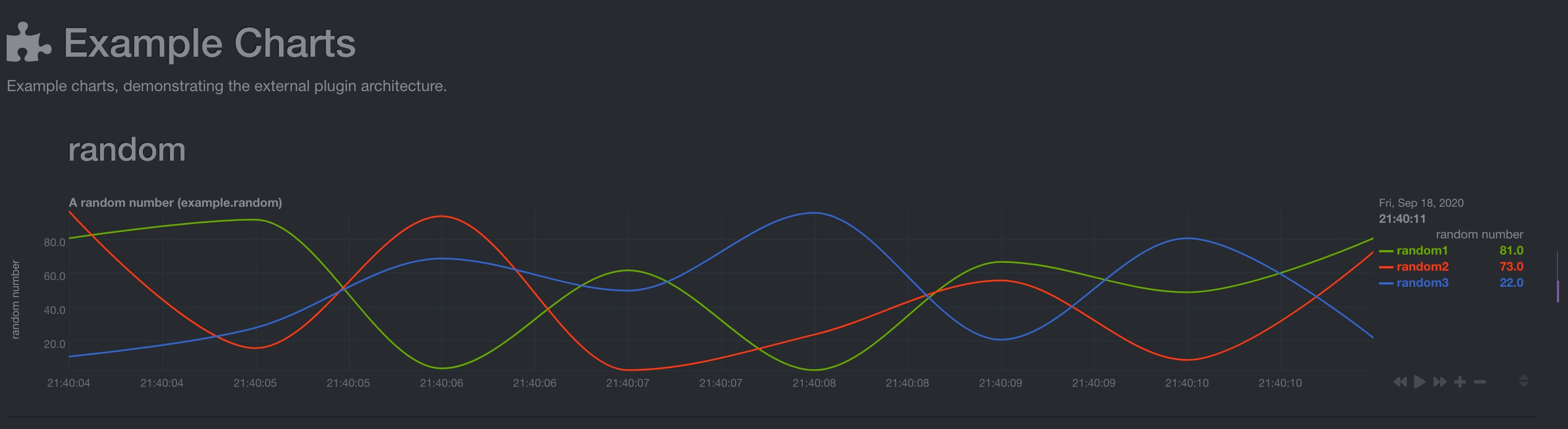
enabl example module in the python.d.conf, restart netdata service and check the dashboard - look for Example Charts section
ilyam8
on 18 Sep 2020
startryst
on 18 Sep 2020
Installed the latest fping, but still out of luck:
[root@xxx sbin]# ./fping -v
./fping: Version 5.0
[root@xxx sbin]# pwd
/usr/local/sbin
[root@xxx netdata]# tail -f /var/log/netdata/error.log | grep fping
2020-09-18 21:37:56: netdata INFO  : PLUGINSD[fping] : thread created with task id 29708
2020-09-18 21:37:56: netdata INFO  : PLUGINSD[fping] : set name of thread 29708 to PLUGINSD[fping]
2020-09-18 21:37:56: netdata INFO  : PLUGINSD[fping] : connected to '/usr/libexec/netdata/plugins.d/fping.plugin' running on pid 29712
2020-09-18 21:37:56: fping.plugin: INFO: Loading config file '/usr/lib/netdata/conf.d/fping.conf'...
2020-09-18 21:37:56: fping.plugin: INFO: Loading config file '/etc/netdata/fping.conf'...
2020-09-18 21:37:56: fping.plugin: INFO: starting fping: /usr/local/sbin/fping -N -l -Q 1 -p 200 -R -b 56 -i 1 -r 0 -t 5000 10.0.4.1 10.0.4.2 10.0.4.3 10.0.4.4
2020-09-18 21:37:56: netdata ERROR : PLUGINSD[fping] : 2020-09-18 21:37:56: python.d INFO: plugin[main] : using python v2
2020-09-18 21:37:56: netdata INFO  : PLUGINSD[fping] : PARSER ended
2020-09-18 21:37:56: netdata ERROR : PLUGINSD[fping] : '/usr/libexec/netdata/plugins.d/fping.plugin' (pid 29712) disconnected after 0 successful data collections (ENDs).
2020-09-18 21:37:56: netdata ERROR : PLUGINSD[fping] : child pid 29712 exited with code 4.
2020-09-18 21:37:56: netdata ERROR : PLUGINSD[fping] : '/usr/libexec/netdata/plugins.d/fping.plugin' (pid 29712) exited with error code 4 and haven't collected any data. Disabling it.
2020-09-18 21:37:56: netdata INFO  : PLUGINSD[fping] : thread with task id 29708 finished
2020-09-18 21:37:56: netdata ERROR : PLUGINSD[fping] : '/usr/libexec/netdata/plugins.d/fping.plugin' (pid 29712) disconnected after 0 successful data collections (ENDs).
2020-09-18 21:37:56: netdata ERROR : PLUGINSD[fping] : child pid 29712 exited with code 4.
2020-09-18 21:37:56: netdata ERROR : PLUGINSD[fping] : child pid 29712 exited with code 4.
https://fping.org/fping.1.html
Exit status is 0 if all the hosts are reachable, 1 if some hosts were unreachable, 2 if any IP addresses were not found, 3 for invalid command line arguments, and 4 for a system call failure.
Unable to start fping in CentOS 7
in CentOS 7
could be some permissions problems 🤷♂️ @Ferroin @stelfrag ?
ilyam8
on 18 Sep 2020
[root@xxx ~]# runuser -l netdata -c '/usr/local/bin/fping -N -l -Q 1 -p 200 -R -b 56 -i 1 -r 0 -t 5000 10.0.4.1 10.0.4.2 10.0.4.3 10.0.4.4'
This account is currently not available.
cat /etc/passwd | grep netdata
netdata:x:994:991:netdata:/var/lib/netdata:/usr/sbin/nologin
after change the netdata user's shell to /bin/bash:
cat /etc/passwd | grep netdata
netdata:x:994:991:netdata:/var/lib/netdata:/bin/bash
same as before, works fine executed directly by netdata:
[root@xxxx ~]# runuser -l netdata -c '/usr/local/bin/fping -N -l -Q 1 -p 200 -R -b 56 -i 1 -r 0 -t 5000 10.0.4.1 10.0.4.2 10.0.4.3 10.0.4.4'
CHART fping.10_0_4_1_packets '' 'FPing Packets for host 10.0.4.1' packets '10_0_4_1' fping.packets line 110020 1
DIMENSION xmt sent absolute 1 1
DIMENSION rcv received absolute 1 1
BEGIN fping.10_0_4_1_packets
SET xmt = 5
SET rcv = 5
END
CHART fping.10_0_4_1_quality '' 'FPing Quality for host 10.0.4.1' percentage '10_0_4_1' fping.quality area 110010 1
DIMENSION returned '' absolute 1 1
BEGIN fping.10_0_4_1_quality
SET returned = 100
END
CHART fping.10_0_4_1_latency '' 'FPing Latency for host 10.0.4.1' ms '10_0_4_1' fping.latency area 110000 1
DIMENSION min minimum absolute 10 1000
DIMENSION max maximum absolute 10 1000
DIMENSION avg average absolute 10 1000
BEGIN fping.10_0_4_1_latency
SET min = 1323
SET avg = 1343
SET max = 1357
END
I spun a new CentOS 7 machine, clean and fresh, installed netdata with minimum steps and configurations, and turns out the same error, check below for the steps which reflect what exact I did, and I believe you can reproduce the same:
1. CentOS version
cat /etc/redhat-release
CentOS Linux release 7.3.1611 (Core)
2. Install epel
yum -y install https://dl.fedoraproject.org/pub/epel/epel-release-latest-7.noarch.rpm
Loaded plugins: fastestmirror
epel-release-latest-7.noarch.rpm                                                                                                     |  15 kB  00:00:00
Examining /var/tmp/yum-root-bWjnce/epel-release-latest-7.noarch.rpm: epel-release-7-12.noarch
Marking /var/tmp/yum-root-bWjnce/epel-release-latest-7.noarch.rpm to be installed
Resolving Dependencies
--> Running transaction check
---> Package epel-release.noarch 0:7-12 will be installed
--> Finished Dependency Resolution

Dependencies Resolved

============================================================================================================================================================
 Package                             Arch                          Version                       Repository                                            Size
============================================================================================================================================================
Installing:
 epel-release                        noarch                        7-12                          /epel-release-latest-7.noarch                         24 k

Transaction Summary
============================================================================================================================================================
Install  1 Package

Total size: 24 k
Installed size: 24 k
Downloading packages:
Running transaction check
Running transaction test
Transaction test succeeded
Running transaction
  Installing : epel-release-7-12.noarch                                                                                                                 1/1
warning: /etc/yum.repos.d/epel.repo created as /etc/yum.repos.d/epel.repo.rpmnew
  Verifying  : epel-release-7-12.noarch                                                                                                                 1/1

Installed:
  epel-release.noarch 0:7-12

Complete!
3. Install netdata
bash <(curl -Ss https://my-netdata.io/kickstart.sh) --dont-wait --disable-telemetry
System            : Linux
Operating System  : GNU/Linux
Machine           : x86_64
BASH major version:
 --- Fetching script to detect required packages... ---
[/tmp/netdata-kickstart-NbeAPC4LhM]# curl -q -sSL --connect-timeout 10 --retry 3 --output /tmp/netdata-kickstart-NbeAPC4LhM/install-required-packages.sh https://raw.githubusercontent.com/netdata/netdata/master/packaging/installer/install-required-packages.sh  OK

 --- Running downloaded script to detect required packages... ---
[/tmp/netdata-kickstart-NbeAPC4LhM]# /usr/bin/bash /tmp/netdata-kickstart-NbeAPC4LhM/install-required-packages.sh --dont-wait --non-interactive netdata Loading /etc/os-release ...
You should have EPEL enabled to install all the prerequisites.
Check: http://www.tecmint.com/how-to-enable-epel-repository-for-rhel-centos-6-5/
Running in non-interactive mode
 > CentOS Version: 7 ...
 > Checking for epel ...
...
...
...
Setting netdata.tarball.checksum to 'new_installation'

The following non-fatal errors were encountered during the installation process:

* Failed to build libbpf. You may not be able to use eBPF plugin.

 --- We are done! ---

  ^
  |.-.   .-.   .-.   .-.   .-.   .  netdata                          .-.   .-
  |   '-'   '-'   '-'   '-'   '-'   is installed and running now!  -'   '-'
  +----+-----+-----+-----+-----+-----+-----+-----+-----+-----+-----+-----+--->

  enjoy real-time performance and health monitoring...

 OK
4. Add 8.8.8.8 as the host ./edit-config fping.conf
5. Install fping /usr/libexec/netdata/plugins.d/fping.plugin install
6. Restart netdata and capture the error.log by fping as the keyword
2020-09-19 13:08:46: netdata INFO  : PLUGINSD[fping] : thread created with task id 29983
2020-09-19 13:08:46: netdata INFO  : PLUGINSD[fping] : set name of thread 29983 to PLUGINSD[fping]
2020-09-19 13:08:46: netdata INFO  : PLUGINSD[fping] : connected to '/usr/libexec/netdata/plugins.d/fping.plugin' running on pid 29991
2020-09-19 13:08:46: fping.plugin: INFO: Loading config file '/usr/lib/netdata/conf.d/fping.conf'...
2020-09-19 13:08:46: fping.plugin: INFO: Loading config file '/etc/netdata/fping.conf'...
2020-09-19 13:08:46: fping.plugin: INFO: starting fping: /usr/local/bin/fping -N -l -Q 1 -p 200 -R -b 56 -i 1 -r 0 -t 5000 8.8.8.8
2020-09-19 13:08:46: netdata ERROR : PLUGINSD[fping] : read failed: end of file (errno 9, Bad file descriptor)
2020-09-19 13:08:46: netdata INFO  : PLUGINSD[fping] : PARSER ended
2020-09-19 13:08:46: netdata ERROR : PLUGINSD[fping] : '/usr/libexec/netdata/plugins.d/fping.plugin' (pid 29991) disconnected after 0 successful data collections (ENDs).
2020-09-19 13:08:46: netdata ERROR : PLUGINSD[fping] : 2020-09-19 05:08:46: go.d ERROR: prometheus[proxmox_ve_exporter_local] Get "http://127.0.0.1:9221/metrics": dial tcp 127.0.0.1:9221: connect: connection refused
2020-09-19 13:08:46: netdata ERROR : PLUGINSD[fping] : '/usr/libexec/netdata/plugins.d/fping.plugin' (pid 29991) exited with error code 4 and haven't collected any data. Disabling it.
2020-09-19 13:08:46: netdata INFO  : PLUGINSD[fping] : thread with task id 29983 finished
2020-09-19 05:08:46: go.d ERROR: prometheus[fping-exporter_local] Get "http://127.0.0.1:9605/metrics": dial tcp 127.0.0.1:9605: connect: connection refused
2020-09-19 05:08:46: go.d ERROR: prometheus[fping-exporter_local] check failed
@ilyam8 @Ferroin @stelfrag
startryst
on 19 Sep 2020
I've repeated the installation step by step. I can't reproduce the problem 🤷♂️.
[vlad@centos-7 netdata]$ cat /etc/redhat-release
CentOS Linux release 7.6.1810 (Core)
[vlad@centos-7 netdata]$ tail -n +0 /var/log/netdata/error.log | grep fping
2020-09-22 05:25:09: netdata INFO  : PLUGINSD[fping] : thread created with task id 4624
2020-09-22 05:25:09: netdata INFO  : PLUGINSD[fping] : set name of thread 4624 to PLUGINSD[fping]
2020-09-22 05:25:09: netdata INFO  : PLUGINSD[fping] : connected to '/usr/libexec/netdata/plugins.d/fping.plugin' running on pid 4648
2020-09-22 05:25:09: fping.plugin: INFO: Loading config file '/usr/lib/netdata/conf.d/fping.conf'...
2020-09-22 05:25:09: fping.plugin: INFO: Loading config file '/etc/netdata/fping.conf'...
2020-09-22 05:25:09: fping.plugin: INFO: starting fping: /usr/local/bin/fping -N -l -Q 1 -p 200 -R -b 56 -i 1 -r 0 -t 5000 8.8.8.8
2020-09-22 09:25:09: go.d ERROR: prometheus[fping-exporter_local] Get "http://127.0.0.1:9605/metrics": dial tcp 127.0.0.1:9605: connect: connection refused
2020-09-22 09:25:09: go.d ERROR: prometheus[fping-exporter_local] check failed
 vlvkobal
on 22 Sep 2020
vlvkobal
on 22 Sep 2020
Can you give a try on CentOS 7.3?
Sent from iPhone
在 2020年9月22日,下午5:36,Vladimir Kobal notifications@github.com 写道:
I've repeated the installation step by step. I can't reproduce the problem 🤷♂️.[vlad@centos-7 netdata]$ cat /etc/redhat-release
CentOS Linux release 7.6.1810 (Core)
[vlad@centos-7 netdata]$ tail -n +0 /var/log/netdata/error.log | grep fping
2020-09-22 05:25:09: netdata INFO : PLUGINSD[fping] : thread created with task id 4624
2020-09-22 05:25:09: netdata INFO : PLUGINSD[fping] : set name of thread 4624 to PLUGINSD[fping]
2020-09-22 05:25:09: netdata INFO : PLUGINSD[fping] : connected to '/usr/libexec/netdata/plugins.d/fping.plugin' running on pid 4648
2020-09-22 05:25:09: fping.plugin: INFO: Loading config file '/usr/lib/netdata/conf.d/fping.conf'...
2020-09-22 05:25:09: fping.plugin: INFO: Loading config file '/etc/netdata/fping.conf'...
2020-09-22 05:25:09: fping.plugin: INFO: starting fping: /usr/local/bin/fping -N -l -Q 1 -p 200 -R -b 56 -i 1 -r 0 -t 5000 8.8.8.8
2020-09-22 09:25:09: go.d ERROR: prometheus[fping-exporter_local] Get "http://127.0.0.1:9605/metrics": dial tcp 127.0.0.1:9605: connect: connection refused
2020-09-22 09:25:09: go.d ERROR: prometheus[fping-exporter_local] check failed
—
You are receiving this because you were mentioned.
Reply to this email directly, view it on GitHub, or unsubscribe.
startryst
on 22 Sep 2020
Anyone can look into it?
startryst
on 25 Sep 2020
I did a try again, and it's weird that under CentOS 7.3 (even though later release of CentOS 7 seems OK), if I restart netdata and tried to capture the error logs of fping:
cat /etc/redhat-release
CentOS Linux release 7.3.1611 (Core)


tail -f /var/log/netdata/error.log | grep fping
2020-09-29 07:49:04: netdata ERROR : MAIN : Health configuration cannot read file '/etc/netdata/health.d/fping.conf'. (errno 13, Permission denied)
2020-09-29 07:49:04: netdata ERROR : MAIN : Health configuration cannot read file '/etc/netdata/health.d/fping.conf'. (errno 13, Permission denied)
2020-09-29 07:49:04: netdata INFO  : PLUGINSD[fping] : thread created with task id 7768
2020-09-29 07:49:04: netdata INFO  : PLUGINSD[fping] : set name of thread 7768 to PLUGINSD[fping]
2020-09-29 07:49:04: netdata INFO  : PLUGINSD[fping] : connected to '/usr/libexec/netdata/plugins.d/fping.plugin' running on pid 7770
2020-09-29 07:49:04: fping.plugin: INFO: Loading config file '/usr/lib/netdata/conf.d/fping.conf'...
2020-09-29 07:49:04: fping.plugin: INFO: Loading config file '/etc/netdata/fping.conf'...
2020-09-29 07:49:04: fping.plugin: INFO: starting fping: /usr/local/bin/fping -N -l -Q 1 -p 200 -R -b 56 -i 1 -r 0 -t 5000 10.0.4.1 10.0.4.2 10.0.4.3 10.0.4.4
2020-09-29 07:49:04: netdata ERROR : PLUGINSD[fping] : read failed: end of file (errno 9, Bad file descriptor)
2020-09-29 07:49:04: netdata INFO  : PLUGINSD[fping] : PARSER ended
2020-09-29 07:49:04: netdata ERROR : PLUGINSD[fping] : '/usr/libexec/netdata/plugins.d/fping.plugin' (pid 7770) disconnected after 0 successful data collections (ENDs).
2020-09-29 07:49:04: netdata ERROR : PLUGINSD[fping] : child pid 7770 exited with code 4.
2020-09-29 07:49:04: netdata ERROR : PLUGINSD[fping] : '/usr/libexec/netdata/plugins.d/fping.plugin' (pid 7770) exited with error code 4 and haven't collected any data. Disabling it.
2020-09-29 07:49:04: netdata INFO  : PLUGINSD[fping] : thread with task id 7768 finished
but if I ran the exact command line(which is the line 197 of /usr/libexec/netdata/plugins.d/fping.plugin) as netdata user directly from the shell, it works:
runuser -l netdata -c 'exec /usr/local/bin/fping -N -l -Q 1 -p 200 -R -b 56 -i 1 -r 0 -t 5000 10.0.4.1 10.0.4.2 10.0.4.3 10.0.4.4'
CHART fping.10_0_4_1_packets '' 'FPing Packets for host 10.0.4.1' packets '10_0_4_1' fping.packets line 110020 1
DIMENSION xmt sent absolute 1 1
DIMENSION rcv received absolute 1 1
BEGIN fping.10_0_4_1_packets
SET xmt = 5
SET rcv = 5
END
CHART fping.10_0_4_1_quality '' 'FPing Quality for host 10.0.4.1' percentage '10_0_4_1' fping.quality area 110010 1
DIMENSION returned '' absolute 1 1
BEGIN fping.10_0_4_1_quality
SET returned = 100
END
i downloaded centos 7.3, will try to reproduce the issue
ilyam8
on 2 Oct 2020
i downloaded centos 7.3, will try to reproduce the issue
Thanks @ilyam8
startryst
on 3 Oct 2020
Well, i install centos7.3 and i get same problem.
[root@localhost netdata]# cat /etc/redhat-release
CentOS Linux release 7.3.1611 (Core)

[root@localhost netdata]# grep fping error.log
2020-10-04 16:30:52: netdata INFO  : PLUGINSD[fping] : thread created with task id 4364
2020-10-04 16:30:52: netdata INFO  : PLUGINSD[fping] : set name of thread 4364 to PLUGINSD[fping]
2020-10-04 16:30:52: netdata INFO  : PLUGINSD[fping] : connected to '/opt/netdata/usr/libexec/netdata/plugins.d/fping.plugin' running on pid 4370
2020-10-04 16:30:52: fping.plugin: INFO: Loading config file '/opt/netdata/usr/lib/netdata/conf.d/fping.conf'...
2020-10-04 16:30:52: fping.plugin: INFO: Loading config file '/opt/netdata/etc/netdata/fping.conf'...
2020-10-04 16:30:52: fping.plugin: INFO: starting fping: /usr/local/bin/fping -N -l -Q 1 -p 200 -R -b 56 -i 1 -r 0 -t 5000 8.8.8.8 8.8.4.4
2020-10-04 16:30:52: netdata ERROR : PLUGINSD[fping] : read failed: end of file (errno 9, Bad file descriptor)
2020-10-04 16:30:52: netdata INFO  : PLUGINSD[fping] : PARSER ended
2020-10-04 16:30:52: netdata ERROR : PLUGINSD[fping] : '/opt/netdata/usr/libexec/netdata/plugins.d/fping.plugin' (pid 4370) disconnected after 0 successful data collections (ENDs).
2020-10-04 16:30:52: netdata ERROR : PLUGINSD[fping] : child pid 4370 exited with code 4.
2020-10-04 16:30:52: netdata ERROR : PLUGINSD[fping] : '/opt/netdata/usr/libexec/netdata/plugins.d/fping.plugin' (pid 4370) exited with error code 4 and haven't collected any data. Disabling it.
2020-10-04 16:30:52: netdata INFO  : PLUGINSD[fping] : thread with task id 4364 finished
I noticed there were no cap_net_raw set, i added it
[root@localhost netdata]# getcap /usr/local/bin/fping
/usr/local/bin/fping = cap_net_raw+ep
However it doesnt fix the problem, both apps.plugin and fping.plugin dont work
[root@localhost netdata]# grep -E "apps|fping" error.log
2020-10-05 03:44:43: netdata INFO  : PLUGINSD[fping] : thread created with task id 5612
2020-10-05 03:44:43: netdata INFO  : PLUGINSD[fping] : set name of thread 5612 to PLUGINSD[fping]
2020-10-05 03:44:43: netdata INFO  : PLUGINSD[fping] : connected to '/opt/netdata/usr/libexec/netdata/plugins.d/fping.plugin' running on pid 5618
2020-10-05 03:44:43: netdata INFO  : PLUGINSD[apps] : thread created with task id 5615
2020-10-05 03:44:43: netdata INFO  : PLUGINSD[apps] : set name of thread 5615 to PLUGINSD[apps]
2020-10-05 03:44:43: netdata INFO  : PLUGINSD[apps] : connected to '/opt/netdata/usr/libexec/netdata/plugins.d/apps.plugin' running on pid 5622
sh: /opt/netdata/usr/libexec/netdata/plugins.d/apps.plugin: Operation not permitted
sh: /opt/netdata/usr/libexec/netdata/plugins.d/apps.plugin: Success
2020-10-05 03:44:43: netdata ERROR : PLUGINSD[apps] : read failed: end of file (errno 9, Bad file descriptor)
2020-10-05 03:44:43: netdata INFO  : PLUGINSD[apps] : PARSER ended
2020-10-05 03:44:43: netdata ERROR : PLUGINSD[apps] : '/opt/netdata/usr/libexec/netdata/plugins.d/apps.plugin' (pid 5622) disconnected after 0 successful data collections (ENDs).
2020-10-05 03:44:43: netdata ERROR : PLUGINSD[apps] : child pid 5622 exited with code 126.
2020-10-05 03:44:43: netdata ERROR : PLUGINSD[apps] : '/opt/netdata/usr/libexec/netdata/plugins.d/apps.plugin' (pid 5622) exited with error code 126 and haven't collected any data. Disabling it.
2020-10-05 03:44:43: netdata INFO  : PLUGINSD[apps] : thread with task id 5615 finished

2020-10-05 03:44:43: fping.plugin: INFO: Loading config file '/opt/netdata/usr/lib/netdata/conf.d/fping.conf'...
2020-10-05 03:44:43: fping.plugin: INFO: Loading config file '/opt/netdata/etc/netdata/fping.conf'...
2020-10-05 03:44:43: fping.plugin: INFO: starting fping: /usr/local/bin/fping -N -l -Q 1 -p 200 -R -b 56 -i 1 -r 0 -t 5000 8.8.8.8 8.8.4.4
/opt/netdata/usr/libexec/netdata/plugins.d/fping.plugin: line 197: /usr/local/bin/fping: Operation not permitted
/opt/netdata/usr/libexec/netdata/plugins.d/fping.plugin: line 197: /usr/local/bin/fping: Success
2020-10-05 03:44:43: netdata ERROR : PLUGINSD[fping] : read failed: end of file (errno 9, Bad file descriptor)
2020-10-05 03:44:43: netdata INFO  : PLUGINSD[fping] : PARSER ended
2020-10-05 03:44:43: netdata ERROR : PLUGINSD[fping] : '/opt/netdata/usr/libexec/netdata/plugins.d/fping.plugin' (pid 5618) disconnected after 0 successful data collections (ENDs).
2020-10-05 03:44:43: netdata ERROR : PLUGINSD[fping] : child pid 5618 exited with code 126.
2020-10-05 03:44:43: netdata ERROR : PLUGINSD[fping] : '/opt/netdata/usr/libexec/netdata/plugins.d/fping.plugin' (pid 5618) exited with error code 126 and haven't collected any data. Disabling it.
2020-10-05 03:44:43: netdata INFO  : PLUGINSD[fping] : thread with task id 5612 finished
I 🤷♂️ what is the problem, the fix is to update centos.
[root@localhost netdata]# yum update
Loaded plugins: fastestmirror
base                                                                                                                                   | 3.6 kB  00:00:00
epel/x86_64/metalink                                                                                                                   |  23 kB  00:00:00
extras                                                                                                                                 | 2.9 kB  00:00:00
updates                                                                                                                                | 2.9 kB  00:00:00
Loading mirror speeds from cached hostfile
 * base: mirror.reconn.ru
 * epel: mirror.logol.ru
 * extras: mirror.corbina.net
 * updates: mirror.logol.ru
...
...
...
[root@localhost netdata]# cat /etc/redhat-release
CentOS Linux release 7.8.2003 (Core)

[root@localhost netdata]# systemctl restart netdata
[root@localhost netdata]# ps aux | grep netdata
netdata  11135  1.2  2.0 243508 20996 ?        Ssl  03:53   0:00 /opt/netdata/usr/sbin/netdata -P /opt/netdata/var/run/netdata/netdata.pid -D
netdata  11139  0.0  0.1  60868  1924 ?        Sl   03:53   0:00 /opt/netdata/usr/sbin/netdata --special-spawn-server
netdata  11250  0.0  0.1   9704  1504 ?        S    03:53   0:00 bash /opt/netdata/usr/libexec/netdata/plugins.d/tc-qos-helper.sh 1
netdata  11261  0.1  0.0   8048   640 ?        S    03:53   0:00 /usr/local/bin/fping -N -l -Q 1 -p 200 -R -b 56 -i 1 -r 0 -t 5000 8.8.8.8 8.8.4.4
netdata  11264  0.3  0.3  53860  3348 ?        S    03:53   0:00 /opt/netdata/usr/libexec/netdata/plugins.d/apps.plugin 1
root     11471  0.0  0.0 112816   972 pts/1    R+   03:53   0:00 grep --color=auto netdata
^^ both apps.plugin and fping.plugin work after the update
ilyam8
on 5 Oct 2020
There is a bug, indeed, in CentOS Linux release 7.3.1611 (Core), however it doesn't exist in centos latest (7.8.2003). I suggest to upgrade.
I am closing it but if someone want to dig into it to find the root cause it would be nice.
ilyam8
on 5 Oct 2020
@ilyam8 Thanks for your support, workaround is crystal clear, but still wish if someone have ideas to fix (some of my server is not suitable to upgrade)
startryst
on 5 Oct 2020
Related issues
 UltimateByte
·
68Comments
UltimateByte
·
68Comments
 thiagoftsm
·
55Comments
thiagoftsm
·
55Comments
 askd77
·
71Comments
askd77
·
71Comments
 ktsaou
·
100Comments
ktsaou
·
100Comments
 pgassmann
·
72Comments
pgassmann
·
72Comments