Netdata: docker container names not resolved when using firehol/netdata:alpine
when running netdata in docker with /var/run/docker.sock mounted to container, the names of cgroups are not resolved when using image firehol/netdata:alpine but it works with firehol/netdata:latest
Also reported to: https://github.com/titpetric/netdata/issues/70
The actual issue is that in the alpine image, the netdata user is not in the docker group.
image: titpetric/netdata:latest
or
image: firehol/netdata
=> container names OK
# ps aufx
USER       PID %CPU %MEM    VSZ   RSS TTY      STAT START   TIME COMMAND
root       607  0.0  0.1  18188  2928 pts/0    Ss   18:59   0:00 /bin/bash
root      1814  0.0  0.1  36640  2828 pts/0    R+   19:01   0:00  \_ ps aufx
netdata      1  1.2  2.0 185452 41676 ?        Ssl  18:58   0:02 /usr/sbin/netdata -D -s /host -p 19999
netdata     18  0.3  0.1  18164  2244 ?        S    18:58   0:00 bash /usr/libexec/netdata/plugins.d/tc-qos-helper.sh 1
root        29  1.7  0.1  19540  2636 ?        S    18:58   0:02 /usr/libexec/netdata/plugins.d/apps.plugin 1

# ls -lha /var/run/docker.sock
srw-rw---- 1 root netdata 0 Jun 17 14:45 /var/run/docker.sock

# id netdata
uid=999(netdata) gid=999(netdata) groups=999(netdata),4(adm),13(proxy)
image: firehol/netdata:alpine
-> container names MISSING
# ps aufx
PID   USER     TIME  COMMAND
    1 netdata   0:01 /usr/sbin/netdata -D -s /host -p 19999
   26 root      0:01 /usr/libexec/netdata/plugins.d/apps.plugin 1
  534 root      0:00 /bin/bash
  540 root      0:00 ps aufx
# ls -lha /var/run/docker.sock
srw-rw----    1 root     ping           0 Jun 17 14:45 /var/run/docker.sock

# id netdata
uid=101(netdata) gid=101(netdata) groups=101(netdata),101(netdata)

# tail /etc/group
utmp:x:406:
ping:x:999:
nogroup:x:65533:
nobody:x:65534:
netdata:x:101:netdata
Solution
In alpine the group ping has gid 999 (docker)
the correct fix is to add netdata to the ping group which has gid 999 in alpine:
addgroup netdata ping
should be added to https://github.com/firehol/netdata/blob/master/Dockerfile.alpine#L44
or workaround:
command: bash -c 'addgroup netdata ping && exec /usr/sbin/netdata -D -s /host -p 19999
I use the following docker-compose.yml file to run netdata in docker container with access to host network (for network metrics).
for use with letsencrypt-nginx-proxy-companion by Evert Ramos
https://github.com/evertramos/docker-compose-letsencrypt-nginx-proxy-companion
docker-compose.yml
# docker-compose.yml
# netdata in docker container with access to host network (for network metrics).
# for use with letsencrypt-nginx-proxy-companion by Evert Ramos
# https://github.com/evertramos/docker-compose-letsencrypt-nginx-proxy-companion
# uses socat to proxy netdata to reverse proxy
# a separate network is defined to bind netdata to a fix ip address
# this ip address is used for the socat target
#
version: '3'
services:
  netdata:
    image: firehol/netdata:alpine
    hostname: example.com # set to fqdn of host
    cap_add:
      - SYS_PTRACE
    volumes:
      - /proc:/host/proc:ro
      - /sys:/host/sys:ro
      - /var/run/docker.sock:/var/run/docker.sock:ro
      #- ./netdata.conf:/etc/netdata.conf:ro
    network_mode: host
    command:  /usr/sbin/netdata -D -s /host -p 19999 -i 192.168.88.1
    # WORKAROUND add netdata to ping group (gid 999) for access to docker.sock
    #command:  bash -c 'addgroup netdata ping && exec /usr/sbin/netdata -D -s /host -p 19999 -i 192.168.88.1'

  socat:
    image: alpine/socat:latest
    environment:
      - VIRTUAL_HOST=netdata.example.com
      - LETSENCRYPT_HOST=netdata.example.com
      - [email protected]
      - VIRTUAL_PORT=19999
    entrypoint: socat TCP-LISTEN:19999,nodelay,fork,reuseaddr TCP:192.168.88.1:19999
    expose:
      - 19999
    networks:
      - webproxy
      - netdata

networks:
  webproxy:
    external:
      name: webproxy
  netdata:
    driver: bridge
    ipam:
      driver: default
      config:
        - subnet: 192.168.88.0/24
 pgassmann
All 72 comments
This docker-compose.yml should also be added to the Wiki. Currently there is no information on how to actually run netdata using docker.
pgassmann
on 16 Jul 2018
Hi @pgassmann
Wiki is open to everyone for edit.
 ilyam8
on 17 Jul 2018
ilyam8
on 17 Jul 2018
@l2isbad I added a Wiki Page: https://github.com/firehol/netdata/wiki/Install-netdata-with-Docker
Can you fix the Dockerfile.alpine by adding addgroup netdata ping at https://github.com/firehol/netdata/blob/master/Dockerfile.alpine#L44
pgassmann
on 17 Jul 2018
added a Wiki Page
Thanks!
Can you fix the Dockerfile.alpine by adding addgroup netdata ping at
You can do a PR :smile_cat:
ilyam8
on 18 Jul 2018
Why this is not a problem for debian?
I mean: adding netdata to the ping group, because this is used by docker, seems somehow twisted. I don't like it. Why groups ping and docker overlap in the first place?
 ktsaou
on 22 Jul 2018
ktsaou
on 22 Jul 2018
The actual issue is that in the alpine image, the netdata user is not in the docker group.
In alpine the group ping has gid 999 (docker)
the correct fix is to add netdata to the ping group which has gid 999 in alpine:
No. This is NOT a correct solution. There is absolutely NO guarantee that docker group on host system will have gid 999. Actually I am running a couple of systems where this group has gid ranging from 990 to 1003. Docker installation just adds system user and group without specifying number, this means that it relies on distro-specific mechanisms. On ubuntu it basically comes down to "add group with first free gid starting from 1000 and counting down".
I tried to replicate this on my machine. First I ran docker run -it firehol/netdata:alpine bash to check what groups are in container:
bash-4.4# cat /etc/group | grep docker
bash-4.4# cat /etc/group | grep ping
ping:x:999:
After running netdata in docker container with following docker-compose (similar to one I use on my NAS box):
version: '3'
services:
  netdata:
    image: firehol/netdata:alpine
    hostname: test
    restart: always
    cap_add:
      - SYS_PTRACE
    ports:
      - 19999:19999
    volumes:
      - /proc:/host/proc:ro
      - /sys:/host/sys:ro
      - /var/run/docker.sock:/var/run/docker.sock:ro
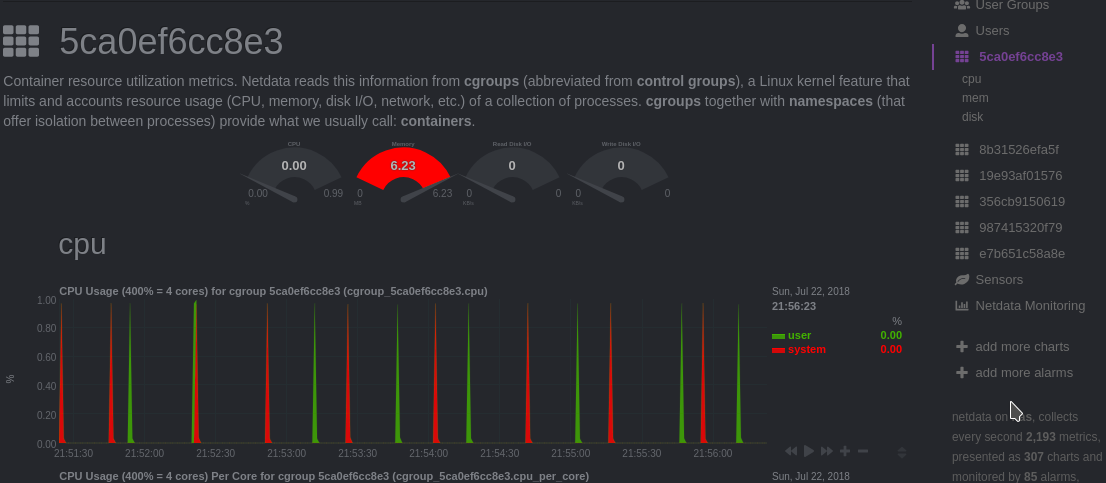
It creates a container with short id of 3bf9bf66ecf7, which is then seen in netdata:

Keep in mind, this is running on Fedora 28 with SELinux enabled.
@pgassmann why do you specify IP number when running application in a container in bridge mode (command: /usr/sbin/netdata -D -s /host -p 19999 -i 192.168.88.1)? This is not the way docker networks and container separation works. Docker will give containers different IPs, and you have no guarantee that container will have ip of 192.168.88.1 and the fact that it works on your machine is a mere coincidence (docker assigns IPs starting from beginning).
@ktsaou, groups overlap because of namespaces. In container groups names are different than those outside. More on the subject.
As for a solution to a problem which I couldn't replicate. If someone wants to be sure that a user in container belongs to a specific gid which is outside of container, one needs to write custom entrypoint script. This script should take a value of gid from environment variables and prepare environment by creating proper groups and assigning users to them before starting application.
I have also editited wiki page about running netdata in docker container since it is very biased and not generic. Later will add complete docker-compose.yml file with letsencrypt config since current looks a bit over-engineered and not complete.
 paulfantom
on 22 Jul 2018
paulfantom
on 22 Jul 2018
So, this should be happening for debian containers too. Does it?
ktsaou
on 22 Jul 2018
I am using debian container on my NAS box. Effect is the same.
paulfantom
on 22 Jul 2018
I also looked into this letsencrypt companion container by Evert Ramos. He have some good examples on how to use it. Most similar to netdata would be one with portainer and it looks nowhere near as complicated as one provided by @pgassmann.
Today or tomorrow I will update this config, but I need to test it first.
paulfantom
on 22 Jul 2018
If someone wants to be sure that a user in container belongs to a specific gid which is outside of container, one needs to write custom entrypoint script.
So, I guess this is the only way.
Can we do it? @titpetric what do you think?
ktsaou
on 22 Jul 2018
I still don't know if we need to do it. I couldn't replicate the problem. Unless I understand it wrong and netdata should show container names instead of ids.
For me it looks more like a workaround than a solution.
paulfantom
on 22 Jul 2018
Ok, I have created a public, containerized netdata setup with SSL/TLS. It is much simpler when one don't force usage of nginx.
docker-compose.yml
version: '3'
volumes:
  caddy:

services:
  caddy:
    image: abiosoft/caddy
    ports:
      - 80:80
      - 443:443
    volumes:
      - /opt/Caddyfile:/etc/Caddyfile
      - caddy:/root/.caddy
    environment:
      ACME_AGREE: 'true'
  netdata:
    restart: always
    hostname: netdata.cloudalchemy.org
    image: firehol/netdata
    cap_add:
      - SYS_PTRACE
    volumes:
      - /proc:/host/proc:ro
      - /sys:/host/sys:ro
      - /var/run/docker.sock:/var/run/docker.sock:ro
content of /opt/Caddyfile:
netdata.cloudalchemy.org {
  proxy / netdata:19999
  tls [email protected]
}
This setup is currently running at netdata.cloudalchemy.org, but I will turn it off today at 23:59 CEST.
@ktsaou should I put it into wiki?
paulfantom
on 22 Jul 2018
Fun fact, this setup didn't have any problems with container names:
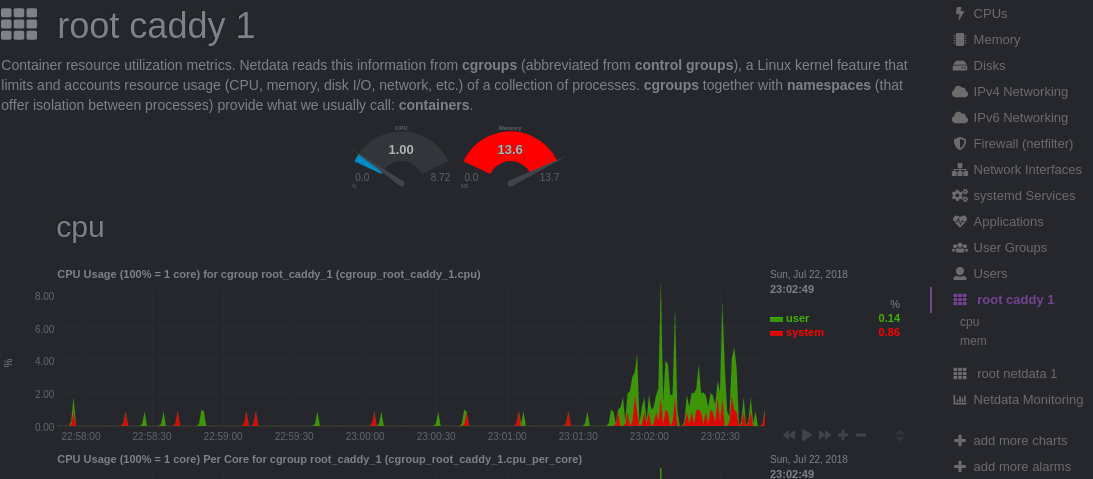
It is running on ubuntu 16.04 in DigitalOcean, droplet type: "Ubuntu Docker 17.12.0~ce on 16.04"
paulfantom
on 22 Jul 2018
Netdata seems to run fine in the container at first look, but it does not have the metrics of the host you normally want!
@paulfantom The docker.sock is not used to detect the containers. The containers are detected as cgroups from the normal proc/sys interface. docker.sock is used to resolve the names of the containers. If successful, the container is listed like in docker ps: netdata_netdata_1
Thanks for the info that docker does not always run with group id 999. This should be noted as Limitation of the docker image. Fact is, the script that is run for the debian:stretch based Dockerfile does add user netdata to the docker group which in that case has also id 999 because it is also debian based.
The reason for my complicated docker-compose.yml is to allow netdata to get the host-net metrics.
As a docker container has its own network namespace, netdata can normally only see the network-traffic of its own container.
@titpetric created a workaround with the fakenet.sh script, that runs on the host and copies the metrics to a separately mounted /fakenet/proc/net
See the README of his Project https://github.com/titpetric/netdata
I did not want to run an additional script on the host. To give netdata access to the host network metrics, I run netdata with network_mode: host
When run with network_mode: host the port 19999 is then also directly open on the host, which I did not want. Also I need a way to access netdata on the host from the ssl-proxy in a docker network.
To work around this issue, I created a separate network of which I know the address and configure netdata and the socat proxy to use that address.
BTW: the cap_add SYS_PTRACE was not enough to get all process metrics. Additional security_opts are neccessary to get actual access to the /host/proc filesystem. otherwise it would only list the processes in its own container namespace.
@ktsaou @paulfantom I documented this already in the netdata Wiki:
https://github.com/firehol/netdata/wiki/Install-netdata-with-Docker
I'm using ubuntu on the host. I did not test other systems. Feedback welcome.
pgassmann
on 22 Jul 2018
@paulfantom what are the permissions of /var/run/docker.sock and netdata uid/gid inside the container at netdata.cloudalchemy.org
You use the standard firehol/netdata image, which is debian based and the script adds netdata to the docker group. that's probably why container names work. Start it with firehol/netdata:alpine and it won't resolve the names.
pgassmann
on 22 Jul 2018
Advising other users to drop security enhancements (ex. seccomp=unconfined) and usage of highly specialized setup with host networking isn't a good idea. I understand your need of such setup, but I don't agree with putting such informations in wiki.
Permissions are same as on most docker setups:
ls -lah /var/run/docker.sock
srw-rw---- 1 root docker 0 Jul 22 20:08 /var/run/docker.sock
And yes, you are right. Names are not resolved after changing to alpine version.
Bug reproduced. I need to look into group creation in docker entrypoint script.
paulfantom
on 22 Jul 2018
@pgassmann why do you specify IP number when running application in a container in bridge mode (command: /usr/sbin/netdata -D -s /host -p 19999 -i 192.168.88.1)? This is not the way docker networks and container separation works. Docker will give containers different IPs, and you have no guarantee that container will have ip of 192.168.88.1 and the fact that it works on your machine is a mere coincidence (docker assigns IPs starting from beginning).
@paulfantom If I could, I would specify the gateway, but in docker-compose v3 this option is not available: https://docs.docker.com/compose/compose-file/#ipam
pgassmann
on 23 Jul 2018
@paulfantom I understand that dropping security enhancement is not nice. This is still more secure than the standard setup which recommends running a bash-script from directly from the internet which installs many build-tools and compiles installs and runs netdata directly on the host.
If netdata in docker runs in your case without errors without setting the security options, that means that the security options are already disabled or apparmor is not running. Can you check the logs for permission errors like the following:
apps.plugin ERROR : MAIN : Cannot process /host/proc/1/io (command 'systemd') (errno 13, Permission denied)
The apparmor=unconfined seems to be enough, I don't see these errors also without specifiing seccomp=unconfined
Bug reproduced. I need to look into group creation in docker entrypoint script.
With alpine the ping group with id 999 is already present in the upstream alpine:edge image. adding a separate docker group does not solve the issue.
pgassmann
on 23 Jul 2018
Fact is, the script that is run for the debian:stretch based Dockerfile does add user netdata to the docker group which in that case has also id 999 because it is also debian based.
That is a coincidence. If you install docker after installing some other software which also adds system group without specifying gid then you get docker group with gid 998 or lower.
docker does not always run with group id 999. This should be noted as Limitation of the docker image
It is highly dependent on how you configure your environment and it is not a limitation of the image it is the way how docker works.
When run with network_mode: host the port 19999 is then also directly open on the host, which I did not want. Also I need a way to access netdata on the host from the ssl-proxy in a docker network.
To work around this issue, I created a separate network of which I know the address and configure netdata and the socat proxy to use that address.
Exactly what I meant by saying "highly specialized setup". For most users who search how to run netdata in docker it is overengineered.
As I said previously, I am running default docker configuration on ubuntu. This means that everything is enabled (seccomp, apparmor). Of course in such setup not everything is available for netdata to read, price you pay for secure environment.
This is still more secure than the standard setup which recommends running a bash-script from directly from the internet which installs many build-tools and compiles installs and runs netdata directly on the host.
Arguable but I agree that recommended script installation method isn't perfect.
adding a separate docker group does not solve the issue.
What do you mean? Adding group where? In docker container or on host, you know those two are different? Please be specific.
Solution is to add user netdata (in container) to group (in container) with gid equal to gid of docker group outside of container. And this needs to be done in runtime not on image build since gids can be different.
Linux doesn't care how you name your group it cares about gid number. Group name is just a convenience same as user name or file permissions in rwx format.
paulfantom
on 23 Jul 2018
Tested solution:
Adding script wrapping execution of netdata in docker, which will run two commands before netdata:
if [[ ${PGID} ]]; then
  groupadd -g "${PGID}" hostgroup 2>/dev/null
  sed -i 's/${PGID}:/${PGID}:netdata/g' /etc/group
fi

netdata -D ...
Where PGID is a gid of host docker group. Those two command can also be run in currently deployed containers but it won't be persistent.
Test can be done by running command above in docker container and then restarting container with docker restart <<container>>
sed is used because alpine doesn't ship with more advanced tools for user and group manipulation. Or it does but I don't know about it :smile:
Group is purposefully named hostgroup and not docker to limit confusion in the future.
paulfantom
on 23 Jul 2018
Agree, this is a proper implementation. PGID is an environment variable that has to be set to the docker group id of the host?
Did you do this modification to the debian image script? do you integrate the script also in the alpine image?
We should define what the use case is with running netdata in a container. My goal is to have a fully functional netdata to monitor the host. So I see my solution as necessary measures to get a "functional setup" and not a "highly specialized setup" .
What is your use case for running netdata with docker without host network metrics and detailed process information?
pgassmann
on 23 Jul 2018
PGID is an environment variable that has to be set to the docker group id of the host?
Exactly.
My goal is to have a fully functional netdata to monitor the host
Sadly you won't get that in a container. It is either "specialized setup" in container or shipping netdata without container. Probably @titpetric knows best about it, since he has been containerizing netdata for last 2 years or so.
I am running it in container just to monitor some basic things for my NAS box. Most of the time I am running netdata outside of containers.
When you start looking into other monitoring solutions, most of them advise against running system probes in container since those probes need to have unrestricted access to base system to get full dataset. Basically it comes down to what you want to monitor:
- full system? probe in system env
- containers? probe as a container
- everything? probe in place where it can access eveything, usually in system env
So glueing things like full system monitoring from inside of a container namespace will need a lot of hacking. Possibly even breaking most of good practices for running containerized applications. And in the end you will get highly specialized monstrosity (which you are already started to have) which no one apart from you will know how works.
If your only concern is to secure shipping application to end boxes, then there are better ways to do this. Like packaging (#3964 ?).
paulfantom
on 23 Jul 2018
OK, I understand your point. I did not much more than what @titpetric describes in his Readme and also the security options are from a comment by @titpetric in a issue.
I don't know netdata well enough (yet) to see what limitations are still not resolved with my setup.
I also tested a similar setup with netdata started on the host and used socat to get netdata through the proxy. That's also not straightforward.
I would like to install netdata as a part of the base docker host on a public server. I don't want netdata publicly available. securing web access is only possible through a proxy. So either I have to get it to work with the existing proxy in docker or I would need to configure another reverse proxy on the host just to get netdata secured. I would welcome if netdata would provide some user authentication for the web ui.
pgassmann
on 23 Jul 2018
or I would need to configure another reverse proxy on the host just to get netdata secured
That is actually the proper way. You configure netdata as a system service (not in docker) which exposes itself only on localhost interface and then you proxy traffic to it via reverse proxy (some time ago I was a fan of nginx for this, but couple of months ago I discovered caddy and couldn't be happier).
As a benefit you have a standard system setup which everyone understand.
I wonder if netdata interface could be exposed as a unix socket instead of tcp/ip one (@ktsaou ?). That would allow to run netdata on host and expose interface via unix socket into a proxy container. And no need for ugly socat workaround.
Fun fact, this is exactly what docker does, by default they run dockerd daemon exposing unix socket, and docker client communicates with it using HTTP protocol. This way they allow users to control system service dockerd from inside of containers.
paulfantom
on 23 Jul 2018
You can run netdata with it's interface on a unix socket instead of the loopback interface. Config syntax looks like this:
bind = unix:/run/netdata/socket
I use this on my own systems for both the security benefits, and because it's way more efficient than using the TCP/IP stack to get data between netdata and nginx.
 Ferroin
on 23 Jul 2018
Ferroin
on 23 Jul 2018
If netdata can bind to a socket, i would mount that in a container and use again socat to forward it to the proxy. like that I can use https://netdata.<fqdn> to access netdata. A second proxy on the same host cannot bind to 80/443
pgassmann
on 23 Jul 2018
@Ferroin I saw some comaprisions of TCP/IP vs. unix socket in modern linux kernel which claimed that there is no performance difference. Have done some performance testing between those two? I'm curious.
@pgassmann why not mount that socket directly into proxy container?
paulfantom
on 23 Jul 2018
Thanks @Ferroin
@paulfantom I use a second container for simple autoconfiguration of the reverse proxy incl. Letsencrypt. For convenience.
https://github.com/evertramos/docker-compose-letsencrypt-nginx-proxy-companion
https://github.com/JrCs/docker-letsencrypt-nginx-proxy-companion
It does not seem to support adding custom vhosts with letsencrypt. The easiest seems to be to run another container.
Performance is not an issue with netdata webgui
pgassmann
on 23 Jul 2018
@paulfantom There is a miniscule difference in performance (in favor of unix sockets) if you have no special routing rules and no filtering involved, but it requires you to either use perf to count cycles, or to use a huge amount of test data sent over a very long period of time to actually see the difference. So, functionally not enough to matter for a vast majority of users.
In my case though (which I sometimes forget is not the normal case), I've got more than a dozen firewall rules on my loopback interfaces (making users who aren't supposed to have network access really have no network access, making it harder for attackers who get local execution to attack other services via the loopback interface, etc), and that results in a few hundred thousand fewer CPU cycles needed per packet on most of my systems (which is where I'm getting the 'way more efficient' argument, because that really is a huge change in the amount of code being executed), which, depending on how heavily loaded the system is, translates in turn to about a few milliseconds per 100MB faster.
Ferroin
on 23 Jul 2018
Now we are getting a little off-topic :smiley:
@paulfantom Will you create a merge request for the proposed changes in the script? Will you change the Dockerfile.alpine to also use that run script?
If you are changing the script it would be nice to have a NETDATA_ARGS environment variable that is appended to the netdata command.
pgassmann
on 23 Jul 2018
@pgassmann you still can use unix socket in this proxy container. I see it uses some sort of a template for nginx configuration, so you need to edit this one and it should work.
I plan on a adding this to Dockerfiles.
paulfantom
on 23 Jul 2018
As @Ferroin said before, netdata supports unix sockets. It can also bind to multiple sockets concurrently.
Regarding group modification, sed should be avoided. The netdata installer has a portable function for this: https://github.com/firehol/netdata/blob/80eb352145de2074489d0f173297528c5f5be3ad/installer/functions.sh#L369-L406
Alpine is the busybox case.
ktsaou
on 23 Jul 2018
@ktsaou Installer needs specifying group by name, not by gid. This won't work in our scenario.
paulfantom
on 23 Jul 2018
Also installer is ran in image build phase not in runtime.
paulfantom
on 23 Jul 2018
Does anyone know why docker build for alpine is so different than ones for other platforms?
paulfantom
on 23 Jul 2018
My first guess would be that it's because Alpine itself is rather drastically different from most other Linux platforms (they use busybox instead of coreutils, musl instead of glibc, and the base install is rather spartan by most standards (no build tools, no interpreted languages other than SH, etc)).
Ferroin
on 23 Jul 2018
I don't think that's the case.
Just applied solutions in alpine image to debian one and this caused 3x image size reduction. Soon will make a PR with drastic changes to Dockerfiles.
paulfantom
on 23 Jul 2018
The other question though is how many features that removes from the debian docker image. I could easily also see the difference being about keeping the alpine image as small as possible because that's much more in-line with what people using Alpine are likely to want.
Ferroin
on 23 Jul 2018
how many features that removes from the debian docker image
None which are important in runtime. It removes unnecessary build artifacts.
From what I see docker image for alpine is a more complicated, but much better way of creating docker images. Builder stage alone is a great improvement.
I also don't understand why we ship debian-based and alpine-based images. They have the same functionalities and target the same CPU architecture. Why not focus on one? In the end docker users don't care if it is based on fedora, debian or alpine. It has to provide features and be as lightweight as possible.
Is there some performance difference between those two images or something else I am not aware of?
paulfantom
on 23 Jul 2018
Thanks for updating the scripts. Have a look also at @titpetric s scripts. He also adds msmtp that can be configured to send alerts via mail.
But I would not add all the various options in the run script that modify the netdata.conf. This can be done by mounting netdata.conf with the desired options.
https://github.com/titpetric/netdata/tree/master/releases/latest/scripts
+1 for the separate build stage. I avoid installing dev-tools on a production machine. This should also be a good practice for containers.
pgassmann
on 23 Jul 2018
@pgassmann I have started #3995 so we could collaborate on this :smile:
Currently problem from #3972 (this issue) is still present.
paulfantom
on 23 Jul 2018
Fun fact: docker installed in ubuntu 18.04 from ubuntu package (docker.io) creates docker group with gid 113.
paulfantom
on 23 Jul 2018
**edit
Perhaps a premature comment... Hadn't hit F5 on latest git commit & latest dockerhub yet, the build hasn't been pushed 😇
 nexusmaniac
on 8 Sep 2018
nexusmaniac
on 8 Sep 2018
@nexusmaniac yeah, we are working on it
paulfantom
on 8 Sep 2018
@paulfantom Haha yeah, my bad 😅 I saw an update and rushed to conclusions 😂 Ignore me 😄
nexusmaniac
on 8 Sep 2018
Ok then, fully up to date now and sadly container names don't resolve on my host 🤔

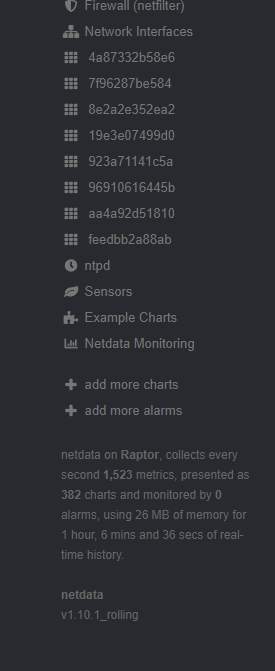
This is now with and without bash -c 'chown -R root:root /usr/share/netdata/web/ && exec /usr/sbin/netdata -D -u root -s /host -p 19999' in the run command for the container 😛
Anything I can grab from Netdata / host OS in order to figure out why? @paulfantom 😄
nexusmaniac
on 9 Sep 2018
@nexusmaniac please provide full command/docker-compose of how you start netdata in container.
I mean:
docker run....
paulfantom
on 9 Sep 2018
root@localhost:# /usr/local/emhttp/plugins/dynamix.docker.manager/scripts/docker run -d --name='Netdata' --net='host' --privileged=true -e TZ="Europe/London" -e HOST_OS="Unraid" -v '/mnt/user/appdata/netdata/':'/etc/netdata':'rw' -v '/proc/':'/host/proc':'ro' -v '/sys/':'/host/sys':'ro' -v '/var/run/docker.sock':'/var/run/docker.sock':'ro' --cap-add SYS_PTRACE --log-opt max-size=50m --log-opt max-file=1 'firehol/netdata' bash -c 'chown -R root:root /usr/share/netdata/web/ && exec /usr/sbin/netdata -D -u root -s /host -p 19999'
You need to drop this:
' bash -c 'chown -R root:root /usr/share/netdata/web/ && exec /usr/sbin/netdata -D -u root -s /host -p 19999'
As we are using entrypoint now and you are passing all this as a parameter to netdata binary.
Also you didn't specify PGID environment variable. It should have a numeric value of host docker group.
Also please make sure that you really downloaded newest image version as default docker setting won't compare if local latest is the same as remote one. Simple docker pull firehol/netdata will do the trick.
Your command converted to workable solution (assuming docker group is 999):
docker run -d --name=Netdata \
              --net=host \
              --privileged=true \
              -e TZ="Europe/London" \
              -e HOST_OS="Unraid" \
              -e PGID=999 \
              -v /mnt/user/appdata/netdata/:/etc/netdata:rw \
              -v /proc:/host/proc:ro -v /sys/:/host/sys:ro \
              -v /var/run/docker.sock:/var/run/docker.sock:ro \
              --cap-add SYS_PTRACE \
              --log-opt max-size=50m \
              --log-opt max-file=1 \
              firehol/netdata:latest
Also I don't think HOST_OS environment variable does anything, but I am not sure.
paulfantom
on 9 Sep 2018
Even without ' bash -c 'chown -R root:root /usr/share/netdata/web/ && exec /usr/sbin/netdata -D -u root -s /host -p 19999' I still have no container name resolution 😄
I've just altered my command:
root@localhost:# /usr/local/emhttp/plugins/dynamix.docker.manager/scripts/docker run -d --name='Netdata' --net='host' --privileged=true -e TZ="Europe/London" -e HOST_OS="Unraid" -e 'PGID'='100' -e 'PUID'='99' -v '/mnt/user/appdata/netdata/':'/etc/netdata':'rw' -v '/proc/':'/host/proc':'ro' -v '/sys/':'/host/sys':'ro' -v '/var/run/docker.sock':'/var/run/docker.sock':'ro' --cap-add SYS_PTRACE --log-opt max-size=50m --log-opt max-file=1 'firehol/netdata'
root@Raptor:~# cat /etc/passwd
Docker doesn't seem to exist in there on unRAID so I've used what every other Docker Container spec's 99/100 (nobody:x:99:100:nobody:/:/bin/false)
nexusmaniac
on 9 Sep 2018
And HOST_OS gets added automatically by unRAID 😋 I can't alter that part
nexusmaniac
on 9 Sep 2018
Just check docker process and assign this group to PGID.
paulfantom
on 9 Sep 2018
Also make sure that /var/run/docker.sock exists and this is a docker communication socket.
paulfantom
on 9 Sep 2018
Just check docker process and assign this group to PGID.
Not sure what you mean, sorry 🙈
Definitely exists, it's been functional on previous builds of the Netdata container but not anymore (since the "Major docker build refactor") 🙂
root@Raptor:~# ls /var/run/
acpid.pid      docker/          inetd.pid      nmbd.pid        rpc.statd.pid  samba/         ttyd.sock=
acpid.socket=  docker.sock=     libvirt/       nscd/           rpcbind/       sm-notify.pid  utmp
atd.pid        dockerd.pid      nginx.origin   ntpd.pid        rpcbind.lock   smbd.pid       winbindd.pid
autofan.pid    emhttpd.socket=  nginx.pid      php-fpm.pid     rpcbind.sock=  sshd.pid
dbus/          haveged.pid      nginx.socket=  php5-fpm.sock=  rsyslogd.pid   syslogd.pid
root@Raptor:~#
Are you sure that this is a correct docker image? Can you check if you have /usr/sbin/run.sh in that container?
Does command grep netdata /etc/group executed in container returns sth similar to this:
netdata:x:201:netdata
hostgroup:x:100:netdata
?
paulfantom
on 9 Sep 2018
Yes, quite sure 👍 There's no way it could be anything besides the latest pushed 16hrs ago to DockerHub.
/usr/sbin # cat run.sh
#!/bin/sh

#set -e

if [ ${PGID+x} ]; then
  echo "Adding user netdata to group with id ${PGID}"
  addgroup -g "${PGID}" -S hostgroup 2>/dev/null
  sed -i "s/${PGID}:$/${PGID}:netdata/g" /etc/group
fi

exec /usr/sbin/netdata -u netdata -D -s /host -p "${NETDATA_PORT}" "$@"
/usr/sbin #
/ # grep netdata /etc/group
netdata:x:201:netdata
/ #
And we have the reason. hostgroup isn't added on your machine. Execute env | grep PGID in this container and check if you get line like PGID=100
paulfantom
on 9 Sep 2018
/usr/sbin # env | grep PGID
PGID=100
/usr/sbin #
What does hostgroup do / mean? 🙂
nexusmaniac
on 9 Sep 2018
hostgroup is system group, basically a docker group.
Check in container logs if you have Adding user netdata to group with id 100. It should be one of the first lines.
paulfantom
on 9 Sep 2018
Oh and -v /mnt/user/appdata/netdata/:/etc/netdata:rw doesn't need to be rw, you can go with ro but files in /mnt/user/appdata/netdata need to be readable by anyone.
paulfantom
on 9 Sep 2018
Can I access the log from inside the container? Just so I know I'm getting the correct file?
Logs from the host for the container don't show "Adding user netdata to group with id 100" anywhere 🤔
Cheers, I'll swap those perms and check the container still works fine 😄
That path is just for config and stuff, no idea if Netdata would ever write data to that DIR but I'll leave as is 😄
nexusmaniac
on 9 Sep 2018
No, you need container logs, not netdata logs. It seems that for some strange reason container didn't register PGID at startup so it didn't create a valid group inside.
paulfantom
on 9 Sep 2018
Here's all I see, right at the top of the log output:

If I search for "group" all I find is lines with cgroup in.
nexusmaniac
on 9 Sep 2018
Man, I don't know. Maybe just destroy this container and recreate it with proper settings? You need to have those two lines in /etc/group inside docker container:
netdata:x:201:netdata
hostgroup:x:100:netdata
And this is achieved by setting -e PGID=100 in docker run execution. Setting that variable triggers 3 commands before netdata start:
  echo "Adding user netdata to group with id ${PGID}"
  addgroup -g "${PGID}" -S hostgroup 2>/dev/null
  sed -i "s/${PGID}:$/${PGID}:netdata/g" /etc/group
So if this succeeds, you will have log entry about new group added. And this will be one of first entries (like in first 5).
paulfantom
on 9 Sep 2018
Just wiped out my container & removed the image. Re-downloaded firehol/netdata:latest
root@localhost:# /usr/local/emhttp/plugins/dynamix.docker.manager/scripts/docker run -d --name='Netdata' --net='host' -e TZ="Europe/London" -e HOST_OS="Unraid" -e 'PGID'='100' -e 'PUID'='99' -v '/mnt/user/appdata/netdata/':'/etc/netdata':'rw' -v '/proc/':'/host/proc':'ro' -v '/sys/':'/host/sys':'ro' -v '/var/run/docker.sock':'/var/run/docker.sock':'ro' --cap-add SYS_PTRACE --log-opt max-size=50m --log-opt max-file=1 'firehol/netdata'
Still no luck on that /etc/group ... 😞
I'm confused as to why! 🤔
nexusmaniac
on 9 Sep 2018
OMG!! 🎉
root@Raptor:~# grep docker /etc/group
docker:x:281:root
-e PGID=281
.......

YAY 😁 Thank you very much for the help here @paulfantom , I looked in the wrong place earlier 🙈 I looked in /etc/passwd/ instead of /etc/group for the Docker PGID thing - My bad!
So with the correct PGID set everything works as intended! 🎉 Excellent work on the docker refactor 😉
Sorry for being a bother! 😇
/ # grep netdata /etc/group
netdata:x:201:netdata
hostgroup:x:281:netdata
/ #
No problem, I am glad it is working :+1:
paulfantom
on 9 Sep 2018
Had the same issue (new to using docker as well). For anyone interested, you can automate this solution using docker-compose like so.
My example is for armhf, since that is the platform I was targeting (Raspberry Pi 3B), likewise, being on Raspbian, I am using docker-compose v2 as that was the newest version I could get working.
compose.sh
#!/bin/bash
# Get docker GID. Container name resolution is fubared without this...
export DOCKER_GID=$(grep -Po "docker:(\w+:)?\K\d+" /etc/group)
echo "Using docker GID ${DOCKER_GID}"
docker-compose $@
docker-compose.yml
version: '2'
services:
  netdata:
    image: firehol/netdata:armhf
    hostname: nekozilla.local
    restart: always
    ports:
      - 80:19999
    cap_add:
      - SYS_PTRACE
    volumes:
      - /proc:/host/proc:ro
      - /sys:/host/sys:ro
      - /var/run/docker.sock:/var/run/docker.sock:ro
    container_name: netdata
    environment:
      PGID: ${DOCKER_GID}
Invocation:
$ ./compose up -d
Thanks for providing the information to solve this :smile:
 ghost
on 15 Sep 2018
ghost
on 15 Sep 2018
Please attach log from compose.sh execution.
paulfantom
on 15 Sep 2018
Fixed for me thanks
For anyone using portainer templates (or even docker compose)
- On the host type 'id' and get the number for the docker group. e.g. 115(docker)
- Add a new ENV variable with PGID=115
- Pat yourself on the back
 githubprojects1
on 30 Jan 2019
githubprojects1
on 30 Jan 2019
Related issues
 jeremyjpj0916
·
64Comments
jeremyjpj0916
·
64Comments
 breed808
·
59Comments
breed808
·
59Comments
 cakrit
·
56Comments
ktsaou
·
116Comments
ktsaou
·
100Comments
cakrit
·
56Comments
ktsaou
·
116Comments
ktsaou
·
100Comments
Most helpful comment
Fixed for me thanks
For anyone using portainer templates (or even docker compose)