Nerdtree: Symlinked One-Child Directories Not Useable
Environment:
- Operating System: Mac
10.12.6 (16G29) - Vim version:
8.0.1175 - NERDTree version:
8a6ae7c - NERDTree settings applied in your vimrc, if any:
autocmd StdinReadPre * let s:std_in=1
autocmd VimEnter * if argc() == 0 && !exists("s:std_in") | NERDTree | endif

map <leader>n :NERDTreeToggle<cr>
let NERDTreeShowHidden=1
Process:
- Create a a directory with a single child directory (
mkdir -p dir_1/child_dir_1) - Create a symlink directory to
dir_1(ln -s ./dir_1 symlink_dir_1) - Create a
file_1inchild_dir_1(echo -n "dir_1/child_dir_1/file_1" > dir_1/child_dir_1/file_1) - Open vim and the nerdtree explore
- Navigate to a
symlink_dir_1and press enter to expand it - Open
file_1
Current Result:
Nothing happens at all.
Expected Result: _Describe what you would expect to have resulted from this process._
The file in the symlinked directory should open and allow for editing.
Additional Info
The same issues occurs for any directories within the symlinked directory. If you press enter to attempt to expand them, nothing happens.
 jamesgoodhouse
All 7 comments
This appears to be directly related to NERDTreeCascadeSingleChildDir. If it is set to 1 then I'm unable to enter symlinked directories or open files within.
jamesgoodhouse
on 17 Oct 2017
Two things:
- Would you include a sample directory hierarchy so that we can replicate your bug and all discuss the same problem?
- I don't have access to a Mac, so debugging will be tough for me. I work on Linux and Windows. I know that, on Windows, shortcuts to directories don't seem to work properly in the NERDTree.
No guarantees here, but, if we can confirm the bug, that's a good start.
 lifecrisis
on 17 Oct 2017
lifecrisis
on 17 Oct 2017
@lifecrisis: I just updated the "Process" section to include steps for the directory structure, but I've also included screenshots below.
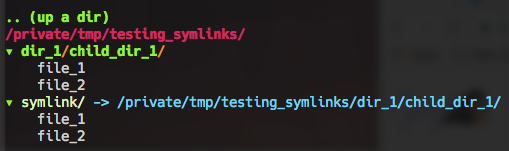
NERDTreeCascadeSingleChildDir=1 results in not being able to access files/directories
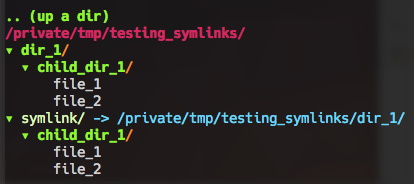
NERDTreeCascadeSingleChildDir=0 allows for accessing files/directories properly
jamesgoodhouse
on 17 Oct 2017
Well, you've done your due diligence here. Thanks!
I'll label this as a confirmed bug, but know that this is actually somewhat complex to fix. You'll likely have to live without cascading for the time being if you symlink a lot of directories. I don't know when I or someone else will be able to get to this.
I can't personally confirm on my own system (because I don't have a Mac), but I've had problems with linking directories on Windows, so this is clearly an area where the NERDTree needs more work.
lifecrisis
on 17 Oct 2017
Note: I just confirmed this on Ubuntu 16.04 as well. So, this is definitely a problem on all three platforms.
lifecrisis
on 17 Oct 2017
I can confirm this bug as well. Below is what I see with the 4 combinations of NERDTreeCascadeSingleChildDir and NERDTreeCascadeOpenSingleChildDir. There have been a lot of other issues related to these options, one of which appear to be a workaround for the other one. See #547 and #558. Plenty of opportunity to fix it once and for all.
let NERDTreeCascadeSingleChildDir =     1
let NERDTreeCascadeOpenSingleChildDir = 1

</junk/testing_symlinks2/
▾ dir_1/child_dir_1/
    file_1
    file_2
▾ symlink/ -> /Users/prunninger/junk/testing_symlinks2/dir_1/child_dir_1/
    file_1
    file_2

---------------------------------------------------------------------------

let NERDTreeCascadeSingleChildDir =     1
let NERDTreeCascadeOpenSingleChildDir = 0

</junk/testing_symlinks2/
▾ dir_1/child_dir_1/
    file_1
    file_2
▸ symlink/ -> /Users/prunninger/junk/testing_symlinks2/dir_1/child_dir_1/

---------------------------------------------------------------------------

let NERDTreeCascadeSingleChildDir =     0
let NERDTreeCascadeOpenSingleChildDir = 1

</junk/testing_symlinks2/
▾ dir_1/
  ▾ child_dir_1/
      file_1
      file_2
▾ symlink/ -> /Users/prunninger/junk/testing_symlinks2/dir_1/
  ▾ child_dir_1/
      file_1
      file_2

---------------------------------------------------------------------------

let NERDTreeCascadeSingleChildDir =     1
let NERDTreeCascadeOpenSingleChildDir = 1

</junk/testing_symlinks2/
▾ dir_1/child_dir_1/
    file_1
    file_2
▾ symlink/ -> /Users/prunninger/junk/testing_symlinks2/dir_1/child_dir_1/
    file_1
    file_2
 PhilRunninger
on 17 Oct 2017
PhilRunninger
on 17 Oct 2017
It's been a while since I've looked at this. A solution wasn't too hard to implement. Check out pull request #914, and see if it solves your issue.
PhilRunninger
on 8 Nov 2018
Related issues
 kevinSuttle
·
4Comments
kevinSuttle
·
4Comments
 fncll
·
4Comments
fncll
·
4Comments
 kristijanhusak
·
3Comments
kristijanhusak
·
3Comments
 PinheiroCosta
·
4Comments
PinheiroCosta
·
4Comments
 nicknick63
·
6Comments
nicknick63
·
6Comments