Nerdtree: Function nerdtree#ui_glue#invokeKeyMap error
Self-Diagnosis
- [x] I have searched the issues for an answer to my question.
- [x] I have reviewed the NERDTree documentation.
:h NERDTree - [x] I have reviewed the Wiki.
- [x] I have searched the web for an answer to my question.
Environment (for bug reports)
- Operating System: Fedora 32
- Vim/Neovim version
:echo v:version: 802 - NERDTree version, found on 1st line in NERDTree quickhelp
?: 6.9.10 - vimrc settings
"""""""""""""""""""""""""""""""""""""""""""""""""""""""""""""""
""" VIM SETTINGS
""" ============
"""""""""""""""""""""""""""""""""""""""""""""""""""""""""""""""

""" General configurations
set nu
set encoding=utf-8

""" Split Window Configuration
set splitbelow
set splitright

""" split navigations
nnoremap <C-J> <C-W><C-J>
nnoremap <C-K> <C-W><C-K>
nnoremap <C-L> <C-W><C-L>
nnoremap <C-H> <C-W><C-H>

""" Folding
set foldmethod=indent
set foldlevel=99
nnoremap <space> za

""" Indentation
set shiftwidth=4
set smartindent
set autoindent

""""""""""""""""""""""""""""""""""""""""""""""""""""""""""""""
""" Vim Plugin list
""" ===============
""""""""""""""""""""""""""""""""""""""""""""""""""""""""""""""

call plug#begin('~/.vim/plugged')
        Plug 'scrooloose/nerdtree'
        Plug 'preservim/nerdcommenter'
        Plug 'jiangmiao/auto-pairs'
        Plug 'joshdick/onedark.vim'
        Plug 'sheerun/vim-polyglot'
        Plug 'dense-analysis/ale'
        Plug 'ycm-core/YouCompleteMe'
        Plug 'vim-airline/vim-airline'
call plug#end()

"""""""""""""""""""""""""""""""""""""""""""""""""""""""""""""" NERDTree
" Ctrl + n "
map <C-n> :NERDTreeToggle<CR>

"""""""""""""""""""""""""""""""""""""""""""""""""""""""""""""" Ale
let g:ale_enabled = 1
let g:ale_completion_enabled = 1
- [ ] NERDTree variables
```vim
```
- Other NERDTree-dependent Plugins
    - [ ] jistr/vim-nerdtree-tabs
    - [ ] ryanoasis/vim-devicons
    - [ ] tiagofumo/vim-nerdtree-syntax-highlight
    - [ ] Xuyuanp/nerdtree-git-plugin
    - [ ] Others (specify):
- [x] I've verified the issue occurs with only NERDTree installed.
Steps to Reproduce the Issue
- open a file
- toggle NERDTree
- switch to NERDTtree window
- navigate to the urls.py file
- press 'o' to open the file
Current Result (Include screenshots where appropriate.)

Expected Result
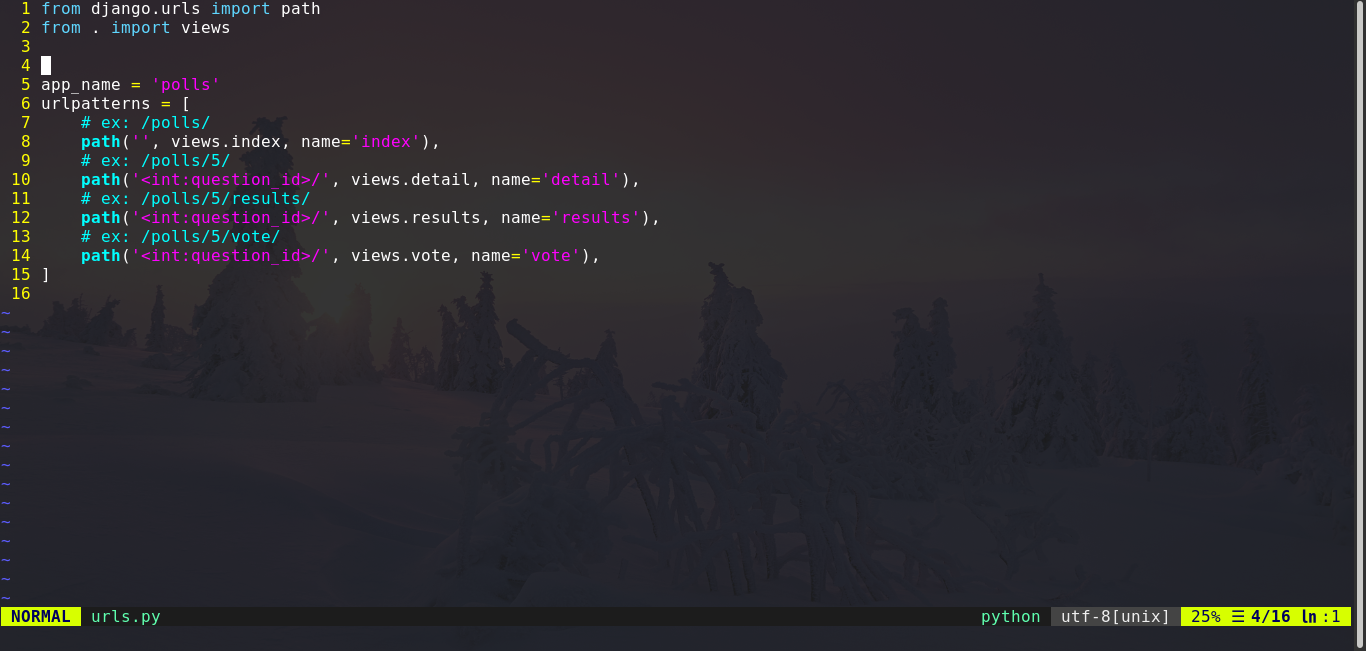
Aditional Notes:
This issue happens only with a specific file called urls.py. and it is solved once i remove the commented lines "Ex: /polls/*" in the following image
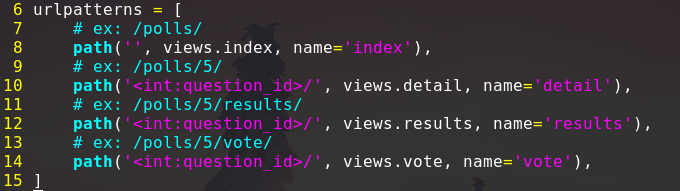
When i try to open the urls.py file directly with those commented lines, this is what happens
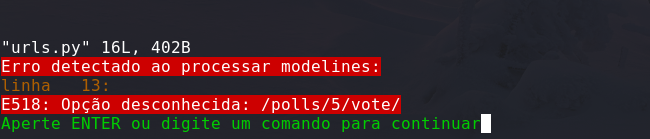
- I couldn't find anything by typing :help E518
- I belive the NERDTree is somehow interpreting the python commented lines as part of the KeyMap.bind() function located in nerdtree/lib/nerdtree/key_map.vim
 PinheiroCosta
All 4 comments
The problem isn't NERDTree. You will see the same issue if you open the file directly: $ vim urls.py. Vim is interepreting your comments as modelines. These lines tell Vim to set one or more settings when it opens this specific file. Typically these are things like indentation, tab expansion, turning on spelling, etc. The syntax of a modeline is found in the help: :h modeline. Your ex: text is what's causing the issues; Vim rightly says that the text after it is an unknown option.
There are a few ways to solve this:
- Change
ex:toExample:in yoururls.pyfile. - Change the value of
'modelines'in your.vimrcto something smaller than the default of 5. Vim is looking at the top 5 lines and the bottom 5 lines in your file for modelines to execute.set modelines=1 - Turn off modelines in your
.vimrc, so that Vim won't look for and process modelines.set momodeline.
 PhilRunninger
on 7 Dec 2020
PhilRunninger
on 7 Dec 2020
thank you @PhilRunninger ! I'm sorry for opening this issue, i will try your suggestions right away.
PinheiroCosta
on 7 Dec 2020
No worries. I just want to clarify. It's not necessary to do all three of the suggestions I gave you. Any single one of them will work, and I just thought of another one. Add some more lines of code at the end so that you're comments are away from the beginning or end of the file.
It's a little unfortunate that these modelines work this way. It's not just comments that can cause this to happen either, although it is a specific syntax. Check this out:
def print_stuff():
    print ("Here's a list.")
    print ("    i: This")
    print ("    ii: will")
    print ("    iii: cause")
    print ("    iv: Vim")
    print ("    v: errors")
    print ("    vi: here.")

print_stuff()
The good news is that the error message is just a nuisance. Editing the file works just as well as if no error had happened.
PhilRunninger
on 7 Dec 2020
Open source community is awesome, i just discovered the usage of vim modelines by accident!
Updating my .vimrc with set nomodeline made those error messages go away. I just turned it off because they are not necessary for me at the moment. But they seem to be pretty useful, i will research more about it later. Thank you for the fast reply and for the explanation!
PinheiroCosta
on 7 Dec 2020
Related issues
 NikosEfthias
·
3Comments
NikosEfthias
·
3Comments
 kevinSuttle
·
4Comments
kevinSuttle
·
4Comments
 BigfootN
·
5Comments
BigfootN
·
5Comments
 nicknick63
·
6Comments
nicknick63
·
6Comments
 trygvis
·
6Comments
trygvis
·
6Comments