Neovide: Some icon fonts not displaying correctly like Font Awesome icons
Hi. I am using neovide in Arch linux. The default font I use is FiraCode. I have noticed that neovide is not able to draw some icon characters properly which appear perfectly fine in my neovim setup in Alacritty terminal. I couldn't find any existing issues like this so creating a new one. Honestly, I don't even know whether this is a configuration issue or something else.
I have tried in all versions: Latest Pre-release, release and what's there in AUR
Here how it looks like now:

Here how it looks in Alacritty
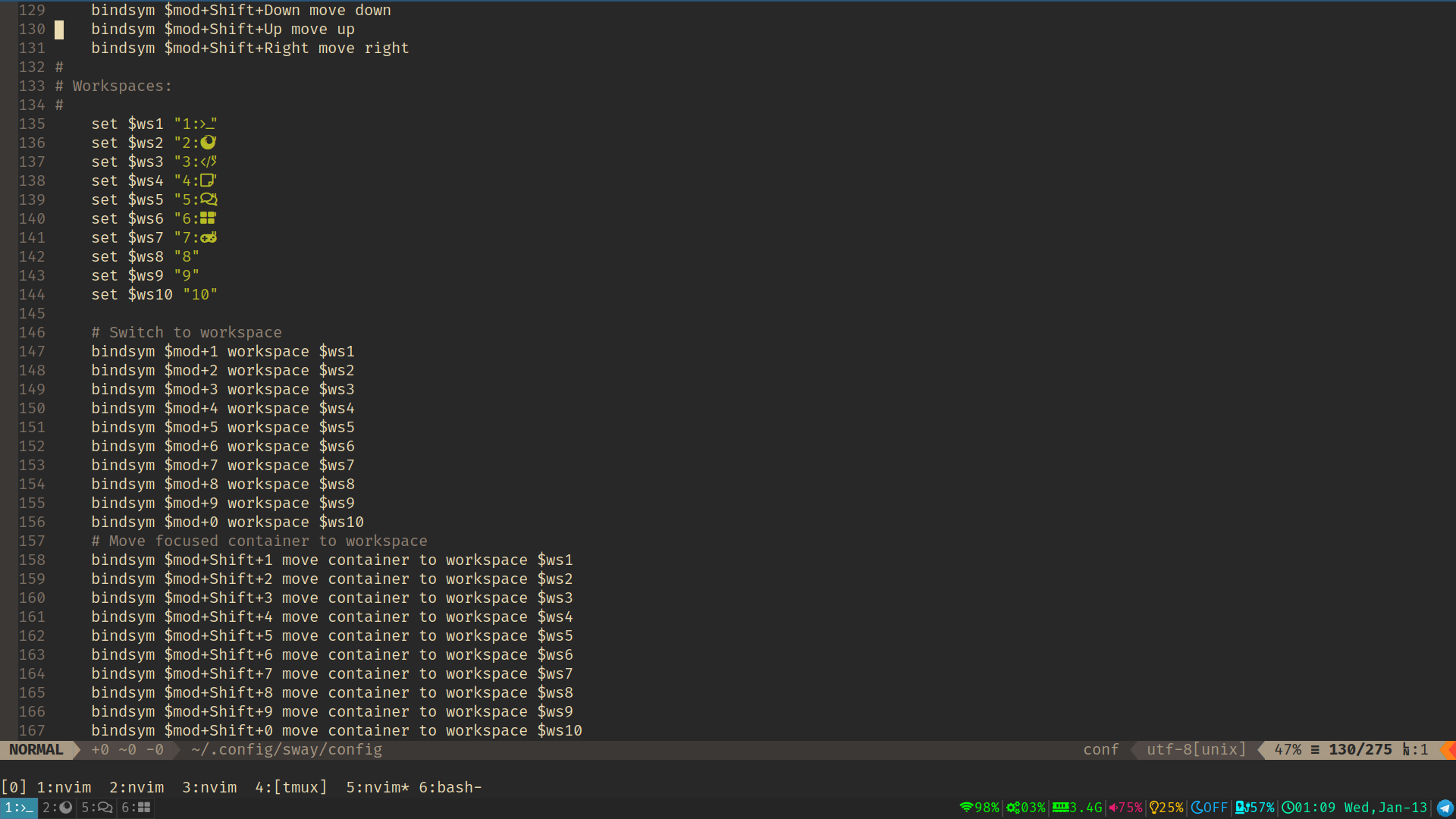
Any help would be hugely appreciated.
Thanks,
Shivanju
 shivanju
All 8 comments
Hi, @shivanju! What setting did you use to change the font for Neovide BTW?
 weiss-d
on 17 Jan 2021
weiss-d
on 17 Jan 2021
I used this in my vim config:
set guifont=Fira\ Code:h19
shivanju
on 17 Jan 2021
Thanks @shivanju, this setting worked for me.
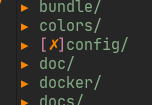
I have the same problem as you now :) Some icons from my "JetBrainsMono Nerd Font" are not displayed correctly:
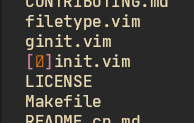
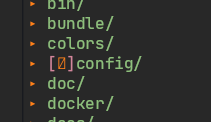
They should look like these:
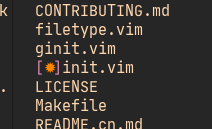
I built neovide from repo today on Debian 10.
weiss-d
on 20 Jan 2021
Same - built this morning on macOS 10.15
λ ~/C/r/neovide git rev-parse HEAD
b0bf7c2e75ededfb580d51f861d1be6aad3ed54f
Using Hack Nerd Font Mono - all icons display fine nvim in Kitty but only some do in Neovide
 ccakes
on 2 Feb 2021
ccakes
on 2 Feb 2021
Hey! @shivanju @weiss-d I'm using Arch and the Nerd Fonts, I changed the settings to:
set guifont=FiraCode\ Nerd\ Font:h19
and it worked for me. @ccakes I have not tried on macOS, but I believe it should work.
 13Kbps
on 16 Feb 2021
13Kbps
on 16 Feb 2021
I think this may be a font fallback thing. If you font got set properly, it should get the extra icons in that exact font correct. However if those icons aren't a part of the font, it probably won't work due to font fallback handling.
https://github.com/Kethku/neovide/issues/444
this issue goes into detail about what the plan is for fixing this. But its a ways out yet.
 Kethku
on 17 Feb 2021
Kethku
on 17 Feb 2021
I think this has been fixed in main. Please reopen if you come back to this and the issue remains.
Kethku
on 14 Jun 2021
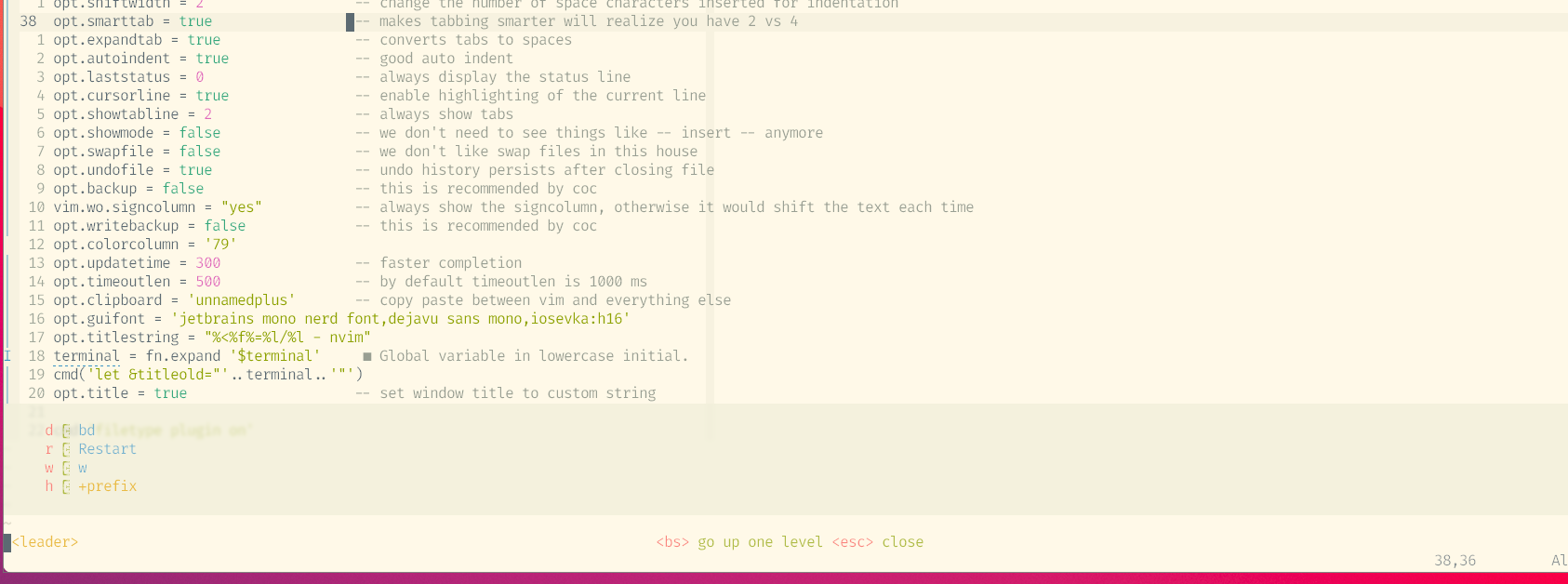
EDIT: It turns out the fonts are there, just cut in half. The window being displayed is from https://github.com/folke/which-key.nvim. Any ideas on where to start looking for this?
I'm still having this issue unfortunately.
OS: MacOSX11.2.3 (20D91
NVIM: v0.5.0-dev+1471-g7d8202087
Neovide: 0.7.0
settings.lua file:
local cmd = vim.cmd  -- to execute vim commands e.g. cmd('pwd')
local fn = vim.fn    -- to call vim functions e.g. fn.bufnr()
local opt = vim.opt  -- to set options

cmd 'syntax enable'                 -- enables syntax highlighing
require('colors')

opt.completeopt = {'menuone', 'noselect'}  -- completion options (for deoplete)
opt.shortmess:append('c')           -- don't pass messages to |ins-completion-menu|
opt.iskeyword:append('-')           -- treat dash separated words as a word text object"
opt.expandtab = true                -- use spaces instead of tabs
opt.hidden = true                   -- enable background buffers
opt.ignorecase = true               -- ignore case
opt.joinspaces = false              -- no double spaces with join
opt.list = true                     -- show some invisible characters
opt.number = true                   -- show line numbers
opt.relativenumber = true           -- relative line numbers
opt.scrolloff = 4                   -- lines of context
opt.shiftround = true               -- round indent
opt.shiftwidth = 2                  -- size of an ident
opt.sidescrolloff = 8               -- columns of context
opt.smartcase = true                -- do not ignore case with capitals
opt.smartindent = true              -- insert indents automatically
opt.splitbelow = true               -- put new windows below current
opt.splitright = true               -- put new windows right of current
opt.tabstop = 2                     -- number of spaces tabs count for
opt.termguicolors = true            -- true color support
opt.wildmode = {'list', 'longest'}  -- command-line completion mode
opt.wrap = false                    -- disable line wrap
opt.encoding = 'utf-8'              -- the encoding displayed
opt.pumheight = 10                  -- makes popup menu smaller
opt.fileencoding = 'utf-8'          -- the encoding written to file
opt.ruler = true                    -- show the cursor position all the time
opt.cmdheight = 2                   -- more space for displaying messages
opt.mouse = 'nicrv'                 -- enable your mouse
opt.conceallevel = 0                -- so that i can see `` in markdown files
opt.shiftwidth = 2                  -- change the number of space characters inserted for indentation
opt.smarttab = true                 -- makes tabbing smarter will realize you have 2 vs 4
opt.expandtab = true                -- converts tabs to spaces
opt.autoindent = true               -- good auto indent
opt.laststatus = 0                  -- always display the status line
opt.cursorline = true               -- enable highlighting of the current line
opt.showtabline = 2                 -- always show tabs
opt.showmode = false                -- we don't need to see things like -- insert -- anymore
opt.swapfile = false                -- we don't like swap files in this house
opt.undofile = true                 -- undo history persists after closing file
opt.backup = false                  -- this is recommended by coc
vim.wo.signcolumn = "yes"           -- always show the signcolumn, otherwise it would shift the text each time
opt.writebackup = false             -- this is recommended by coc
opt.colorcolumn = '79'
opt.updatetime = 300                -- faster completion
opt.timeoutlen = 500                -- by default timeoutlen is 1000 ms
opt.clipboard = 'unnamedplus'       -- copy paste between vim and everything else
opt.guifont = 'jetbrains mono nerd font,dejavu sans mono,iosevka:h16'
opt.titlestring = "%<%f%=%l/%l - nvim"
terminal = fn.expand '$terminal'
cmd('let &titleold="'..terminal..'"')
opt.title = true                    -- set window title to custom string

cmd 'filetype plugin on'
 michaelslec
on 3 Jul 2021
michaelslec
on 3 Jul 2021
Related issues
 chipaltman
·
5Comments
chipaltman
·
5Comments
 lijaesela
·
3Comments
lijaesela
·
3Comments
 dineshKumar777
·
6Comments
Kethku
·
7Comments
dineshKumar777
·
6Comments
Kethku
·
7Comments
 noelzubin
·
6Comments
noelzubin
·
6Comments
Most helpful comment
I think this may be a font fallback thing. If you font got set properly, it should get the extra icons in that exact font correct. However if those icons aren't a part of the font, it probably won't work due to font fallback handling.
https://github.com/Kethku/neovide/issues/444
this issue goes into detail about what the plan is for fixing this. But its a ways out yet.