Neos-ui: Dimensions not selectable from the dimensions menu
Description
If you configure two dimensions-sets with one combination which is completely separated from all others, it is impossible to select this specific one from the dimensions menu in the backend. It is grayed out due to the constraints set.
Here is an example configuration:
Neos:
  ContentRepository:
    contentDimensions:
      'country':
        default: 'deu'
        defaultPreset: 'deu'
        label: 'Country'
        icon: 'icon-globe'
        presets:
          'deu':
            label: 'Germany'
            values: ['deu']
            uriSegment: 'deu'
          'aut':
            label: 'Austria'
            values: ['aut', 'deu']
            uriSegment: 'aut'
          'lux':
            label: 'Luxembourg'
            values: ['lux', 'deu']
            uriSegment: 'lux'
          'dnk':
            label: 'Denmark'
            values: ['dnk']
            uriSegment: 'dnk'
      'language':
        default: 'de'
        defaultPreset: 'de'
        label: 'Language'
        icon: 'icon-language'
        presets:
          'de':
            label: 'German'
            values: ['de']
            uriSegment: 'de'
            constraints:
              country:
                '*': false
                'deu': true
                'aut': true
                'lux': true
          'en':
            label: 'English'
            values: ['en']
            uriSegment: 'en'
            constraints:
              country:
                '*': false
                'deu': true
                'aut': true
          'da':
            label: 'Danish'
            values: ['da']
            uriSegment: 'da'
            constraints:
              country:
                '*': false
                'dnk': true
With this, you can't choose "Denmark" or "Danish" from the dimensions menu, as Denmark ist prohibited in the languages English and German while Danish is prohibited in Germany, Austria and Luxembourg:
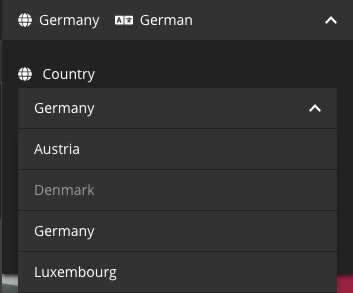
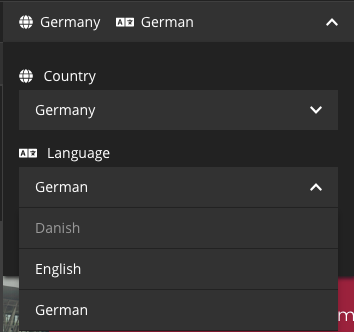
On the other hand, if you enter the danish dimension via the URI, you can't switch back to any other dimension from the menu:
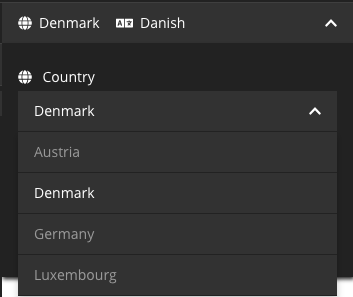
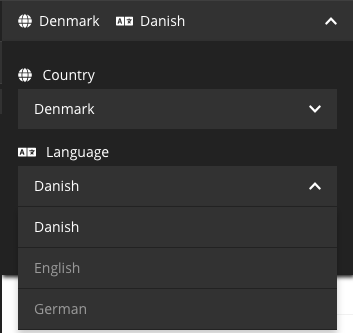
Expected behavior
Any ability to choose the Danish dimension from the menu.
Actual behavior
Not to have that ability...
Affected Versions
Neos: 3.3.13
UI: 1.3.3
 dennisirmscher
All 11 comments
@dennisirmscher Interesting problem, I can confirm this.
It's a special situation, but I'll take care of it and will make a proposal to solve this in the next few days, if not someone else is faster.
 sbruggmann
on 28 Aug 2018
sbruggmann
on 28 Aug 2018
Yeah, would be cool to come up with a sound UX concept, coding it shouldn't be hard.
 dimaip
on 28 Aug 2018
dimaip
on 28 Aug 2018
@dennisirmscher @dimaip Sorry for the delay.
After some experiments I would go with the most simple solution: Allow clicks on "disabled" / secondary dimensions:
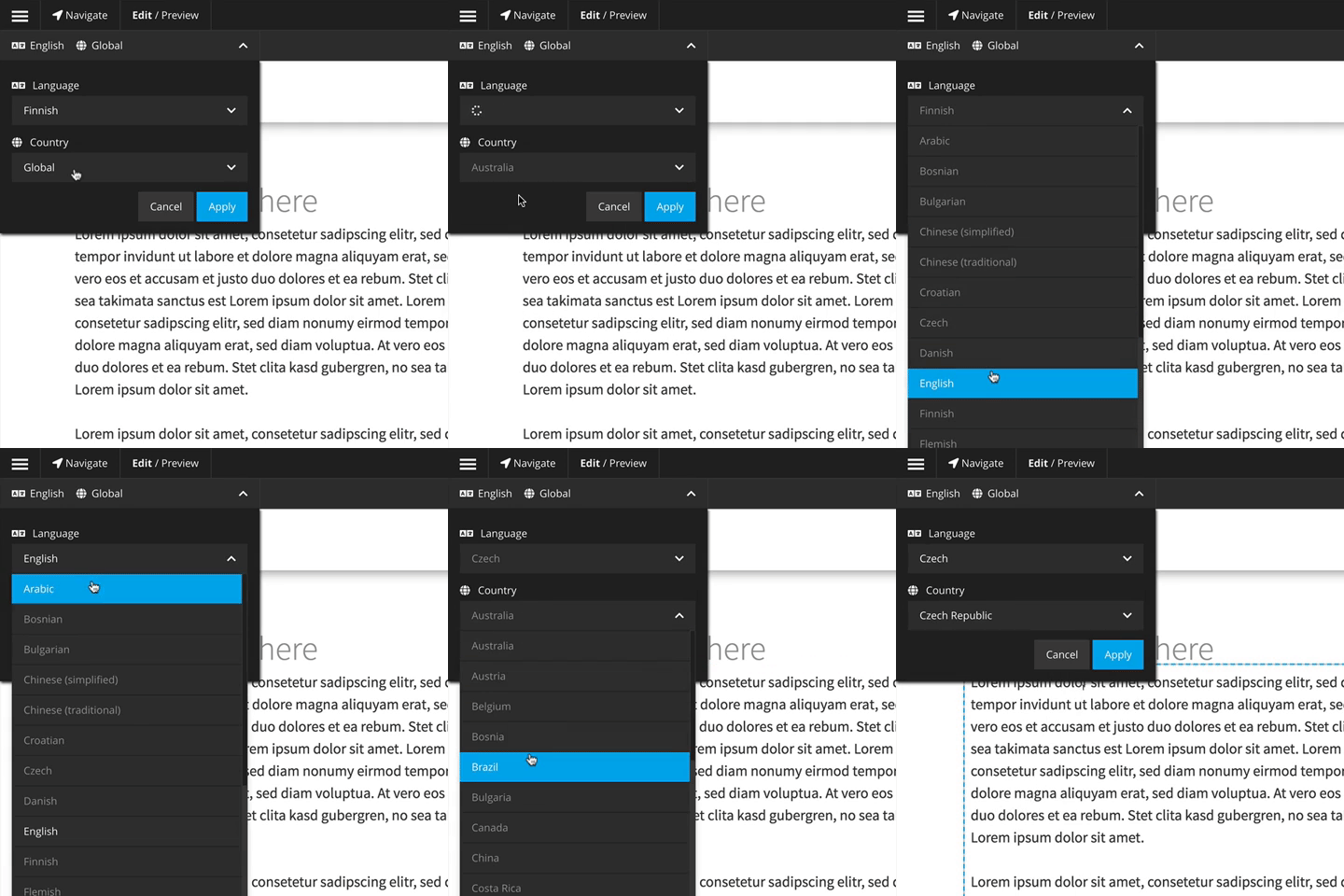
Definitely not finished:
https://github.com/neos/neos-ui/compare/master...sbruggmann:secondary-dimensions
Whats missing is, that the Apply-Button get's disabled if a not-valid dimension combination is used.
sbruggmann
on 6 Sep 2018
In that case when you click disabled dimension, the other dimension(s) should refresh to the first matching valid config.
dimaip
on 6 Sep 2018
Or this way, yes. Then the Apply Button can always be clicked.
But I didn't figure out how ;)
sbruggmann
on 6 Sep 2018
Haha challenges is what makes our job fun, right? =)
dimaip
on 6 Sep 2018
I think it's a nice approach to make the disabled entries clickable but agree with @dimaip it would be more convenient for the user if the other menus will switch to the first valid entry. And I too have no clue how to achieve that :)
dennisirmscher
on 6 Sep 2018
@dennisirmscher how did you solve this situation in your project? I am in a similar situation right now.
 DrillSergeant
on 3 Dec 2018
DrillSergeant
on 3 Dec 2018
@DrillSergeant No, I'm afraid not. We explained the problem to our customer and he simply added English as an additional language for DK to work around the problem. Since then I honestly haven't pursued it any further.
dennisirmscher
on 3 Dec 2018
@dennisirmscher Thanks for the update. We took the same route so far, I allow the norway language in the country "global" but there will never be content in there, it's just to be able to switch to Dimension "no_no" (country_lang).
Additionally added a EditNodePrivilege to the policy which is explict denied for everybody to prevent getting content in the global_no-Dimension:
matcher: 'isInDimensionPreset("country", "global") && isInDimensionPreset("language", "no")'
But it's still not nice to have a dummy dimension combination. Maybe someone come up with a better solution.
DrillSergeant
on 3 Dec 2018
Hi @sbruggmann! Do you still plan to try to fix it, or should someone take over?
dimaip
on 4 Dec 2018
Related issues
 johannessteu
·
4Comments
johannessteu
·
4Comments
 jonnitto
·
7Comments
jonnitto
·
7Comments
 lorenzulrich
·
9Comments
jonnitto
·
8Comments
lorenzulrich
·
9Comments
jonnitto
·
8Comments
 skurfuerst
·
9Comments
skurfuerst
·
9Comments
Most helpful comment
In that case when you click disabled dimension, the other dimension(s) should refresh to the first matching valid config.