Neon-wallet: Travala.com AVA Price not displaying
Wallet version or commit SHA:
2.2.1
Environment:
MacOS 10.14.5 (18F132)
Prerequisites:
None
Reproduction steps:
e.g.:
- Start Neon Wallet
- Click on "Wallet" button
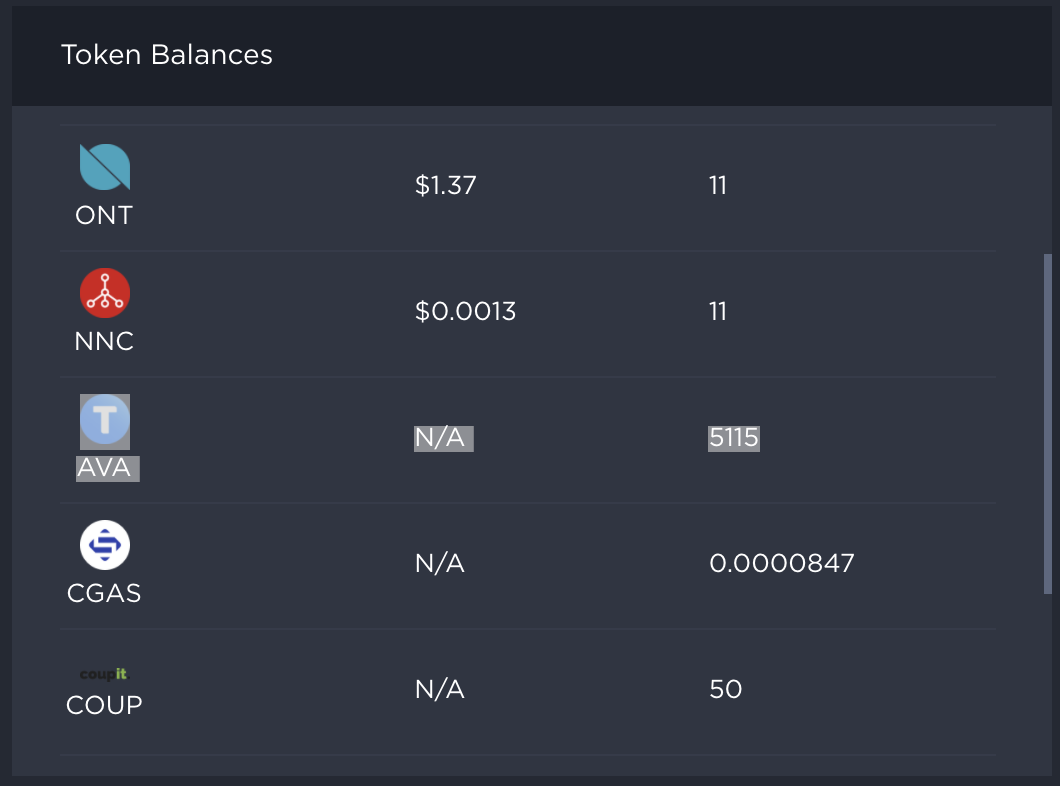
- In "Token Balances" section, AVA is listed with "N/A" in price
AVA price information is readily available and has been for over 12 months: https://coinmarketcap.com/currencies/travala/
Screenshots/Video:
 warwickchapman
All 15 comments
Apparently AVA is listed as "AVALA" on CryptoCompare, which is the API Neon uses to get pricing data, so the pricing data request for AVA returns no data. (They have a defunct ERC-20 token listed using the AVA symbol).
There may be other silent token symbol changes preventing other token prices from displaying, someone should do an audit of the existing tokens pricing data return values and also figure out how to add special handling to Neon to deal with CryptoCompare's renaming instances.
My suggestion: rather than hard-coding substitutions in the Neon code, maybe it would be good to have an optional field such as cryptocompareSymbol added to the token objects in the tokenList.json file, then if it was present, the pricing request code could default to use that value instead of that of symbol so we can easily fix these edge cases going forward.
 hal0x2328
on 6 Jul 2019
hal0x2328
on 6 Jul 2019
Thanks for reporting @warwickchapman we will get this fixed
 comountainclimber
on 8 Jul 2019
comountainclimber
on 8 Jul 2019
FYI, I am working on this.
 dauTT
on 9 Jul 2019
dauTT
on 9 Jul 2019
Awesome @dauTT 💪 💪
Just so you know an example of this already exists for SOUL as you can see in pricesActions.js https://github.com/CityOfZion/neon-wallet/blob/dev/app/actions/pricesActions.js#L10 I am ok with using this solution as a temporary work around until we can implement what @hal0x2328 was discussing
comountainclimber
on 10 Jul 2019
Thanks for the advice! :+1:
dauTT
on 10 Jul 2019
Have you considered the CoinGecko open API at https://www.coingecko.com/en/api ?
Price info can be obtained from
https://api.coingecko.com/api/v3/simple/price?ids=concierge-io&vs_currencies=usd,aud
It looks like id is different, may be due to a rebrand as list can be pulled over at https://api.coingecko.com/api/v3/coins/list
There is a support for contract address but it looks like its only for Ethereum at the moment, for example BAT, https://api.coingecko.com/api/v3/simple/token_price/ethereum?contract_addresses=0x0d8775f648430679a709e98d2b0cb6250d2887ef&vs_currencies=usd%2Ceur
 tmlee
on 11 Jul 2019
tmlee
on 11 Jul 2019
Thanks, @tmlee for the advice. But let see first if we can keep the existing setup by making a small adjustment before switching to a different service provider. :smile:
dauTT
on 25 Jul 2019
@comountainclimber ,
I was testing the solution proposed by @hal0x2328, but I realize that www.cryptocompare.com does not track all the nep5 token. For instance, I can't find NEX:
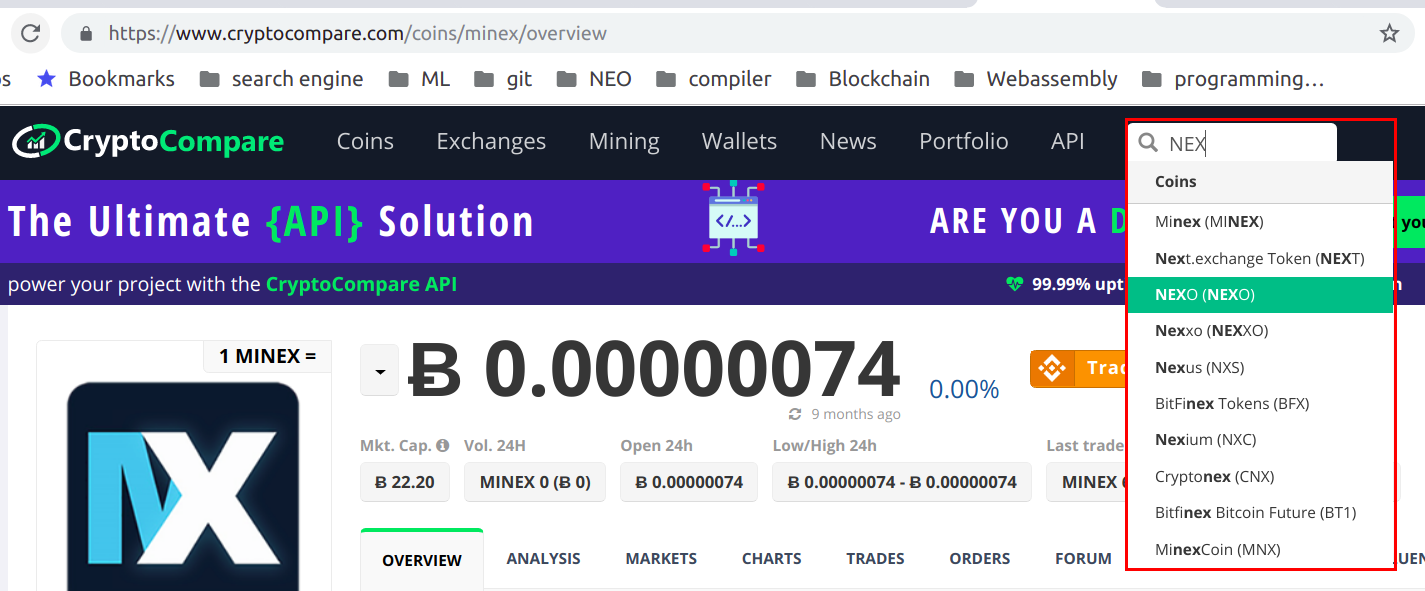
Do I search in the right place?
dauTT
on 25 Jul 2019
I see it here https://www.cryptocompare.com/coins/nex/overview but not sure what the symbol is within their API
comountainclimber
on 25 Jul 2019
Thanks, @comountainclimber. Let see if I can find the api symbol for NEX...
dauTT
on 25 Jul 2019
Actually the NEX symbol does exist on the cryptocompare webpage:

But we don't get any price via the api call:
https://min-api.cryptocompare.com/data/pricemultifull?fsyms=NEX&tsyms=USD

I have raised a support request to cryptocompare to see how we can solve this issue.
dauTT
on 26 Jul 2019
I got the reply from CryptoCompare:
Hello,
Thank you for contacting CryptoCompare.
We don't have any NEX/USD pairs listed on our website and that is why you can get any price data for that pair. Please use https://min-api.cryptocompare.com/data/price?fsym=NEX&tsyms=NEO since we have NEX/NEO price data available.If there is anything else we can do for you, please let us know.
Best regards,
CryptoCompare team
So we will need to adjust the api call to accomodate these cases as well and do a crypto fx conversion. :sweat_smile:
dauTT
on 26 Jul 2019
@comountainclimber ,
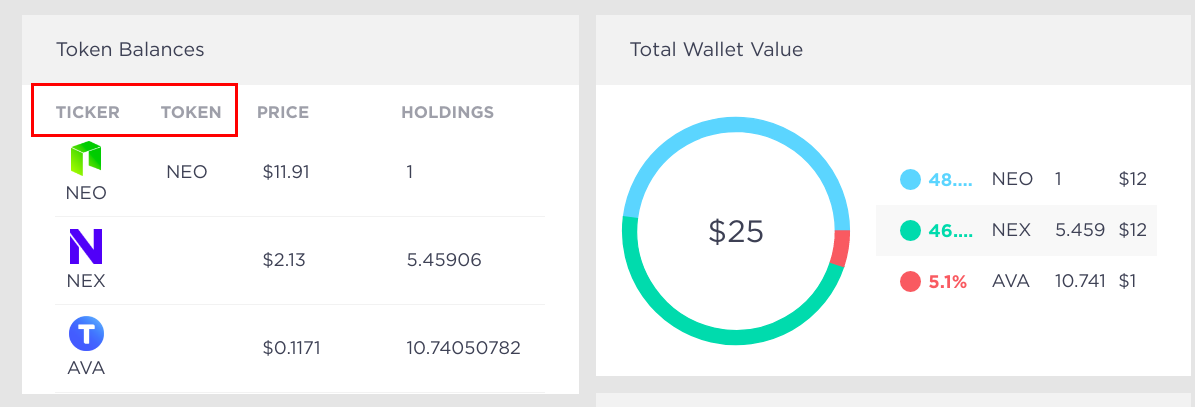
What is the difference between ticker and token column? Can we just keep ticker column and drop the token one?
dauTT
on 27 Jul 2019
Closing this as the fix has been merged into dev 🎉 - will be in the next release.
comountainclimber
on 13 Aug 2019
Thanks team!
warwickchapman
on 14 Aug 2019
Related issues
 drptbl
·
7Comments
drptbl
·
7Comments
 lemmallari
·
4Comments
lemmallari
·
4Comments
 summertooth
·
7Comments
warwickchapman
·
3Comments
drptbl
·
3Comments
summertooth
·
7Comments
warwickchapman
·
3Comments
drptbl
·
3Comments
Most helpful comment
Apparently AVA is listed as "AVALA" on CryptoCompare, which is the API Neon uses to get pricing data, so the pricing data request for
AVAreturns no data. (They have a defunct ERC-20 token listed using the AVA symbol).There may be other silent token symbol changes preventing other token prices from displaying, someone should do an audit of the existing tokens pricing data return values and also figure out how to add special handling to Neon to deal with CryptoCompare's renaming instances.
My suggestion: rather than hard-coding substitutions in the Neon code, maybe it would be good to have an optional field such as
cryptocompareSymboladded to the token objects in the tokenList.json file, then if it was present, the pricing request code could default to use that value instead of that ofsymbolso we can easily fix these edge cases going forward.