Nemo: Row selection/highlighting is inconsistent after swapping pane.
4.2.3
Nemo window
Ubuntu Budgie 19.10
? Nvidia 340.107
64
The selection and highlighting of a row isn’t what I would expect.
If I hover over a row in paneA it is highlighted slightly, if I then click it, it shows that it is selected by being highlighted strongly and I can now do things to that row. For example if I click and hold, I can drag and drop it.
If I then move the pointer to paneB, I can do the same, and the same happens, but sensibly the row in paneA also stays highlighted strongly - to me this indicates that it will still be selected if the pointer returns to that pane.
However, If I now go back to the row in paneA, although it is still highlighted, I can’t move it after click and hold. Presumably because it is no longer selected despite being strongly highlighted.
This is inconsistent.
I would prefer it to have stayed selected for that pane, so one row is highlighted in each pane.
If that were thought to be confusing, and it was decided that only one row in total could be highlighted in the Nemo window, I think that when I switch to the other pane, it should lose its highlighting to show that it is no longer selected.
 ChrisOfBristol
All 8 comments
@ChrisOfBristol - What GTK3 theme are you using? A lot of themes don't define a specific background or text color for nemo's inactive pane which results in highlighting remaining on the inactive pane when an item is in fact no longer selected. I'd suggest reporting it as a bug to the theme developer.
 smurphos
on 29 Dec 2019
smurphos
on 29 Dec 2019
Having said that both Mint Y and Mint X also suffer from this theming bug.....so perhaps this should be reported against mint-themes, or perhaps it is a nemo bug as both those themes specifically retain the selection highlighting in the inactive pane despite the possibility for confusion.
smurphos
on 29 Dec 2019
This isn't a bug in Nemo or the theme. In your example when you move back to PaneA, your first click is being used to set the focus to that pane. You'll notice that clicking anywhere in the pane doesn't change your selection. Focus isn't changed between panes simply by moving the pointer between them.
 JosephMcc
on 29 Dec 2019
JosephMcc
on 29 Dec 2019
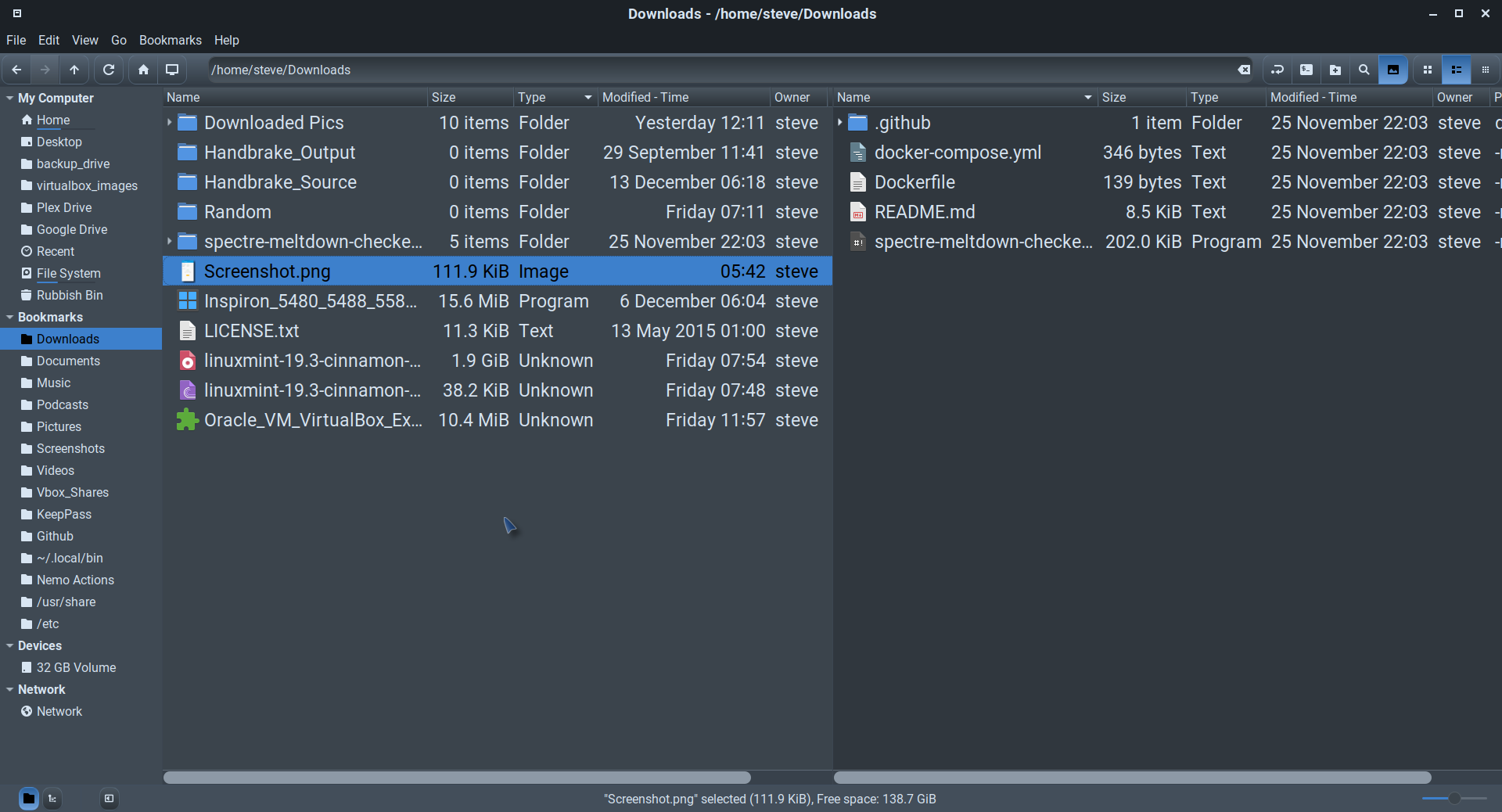
@JosephMcc - do you not think that retaining the selection highlighting on the inactive pane can potentially cause confusion as per the OP? I do and actively avoid that in any theme I have a hand in.
E.g. I don't think it's very clear which files path will be copied to the clipboard if I Ctrl-C here (Mint-Y-Dark). Sure there are clues - the sidebar, pathbar and background colour differences but the highlighted row in the inactive pane will always attract the eye and cause some doubt.
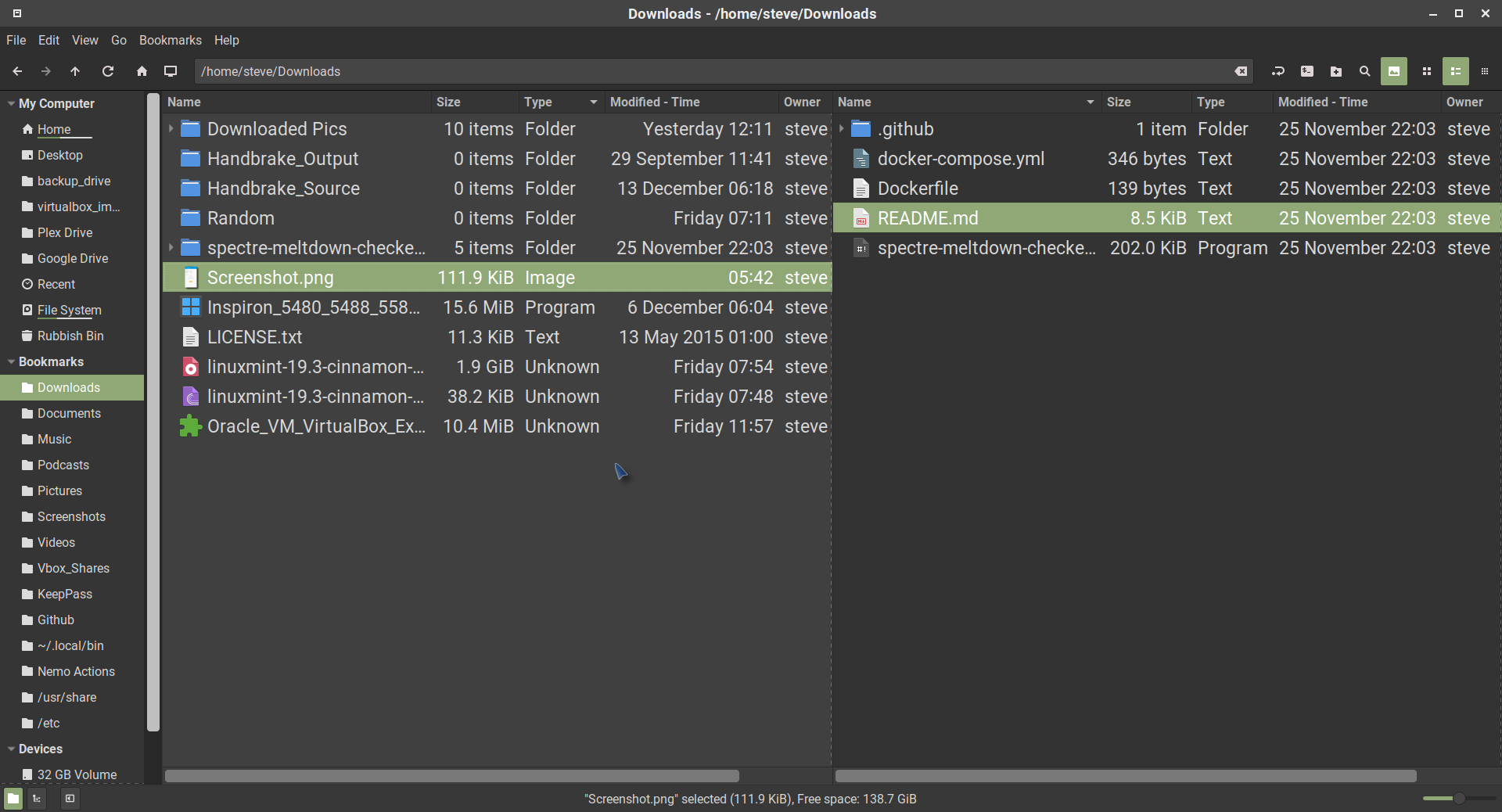
Whereas I think it is more obvious here (Cinnamox-Rhino)
smurphos
on 30 Dec 2019
@smurphos - What GTK3 theme are you using?
I have checked this with Pocilla, QogiBudgie, Arc Design and Materia Design.
@smurphos - do you not think that retaining the selection highlighting on the inactive pane can potentially cause confusion as per the OP?
I agree. If, as you imply, the row in the inactive pane is not in any way selected, then highlighting it is pointless and it is misleading.
ChrisOfBristol
on 30 Dec 2019
@smurphos Yes this could maybe be improved. I'll look into it
JosephMcc
on 30 Dec 2019
@ChrisOfBristol To save you trying to hand edit themes, try this generic over-ride css in ~/.config/gtk-3.0/gtk.css. If you don't have this file create a empty one. It should in theory be theme agnostic, but results may vary depending on system theme.
You may want to experiment with a using @theme_base_color rather than @theme_bg_color and with varying the shade modifier between roughly 0.9 and 1.1.
One first adding it, and / or after any further edits shutdown nemo with the command nemo -q and reopen nemo to test.
.nemo-window .nemo-inactive-pane .view,
.nemo-window .nemo-inactive-pane iconview,
.nemo-window .nemo-inactive-pane .view:selected,
.nemo-window .nemo-inactive-pane iconview:selected  {
    background-color: shade(@theme_bg_color, 1.05);
    color: @theme_fg_color;
}
@smurphos I'm already familiar with that file as I have a statement to increase the width of the scrollbar sliders.
I've tried your code on my current theme and made a quick check on both the dark and light versions and it fixes it. I've copied your post (with credit) to the Ubuntu Budgie Discourse where I first asked the question. I hope that's OK with you.
ChrisOfBristol
on 31 Dec 2019
Related issues
 Enkouyami
·
7Comments
Enkouyami
·
7Comments
 WhyNotHugo
·
6Comments
WhyNotHugo
·
6Comments
 mdogancay
·
3Comments
mdogancay
·
3Comments
 memeplex
·
6Comments
memeplex
·
6Comments
 blueray453
·
5Comments
blueray453
·
5Comments