nemo file sort order differs from /bin/ls
~ > nemo --version
nemo 4.2.3
~ > cat script
#!/bin/sh

dir="`mktemp -d`"
cd "$dir" || exit

touch "2017 foo"
touch "2018 bar"
touch "201801 baz"
touch "2019 qux"

LC_ALL="C" LC_COLLATE="C" /bin/ls -la .
LC_ALL="C" LC_COLLATE="C" /usr/bin/nemo .
How is the difference in sort order explained?
 bjd-pfq
All 38 comments
Probably the most raised issue there is. They'll probably only ever fix it given some pull requests.
 stevenxxiu
on 2 Dec 2019
stevenxxiu
on 2 Dec 2019
Most elegant solution to this abomination: https://github.com/heralight/GlibSortFileNameHackLibrary
bjd-pfq
on 9 Dec 2019
My pull request https://github.com/linuxmint/nemo/pull/2260 solves part of it, with the custom locale it fixes almost all of it (I can't tell any more sorting issues) https://github.com/linuxmint/nemo/issues/578#issuecomment-500096351.
stevenxxiu
on 15 Dec 2019
I am using Desktop: Cinnamon 4.4.8 Distro: Linux Mint 19.3 Tricia
My -
$ nemo --version
nemo 4.4.2
I checked changelog, the latest is 4.4.2.
Where did you get nemo 4.2.3?
Being said that, please look at my nemo and terminal screenshot bellow. I arranged icons by name.
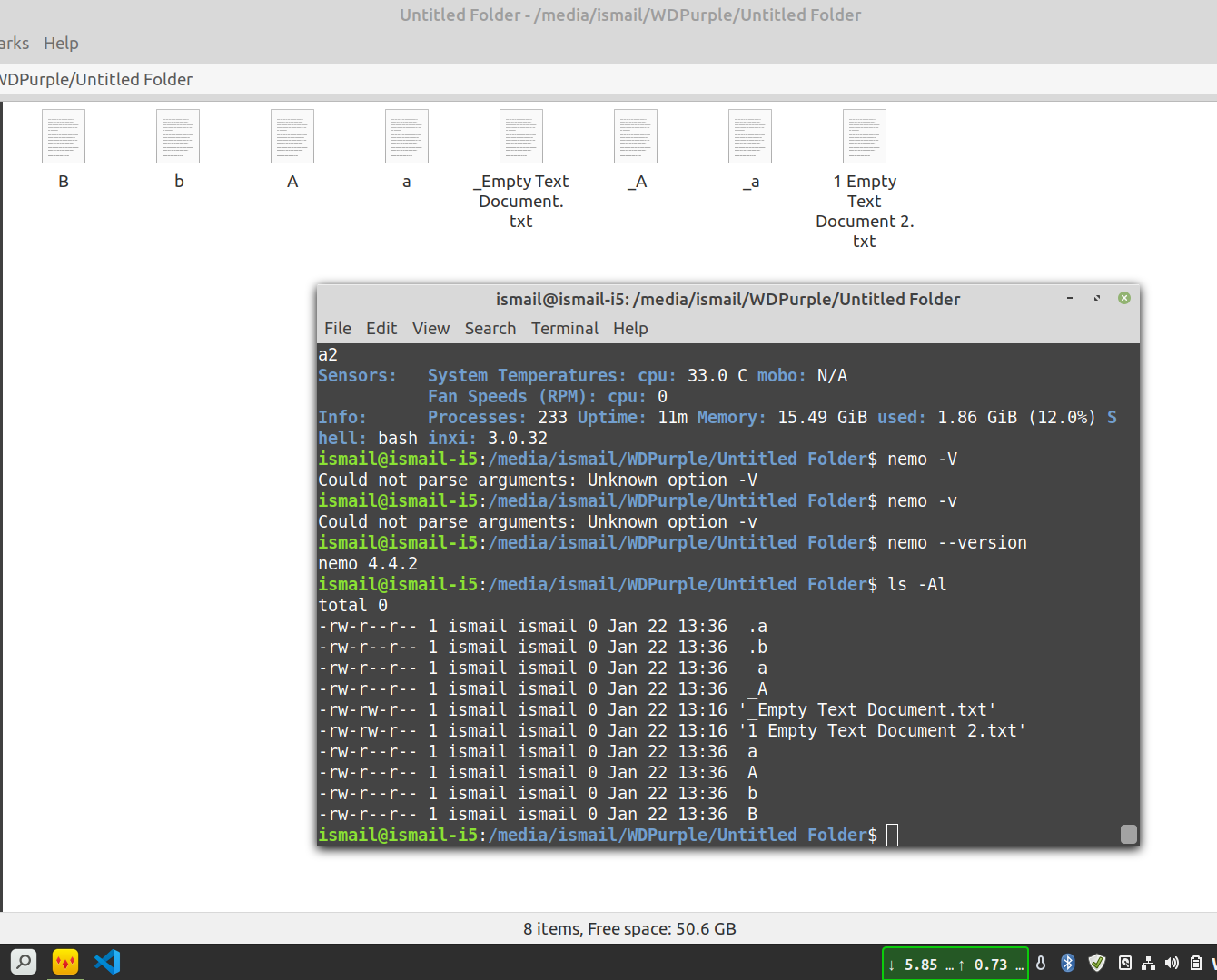
I made few changes in the /usr/share/i18n/locales/iso14651_t1_common file to first sort dot then underscore. The changes reflected in the terminal but not in Nemo.
I also checked Thunar 1.8.9, It also has the same problem. Sort order differs from $ ls -Al
Is it a Mint thing or a Cinnamon thing? What is the issue here?
 blueray453
on 22 Jan 2020
blueray453
on 22 Jan 2020
@blueray453 It is a Nemo thing. It is hard-coded. Check my pull request for the simple fix.
Nemo rejected it without any room for discussion.
The only way out here is to build your own Nemo, which is what I've done (I made my own PKGBUILD on Arch Linux).
stevenxxiu
on 22 Jan 2020
@stevenxxiu can you please give me the instructions to build my own nemo?
blueray453
on 22 Jan 2020
@blueray453 Yes sure, I just published my PKGBUILD file which I use build Nemo here.
I'm not sure if this is special enough to put on Arch Linux's AUR though.
stevenxxiu
on 22 Jan 2020
@stevenxxiu if you look at my screenshot, at the top there are hidden files, starting with dot. Then I have files starting with underscore. It was achieved by modifying /usr/share/i18n/locales/iso14651_t1_common file. If nemo uses default LC_COLLATE for sorting then it will be enough for me. I think nemo is overriding LC_COLLATE from somewhere. I do not want that.
Can we achieve the expected result through extensions, without recompiling nemo?
blueray453
on 22 Jan 2020
Friends, you're all missing the point. It's glib that does this. And it can be 'solved' (circumvented) elegantly by making a LD_PRELOAD object, as I indicated in my comment on Dec. 9th. I may make one myself one of these days. It's really quite easy to create it. An LD_PRELOAD object has the added advantage that anything that uses glib for opening/saving/reading files thus has the fixed sort order (so LibreOffice, etc.). Patching nemo is just creating false expectations in those other programs, not the way to go imo.
bjd-pfq
on 22 Jan 2020
@bjd-pfq I had this hunch that it is not nemo. Anyways, I saw your link, but not sure what to do with it. can you please give us a step by step guide on what to do and how to do?
blueray453
on 22 Jan 2020
@bjd-pfq but one more thing, if it is glib then how is my terminal getting it right (please look at the screenshot on my earlier comment).
blueray453
on 22 Jan 2020
Quite easy. Download the glib-dev sources. You need this to build your tiny little .so library, afterwards you can remove them.
Preamble: the culprit is the function g_utf8_collate_key_for_filename(), in the glib sources (now that you have downloaded the sources, you can look that up ;-) ) When you take a minute to look there, you'll see that its does all kinds of funny things to get the peculiar (unwanted) sort order. Why do I call this an abomination? Because a library should a) not hardcode non-standard behaviour b) not hardcode this idiotic non-standard behaviour c) a library isn't the place to code this in the first place (when not even using user-definable settings or e.g. a config file).
So what you want to do is catch all calls to function g_utf8_collate_key_for_filename.() and redirect them to function g_utf8_collate_key(). How do you do this? By creating the LD_PRELOAD object. How do you use it? By, for instance calling nemo like this: LD_PRELOAD=foo.so nemo &. Same for LibreOffice et al. But you're lazy and don't want to type this in all the time, or you don't want to create wrapper scripts for nemo, LibreOffice et al. Well, the you can you set it system-wide in /etc or in I believe ~/.gnomerc (from memory, please find out where); so in essence you state in that appropriate file that you always want to use LD_PRELOAD=foo.so and you don't have to type that in all the time. Benefit: all your glib-using programs will now display the sort order you want. Problem solved - case closed.
Again: the object foo.so is a very tiny object, as given here: https://github.com/heralight/GlibSortFileNameHackLibrary It's basically a simple oneliner, re-routing g_utf8_collate_key_for_filename() to g_utf8_collate_key(). Read up on LD_PRELOAD if you can, because it's a powerful notion -- but don't misuse it! Remember: when you deviate too much from 'the norm' you're creating false expectations for yourself when you sit behind other UNIX/Linux systems. That doesn't take away from the fact that an abomination is an abomination that should be called out and stymied. ;-) (In an ideal world glib should reverse and correct this, but that has been proved to be a doomed endeavour).
bjd-pfq
on 22 Jan 2020
@blueray453
You mean ls? Because ls isn't using glib. Glib is the library used in graphical programs. ls isn't using it.
bjd-pfq
on 22 Jan 2020
Added comment:
You can find out which libraries a program uses by doing ldd program.
For instance:
$> ldd /bin/ls
    linux-vdso.so.1 (0x00007ffca1db2000)
    libselinux.so.1 => /lib/x86_64-linux-gnu/libselinux.so.1 (0x00007fa581df9000)
    libc.so.6 => /lib/x86_64-linux-gnu/libc.so.6 (0x00007fa581a08000)
    libpcre.so.3 => /lib/x86_64-linux-gnu/libpcre.so.3 (0x00007fa581796000)
    libdl.so.2 => /lib/x86_64-linux-gnu/libdl.so.2 (0x00007fa581592000)
    /lib64/ld-linux-x86-64.so.2 (0x00007fa582243000)
    libpthread.so.0 => /lib/x86_64-linux-gnu/libpthread.so.0 (0x00007fa581373000)
Note absence of libglib.
$> ldd /usr/bin/nemo        # shortened because it's a LONG list
    linux-vdso.so.1 (0x00007fff6752a000)
    libnemo-extension.so.1 => /usr/lib/x86_64-linux-gnu/libnemo-extension.so.1 (0x00007f0bdfb96000)
    libcinnamon-desktop.so.4 => /usr/lib/x86_64-linux-gnu/libcinnamon-desktop.so.4 (0x00007f0bdf965000)
    libgtk-3.so.0 => /usr/lib/x86_64-linux-gnu/libgtk-3.so.0 (0x00007f0bdf05d000)
    libgdk-3.so.0 => /usr/lib/x86_64-linux-gnu/libgdk-3.so.0 (0x00007f0bded67000)
    libpangocairo-1.0.so.0 => /usr/lib/x86_64-linux-gnu/libpangocairo-1.0.so.0 (0x00007f0bdeb5a000)
    libpango-1.0.so.0 => /usr/lib/x86_64-linux-gnu/libpango-1.0.so.0 (0x00007f0bde90d000)
    libatk-1.0.so.0 => /usr/lib/x86_64-linux-gnu/libatk-1.0.so.0 (0x00007f0bde6e7000)
    libcairo-gobject.so.2 => /usr/lib/x86_64-linux-gnu/libcairo-gobject.so.2 (0x00007f0bde4de000)
    libcairo.so.2 => /usr/lib/x86_64-linux-gnu/libcairo.so.2 (0x00007f0bde1c1000)
    libgdk_pixbuf-2.0.so.0 => /usr/lib/x86_64-linux-gnu/libgdk_pixbuf-2.0.so.0 (0x00007f0bddf9d000)
    libgio-2.0.so.0 => /usr/lib/x86_64-linux-gnu/libgio-2.0.so.0 (0x00007f0bddbfe000)
    libgobject-2.0.so.0 => /usr/lib/x86_64-linux-gnu/libgobject-2.0.so.0 (0x00007f0bdd9aa000)
    libglib-2.0.so.0 => /usr/lib/x86_64-linux-gnu/libglib-2.0.so.0 (0x00007f0bdd693000)
       ....
Note libglib here!
bjd-pfq
on 22 Jan 2020
@bjd-pfq My patch was to sort hidden files (files starting with .) without special treatment (Nemo sorts them after). Ideally to have them come first.
Does using GlibSortFileNameHackLibrary fix this issue without patching Nemo? That would be ideal for me too since I wouldn't need to re-compile and can just install from package repos.
stevenxxiu
on 23 Jan 2020
I'm not sure if it does -- I haven't been able to find the time to look into it with that kind of specificty. But anyway, I don't think it would be that hard to make it do that. Why don't you first give it a try to create the tiny shared object library as given on that site? It's really extremely easy, you just have to first download the sources of libglib-2.0.dev (or whatever your package manager proposes), then you can straight compile that shared object and test wtih LD_PRELOAD=foo.so nemo. If this works as advertized, see if you can hack g_utf8_collate_key() (it's in those dev sources, copy and paste into the tiny C-file that the shared object is now) such a way that it does dotfiles first.
But first of all look at that tiny C-source file and understand what it does. It routes all calls to g_utf8_collate_key_for_filename() to g_utf8_collate_key(); this works straightforward because they use exactly the same arguments in the same order, so it's basically a one liner.
Okay, now if you have special wishes instead of pure function g_utf8_collate_key(), you could cut that function from the glib dev sources, paste it as a new function in the tiny c-program, and insteda of callling g_utf8_collate_key() call that function. In that function you can do as you please. Sorry for the typos it's late here.
bjd-pfq
on 23 Jan 2020
I wasn't clear enough: you need to install the glib-2.0-dev package, but that itself doesn't install the glib source files. The particular source file with the functions g_utf8_collate_key_for_filename() and g_utf8_collate_key() is here: https://github.com/GNOME/glib/blob/mainline/glib/gunicollate.c.
Read the comments to both functions. If you want to hack your small preload librrary further, I'd suggest taking the entire function g_utf8_collate_key() and copy/paste it in the .so source file, name it slightly different, hack it as you wish, and then call that from the wrapper function g_utf8_collate_key_for_filename().
bjd-pfq
on 23 Jan 2020
@stevenxxiu
"_Does using GlibSortFileNameHackLibrary fix this issue without patching Nemo? That would be ideal for me too since I wouldn't need to re-compile and can just install from package repos._"
It's possible it does w/o further hacking, but it's preferable to hacking nemo for various reasons already given. The preload library should survive many versions of nemo or glib for that matter without recompilation. Plus if properly setup (i.e. system wide) all programs using glib for sorting (i.e. a great many programs e.g. LO, Gimp, editors, etc., etc.) will display the desired behaviour, becuaes the calls to glib/g_utf8_collate_key_for_filename() they make will be 'caught and handled' by your little LD_PRELOAD lib.
bjd-pfq
on 23 Jan 2020
@bjd-pfq I tested the solution. Not Working.
$ export LD_PRELOAD=/home/ismail/Documents/glibSortFileNameHack.so
$ ldd /usr/bin/nemo
    linux-vdso.so.1 (0x00007ffe69757000)
    /home/ismail/Documents/glibSortFileNameHack.so (0x00007fb849471000)
       ...................
$ nemo
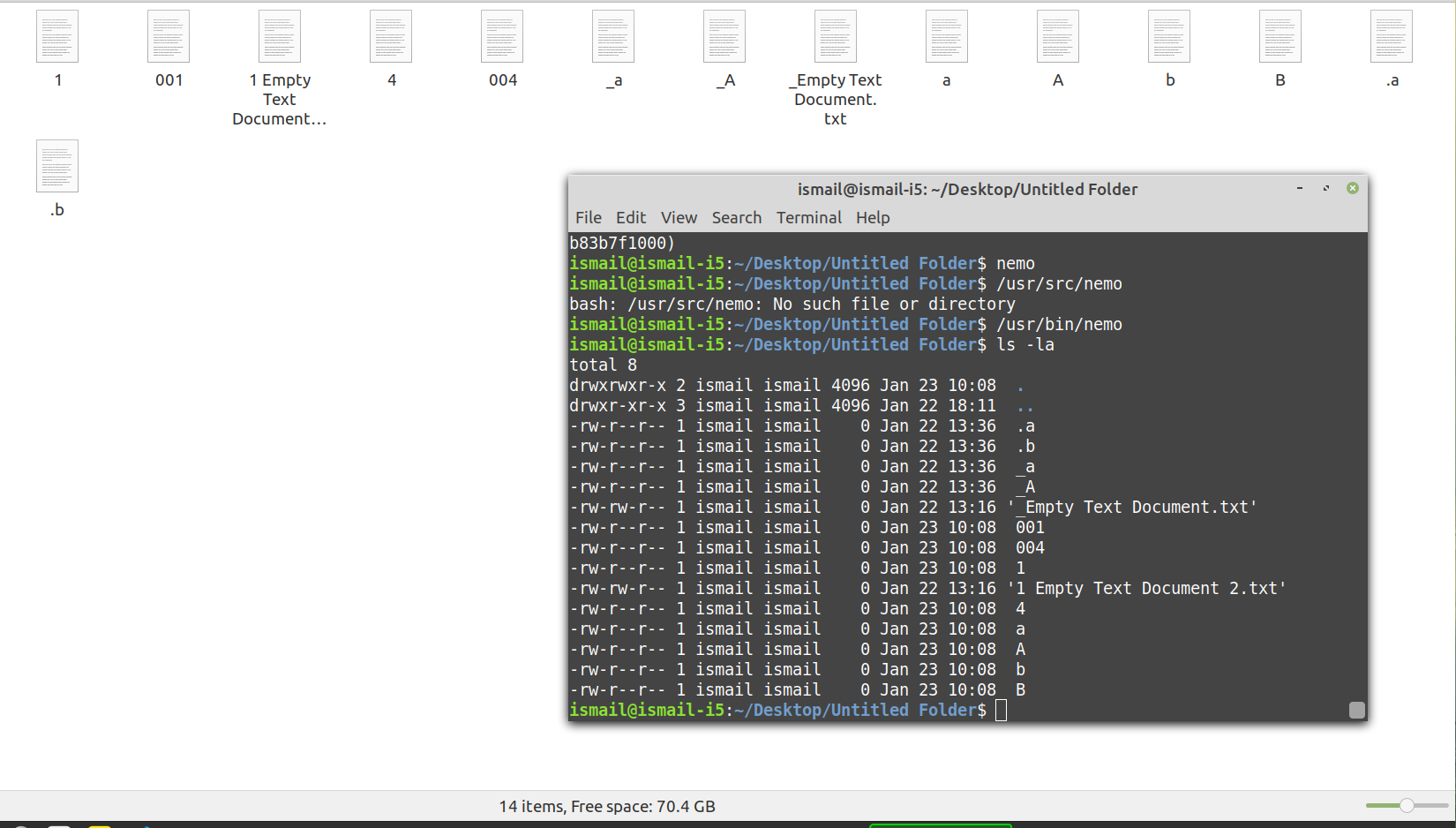
Please suggest some solution or let me know if I can provide you with some more information.
blueray453
on 23 Jan 2020
@bjd-pfq I looked at Nemos code today and indeed don't think the . issue will be solved using GlibSortFileNameHackLibrary.
The issue is that your hook library hooks g_utf8_collate_key_for_filename(). This is called in nemo-file.c > nemo_file_set_display_name().
The function I patched, compare_by_display_name() overrides nemo_file_peek_display_name_collation_key().
The only method is to patch Nemo itself like I did.
w.r.t the Gnome issue, I think a language file is still easier than using a hook as it doesn't require compiling and installing yet another extra tool.
@blueray453 Just use my fix. It will certainly fix the hidden file sorting issue.
Other sorting issues can be fixed using GlibSortFileNameHackLibrary, although I recommend using a locale file for reasons above.
stevenxxiu
on 23 Jan 2020
@stevenxxiu As you have seen in my previous screenshot, the terminal is sorting according to my liking. I want that in Nemo. I have to use the locale file (like you suggested) because I have made some changes in /usr/share/i18n/locales/iso14651_t1_common to make it work as per my liking. I just want to sort according to en_US.UTF-8 in Nemo.
I am using Linux Mint 19.3 so probably will not be able to use Arch Linux's AUR.
I have no idea which commands to use to build or patch. I need a guide which you might give to a 5 year old. Can you please give me a step-by-step guide on how to use https://github.com/stevenxxiu/nemo-better-sorting-git
blueray453
on 23 Jan 2020
@blueray453 To show exactly the way ls does you will still need to have GlibSortFileNameHackLibrary in addition to my patch.
To use my patch, first download https://github.com/stevenxxiu/nemo-better-sorting-git.
Make sure you have the following installed:
gitmesongobject-introspectionintltool
cd into the directory you downloaded to, then run:
$ git clone https://github.com/linuxmint/nemo
$ cd nemo
$ sed -i '/^\[Desktop Entry/,/^\[Desktop Action/ s/^Name\(.*\)=.*/Name\1=Nemo/' data/nemo.desktop.in
$ patch --forward --strip=1 --input="../0001-nemo-file.c-sort-hidden-files-the-same-as-normal-fil.patch"
$ mkdir build
$ cd build
$ meson --prefix=/usr \
      --libexecdir=lib/${pkgname} \
      --buildtype=plain \
      ..
$ ninja
Hope that works, if it doesn't show what issues you have.
stevenxxiu
on 23 Jan 2020
With all 3 methods:
- My patch for hidden files
- Using my own sorting locale
- GlibSortFileNameHackLibrary
I get the following sort order:
_a_A_Empty Text Document.txt.a.b00100411 Empty Text Document 2.txt4aAbB
I think this is quite a reasonable sorting order.
stevenxxiu
on 23 Jan 2020
@stevenxxiu
$ meson --prefix=/usr \
>       --libexecdir=lib/${pkgname} \
>       --buildtype=plain \
>       ..
Directory already configured, exiting Meson. Just run your build command
(e.g. ninja) and Meson will regenerate as necessary. If ninja fails, run ninja
reconfigure to force Meson to regenerate.

If build failures persist, manually wipe your build directory to clear any
stored system data.

To change option values, run meson configure instead.
ismail@ismail-i5:~/Documents/nemo/build$ ninja
[1/1] Generating nemo.xml with a custom command.
ismail@ismail-i5:~/Documents/nemo/build$ ninja
[1/1] Generating nemo.xml with a custom command.
The generated nemo.xml file is -
<?xml version="1.0" encoding="UTF-8"?>
<mime-info xmlns="http://www.freedesktop.org/standards/shared-mime-info">
   <mime-type type="application/x-gnome-saved-search">
     <sub-class-of type="text/xml"/>
     <comment>Saved search</comment>
     <glob pattern="*.savedSearch"/>
   </mime-type>


   <mime-type type="application/nemo-action">
     <comment>A Nemo action definition file</comment>
     <generic-icon name="text-x-generic"/>
     <sub-class-of type="text/plain"/>
     <glob pattern="*.nemo_action"/>
   </mime-type>
</mime-info>
What to do next?
blueray453
on 23 Jan 2020
@stevenxxiu What have you left me with amigo?
ismail@ismail-i5:~/Documents/_Temp/nemo/build$ meson --prefix=/usr --libexecdir=lib/${pkgname} --buildtype=plain ..
The Meson build system
Version: 0.45.1
Source dir: /home/ismail/Documents/_Temp/nemo
Build dir: /home/ismail/Documents/_Temp/nemo/build
Build type: native build
Project name: nemo
Native C compiler: cc (gcc 7.4.0 "cc (Ubuntu 7.4.0-1ubuntu1~18.04.1) 7.4.0")
Build machine cpu family: x86_64
Build machine cpu: x86_64
Has header "malloc.h": YES
Has header "sys/mount.h": YES
Has header "sys/param.h": YES
Has header "sys/vfs.h": YES
Has header "X11/XF86keysym.h": YES
Checking for function "mallopt": YES
Library m found: YES
Found pkg-config: /usr/bin/pkg-config (0.29.1)
Native dependency gtk+-3.0 found: YES 3.22.30
Native dependency gio-2.0 found: YES 2.56.4
Native dependency gio-unix-2.0 found: YES 2.56.4
Native dependency glib-2.0 found: YES 2.56.4
Native dependency gmodule-no-export-2.0 found: YES 2.56.4
Native dependency gobject-2.0 found: YES 2.56.4
Native dependency gobject-introspection-1.0 found: YES 1.56.1
Native dependency libnotify found: YES 0.7.7
Native dependency cinnamon-desktop found: YES 4.4.1
Native dependency gail-3.0 found: YES 3.22.30
Native dependency libxml-2.0 found: YES 2.9.4
Native dependency x11 found: YES 1.6.4
Native dependency xapp found: YES 1.6.10
Native dependency libexif found: YES 0.6.21
Native dependency exempi-2.0 found: YES 2.4.5
Native dependency pango found: NO found '1.40.14' but need: '>=1.44.0'
Dependency pango found: NO
Has header "libintl.h": YES
Has header "locale.h": YES
Message: Native statx support used.
Configuring config.h using configuration
Program meson_install_schemas.py found: YES (/usr/bin/python3 /home/ismail/Documents/_Temp/nemo/install-scripts/meson_install_schemas.py)
Program meson_update_mime_database.py found: YES (/usr/bin/python3 /home/ismail/Documents/_Temp/nemo/install-scripts/meson_update_mime_database.py)
Program meson_update_icon_cache.py found: YES (/usr/bin/python3 /home/ismail/Documents/_Temp/nemo/install-scripts/meson_update_icon_cache.py)
Configuring nemo-autorun-software.desktop using configuration
Configuring nemo-autostart.desktop using configuration
Configuring nemo.desktop using configuration
Configuring nemo.service using configuration
Configuring nemo.FileManager1.service using configuration
Configuring org.nemo.root.policy using configuration
Message: Copying ./files structure
Native dependency glib-2.0 found: YES 2.56.4
Program g-ir-scanner found: YES (/usr/bin/g-ir-scanner)
Program g-ir-compiler found: YES (/usr/bin/g-ir-compiler)
Native dependency gobject-introspection-1.0 found: YES 1.56.1
Program gdbus-codegen found: YES (/usr/bin/gdbus-codegen)
Message:
        nemo-4.4.2

    prefix:                 /usr
    source code location:   /home/ismail/Documents/_Temp/nemo
    compiler:           gcc
    debugging support:  plain
    libexif support:    true
    exempi  support:    true

    nemo-extension documentation: false
    nemo-extension introspection: true

    perf profiling support:  false
Build targets in project: 23
Found ninja-1.8.2 at /usr/bin/ninja
ismail@ismail-i5:~/Documents/_Temp/nemo/build$ ninja
[82/268] Generating Nemo-3.0.gir with a custom command.
g-ir-scanner: link: cc -o /home/ismail/Documents/_Temp/nemo/build/tmp-introspectobpck6xz/Nemo-3.0 /home/ismail/Documents/_Temp/nemo/build/tmp-introspectobpck6xz/Nemo-3.0.o -L. -Wl,-rpath,. -Wl,--no-as-needed -lnemo-extension -lglib-2.0 -lgtk-3 -lgdk-3 -lpangocairo-1.0 -lpango-1.0 -latk-1.0 -lcairo-gobject -lcairo -lgdk_pixbuf-2.0 -lgio-2.0 -lgobject-2.0 -L/home/ismail/Documents/_Temp/nemo/build/libnemo-extension -Wl,-rpath,/home/ismail/Documents/_Temp/nemo/build/libnemo-extension -lgio-2.0 -lgobject-2.0 -Wl,--export-dynamic -lgmodule-2.0 -pthread -lglib-2.0
<unknown>:: Warning: Nemo: (Interface)FileInfo: Couldn't find associated structure for 'FileInfo'
[268/268] Linking target test/test-nemo-copy.
What to do next?
Please note
Native dependency pango found: NO found '1.40.14' but need: '>=1.44.0'
Dependency pango found: NO
These are the only reds here.
blueray453
on 23 Jan 2020
@blueray453 Try follow the error and upgrade your pango?
stevenxxiu
on 23 Jan 2020
@stevenxxiu There was 10 more dependencies to reach this point. And each dependency had 10 more dependencies. These dependencies are like Hercules Hydra.
In Linux Mint's repo packages are years old. A lot of dependency, you have to build from source because of the version requirment. When building from source, they have dependencies that need building from source.
Which distro are you using? How are you handling this? And when ninja is complete, will it automatically replace my existing Nemo, or do I need to do something about it?
blueray453
on 23 Jan 2020
@blueray453 Building these things on Arch Linux is quite easy, as it always has the latest packages.
When ninja is complete you can just use your built nemo as your file manager.
I'm not sure how you would replace the packaged version on Linux Mint, but on Arch Linux all you need is a PKGBUILD that's similar to the official Nemo's PKGBUILD, replacing the official nemo package by marking my one as a conflicts/provides. This is the one I based mine off (I actually based mine off nemo-git in the AUR, but that one's probably based off the official package).
stevenxxiu
on 23 Jan 2020
When trying to compile from source I am having https://github.com/linuxmint/nemo/issues/2308
blueray453
on 26 Jan 2020
@stevenxxiu your patch worked. It put files starting with dot on top. However, there was no way I could make nemo comply with LC_COLLATE=en_US.UTF-8 In other words, there is no way I could make nemo comply with the sort order defined in /usr/share/i18n/locales/iso14651_t1_common.
As I mentioned to @bjd-pfq in https://github.com/linuxmint/nemo/issues/2247#issuecomment-577501207 GlibSortFileNameHackLibrary is not working for me.
blueray453
on 26 Jan 2020
Have you tried starting Nemo with:
env LC_COLLATE=en_US.UTF-8 nemo "%s"
I start my own compiled Nemo that way, and it sticks to the locale.
stevenxxiu
on 26 Jan 2020
@bjd-pfq I found something interesting stuff. In https://developer.gnome.org/glib/stable/glib-Unicode-Manipulation.html#g-utf8-collate-key-for-filename it says -
Note that this function depends on the current locale.
In https://developer.gnome.org/glib/stable/glib-running.html#setlocale it says -
A number of interfaces in GLib depend on the current locale in which an application is running. Therefore, most GLib-using applications should call setlocale (LC_ALL, "") to set up the current locale.
I searched the whole nemo repository with setlocale. Check it out for yourselves.
https://github.com/linuxmint/nemo/search?q=setlocale&unscoped_q=setlocale
blueray453
on 26 Jan 2020
@stevenxxiu I did it. Nothing works. Please check my previous comment.
blueray453
on 26 Jan 2020
@bjd-pfq @stevenxxiu Apparently both of you were right. We only need one patch with both of your suggestion.
git clone https://github.com/linuxmint/nemo
Now we have to edit /nemo/libnemo-private/nemo-file.c
Remove -
/* Files that start with these characters sort after files that don't. */
#define SORT_LAST_CHAR1 '.'
#define SORT_LAST_CHAR2 '#'
Replace -
static int
compare_by_display_name (NemoFile *file_1, NemoFile *file_2)
{
    const char *name_1, *name_2;
    const char *key_1, *key_2;
    gboolean sort_last_1, sort_last_2;
    int compare=0;

    name_1 = nemo_file_peek_display_name (file_1);
    name_2 = nemo_file_peek_display_name (file_2);

    sort_last_1 = name_1 && (name_1[0] == SORT_LAST_CHAR1 || name_1[0] == SORT_LAST_CHAR2);
    sort_last_2 = name_2 && (name_2[0] == SORT_LAST_CHAR1 || name_2[0] == SORT_LAST_CHAR2);

    if (sort_last_1 && !sort_last_2) {
        compare = +1;
    } else if (!sort_last_1 && sort_last_2) {
        compare = -1;
    } else if (name_1 == NULL || name_2 == NULL) {
        if (name_1 && !name_2)
            compare = +1;
        else if (!name_1 && name_2)
            compare = -1;
    } else {
        key_1 = nemo_file_peek_display_name_collation_key (file_1);
        key_2 = nemo_file_peek_display_name_collation_key (file_2);
        compare = g_strcmp0 (key_1, key_2);
    }

    return compare;
}
With -
static int
compare_by_display_name (NemoFile *file_1, NemoFile *file_2)
{
    const char *key_1, *key_2;
    int compare=0;

    key_1 = nemo_file_peek_display_name_collation_key (file_1);
    key_2 = nemo_file_peek_display_name_collation_key (file_2);
    compare = strcmp (key_1, key_2);

    return compare;
}
And Replace -
file->details->display_name_collation_key = g_utf8_collate_key_for_filename (display_name, -1);
with -
file->details->display_name_collation_key = g_utf8_collate_key (display_name, -1);
Now Inside nemo directory -
####(you'll need to have turned on 'source code repositories' in Software Sources)
sudo apt-get build-dep nemo

####(you'll need to have turned on 'source code repositories' in Software Sources)
dpkg-buildpackage

cd .. && sudo dpkg -i *.deb
ctrl+alt+backspace to restart Xorg
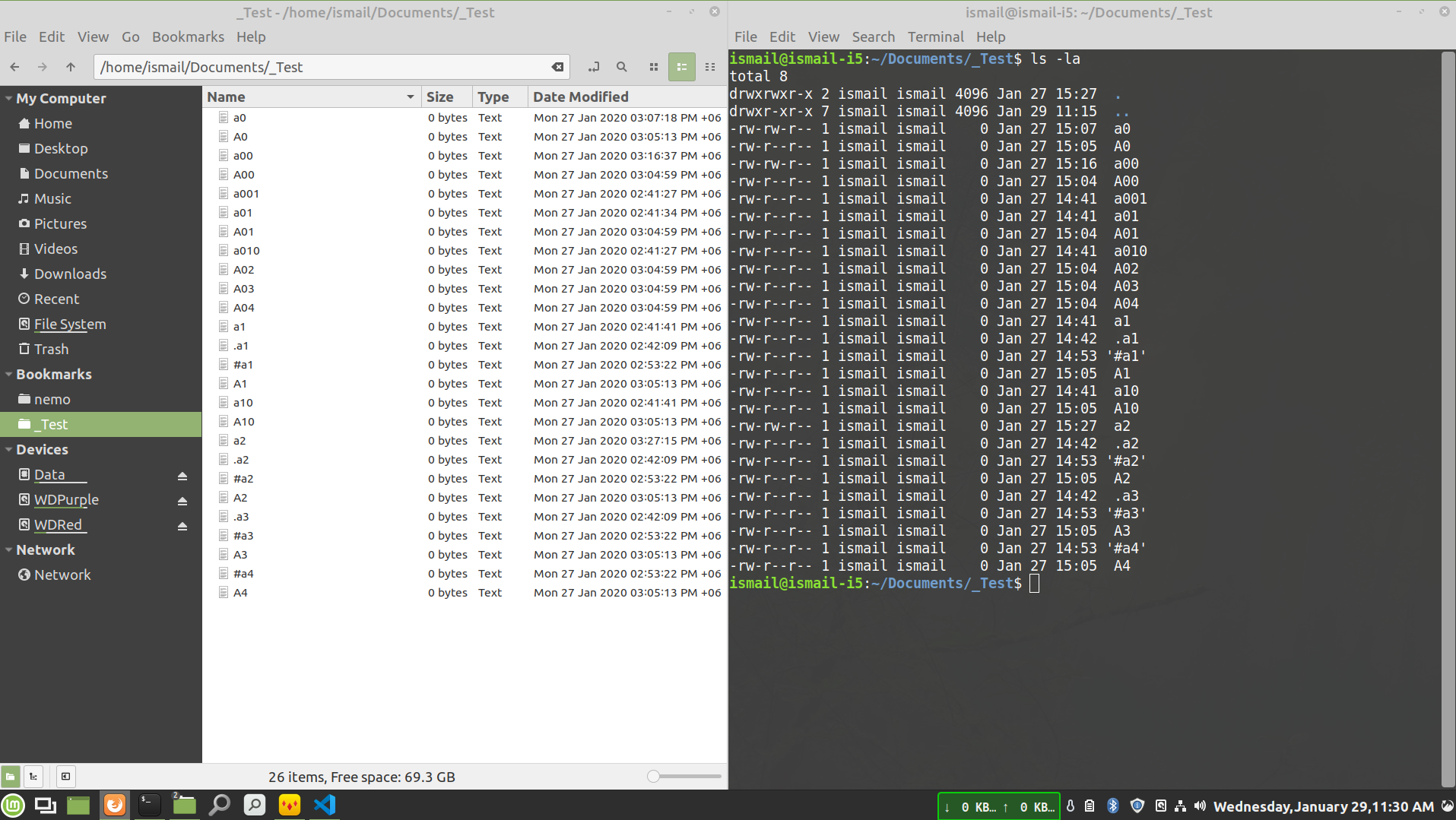
Being said that, I would be glad if @stevenxxiu teach me how to create .patch files.
blueray453
on 29 Jan 2020
The complete solution in now on https://unix.stackexchange.com/a/515840/206574
blueray453
on 29 Jan 2020
Nice to see you got it working. You can create .patch files by committing in Git and doing a:
$ git format-patch -1 HEAD
Was this issue fixed?
I updated my nemo from the repo. Did not apply the customization. Still it is sorting properly.
blueray453
on 28 Jun 2020
@blueray453 No. Per https://github.com/linuxmint/nemo/blob/4d3a935d26ffc0dfcd898055fad842759fb567d4/libnemo-private/nemo-file.c, SORT_LAST_CHAR1 is still there.
The sorting bug has been here for many many years, countless issues raised, and nothing has been done. Even my patch which makes things better was rejected. Highly doubt it'll get fixed.
stevenxxiu
on 28 Aug 2020
Related issues
 mikehaertl
·
5Comments
blueray453
·
5Comments
mikehaertl
·
5Comments
blueray453
·
5Comments
 lucypol
·
6Comments
lucypol
·
6Comments
 WhyNotHugo
·
6Comments
WhyNotHugo
·
6Comments
 nitrocode
·
6Comments
nitrocode
·
6Comments