Nemo: Nemo fails to reconnect to SSH shares after connection breaks
Nemo 2.2.2 (and many if not all previous versions) running on Ubuntu 14.04 fails to reconnect to SSH shares after a connection has timed out or otherwise become broken (wifi/3G failure etc.):
"Error: The name :1.897 was not provided by any .service files. Please select another viewer and try again."
Sometimes when attempting to unmount these shares Nemo also freezes for a while and finally crashes, which is probably related.
Looks like others have similar issues: http://askubuntu.com/questions/477254/error-connecting-to-server-in-nemo
In my case the connections are tunneled, if that makes a difference. The tunneling is done transparently through ~/.ssh/config:
Host remotehost
ProxyCommand ssh proxyuser@proxyhost -p2222 nc %h %p 2> /dev/null
IIRC Nautilus used to have the same problem in some earlier versions, but nowadays it reconnects fine by just reopening the bookmark. To get Nemo to browse them again a reboot or logging out is necessary, which is quite a nuisance at work. Perhaps Nemo inherited a bug from Nautilus, and a patch already exists out there?
Is there any way to manually "reset" these shares to get them working in Nemo without reboots? That'd help a lot until a proper solution is found.
 Martinique
All 48 comments
Does running this help?
killall gvfsd-sftp
 leigh123linux
on 16 Aug 2014
leigh123linux
on 16 Aug 2014
Looks like killing the daemon helps temporarily, although reproducing this issue has become harder now that I managed to convince admins to disable timeouts on the servers. On the other hand I've now occasionally seen the same error when trying to unmount. Better than freezing or crashing, though.
Martinique
on 27 Aug 2014
Correction: Killing the daemon does not help. I'm still getting the same error after gvfsd-sftp is gone, and this time it was not even a tunneled connection, so that probably doesn't make a difference. Nautilus connects fine with and without the daemon running.
Martinique
on 30 Aug 2014
Similar issue here. Weird number in error message:
The name :1.89 was not provided by any .service files
Nemo 2.2.4 works flawlessly. The error happens when trying to open a remote file from another program like Sublime. It fails as described above.
Nemo continues working even after the error. In fact, drag-n-drop from Nemo to Sublime works. Saving from Sublime works too. Changes are written to remote host. Weird. Digging further, Sublime reports the full path of the file as:
/run/user/1003/gvfs/sftp:host=myserver.amazonaws.com/home/myusername/x.txt
Running Linux Mint 17 Qiana. Kernel Linux 3.13.0-36-generic (x86_64). Compiled #63-Ubuntu SMP Wed Sep 3 21:30:07 UTC 2014.
 rslinford
on 30 Sep 2014
rslinford
on 30 Sep 2014
Obviously the GVFS daemon knows how to reconnect, since many applications manage to open and save files even when it needs to, but Nemo and some other apps don't seem to get it right. Someone complained Geany having had problems with remote files, too. Gedit, on the other hand, seems to work OK.
@rslinford, could you test this by opening the file with Gedit? I assume it could help the developers to be able to compare what applications do differently.
Could it be that GVFS sometimes takes a while to reconnect, and Nemo should wait a bit more patiently before announcing failure? That would explain why this rarely (if ever) happens with LAN servers, and frequently with slow and tunneled connections.
Martinique
on 30 Sep 2014
@Martinique, seems like the first App to connect can reconnect/disconnect consistently. So rebooting the box and connecting with Sublime -- File | Open File | book-marked-sftp-network-location -- works and keeps on working. Nemo works too... for awhile. And here's where steps-to-reproduce get fuzzy.
At some point Nemo breaks even while Sublime continues to access files, reading, writing, disconnecting, reconnecting. After the "event" I can't get Nemo working without rebooting. It seems related to session environments and the tricks the shell plays when launching applications. I'm no expert. I reboot to fix stuff like this.
If I connect with Nemo first then Sublime will break after some "event". For a while both work. Then the 2nd App "breaks" while the 1st keeps working. I spent hours trying figure out reliable steps to reproduce the "event". Couldn't. But after it happens -- say Nemo can't connect and Sublime can -- the "broken" App can't read the files even when they are mounted. Really weird. Remote files remain accessible via the command line, mounted at:
/run/user/1003/gvfs/sftp:host=myhostname.compute-1.amazonaws.com/home/
I can cat them, list them with ls, gedit, etc. from the command line. But Nemo can't access them. Wierd.
rslinford
on 1 Oct 2014
@rslinford, those symptoms are indeed much like mine, although so far I haven't noticed anything besides Nemo failing.
As the issue is hard to reproduce reliably, it'd be nice to get some developer hints on how to diagnose what exactly has gone wrong when Nemo decides it can no longer talk to GVFS about a network share.
Martinique
on 1 Oct 2014
@Martinique, exactly. I'm also wondering about Bookmarks and how they affect patterns of usage. How often do you connect first from 3rd party software? Can't be done from Sublime unless you've created a bookmark in Nemo previously:
Adding a "Places" bookmark to Nemo's sidebar:
Nemo | File | Connect to Server |
rslinford
on 1 Oct 2014
@rslinford, bookmarks (stored in ~/.gtk-bookmarks, or ~/.config/gtk-3.0/bookmarks in recent distros) are pretty independent from file managers and other apps. I often open recently edited files in Gedit and some other apps, which triggers the connection. Nemo is able to browse using that same connection fine, until the "event". I'm not sure if the file open/save dialog in applications has something to do with the default file manager, which on my system is still Nautilus, as I haven't bothered to change that. I seldom open files that way, but it seems to work OK. I think the dialog can only browse a local network, so in order to connect to remote servers it needs existing bookmarks, as you mentioned.
Martinique
on 2 Oct 2014
I'm also experiencing this problem. When I click Nemo SSH bookmarks, I get this error, even if other apps like Gedit are using the same connection with no problems:
Error: The name :1.78 was not provided by any .service files
Please select another viewer and try again.
 rcrogers
on 19 Dec 2014
rcrogers
on 19 Dec 2014
I too am experiencing this issue when working with SFTP bookmarks on Mint 17. This is a workaround that I have used sucessfully:
killall nemo
It will obviusly close all your open file managers.
 carlsa
on 29 Dec 2014
carlsa
on 29 Dec 2014
I'm having the same problem. killall nemo fixes the issue for me temporarily. Thanks @carlsa.
 leetwanker
on 12 May 2015
leetwanker
on 12 May 2015
I get the same issue in nemo 2.6.7-2 (running on Ubuntu 15.04) if I connect to a remote server and then disconnect and reconnect the network (I had to disable and re-enable networking via network manager to get the connection back).
Killing gvfsd-sftp and gvfsd doesn't fix it, but killing nemo does.
 rockorequin
on 24 Aug 2015
rockorequin
on 24 Aug 2015
Getting this issue with Thunar on Xubuntu 14.04, have gotten it occasionally for a long time. Posting here as I can't find much else about it anywhere. anyone have any other references? If not will report a bug in the proper place.
Has any progress been made?
Occurs for me even when gvfsd-sftp is gone, and usually only happens after a suspend or hibernate. (so I can reproduce easily enough if anyone wants me to do anything)
The number in :1.xxx seems to vary randomly, at present it is :1.84 for me. Closing and opening file manager windows does not usually work, but at the moment killall Thunar is.
 aaron-bru
on 9 Oct 2015
aaron-bru
on 9 Oct 2015
Killing nemo seems to be a temp fix for now.
I never came across this issue before and I am mounting SFTPs a lot while barely using shutdown(almost exclusively suspend). On Mint 17.2(updated from 17.1) never experienced this. Now fresh 17.3, same HW - getting this error.
 entr
on 16 Dec 2015
entr
on 16 Dec 2015
Had this issue since 17.2 and still experiencing the same issue on 17.3. Very annoying when sshfs works so well otherwise. Hope that we can get to the bottom of it soon. Thanks wish I had more time to troubleshoot.
 FeralBytes
on 24 Dec 2015
FeralBytes
on 24 Dec 2015
no nemo processes running
Seems like killing Nautilus does the trick for me.
$ sudo killall nautilus
then relaunch nautilus either on the desktop via gui or cli
 SkellaMental
on 14 Mar 2016
SkellaMental
on 14 Mar 2016
I also have this issue. My workaround is to bring htop and kill a process that has this command line:
/usr/bin/ssh -oForwardX11 no ...
followed by some other options. Then I can reconnect.
 cossio
on 5 Apr 2016
cossio
on 5 Apr 2016
Same problem with my XFCE desktop.
resolve problem by killing XFCE file manager(thunar)
killall Thunar
If does not work, try killing gvfsd-sftp
killall gvfsd-sftp
and
killall Thunar
 haghighi-ahmad
on 10 May 2016
haghighi-ahmad
on 10 May 2016
haghighi-ahmad I can confirm this on Debian unstable Thunar 1.6.10 (Xfce 4.12) - SSH file bookmarks
 OctopusKat
on 25 May 2016
OctopusKat
on 25 May 2016
This happens nearly every time the laptop resumes from suspend.
FeralBytes
on 25 May 2016
Also suffering from this problem, particularly after laptop resume from suspend, but other times just after varying lengths of inactivity (sometimes hours, sometimes a few minutes). I find that killall nemo helps about half the time,.
 Stargrazer82301
on 7 Aug 2016
Stargrazer82301
on 7 Aug 2016
SSH servers aren't meant to keep your connections open when you connection breaks for more than the set time on the ssh server
As for the reconnect problem with nemo that would be a gvfs issue!
leigh123linux
on 8 Aug 2016
@leigh123linux I agree with the behaviour of ssh being correct; but the behaviour of nemo is incorrect; because it does not tell gvfs to reconnect to the ssh server.
Simply killing nemo fixes the issue; also there is no problems with gvfs other than it no longer providing that service which is really a file path because it knows the connection has dropped (which is correct behavior). In fact without killing nemo I can still use gvfs from the command line to establish a new connection to the ssh server.
So if nemo would encounter this lost service error and then attempt to re-establish the service then the problem would be solved; and an error only need be displayed if after the lost service gvfs can not re-establish a connection because say the ssh server has gone down.
Does that make sense?
FeralBytes
on 10 Aug 2016
Just to note, this still happens on nemo 3.4.7
 vranki
on 21 Dec 2017
vranki
on 21 Dec 2017
I continue to facing with that from time to time (but rare enough to not remember the solution :)
Then I google; visiting that page, looking for solution....
looking at the top and at the bottom.... skipping the middle (I'm not very patient).
I believe that the solution should be at the top or at least at the bottom.
So - here are my little contribution to that :)
$ killall nemo
 zpetukhov
on 11 Apr 2018
zpetukhov
on 11 Apr 2018
~ $ sudo killall nemo
did it for me too.
 LaochMumhain
on 10 Feb 2019
LaochMumhain
on 10 Feb 2019
This problem has not been solved until now.
 seo1214
on 12 Mar 2019
seo1214
on 12 Mar 2019
This issue is still not solved? I encountered it very frequently, even if I gracefully umounted the directory, switching the network connection and have the same issue when I try to connect.
The killall does work though... but it's annoying
 minhng99
on 20 Mar 2019
minhng99
on 20 Mar 2019
Same here (mint 19.1 nemo v4.0.6),
Thanks for posting the workaround killall nemo.
 sf7dev
on 2 Jun 2019
sf7dev
on 2 Jun 2019
I'm still getting this error, running Ubuntu 18.04 with Cinnamon. The killall workaround is incredibly annoying when you have multiple nemo windows with multiple tabs open and no way to restore them.
This issue has been there for 5 years, has there been any progress?
 petl
on 23 Jun 2019
petl
on 23 Jun 2019
As is shown in comment "Note that nemo_bookmark_list_insert_item() makes a copy of the bookmark", This nemo_bookmark_list_insert_item() invokes nemo_bookmark_copy () which copy old bookmark's location (bookmark->details->location) too. When g_file_query_info_async() try to query the old location (eg. "/var/run/user/1000/gvfs/smb-share:server=172.30.44.160\,share=共享/") , the old dbus name can't found, this name was not provided by any .service files.
 xunli
on 1 Jul 2019
xunli
on 1 Jul 2019
Same problem here, with Ubuntu 18.04. Pretty incredible that this was not addressed after 5 years.
 KShutter
on 4 Jul 2019
KShutter
on 4 Jul 2019
Have any of the whingers here even bothered reporting the issue against gvfs
leigh123linux
on 4 Jul 2019
1) The comment from @FeralBytes, which received no response, seemed to suggest that gvfs is not doing anything unexpected, and that a fix could be implemented at the level of nemo.
2) Closing the issue even though the problem is not actually fixed, without even a "fix upstream" tag or anything else to indicate what is going to happen next, sends the wrong message.
3) I'm not a native English speaker so I don't know what you mean by "wringers", but something tells me that can't be good. Yes, the "why hasn't this been fixed" comments are irritating and not productive, but the majority of us watching this bug report have been respectful of you and your work. Is it really necessary to use that kind of language?
 cschreib
on 5 Jul 2019
cschreib
on 5 Jul 2019
Either reopen it, fix it or I create the exact same issue again until it get fixed. No problem.
 NicolasGoeddel
on 5 Jul 2019
NicolasGoeddel
on 5 Jul 2019
@cschreib
I can't reproduce the original issue with recent nemo, I can disconnect the network for < 1 minute and nemo doesn't freeze and the sftp share is still connected.
leigh123linux
on 5 Jul 2019
@leigh123linux "< 1 minute" maybe that is the problem. "<" == "less than". Still the issue is clearly still present amongst many other users.
FeralBytes
on 5 Jul 2019
@FeralBytes ssh server and client timeouts aren't something that can/should be fixed within nemo.
leigh123linux
on 5 Jul 2019
@leigh123linux I don't think you should fix that in Nemo either. What the problem is that Nemo fails to re-connect, even though establishing a new ssh or gvfs connection is perfectly possible. But instead nemo requires a complete re-start just to re-connect. No one has asked that you fix ssh. I also have not personally asked that you fix Nemo. Instead this is an issue tracker, there is an issue and thus I have reported it. Closing this issue will just result in duplication of issues, which is not productive and is more distracting. The better solution is to simply leave the issue open until the issue is resolved. Or are YOU speaking on behalf of the LINUX MINT COMMUNITY of developers and stating that the community WILL NOT FIX this issue?
FeralBytes
on 5 Jul 2019
@FeralBytes I don't like your tone, read this
leigh123linux
on 5 Jul 2019
@leigh123linux tone is difficult to discern in text, but name calling is very obvious. I do hope that the link translates to the bug is possibly fixed, or that at least a fix is coming. Perhaps if that were comminucated earlier all of our reception would have been better percieved.
FeralBytes
on 5 Jul 2019
According to the tip from @leigh123linux I've filed an issue for gvfs (https://gitlab.gnome.org/GNOME/gvfs/issues/408).
Maybe the one @FeralBytes was linking to (https://gitlab.gnome.org/GNOME/nautilus/issues/266) is related to that?
What would be the best option, leave all of them open, do we know what's responsible for the issue or are we continuing blaming each other?
petl
on 6 Jul 2019
I've reproduced the error while logging gvfs according to the instructions Ondrej Holy gave me here: https://gitlab.gnome.org/GNOME/gvfs/issues/408
The error appeared after suspending my machine over night and leaving the connection open. The gvfsd.log was over 121,000 lines long, so I took the liberty to shorten out all the repetitive transmission infos. The rest I've attached.
Funnily enough, producing the error by clicking on the bookmark (see screenshot) did not produce any output in the log. May that point back to nemo?
I hope that this helps and if you want to, I can also attach the unshortened version.
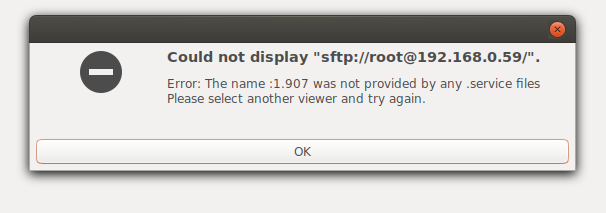
petl
on 7 Jul 2019
Expiriencing the same error. Fresh install of Linux Mint 19.2 Cinnamon using Nemo. I have a couple of Samba shares bookmarked in Nemo which I can tell for sure always break as soon as I mount them and unmount them manually after a while. After that Nemo refuses mounting them again with a similar error message as @petl posted. Glad I found out I'm not alone with this error and sad at the same time figuring out this error persists for more than 5 years now :disappointed:
 Arno-Nymous
on 13 Nov 2019
Arno-Nymous
on 13 Nov 2019
Glad I found out I'm not alone with this error and sad at the same time figuring out this error persists for more than 5 years now disappointed
Thanks for confirming the problem. The issue is unfortunately already closed, as I've filed the error with gvfs (https://gitlab.gnome.org/GNOME/gvfs/issues/408) like @leigh123linux recommended. Over there we did a bit more troubleshooting, but to no avail.
petl
on 14 Nov 2019
I got the same issue in Linux Mint 20 when trying to connect to my android device via usb
"Error: The name :1.897 was not provided by any .service files. Please select another viewer and try again"
 AdwaithHSivam
on 21 Jul 2020
AdwaithHSivam
on 21 Jul 2020
I'm sorry to revive such an old closed issue, but seems to me that other packages that had the issue, such as Nautilus, fixed it somehow, but it did not fix the issue in Nemo. Should researching Nautilus's changes give some hint here?
I'm experiencing this issue after suspending the machine. After the issue happens, I no longer can connect to the sftp device, but I can connect to it using a different name (such as a synonym domain name or its IP).
Using Nautilus I can connect as usual, but doing so doesn't fix the issue back at Nemo.
I'm happy to try to find out more information at developers request.
 AndresRReina
on 24 Jul 2020
AndresRReina
on 24 Jul 2020
Related issues
 ngabor7
·
6Comments
ngabor7
·
6Comments
 WhyNotHugo
·
6Comments
WhyNotHugo
·
6Comments
 lucypol
·
6Comments
lucypol
·
6Comments
 mdogancay
·
3Comments
mdogancay
·
3Comments
 teo1978
·
5Comments
teo1978
·
5Comments
Most helpful comment
I too am experiencing this issue when working with SFTP bookmarks on Mint 17. This is a workaround that I have used sucessfully:
It will obviusly close all your open file managers.