Nemo: Show hidden files button, with visible state
(Please let me know if this is already in Nemo 3.x, which I have no way of testing right now.) In 2.x there is no way to tell whether the directory listing is showing hidden files. You'd have to navigate to a folder with hidden files in it and toggle Ctrl-H, perhaps more than once to be sure, to get the desired state if you hadn't memorised it already.
It would put the user more in control (more consistently with the Nemo design as I see it) if there were a Toolbar Preferences checkbox, in addition to the 13 already there in 2.8.7, for Show hidden files button. This could also show the toggled state of hidden files: pressed if so, normal if not.
 rphair
All 9 comments
No, there's still no indication in Nemo 3.
But would it be convenient to go to Preferences->Toolbar to look at the checkbox? I'm thinking there could be an indication not so far away, in the bottom bar maybe?
 f2404
on 27 Jun 2016
f2404
on 27 Jun 2016
No no no, look at the top bar ("Toolbar") in Nemo, especially in the group of buttons where you'd see the button "Toggle location entry" (itself a toggle button, though its state is not visible on the button itself), "Open a terminal", and another toggle button for the search bar. I'm talking about a button like that, probably in the same place... the checkbox in Preferences would merely be to enable it.
rphair
on 27 Jun 2016
Ah, I see what you mean. Yes, I think that could be useful (better than hitting Ctrl+H twice, anyway).
f2404
on 27 Jun 2016
yes, the excellence of Nemo is that it's a navigational instrument: not just removing extra keystrokes but also uncertainty about moving through & viewing your files. For instance, even if you hit Ctrl-H twice in a directory without having hidden files, it will tell you nothing. A toggle button with visible state would guide & inform you in any possible situation, like an indicator on the dashboard of a car.
rphair
on 27 Jun 2016
This isn't changed on Nemo 3.0.6. Would many users toggle to show hidden files often if ever? This may make more sense as an extension https://github.com/linuxmint/nemo-extensions.
 xenopeek
on 25 Aug 2016
xenopeek
on 25 Aug 2016
I labeled this as a feature request but I'm not a big fan of adding even more buttons to the toolbar. Just personal opinion.
 JosephMcc
on 25 Aug 2016
JosephMcc
on 25 Aug 2016
Just right click on a whitespace somewhere in a folder. In the context menu there is an option Show hidden files. If hidden files are shown, the checkbox is checked. If not the checkbox is emtpy.
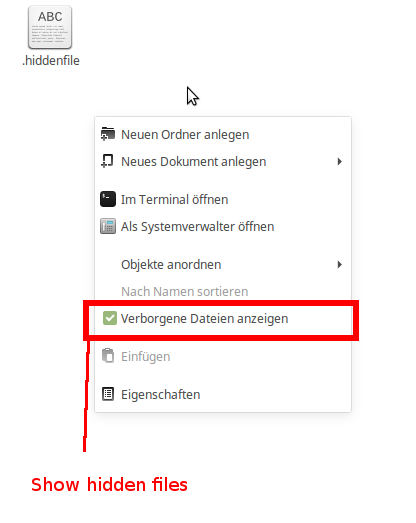
 NikoKrause
on 1 Aug 2017
NikoKrause
on 1 Aug 2017
Great! That's like telling a car driver, "You don't need a brake light on the dashboard," after you've mounted the brake light inside the glove box... "All you need to do is open up that glove box & you can see the brake light right there!"
In that same analogy, comments further up are saying: "You don't need to the brake light at all, since you should always be able to remember whether or not your foot is on the brake."
In general, UNIX users want to do with their eyes (and typing) what Windows users would have to reach to the mouse for... although with thanks to @NikoKrause, it _is_ better than nothing to have that checkbox available somewhere, even with a repetitive motion conceptually unrelated either to the context menu or the blank screen the user is expected to click on.
The purpose of indicators is to indicate things: perhaps an unfashionable idea (e.g. as GNOME takes away more configurable options every year) but easily accommodated by an indicator toggle with a default state of OFF.
rphair
on 1 Aug 2017
Many thanks for submitting your feature request for Nemo. Your feature request has been documented and will be reviewed by the Linux Mint team.
For more information on our workflow and feature requests, read https://linuxmint-troubleshooting-guide.readthedocs.io/en/latest/faq.html.
 icarter09
on 21 Jan 2020
icarter09
on 21 Jan 2020
Related issues
 blueray453
·
5Comments
blueray453
·
5Comments
 mdogancay
·
3Comments
mdogancay
·
3Comments
 teo1978
·
5Comments
teo1978
·
5Comments
 ngabor7
·
6Comments
ngabor7
·
6Comments
 hiboudev
·
3Comments
hiboudev
·
3Comments
Most helpful comment
I labeled this as a feature request but I'm not a big fan of adding even more buttons to the toolbar. Just personal opinion.