Navcontainerhelper: The paging file is too small for this operation to complete
Issue Description
We get the following error when creating a container with external database (I assume the database does not matter): docker.exe: Error response from daemon: hcsshim::CreateComputeSystem b335320a7bcd16cd03b0332db53afd108be43253ef8fbfd0528e89d58061d7f2: The paging file is too small for this operation to complete.
Environment
- Windows Server 2019
- February 2020 Update downloaded but deferred
- Container with -memory 10G, -isolation hyperv (in prep. for the update)
- Existing database (attaching container)
- Pulled image to ensure it is current (BC SaaS 16.0.10855.0-de-ltsc2019)
The same works without specifying "-isolation hyperv".
The full command
                    New-BCContainer `
                        -accept_eula `
                        -accept_outdated `
                        -assignPremiumPlan `
                        -imageName $dockerImageName `
                        -containerName $instanceBaseName `
                        -licenseFile $licenseFile `
                        -auth NavUserPassword `
                        -Credential $cred `
                        -memoryLimit 10G `
                        -isolation hyperv `
                        -shortcuts None `
                        -useTraefik `
                        -useSSL `
                        -PublicDnsName $dnsName `
                        -additionalParameters $additionalParameters `
                        -databaseServer $databaseServer `
                        -databaseInstance $databaseInstance `
                        -databaseName $instanceBaseName `
                        -databaseCredential $dbCred `
                        -myScripts $additionalScripts `
                        -Verbose `
                        -Debug;
$additionalParameters is empty.
$additionalScripts is empty.
The Log
WARNING: Container name should not exceed 15 characters
VERBOSE: Perform operation 'Enumerate CimInstances' with following parameters, ''namespaceName' = root\cimv2,'className' = Win32_OperatingSystem'.
VERBOSE: Operation 'Enumerate CimInstances' complete.
NavContainerHelper is version 0.6.4.30
NavContainerHelper is running as administrator
Host is Microsoft Windows Server 2019 Datacenter - ltsc2019
Docker Client Version is 19.03.4
Docker Server Version is 19.03.4
Disabling SSL on the container as you have configured -forceHttpWithTraefik
Using image bcinsider.azurecr.io/bcsandbox-master:16.0.10855.0-de-ltsc2019
PublicDnsName is dev-dockerbc.host.de
Removing C:\ProgramData\NavContainerHelper\Extensions\docker-favcontainer
Creating Container docker-favcontainer
Version: 16.0.10855.0-de
Style: sandbox
Platform: 15.0.39761.0
Generic Tag: 0.0.9.97
Container OS Version: 10.0.17763.914 (ltsc2019)
Host OS Version: 10.0.17763.1039 (ltsc2019)
Using locale de-DE
Using hyperv isolation
Adding special CheckHealth.ps1 to enable Traefik support
Disabling the standard eventlog dump to container log every 2 seconds (use -dumpEventLog to enable)
Using license file D:\ProgramData\dockerbc16.0.10855.0-de-ltsc2019\Temp\fafc7227-c455-49ed-ae06-c9495537b413.flf
Files in C:\ProgramData\NavContainerHelper\Extensions\docker-favcontainer\my:
- AdditionalOutput.ps1
- CheckHealth.ps1
- license.flf
- MainLoop.ps1
- SetupNavUsers.ps1
Creating container docker-favcontainer from image bcinsider.azurecr.io/bcsandbox-master:16.0.10855.0-de-ltsc2019
9bc27e9fdc19195c01df4753ecccc8e91c2c35e8466084b503377380088aa22f
The full error
docker.exe: Error response from daemon: hcsshim::CreateComputeSystem 9bc27e9fdc19195c01df4753ecccc8e91c2c35e8466084b503377380088aa22f: The paging file is too small for this operation to complete.
(extra info: {"SystemType":"Container","Name":"9bc27e9fdc19195c01df4753ecccc8e91c2c35e8466084b503377380088aa22f","Owner":"docker","IgnoreFlushesDuringBoot":true,"LayerFolderPath":"D:\ProgramData\Docker\
windowsfilter\9bc27e9fdc19195c01df4753ecccc8e91c2c35e8466084b503377380088aa22f","Layers":[{"ID":"259914a6-aba4-596c-acac-17526744b153","Path":"D:\ProgramData\Docker\windowsfilter\0d685f95a4d675f7ff4dd
e3af609128cc43aefb4f810e5314f46043336bb1252"},{"ID":"82ae3fb6-9a3e-5829-8b0b-232da37b90ba","Path":"D:\ProgramData\Docker\windowsfilter\2b873b186df8c03de350c79fe9c22b1797e39aadc7cd3052ae7969ff1de84541"}
,{"ID":"c2be29b4-881e-5b22-84bc-1fd5e4d82844","Path":"D:\ProgramData\Docker\windowsfilter\5948072e53a6abef85589b8e9ee15da130279f0142d8ade3148051b8c43a4408"},{"ID":"fc07c80c-f002-5c20-84b4-d29b83516798"
,"Path":"D:\ProgramData\Docker\windowsfilter\d5d0a1cb815023234b89afba6bc740f01f4896e0992900f98e7dfa83cbdb7390"},{"ID":"9f94f90f-787a-54b2-bfec-d5ffac9e8e79","Path":"D:\ProgramData\Docker\windowsfilt
er\24bba0fb15f8c592b9572db1d151627b5fa5d82242bf50c5fcfcdb9a69d6c1f1"},{"ID":"69e18a00-bd29-5335-aff0-09f190d6cd24","Path":"D:\ProgramData\Docker\windowsfilter\7c45ab70c9f36449d81f919b56860445a470f1112
06c053d39067001e6223a99"},{"ID":"5dbfe29f-d6d5-580a-8bd1-1b61876e1546","Path":"D:\ProgramData\Docker\windowsfilter\9f0f2bbfe48231da3da32783148f63a69ae70096f889d5df803edb360574e7e0"},{"ID":"9db8b9bb-af7
f-56e5-aace-0e7f3ae38aa4","Path":"D:\ProgramData\Docker\windowsfilter\4fb6eaf0a18f174d660edaf8b8f1d2e4a0ef74349b4a4f9dd64216ab038cb4d6"},{"ID":"30334b43-1fd5-5614-aff6-8066b0539655","Path":"D:\Program
Data\Docker\windowsfilter\591f2954c9dbef957e49308a18e73b4ee17c615b4cba54121cedd7d1b6b31228"},{"ID":"428e95bf-7b60-59fa-9906-669aa9b6329f","Path":"D:\ProgramData\Docker\windowsfilter\7110db5e67edf514
1bc882ed65530dae6ee4030dd5a15a3c8dd9760495a02869"},{"ID":"b98d8c4e-65bc-552c-8e6f-f55655bc52e2","Path":"D:\ProgramData\Docker\windowsfilter\9d59673cee869a7e104b8659976960ff5de9a5d16e30e7bb7651f9e269c1e
980"},{"ID":"a411d75f-0441-5474-bf0d-72f25433ca2a","Path":"D:\ProgramData\Docker\windowsfilter\173d32c52d98ed53eeedbc24633c0dc25a7689ccca2c9e1967cd6e4b7fefe8d8"},{"ID":"3be5e309-52e8-597a-ab65-6586b10d
af15","Path":"D:\ProgramData\Docker\windowsfilter\946d754739b316387d5556354761985db9af83727d8d54e6c8cb46b137ff2861"},{"ID":"45c4dd92-ae84-5d54-a191-d3931fdbb4e0","Path":"D:\ProgramData\Docker\window
sfilter\aa37896313740150752080908b1f1750742d9b966181f59b46f1bcb0079d19f7"},{"ID":"82929919-5d3a-54c9-98d8-b2c29416ba55","Path":"D:\ProgramData\Docker\windowsfilter\8ffab254ec5b92dfba4f2411b8836ca3facc
7021a9de114ca6beeb1344fb89b1"},{"ID":"bb3806cc-95d5-5524-93ff-a85de180e5ce","Path":"D:\ProgramData\Docker\windowsfilter\ce46a2a064217dfe00f69040f0670eb611c7b70a6b7d6b1655cda2998c126684"},{"ID":"464967b
b-845a-548d-94ad-db88c1cbbeb0","Path":"D:\ProgramData\Docker\windowsfilter\50350eaa15cfbf739503ff2d423ac9f5f444e8db1c7ce8a2bd06a1bd0a7519dd"},{"ID":"4493513d-a8ae-5a9e-a0ef-c47eec904b0f","Path":"D:\Pr
ogramData\Docker\windowsfilter\194af027099cd48c99b6954dad8782b01dc08fbd084a470fd9649b1ffd8a1b0a"},{"ID":"bc2dae32-6a9f-51b3-b722-7a38d742026a","Path":"D:\ProgramData\Docker\windowsfilter\e6d6398c7fe
67d54933f1d1e46031b28c7db0f04e30bd49a4d2a0f7646035ba1"},{"ID":"9965fae1-756c-54db-ac10-7ce711b17cae","Path":"D:\ProgramData\Docker\windowsfilter\03132b825f1fd26c566d90bc24812460c394bba81f2630634debb4f6
3dfa0fb8"},{"ID":"4ee20c3f-8ca6-58f0-80e4-ad5093773e4c","Path":"D:\ProgramData\Docker\windowsfilter\790bff7e1acca9fc7fccfc035a724a8edf1a056e5181e6d69ab5ec639622fa5e"},{"ID":"0cbd5805-4ab2-51f3-baf8-847
cf89fc690","Path":"D:\ProgramData\Docker\windowsfilter\e9c8be338a74775c6653f47191bb0be502c6d9d373548b07ccf537e075b8bb6a"},{"ID":"fc723184-5cc3-53aa-989d-0db3fc78cb15","Path":"D:\ProgramData\Docker\w
indowsfilter\79827a2e94dbfb82b761c64430b2372c535335a8048a29334774abc7e87e9857"},{"ID":"813cd7c0-1f06-5f8c-95a7-2dd1e4be169a","Path":"D:\ProgramData\Docker\windowsfilter\ea2fc743722e5728e32af15ade1ad57
1fdfccecfa81ba5482d0fb3024e2e1413"},{"ID":"8d7c7ea9-1242-53b4-9aa8-82f200b4ac92","Path":"D:\ProgramData\Docker\windowsfilter\cffff297fd9aef21294735c05d965e2ad048516a49b398930aad9bac9be6fe79"},{"ID":"be
4db4fb-f0a3-5bdc-b129-38207d019f0c","Path":"D:\ProgramData\Docker\windowsfilter\f844007f0f1a38ff07e4096582b40f2eaae7c2bdf59f9e333bdee6768619d2cc"},{"ID":"17f64337-ebcb-5742-b852-72527afcf0ef","Path":"D
:\ProgramData\Docker\windowsfilter\d6db18600c9917ff7cc38c26a7afd0d2431c9f9de80d3f0105edafa0e54e015e"},{"ID":"547fec42-7967-5f04-abef-4d93c13bfe62","Path":"D:\ProgramData\Docker\windowsfilter\5901c4
446c00d7a8d552cfa5e2ace5f74a2b0a3e61463707cfd95695361ba9aa"},{"ID":"f767efc5-431c-5f6f-95e2-c7c9cfb9e977","Path":"D:\ProgramData\Docker\windowsfilter\368a14941846d00b069a31fcd1d9b2463b2b2b8fe7154843830
e2a64d0930158"},{"ID":"c18090bb-8c2c-5fcd-becf-e325ef6470a4","Path":"D:\ProgramData\Docker\windowsfilter\1c3c3e419b270234f310bcd1c814ab2a30c1bb9e0813846ef2b0617cf43c3b7e"},{"ID":"633fc4ca-6bee-5485-84c
4-790c5d10779c","Path":"D:\ProgramData\Docker\windowsfilter\0965ac701d60fcb6ab857c9eeb295c0f6902c689c0ed67b5c957fe31296c9ccc"},{"ID":"d53a962a-8551-5daf-a0a5-8bb9ca186d65","Path":"D:\ProgramData\Dock
er\windowsfilter\71a4ed9b5079e4a748a15a413b3760d9624871d31a76fa7983674308259e0042"},{"ID":"7c0de9a4-19f7-51ab-b157-bf9a0deea36c","Path":"D:\ProgramData\Docker\windowsfilter\1d0773e899ea59102bb64714b3
d4e73ce3157ed3af31eb926418f408fc1edcda"},{"ID":"b4d214db-07ab-599c-825f-8bd0c6bf466c","Path":"D:\ProgramData\Docker\windowsfilter\50214b2611d04d9dbe7f49ce95e0acfa343947b58aeafff54a8691a28c4f59b8"},{"ID
":"5f32298c-fbe7-5383-8ff8-835c0c962b18","Path":"D:\ProgramData\Docker\windowsfilter\4aad68b4338e7cfe60d6b5dd014302b2630039e5d614b2394895ffff992c7ff0"},{"ID":"18e3bd22-447b-549c-a8c2-e355a9924a24","Pat
h":"D:\ProgramData\Docker\windowsfilter\0ce69927edae447c537a0dc7d30a990e9531cd3f778814d03cc927625abbb86e"}],"MemoryMaximumInMB":10240,"HostName":"dev-dockerbc","MappedDirectories":[{"HostPath":"d:\prog
ramdata\dockerbc\16.0.10855.0-de-ltsc2019","ContainerPath":"c:\dockerbc","ReadOnly":false,"BandwidthMaximum":0,"IOPSMaximum":0,"CreateInUtilityVM":false},{"HostPath":"c:\programdata\navcontainerhelper",
"ContainerPath":"c:\programdata\navcontainerhelper","ReadOnly":false,"BandwidthMaximum":0,"IOPSMaximum":0,"CreateInUtilityVM":false},{"HostPath":"c:\programdata\navcontainerhelper\extensions\docker-cl
ustersorting\my","ContainerPath":"c:\run\my","ReadOnly":false,"BandwidthMaximum":0,"IOPSMaximum":0,"CreateInUtilityVM":false}],"HvPartition":true,"EndpointList":["19894C0B-4F2A-4CDA-885D-923335F1960F"],
"HvRuntime":{"ImagePath":"D:\ProgramData\Docker\windowsfilter\4aad68b4338e7cfe60d6b5dd014302b2630039e5d614b2394895ffff992c7ff0\UtilityVM"},"AllowUnqualifiedDNSQuery":true}).
ExitCode: 125
Commandline: docker run --env PublicDnsName=dev-dockerbc.host.de --env licenseFile="c:\run\my\license.flf" --name docker-favcontainer --hostname docker-favcontainer --env auth=NavUserPassword --en
v username="admin" --env ExitOnError=N --env locale=de-DE --env databaseServer="atlas2.internal.x3.net" --env databaseInstance="dev2017" --volume "C:\ProgramData\NavContainerHelper:C:\ProgramData\NavContai
nerHelper" --volume "C:\ProgramData\NavContainerHelper\Extensions\docker-favcontainer\my:C:\Run\my" --isolation hyperv --restart unless-stopped --memory 10G --env enableApiServices=Y --env databaseName="m
x365-favcontainer" --env useSSL=N --env securePassword=76492d1116743f0423413b16050a5345MgB8AGMANQB1ADQAQwBLAEwAZABHAFEAdgBFAEEATQBRADMAZQA2AGQASgBUAHcAPQA9AHwAOQA1ADkAZABkAGIANwAxAGIAMQAxADcAMQBjADEAYgAx
ADIANgA2AGIAMQAwAGMANgA5AGUAMABhADcAMwBiAA== --env passwordKeyFile="c:\run\my\aes.key" --env removePasswordKeyFile=Y --env databaseUsername=dockerbcDeployment --env databaseSecurePassword=76492d1116743f0423
413b16050a5345MgB8AEYAVwByAHIAQQBCAGgAaABvAHUATABkAEcAMAAxAC8AMQA1AFcAVgAyAEEAPQA9AHwANAAzADUANAA4ADcAMAAxADQAMQA2ADkAMQAwAGEAMQAxADIAMgAzADAAMABlADEAMAAyADEAYwBmAGMAMAA0ADEAMQAxAGUAZABmADcAYQAyADcAMgA5ADI
AMgBiADEANgAzADgAMQA5ADgAMwA3ADQAZQAxADgANQBiADYAMAA= --env encryptionSecurePassword=76492d1116743f0423413b16050a5345MgB8AEYAVwByAHIAQQBCAGgAaABvAHUATABkAEcAMAAxAC8AMQA1AFcAVgAyAEEAPQA9AHwANAAzADUANAA4ADcA
MAAxADQAMQA2ADkAMQAwAGEAMQAxADIAMgAzADAAMABlADEAMAAyADEAYwBmAGMAMAA0ADEAMQAxAGUAZABmADcAYQAyADcAMgA5ADIAMgBiADEANgAzADgAMQA5ADgAMwA3ADQAZQAxADgANQBiADYAMAA= -v D:\ProgramData\dockerbc16.0.10855.0-de-ltsc20
19:c:\dockerbc -e customNavSettings=PublicODataBaseUrl=https://dev-dockerbc.host.de/docker-favcontainerrest/odata,PublicSOAPBaseUrl=https://dev-dockerbc.host.de/docker-favcontainersoap/ws,Pu
blicWebBaseUrl=https://dev-dockerbc.host.de/docker-favcontainer --hostname dev-dockerbc -e webserverinstance=docker-favcontainer -e publicdnsname=dev-dockerbc.host.de -l "traefik.protocol=ht
tp" -l "traefik.web.frontend.rule=PathPrefix:/docker-favcontainer" -l "traefik.web.port=80" -l "traefik.soap.frontend.rule=PathPrefix:/docker-favcontainersoap;ReplacePathRegex: ^/docker-favcontainersoap
(.) /BC$1" -l "traefik.soap.port=7047" -l "traefik.rest.frontend.rule=PathPrefix:/docker-favcontainerrest;ReplacePathRegex: ^/docker-favcontainerrest(.) /BC$1" -l "traefik.rest.port=7048" -l "traefik.d
ev.frontend.rule=PathPrefix:/docker-favcontainerdev;ReplacePathRegex: ^/docker-favcontainerdev(.*) /BC$1" -l "traefik.dev.port=7049" -l "traefik.dl.frontend.rule=PathPrefixStrip:/docker-favcontainerdl"
-l "traefik.dl.port=8080" -l "traefik.dl.protocol=http" -l "traefik.enable=true" -l "traefik.frontend.entryPoints=https" --env accept_eula=Y --env accept_outdated=Y --detach bcinsider.azurecr.io/bcsandbox-
master:16.0.10855.0-de-ltsc2019 at at
Info
As mentioned, the same works without specifying "-isolation hyperv". I want to clarify this BEFORE I install the updates and before we cannot access all our machines anymore.
 MODUSCarstenScholling
All 11 comments
How much memory do you have on the host?
 freddydk
on 24 Feb 2020
freddydk
on 24 Feb 2020
48 GB, 12 GB free currently. Could this depend on the 10G memory somehow? Does it make sense to reduce it to 8GB for testing?
MODUSCarstenScholling
on 24 Feb 2020
And what is the paging file on the host set to?
(Have never seen this before)
freddydk
on 24 Feb 2020
Completely automatic. Was 9GB this morning if I remember correctly.
MODUSCarstenScholling
on 24 Feb 2020
Host OS Version: 10.0.17763.1039 (ltsc2019)
1039 is February Update - but since you are running Hyperv that shouldn't matter.
If you lower the number of parameters and lower the memorylimit - is there a point where it works?
freddydk
on 24 Feb 2020
Hmm, it still works without hyperv and the update itself is put on hold. There is only a security update installed, not the other one.
It seems that it works with "-memoryLimit 8G". ...And now, back to 10G, it still works with "-isolation hyperv". With almost the same resources on the host. How can that be?
The whole morning it did not work. We did not restart docker or the host in the meantime. Strange. Can you please keep the issue open for one week, I will keep an eye on our deployments and let you know if I am able to damage it again :/
MODUSCarstenScholling
on 24 Feb 2020
OK
freddydk
on 24 Feb 2020
I have a 64GB machine on 1909.
Just tried to see how many Hyperv containers I could create with 20G memorylimit.
In the old days, creating a hyperv container with 20G memorylimit would allocate 20G memory.
Turns out it still does - it just allocates them in the pagefile and only keeps the allocated memory in memory - pretty smart if you ask me.
I had a some other images running and after 2 images my machine looks like:

111G out of 113G pagefile used.
creating one more fails with: The paging file is too small for this operation to complete.
pagefile=auto never creates a pagefile larger than physical memory * 2 and even though I had 30+ GB free memory - I could not create another 20G container.
Removing one container:
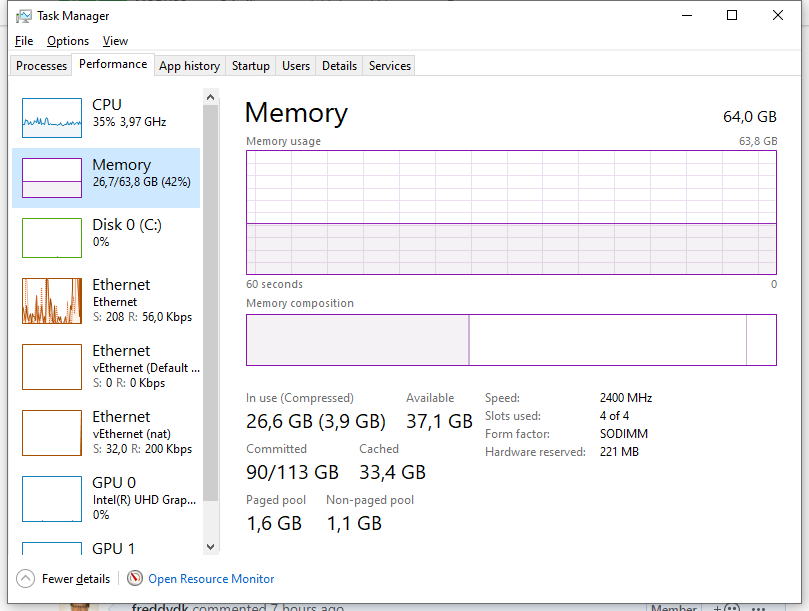
20G pagefile freed, and ~4G memory (docker stats said ~4G)
Removing all containers:
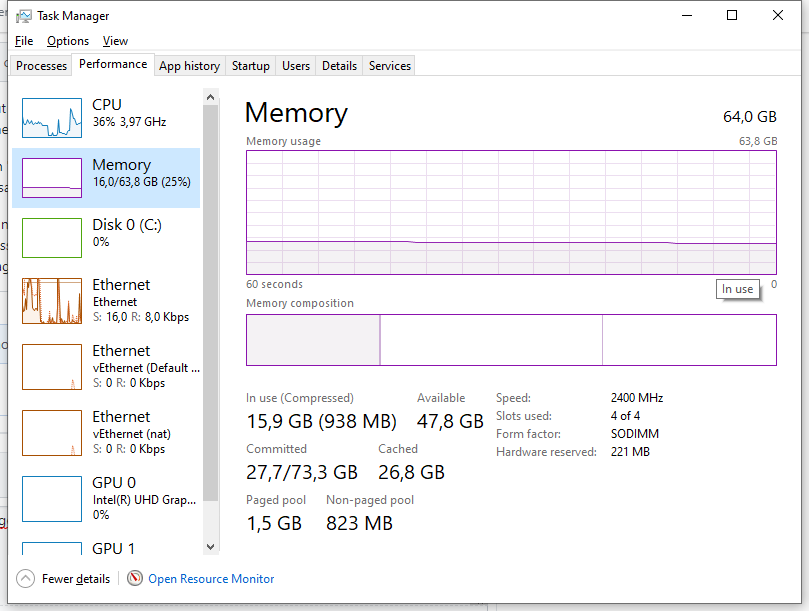
Not sure what the allocated memory is, but it kind of makes sense...
freddydk
on 24 Feb 2020
Wow, Freddy! Thank you for that detailed analysis! Indeed, that makes sense, knowing the part about the page file allocation and automatic = max. 2x physical RAM.
I remember we had >10 containers running, but some of them still in process isolation. 48 RAM * 2 = 96 page file would allow 9 containers with hyperv isolation and 10G.
That's it! I have now reduced maxMemory to 5G (+ 3G in case of the test framework). Probably we can reduce it by 1-2 GB over time if it runs stable now.
Definitely something you can add to the readme.
Thanks again, Freddy! 1 out of 100 problems solved/demystified. 99 to go :)
MODUSCarstenScholling
on 25 Feb 2020
problem fixed here : https://youtu.be/Oh6dga-Oy10
 ahmedaniss25
on 4 Jul 2020
ahmedaniss25
on 4 Jul 2020
problem fixed here : https://youtu.be/Oh6dga-Oy10
Thanks this worked perfectly
 sachindabas
on 23 Mar 2021
sachindabas
on 23 Mar 2021
Related issues
 gintuoklis
·
5Comments
gintuoklis
·
5Comments
 Sven-Niehus
·
3Comments
Sven-Niehus
·
3Comments
 chavansachin20
·
4Comments
chavansachin20
·
4Comments
 DanielGoehler
·
4Comments
DanielGoehler
·
4Comments
 mattiasboustedt
·
5Comments
mattiasboustedt
·
5Comments
Most helpful comment
I have a 64GB machine on 1909.



Just tried to see how many Hyperv containers I could create with 20G memorylimit.
In the old days, creating a hyperv container with 20G memorylimit would allocate 20G memory.
Turns out it still does - it just allocates them in the pagefile and only keeps the allocated memory in memory - pretty smart if you ask me.
I had a some other images running and after 2 images my machine looks like:
111G out of 113G pagefile used.
creating one more fails with: The paging file is too small for this operation to complete.
pagefile=auto never creates a pagefile larger than physical memory * 2 and even though I had 30+ GB free memory - I could not create another 20G container.
Removing one container:
20G pagefile freed, and ~4G memory (docker stats said ~4G)
Removing all containers:
Not sure what the allocated memory is, but it kind of makes sense...