Navcontainerhelper: Unexpected behavior in Export-NavContainerObjects
So I wanted to get a full export of all objects into a single txt file and couldn't remember the syntax, so I tried this command:
Export-NavContainerObjects -containerName mysandbox -objectsFolder "C:\ProgramData\NavContainerHelper\" -exportTo "txt file"
This exports only modified objects, no big deal, but to my horror, the entire content of my NavContainerHelper folder was erased. An entire year of sample scripts and snippets gone, backups of workshop files, all my current containers (including test data). Recreating containers is a piece of cake (except of course the test data) but I'm very upset about losing a ton of reference material.
I'm not sure what the purpose is of me submitting this issue, because all my stuff's gone anyway, but I was not expecting an export command to completely clean up the target folder by default.
 TheDenSter
All 10 comments
Hi,
If you read the documentation for this function is explained clearly which are the parameters, which are mandatory and also the behavior
https://github.com/Microsoft/navcontainerhelper/blob/master/ObjectHandling/Export-NavContainerObjects.ps1
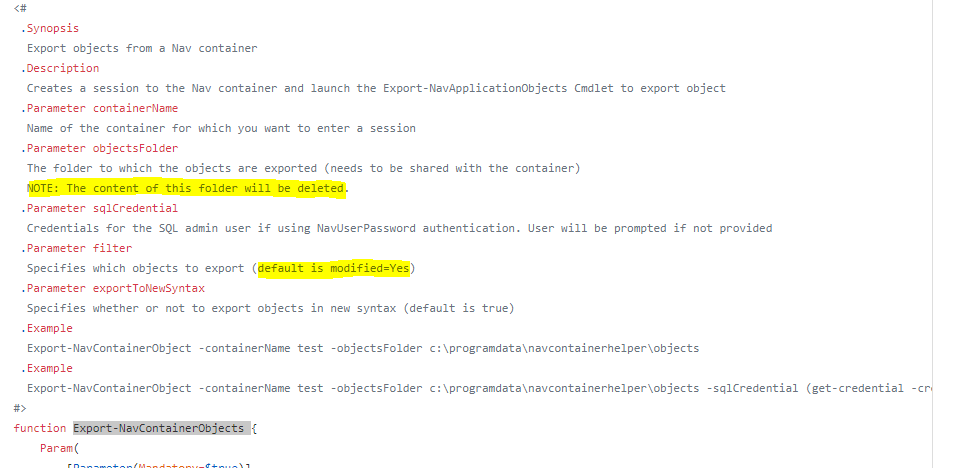
So you should choose a better folder and also use the -filter parameter
 eclipses24
on 8 Feb 2019
eclipses24
on 8 Feb 2019
Sorry Daniel, I hope you have some backup somewhere of some of your work.
It doesn't help you, but I think I will add a check to make sure that you don't specify that exact folder (you are the second guy I know of who uses that folder)
 freddydk
on 8 Feb 2019
freddydk
on 8 Feb 2019
Thank you Sergio for telling me to RTFM, that's the most helpful suggestion I've had in years. Here's one for you: try a little empathy and kindness, the next one that makes a stupid mistake might be you
@freddydk I was going to suggest a test for only *.txt files, but a check for the NavContainerHelper folder would also be good. And no I don't have backups... despite years of evidence to the contrary, I'm a victim of my own hubris yet again...
TheDenSter
on 8 Feb 2019
Daniel I'm sorry that you lost files, it was not my intention to make you angry was just to point out that the function actually was working as designed. I always sayd "if I had 1 dollar for each mistake I did in my life now I would be rich"
eclipses24
on 8 Feb 2019
Please accept my apologies both
eclipses24
on 8 Feb 2019
No need to apologize Sergio, the tone of our posts can come across completely different than we intend sometimes, that has happened to me SO many times :), and I appreciate you linking to that information. I'm mostly upset at myself because after this happened I did read the documentation and realized that this is the Cmdlet that New-NavContainer uses to export objects, and I realized I should have known all along. What you said was spot on, I had nobody but myself to blame.
TheDenSter
on 8 Feb 2019
Daniel, I'm sorry because English is not my mother tongue and this can lead to misunderstandings in communications. I'm a big man, but if I'm wrong I learned to always apologize
eclipses24
on 8 Feb 2019
Daniel, I have added an error as described.
Is there anything I can do to help you recreate your loss?
(I might have a lot of scripts lying around)
freddydk
on 8 Feb 2019
Thanks for offering Freddy, but I don't think so. There are dupes of most of it, just have to find it again. It's scattered around though, it was so nice to have it all in one spot...
TheDenSter
on 11 Feb 2019
Shipped in 0.5.0.5
freddydk
on 5 Mar 2019
Related issues
 ashik-ivor
·
4Comments
ashik-ivor
·
4Comments
 Rukkulakki
·
5Comments
Rukkulakki
·
5Comments
 lvanvugt
·
5Comments
lvanvugt
·
5Comments
 Sven-Niehus
·
3Comments
Sven-Niehus
·
3Comments
 staedter
·
3Comments
staedter
·
3Comments
Most helpful comment
Daniel I'm sorry that you lost files, it was not my intention to make you angry was just to point out that the function actually was working as designed. I always sayd "if I had 1 dollar for each mistake I did in my life now I would be rich"