Navcontainerhelper: Importing testtoolkit ends with timeout on schema synchronization
On some images I am getting this error when creating container including test toolkit>
: [31719426] The objects from the .fob file were imported, but they contain schema changes that cannot be synchronized to the database with the Microsoft Dynamics NAV Server instance.
Contact your system administrator with the following information:

Server Name:         localhost
Server Instance:     NAV
Tenant Name:

Description:
The requested task failed to start within the timeout period of 10 seconds that has been specified in the Microsoft Dynamics NAV Development Environment / Database / Alter. The
reason is that Microsoft Dynamics NAV Server is busy with a similar task.
 -- File: C:\TestToolKit\CALTestRunner.fob
I cannot see any way how to change the timeout. Right now I am getting this on image microsoft/dynamics-nav:2018-ch. It is mostly on images with heavy localization (more objects?).
 kine
kine
All 8 comments
Does this also happen if you try to import this using CSIDE?
/Freddy
Fra: Kamil Sacek notifications@github.com
Sendt: 9. juli 2018 09:11
Til: Microsoft/navcontainerhelper navcontainerhelper@noreply.github.com
Cc: Subscribed subscribed@noreply.github.com
Emne: [Microsoft/navcontainerhelper] Importing testtoolkit ends with timeout on schema synchronization (#163)
On some images I am getting this error when creating container including test toolkit>
: [31719426] The objects from the .fob file were imported, but they contain schema changes that cannot be synchronized to the database with the Microsoft Dynamics NAV Server instance.
Contact your system administrator with the following information:
Server Name: localhost
Server Instance: NAV
Tenant Name:
Description:
The requested task failed to start within the timeout period of 10 seconds that has been specified in the Microsoft Dynamics NAV Development Environment / Database / Alter. The
reason is that Microsoft Dynamics NAV Server is busy with a similar task.
-- File: C:\TestToolKit\CALTestRunner.fob
I cannot see any way how to change the timeout. Right now I am getting this on image microsoft/dynamics-nav:2018-ch. It is mostly on images with heavy localization (more objects?).
—
You are receiving this because you are subscribed to this thread.
Reply to this email directly, view it on GitHubhttps://na01.safelinks.protection.outlook.com/?url=https%3A%2F%2Fgithub.com%2FMicrosoft%2Fnavcontainerhelper%2Fissues%2F163&data=02%7C01%7Cfreddy.kristiansen%40microsoft.com%7C53cb079d07ba4e942f3e08d5e56b11e6%7C72f988bf86f141af91ab2d7cd011db47%7C1%7C0%7C636667170378832922&sdata=x%2FM5fEe2DVYGM4DdaDzrQUfVi5eMe4T8oeylrAtWAzM%3D&reserved=0, or mute the threadhttps://na01.safelinks.protection.outlook.com/?url=https%3A%2F%2Fgithub.com%2Fnotifications%2Funsubscribe-auth%2FAKRqA_djBDVpfS7In7oMwJDDA0Bv3xwrks5uEwHsgaJpZM4VHMCH&data=02%7C01%7Cfreddy.kristiansen%40microsoft.com%7C53cb079d07ba4e942f3e08d5e56b11e6%7C72f988bf86f141af91ab2d7cd011db47%7C1%7C0%7C636667170378842931&sdata=bIcJmEnj%2FiQfqR7MAx4rbEtRBHqkWCRZDPNLsrPEJow%3D&reserved=0.
 freddydk
on 9 Jul 2018
freddydk
on 9 Jul 2018
I can confirm that I've seen this happen as well with the US images (NAV 2018 and BC are only ones I've been using, but all have been US). It's been hit and miss though as to when it happens. I've had it happen but then a re-run of my entire "create container" script would be ok. Even if the script fails though doing the import via C/Side has always worked.
 MikeGlue
on 9 Jul 2018
MikeGlue
on 9 Jul 2018
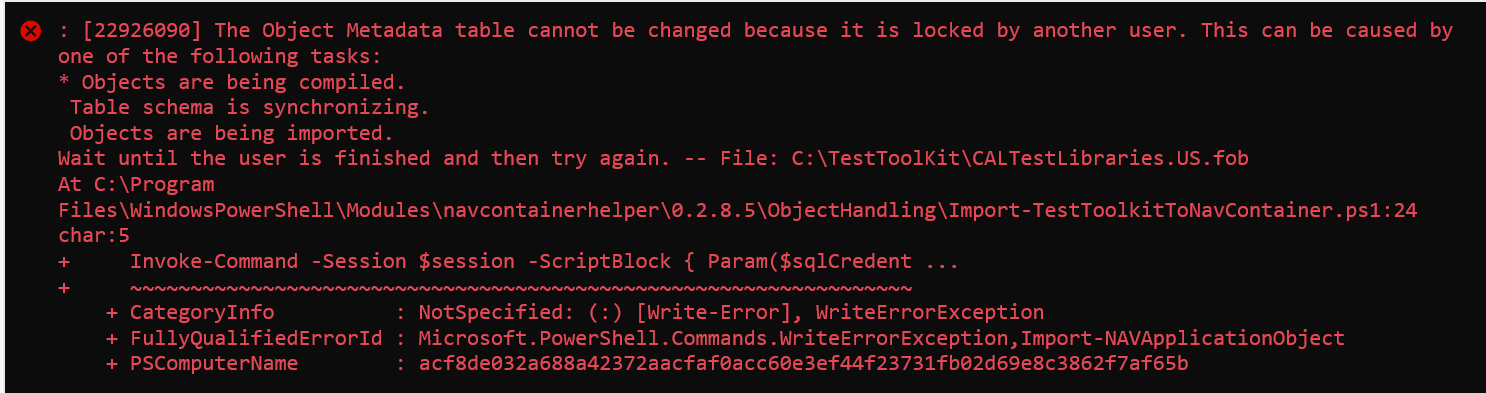
This is the other error that I periodically get when importing the test toolkit:
MikeGlue
on 27 Jul 2018
I used a modified command that did not generate the symbols and delayed the schema sync until all of the objects were imported, and now I can run my build and it passes this step every time! Code is below.....I can submit as a pull request if you want to make this change. The only downside is that the symbols will not generate, but I am not sure this is bad since the 'Test' symbols package is already loaded into the base database.
Get-ChildItem -Path "C:\TestToolKit\*.fob" | ForEach-Object {
        $objectsFile = $_.FullName
        Write-Host "Importing Objects from $objectsFile (container path)"
        $databaseServerParameter = $databaseServer

        Import-NAVApplicationObject -Path $objectsFile `
                                    -DatabaseName $databaseName `
                                    -DatabaseServer $databaseServerParameter `
                                    -ImportAction Overwrite `
                                    -SynchronizeSchemaChanges No `
                                    -NavServerName localhost `
                                    -NavServerInstance NAV `
                                    -NavServerManagementPort 7045 `
                                    -Confirm:$false
        }

        #Sync after all objects hav been imported
        Sync-NavTenant NAV -Mode ForceSync -Force
That's exactly what I did Mike, it works a lot better!
 richardrobberse
on 7 Aug 2018
richardrobberse
on 7 Aug 2018
What is the status on this? I still have the same problem, yet I see that the pullrequest has been closed.
 hemisphera
on 28 Aug 2018
hemisphera
on 28 Aug 2018
A fix will be included in the next drop of navcontainerhelper (probably this weekend)
freddydk
on 28 Aug 2018
Included in version 0.3.1.0
freddydk
on 3 Sep 2018
Related issues
 dkorinets
·
3Comments
dkorinets
·
3Comments
 chavansachin20
·
4Comments
chavansachin20
·
4Comments
 staedter
·
3Comments
staedter
·
3Comments
 ashik-ivor
·
4Comments
ashik-ivor
·
4Comments
 MODUSCarstenScholling
·
5Comments
MODUSCarstenScholling
·
5Comments
Most helpful comment
That's exactly what I did Mike, it works a lot better!