Nativescript-ui-feedback: RadSideDrawer Angular — Open Drawer not working
_From @TimHawkHodg on November 30, 2017 20:23_
Did you verify this is a real problem by searching [Stack Overflow]
YES
Tell us about the problem
I have been attempting to add a side drawer to my component using the following tutorial.
I believe the problem is with AfterViewInit because my ui components are never initialized. Tried placing a console.log() inside the method and it was never executed. There seems to be similar complaints here.
Finally if I add
this.drawer.openDrawer();
inside ngOnInit(), the console log command is hit but drawer does not appear. No errors in the console.
Which platform(s) does your issue occur on?
iOS
Please provide the following version numbers that your issue occurs with:
- CLI: 3.4.0-2017-11-15-10117
Please tell us how to recreate the issue in as much detail as possible.
create a tns-template-hello-world-ng app
add the code below to a new component
Is there code involved?
header.component.ts
import { Component, ViewChild, OnInit, AfterViewInit, ChangeDetectorRef } from '@angular/core';
import { SearchService } from '../search.service';
import { Page } from "ui/page";
import { ActionItem } from "ui/action-bar";
import { Observable } from "data/observable";
import { RadSideDrawerComponent, SideDrawerType } from "nativescript-pro-ui/sidedrawer/angular";
import { RadSideDrawer } from 'nativescript-pro-ui/sidedrawer';

@Component({
    moduleId: module.id,
    selector: 'header-bar',
    templateUrl: './header-bar.component.html',
    styleUrls: ['./header-bar.component.css']
})

export class HeaderBarComponent implements AfterViewInit, OnInit {
    private _mainContentText: string;

    constructor(private _changeDetectionRef: ChangeDetectorRef) { }

    @ViewChild(RadSideDrawer) public drawerComponent: RadSideDrawerComponent;
    private drawer: RadSideDrawer;

    ngAfterViewInit() {
        //fairly certain this statement is never entered
        this.drawer = this.drawerComponent.sideDrawer;
        this._changeDetectionRef.detectChanges();
    }

    ngOnInit() {

     }

     public openDrawer() {
         console.log("Drawer method reached");
         console.log(this.drawer); //returns undefined
         this.drawer.showDrawer();
     }

     public onCloseDrawerTap() {
         this.drawer.closeDrawer();
     }
}
header.component.html
<RadSideDrawer tkExampleTitle tkToggleNavButton>
    <AbsoluteLayout tkMainContent dock="top" >
        <Button class="header-bar"></Button>
        <Image src="res://logo" height="77" width="95" class="logo"></Image>
        <Button left="250" text="OPEN DRAWER" (tap)="openDrawer()" class="drawerContentButton"></Button>
    </AbsoluteLayout>
    <StackLayout tkDrawerContent class="sideStackLayout">
        <StackLayout class="sideTitleStackLayout">
            <Label text="Navigation Menu"></Label>
        </StackLayout>
        <StackLayout class="sideStackLayout">
            <Label text="Primary" class="sideLabel sideLightGrayLabel"></Label>
            <Label text="Social" class="sideLabel"></Label>
            <Label text="Promotions" class="sideLabel"></Label>
            <Label text="Labels" class="sideLabel sideLightGrayLabel"></Label>
            <Label text="Important" class="sideLabel"></Label>
            <Label text="Starred" class="sideLabel"></Label>
            <Label text="Sent Mail" class="sideLabel"></Label>
            <Label text="Drafts" class="sideLabel"></Label>
        </StackLayout>
        <Label text="Close Drawer" color="lightgray" padding="10" style="horizontal-align: center" (tap)="onCloseDrawerTap()"></Label>
    </StackLayout>
</RadSideDrawer>
_Copied from original issue: NativeScript/NativeScript#5115_
 tsonevn
All 18 comments
Hi @TimHawkHodg,
Thank you for contacting us.
I tested the provided code on my side and found that to resolve the issue you should provide a valid id for the component or to replace RadSideDrawer with RadSideDrawerComponent inside the ViewChild directive. For example:
- Replacing RadSideDrawer with RadSideDrawerComponent
@ViewChild(RadSideDrawerComponent) public drawerComponent: RadSideDrawerComponent;
- using id
HTML
<RadSideDrawer #sidedrawerId tkExampleTitle tkToggleNavButton>
    <AbsoluteLayout tkMainContent dock="top" >
        <Button class="header-bar"></Button>
        <Image src="res://logo" height="77" width="95" class="logo"></Image>
        <Button left="250" text="OPEN DRAWER" (tap)="openDrawer()" class="drawerContentButton"></Button>
    </AbsoluteLayout>
    <StackLayout tkDrawerContent class="sideStackLayout">
        <StackLayout class="sideTitleStackLayout">
            <Label text="Navigation Menu"></Label>
        </StackLayout>
        <StackLayout class="sideStackLayout">
            <Label text="Primary" class="sideLabel sideLightGrayLabel"></Label>
            <Label text="Social" class="sideLabel"></Label>
            <Label text="Promotions" class="sideLabel"></Label>
            <Label text="Labels" class="sideLabel sideLightGrayLabel"></Label>
            <Label text="Important" class="sideLabel"></Label>
            <Label text="Starred" class="sideLabel"></Label>
            <Label text="Sent Mail" class="sideLabel"></Label>
            <Label text="Drafts" class="sideLabel"></Label>
        </StackLayout>
        <Label text="Close Drawer" color="lightgray" padding="10" style="horizontal-align: center" (tap)="onCloseDrawerTap()"></Label>
    </StackLayout>
</RadSideDrawer>
TypeScript
import { Component, ViewChild, OnInit, AfterViewInit, ChangeDetectorRef } from '@angular/core';
import { SearchService } from '../search.service';
import { Page } from "ui/page";
import { ActionItem } from "ui/action-bar";
import { Observable } from "data/observable";
import { RadSideDrawerComponent, SideDrawerType } from "nativescript-pro-ui/sidedrawer/angular";
import { RadSideDrawer } from 'nativescript-pro-ui/sidedrawer';

@Component({
    moduleId: module.id,
    selector: 'header-bar',
    templateUrl: './header-bar.component.html',
    styleUrls: ['./header-bar.component.css']
})

export class HeaderBarComponent implements AfterViewInit, OnInit {
    private _mainContentText: string;

    constructor(private _changeDetectionRef: ChangeDetectorRef) { }

    @ViewChild("sidedrawerId") public drawerComponent: RadSideDrawerComponent;
    private drawer: RadSideDrawer;

    ngAfterViewInit() {
        //fairly certain this statement is never entered
        this.drawer = this.drawerComponent.sideDrawer;
        this._changeDetectionRef.detectChanges();
    }

    ngOnInit() {

     }

     public openDrawer() {
         console.log("Drawer method reached");
         console.log(this.drawer); //returns undefined
         this.drawer.showDrawer();
     }

     public onCloseDrawerTap() {
         this.drawer.closeDrawer();
     }
}
Thanks @tsonevn!!! It works brilliantly in android and the component is being created in iOS. However in iOS the (tap)="openDrawer()" does not work. It works very smooth in android but the method is never called after the tap event in iOS.
 TimHawkHodg
on 1 Dec 2017
TimHawkHodg
on 1 Dec 2017
Hi @TimHawkHodg,
I tested this case, however, I was unable to recreate an issue with SideDrawer on iOS. For your convenience, I am attaching GIF file and sample project, please review it and make the needed changes, which will allow us to recreate this behavior.
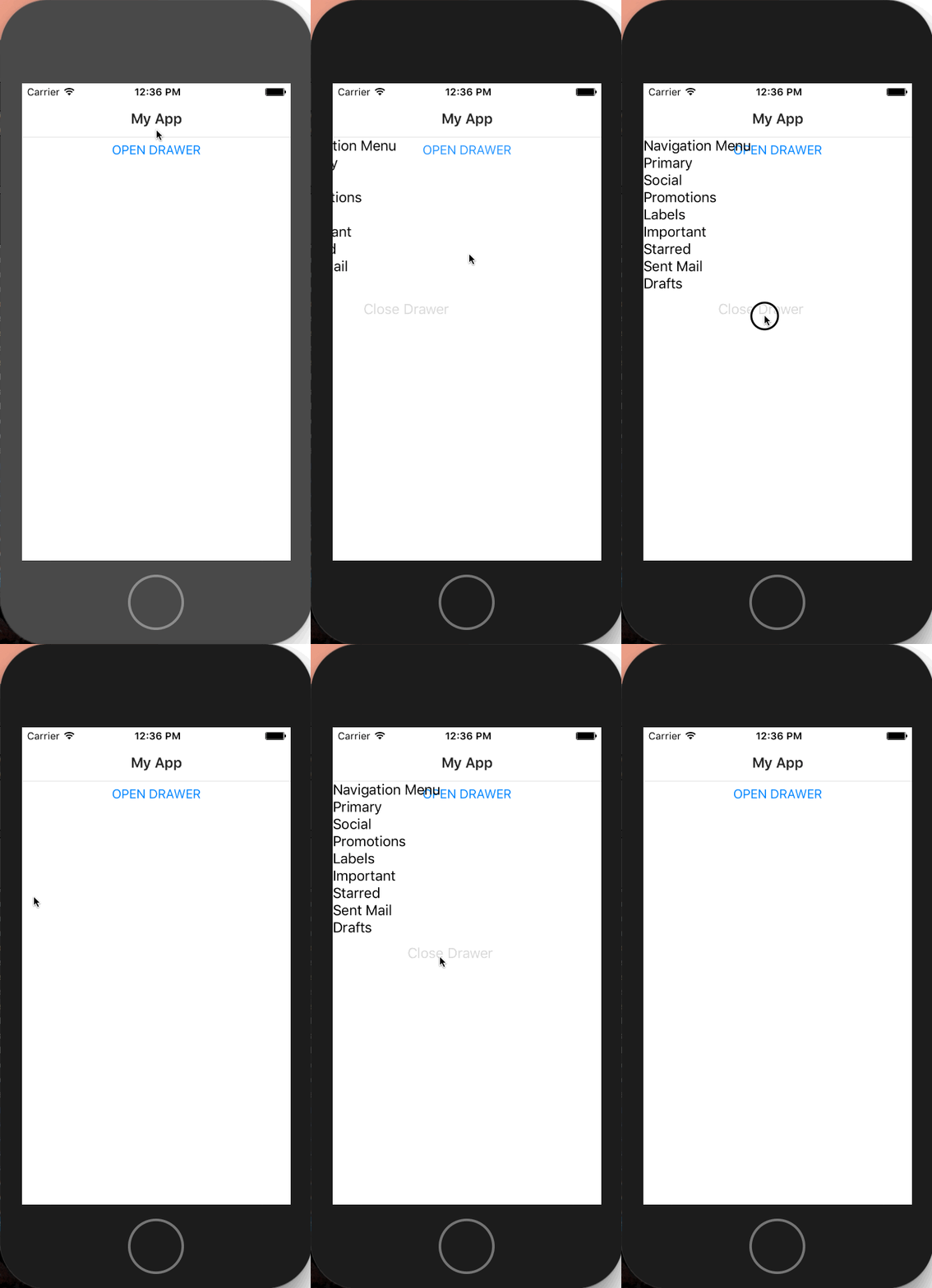
Archive.zip
tsonevn
on 5 Dec 2017
Your solution worked! The issue was actually due to the layouts rendering differently on each device. There was a layout over the icon that I did not pick up on
From: Nikolay Tsonev notifications@github.com
Sent: Tuesday, December 5, 2017 5:37:18 AM
To: telerik/nativescript-ui-feedback
Cc: Tim Hawkins Hodgson; Mention
Subject: Re: [telerik/nativescript-ui-feedback] RadSideDrawer Angular — Open Drawer not working (#430)
Hi @TimHawkHodghttps://github.com/timhawkhodg,
I tested this case, however, I was unable to recreate an issue with SideDrawer on iOS. For your convenience, I am attaching GIF file and sample project, please review it and make the needed changes, which will allow us to recreate this behavior.
[screencast 2017-12-05 at 12 36 12 pm]https://user-images.githubusercontent.com/17448734/33602737-f1c93ba6-d9b8-11e7-8374-3a3ae57cd9de.gif
Archive.ziphttps://github.com/telerik/nativescript-ui-feedback/files/1530768/Archive.zip
—
You are receiving this because you were mentioned.
Reply to this email directly, view it on GitHubhttps://github.com/telerik/nativescript-ui-feedback/issues/430#issuecomment-349264464, or mute the threadhttps://github.com/notifications/unsubscribe-auth/Ae1o82_AckHVEmAWZvIuA-tayQLbNk27ks5s9RzegaJpZM4Qx8cA.
TimHawkHodg
on 5 Dec 2017
Hi ! I use any of the solutions above but still get this error
com.tns.NativeScriptException:
Calling js method onCreateView failed
TypeError: com.telerik.android.primitives.widget.sidedrawer.RadSideDrawer is not a constructor
File: ... /ativescript-pro-ui/sidedrawer/sidedrawer.js, line: 103, column: 24
I added NativeScriptUISideDrawerModule, NativeScriptUIListViewModule in my @NgModule.
After login i use this.router.navigate(["/main"]) wich is the @Component where i declared the SideDrawer
 bigggjimmm
on 10 Feb 2018
bigggjimmm
on 10 Feb 2018
Hi @bigggjimmm,
Can you provide more info about the nativescript-pro-ui versions, which you are using? Also, it would help if you send us the project sample one, which could be used for debugging and will allow us to investigate the problem.
tsonevn
on 12 Feb 2018
i send the all zipped with all the package.json.
I did follow all examples and searched evrywhere for this.
System.err: Calling js method onCreateView failed
System.err: TypeError:
com.telerik.android.primitives.widget.sidedrawer.RadSideDrawer is not a constructor
System.err: File:
"file:///.../files/app/tns_modules/nativescript-pro-ui/sidedrawer/sidedrawer.js, line: 103, column: 24
System.err: StackTrace:
System.err:
Frame: function:'**RadSideDrawer.initDrawer**', file:'file:///.../files/app/tns_modules/nativescript-pro-ui/sidedrawer/sidedrawer.js', line: 103, column: 25
System.err:     Frame: function:'RadSideDrawer.createNativeView', file:'file:///data/data/org.nativescript.TIASSAPP/files/app/tns_modules/nativescript-pro-ui/sidedrawer/sidedrawer.js', line: 171, column: 14
Hi @bigggjimmm,
Thank you for the project,
I the issue in the project was related to the fact that you have missed adding the NativeScriptUISideDrawerModule in the AppModule imports. For example:
app.module.ts
......
@NgModule({
  imports: [
    AppModuleParent,
    NativeScriptRouterModule,
    NativeScriptRouterModule.forRoot(routes),
    NativeScriptUISideDrawerModule
  ],
  declarations: [
    AppComponent,
    ...navigatableComponents,
    // SIDEDRAWER_DIRECTIVES
  ],
  bootstrap: [AppComponent],
  schemas: [
    NO_ERRORS_SCHEMA
  ]
})
export class AppModule { }
I have the same issue. I have libs module import in app module.
@NgModule({
    imports: [
        NativeScriptModule,
        NativeScriptCommonModule, // RIGHT HERE
        NativeScriptUISideDrawerModule,
    ],
    declarations: [
        ...components
    ],
    exports: [
        ...components
    ],
})
export class LibsModule {
}
and I have component with SideDrawer from this tutorial:
http://docs.telerik.com/devtools/nativescript-ui/Controls/Angular/SideDrawer/getting-started
I have the same error:
com.tns.NativeScriptException:
Calling js method onCreateView failed
TypeError: com.telerik.android.primitives.widget.sidedrawer.RadSideDrawer is not a constructor
File: ... /ativescript-pro-ui/sidedrawer/sidedrawer.js, line: 103, column: 24
I try add NativeScriptUISideDrawerModule to AppModule, but the same.
my version:
"tns-android": {
"version": "3.4.1"
}
tns --version
3.4.2
 merigold
on 1 Mar 2018
merigold
on 1 Mar 2018
Hi @merigold,
Please provide sample project, which could be used for debugging.
tsonevn
on 2 Mar 2018
I can't. I spend few hours on it. Then I take sample project from github with sidedrawer and use them. I didn't find problem in my code.
merigold
on 2 Mar 2018
Hi y'all ! I think the issue is just some libraries that do miss when installing the nativescript-pro-ui plugin. And for them to be added in your dev environment u must (seems like) reinstall the plateform. It makes u loose some minutes of your life. But your app remain untouched !
Just do this
tns plateform remove android
tns plateform add android
And u will fixe the bug.
bigggjimmm
on 2 Mar 2018
Hi.
I have the same error: "com.telerik.android.primitives.widget.sidedrawer.RadSideDrawer is not a constructor: File: ... /ativescript-pro-ui/sidedrawer/sidedrawer.js, line: 103, column: 24"
I`m doing next steps.
1) npm install -g nativescript
2) tns create a013test
Trying to run. Test example works OK.
3) tns plugin add nativescript-ui-sidedrawer
and change code in main-page.js and main-page.js to code in link:
https://www.nativescript.org/blog/a-deep-dive-into-telerik-ui-for-nativescripts-sidedrawer
<Page xmlns="http://schemas.nativescript.org/tns.xsd" xmlns:sd="nativescript-ui-sidedrawer" loaded="pageLoaded">
    <ActionBar title="RadSideDrawer Demo" class="action-bar" />
    <sd:RadSideDrawer id="sideDrawer">
        <!-- side drawer content -->
        <sd:RadSideDrawer.drawerContent>
            <StackLayout class="sidedrawer-left">
                <StackLayout class="sidedrawer-header">
                    <Label text="Hello RadSideDrawer!" class="sidedrawer-header-brand" />
                </StackLayout>
                <StackLayout class="sidedrawer-content">
                    <Label text="Home" class="sidedrawer-list-item-text" />
                    <Label text="Basics" class="sidedrawer-list-item-text" />
                    <Label text="Options" class="sidedrawer-list-item-text" />
                    <Label text="Help" class="sidedrawer-list-item-text" />
                    <Label text="Advanced" class="sidedrawer-list-item-text" />
                </StackLayout>
            </StackLayout>
        </sd:RadSideDrawer.drawerContent>
        <!-- The main content -->
        <sd:RadSideDrawer.mainContent>
            <StackLayout>
                <Button text="Toggle Drawer" class="btn btn-primary" tap="toggleDrawer" />
            </StackLayout>
        </sd:RadSideDrawer.mainContent>
    </sd:RadSideDrawer>
</Page>
var view = require("ui/core/view");
var drawer;
-----------------------------------------
exports.pageLoaded = function(args) {
    var page = args.object;
    drawer = view.getViewById(page, "sideDrawer");
};

exports.toggleDrawer = function() {
    drawer.toggleDrawerState();
};
---------------------------------------
trying to run give a error com.telerik.android.primitives.widget.sidedrawer.RadSideDrawer is not a constructor: File: ... /ativescript-pro-ui/sidedrawer/sidedrawer.js, line: 103, column: 24
configuration WO "platforms" folder
a013test.zip
 ozertx
on 23 Mar 2018
ozertx
on 23 Mar 2018
I would suggest to delete the platforms folder after you install any nativescript plugins. Some times that folder blocks the recompiling of the native arr files of the plugins which leads to a build app but without the actual native library that those plugins use.
 VladimirAmiorkov
on 23 Mar 2018
VladimirAmiorkov
on 23 Mar 2018
Hi @VladimirAmiorkov
I try to do it early. It doesn't help.
I make a new clean project it doesn't work.
I try it in new project.
1) tns platform remove android
2) tns platform add android
it doesn't work too
UPD: I try to use older version of sidedrawer (3.3.0) it`s work!
ozertx
on 23 Mar 2018
Hi @ozertx ,
Running your provided project (a013test.zip) works on my side, here is a video of it working as expected:

Maybe try to install the latest version of NativeScript's RC:
npm i -g nativescript@rc
VladimirAmiorkov
on 23 Mar 2018
I had the same problem and resolved it with the fix mentioned by bigggjimmm
java.lang.RuntimeException: Unable to resume activity {org.nativescript.Qless/com.tns.NativeScriptActivity}: com.tns.NativeScriptException:
Calling js method onCreateView failed

TypeError: com.telerik.android.primitives.widget.sidedrawer.RadSideDrawer is not a constructor
File: "file:///data/data/org.nativescript.Qless/files/app/tns_modules/nativescript-ui-sidedrawer/ui-sidedrawer.js, line: 103, column: 24
Running below tns commands resolved the issue for me,
tns platform remove android
tns platform add android
Thanks
 RajPack
on 8 Apr 2018
RajPack
on 8 Apr 2018
I don't understand it but @RajPack 's suggestion worked! Why remove-add android works is a mystery but I can vouch that it works on nativescript-vue as well.
 jhfoo
on 25 Apr 2018
jhfoo
on 25 Apr 2018
Related issues
 ginev
·
4Comments
ginev
·
4Comments
 sudhanshu-15
·
3Comments
sudhanshu-15
·
3Comments
 felipebernardes
·
3Comments
felipebernardes
·
3Comments
 bozhidarc
·
3Comments
bozhidarc
·
3Comments
 marcelomiranda90
·
3Comments
marcelomiranda90
·
3Comments
Most helpful comment
Hi y'all ! I think the issue is just some libraries that do miss when installing the nativescript-pro-ui plugin. And for them to be added in your dev environment u must (seems like) reinstall the plateform. It makes u loose some minutes of your life. But your app remain untouched !
Just do this
And u will fixe the bug.