Nativescript-cli: iOS Upload App Failed
_From @pap5508 on January 18, 2018 13:19_
I am trying to upload app to App store in iOS. I am getting following error after succesfully archive project and Export IPA file
I am getting this error only when trying to upload to app store.
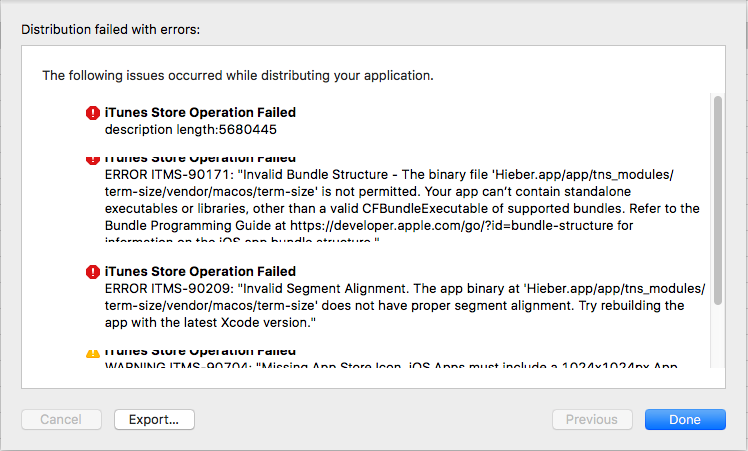
Thank you..
_Copied from original issue: NativeScript/NativeScript#5294_
 NickIliev
All 9 comments
@pap5508 are you producing a release build with the --release flag
NickIliev
on 18 Jan 2018
@NickIliev : yes, I am preparing release build with --release flag
 : {
  "description": "NativeScript Application",
  "name": "hieberapp",
  "license": "SEE LICENSE IN <your-license-filename>",
  "readme": "NativeScript Application",
  "repository": "<fill-your-repository-here>",
  "nativescript": {
    "id": "com.hieber.app",
    "hooks": [
      {
        "type": "after-prepare",
        "script": "after-prepare.js"
      }
    ],
    "tns-android": {
      "version": "3.4.0"
    },
    "tns-ios": {
      "version": "3.4.0"
    }
  },
  "dependencies": {
    "@angular/common": "~4.4.5",
    "@angular/compiler": "~4.4.5",
    "@angular/core": "~4.4.5",
    "@angular/forms": "~4.4.5",
    "@angular/http": "~4.4.5",
    "@angular/platform-browser": "~4.4.5",
    "@angular/platform-browser-dynamic": "~4.4.5",
    "@angular/router": "~4.4.5",
    "@ngx-translate/core": "^7.0.0",
    "@ngx-translate/http-loader": "^0.1.0",
    "email-validator": "^1.0.7",
    "enhanced-resolve": "^3.3.0",
    "latest-version": "^3.1.0",
    "moment": "^2.18.1",
    "nativescript-angular": "^4.4.1",
    "nativescript-camera": "^3.1.4",
    "nativescript-cardview": "^2.0.2",
    "nativescript-checkbox": "^3.0.1",
    "nativescript-couchbase": "^1.0.18",
    "nativescript-drop-down": "^3.2.0",
    "nativescript-imagepicker": "^3.0.1",
    "nativescript-iqkeyboardmanager": "^1.1.0",
    "nativescript-permissions": "^1.2.3",
    "nativescript-plugin-firebase": "^4.2.1",
    "nativescript-pro-ui": "^3.1.4",
    "nativescript-pulltorefresh": "^2.0.3",
    "nativescript-sqlite": "^2.0.1",
    "nativescript-theme-core": "~1.0.4",
    "nativescript-web-image-cache": "^4.2.2",
    "ng2-filter-pipe": "^0.1.10",
    "ng2-translate": "^5.0.0",
    "reflect-metadata": "~0.1.10",
    "rxjs": "~5.4.2",
    "tns-core-modules": "^3.3.0",
    "tns-platform-declarations": "^3.3.0"
  },
  "devDependencies": {
    "@angular/compiler-cli": "~4.4.5",
    "@ngtools/webpack": "~1.6.0",
    "babel-traverse": "6.24.1",
    "babel-types": "6.24.1",
    "babylon": "6.17.0",
    "copy-webpack-plugin": "~4.0.1",
    "cross-env": "^5.1.1",
    "extract-text-webpack-plugin": "~3.0.0",
    "lazy": "1.0.11",
    "mkdir": "0.0.2",
    "mkdirp": "^0.5.1",
    "nativescript-css-loader": "~0.26.0",
    "nativescript-dev-android-snapshot": "^0.*.*",
    "nativescript-dev-typescript": "^0.5.1",
    "nativescript-dev-webpack": "^0.8.0",
    "nativescript-worker-loader": "~0.8.1",
    "raw-loader": "~0.5.1",
    "resolve-url-loader": "~2.1.0",
    "tslint": "^5.4.2",
    "typescript": "~2.3.4",
    "webpack": "~3.2.0",
    "webpack-bundle-analyzer": "^2.8.2",
    "webpack-sources": "~1.0.1",
    "zone.js": "^0.8.2"
  },
  "scripts": {
    "ns-bundle": "ns-bundle",
    "android-prod": "cross-env BUILD_PROFILE=prod tns run android --device 1",
    "android-dev": "cross-env BUILD_PROFILE=dev tns run android --device 1",
    "ios6s-prod": "cross-env BUILD_PROFILE=prod tns run ios --device 1",
    "ios6s-dev": "cross-env BUILD_PROFILE=dev tns run ios --device 1",
    "ios6-prod": "cross-env BUILD_PROFILE=prod tns run ios --device 2",
    "ios6-dev": "cross-env BUILD_PROFILE=dev tns run ios --device 2",
    "ios-publish": "cross-env BUILD_PROFILE=prod tns publish ios",
    "ios-release": "cross-env BUILD_PROFILE=dev tns prepare ios --release",
    "ios-prod-release": "cross-env BUILD_PROFILE=prod tns prepare ios --release",
    "ios-emulator": "cross-env BUILD_PROFILE=dev tns run ios",
    "ios-provision": "cross-env BUILD_PROFILE=dev tns run ios --provision 1",
    "publish-ios-bundle": "npm run ns-bundle --ios --publish-app",
    "generate-android-snapshot": "generate-android-snapshot --targetArchs arm,arm64,ia32 --install",
    "start-android-bundle": "npm run ns-bundle --android --run-app",
    "start-ios-bundle": "npm run ns-bundle --ios --run-app",
    "build-android-bundle": "npm run ns-bundle --android --build-app",
    "build-ios-bundle": "npm run ns-bundle --ios --build-app"
  }
}
 pap5508
on 18 Jan 2018
pap5508
on 18 Jan 2018
Hi @pap5508,
I see the in logs the problem is with some binary of term-size.
Is it something you need in app at runtime?
If not may be you should add it as dev dependency, not as dependency.
 dtopuzov
on 18 Jan 2018
dtopuzov
on 18 Jan 2018
@dtopuzov : I have added https://www.npmjs.com/package/term-size in dev-dependencies. Still getting the same error.
pap5508
on 19 Jan 2018
@pap5508: Can you delete node_modules and platforms folders inside your project and try to publish again?
dtopuzov
on 19 Jan 2018
@dtopuzov : Sorry for late reply... I am not able fix it out. Also tried after removing Platforms, node_modules and hooks as well.
Still getting the same error.
pap5508
on 13 Mar 2018
Hi @pap5508,
Can you please try to upload using the latest versions of components?
npm install -g nativescript@rc
npm install --save tns-core-modules@next
rm -rf platforms
tns platform add ios@next
 Fatme
on 5 Apr 2018
Fatme
on 5 Apr 2018
Solve by Following =>
Open Xcode > click on left top corner Xcode > preferences > location > click on DerivedData arrow icon which opens in new tab… > force quit Xcode. > delete Derived Data folder
after that run this command from terminal
tns build ios --bundle --env.uglify --env.aot --release --forDevice --provision ProvisioningProfileID
pap5508
on 24 Jul 2018
@pap5508,
I'm happy to hear your problem is resolved.
Fatme
on 24 Jul 2018
Related issues
 charsleysa
·
3Comments
charsleysa
·
3Comments
 StevenSeo
·
3Comments
StevenSeo
·
3Comments
 Anilinfo2015
·
3Comments
Anilinfo2015
·
3Comments
 donker
·
3Comments
donker
·
3Comments
 kefahB
·
3Comments
kefahB
·
3Comments